New to Rust? Grab our free Rust for Beginners eBook Get it free →
Express.js Production Checklist: 7 Steps to a Reliable Backend

Before real users rely on your Express backend, it needs more than routes that return the right response. A production checklist covers what happens around those routes, such as limiting incoming requests and keeping sessions alive when the server process is replaced.
The checklist builds one test app through seven checks, from request limits to shutting down safely during a deploy.
What is an Express.js production checklist?
An Express.js production checklist is a set of checks for request safety and process behavior before you expose a backend to users. A successful response proves the route works, but it does not prove session survival or safe deployment termination.
Express middleware is a function that handles a request or passes it to the next registered function. Middleware order determines whether a request reaches validation, a route or the error handler.
| Boundary | Application responsibility | Deployment responsibility |
|---|---|---|
| Incoming request | Validate content and limit its size | Terminate Transport Layer Security (TLS) and restrict direct access |
| Shared state | Store sessions and quotas outside the process | Protect Redis and choose its persistence policy |
| Process replacement | Stop admission and finish active responses | Send SIGTERM and supervise replacement processes |
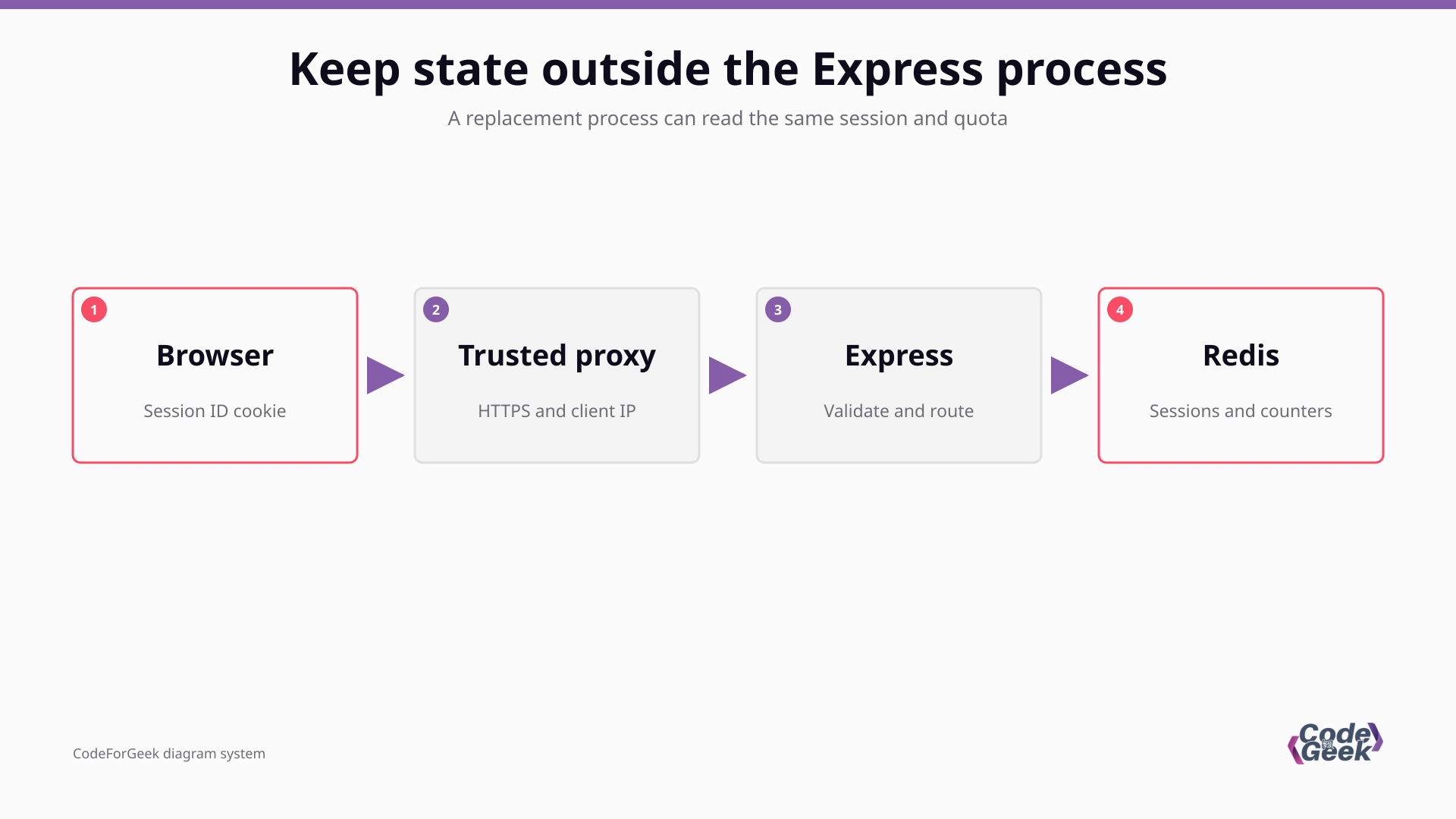
The browser sends a session identifier, and Express uses it to retrieve session data from Redis. Both Express processes must use the same secret and storage prefixes so replacing one process does not change that lookup.
Prerequisites for the test application
The executable example uses JavaScript modules on Linux, with Node.js 26.10.0 and Redis server 7.0.15 in the test environment. The packages installed for it are listed below, and the application uses Express 5.2.1.
| Package | Observed version |
|---|---|
| express | 5.2.1 |
| helmet | 8.3.0 |
| compression | 1.8.2 |
| express-session | 1.19.0 |
| connect-redis | 10.0.0 |
| redis | 6.3.0 |
| express-rate-limit | 8.7.0 |
| rate-limit-redis | 6.0.1 |
| pino | 10.4.0 |
- Use a disposable directory with Node.js and a redis-server executable available on PATH. The tests start a private Redis instance on loopback with persistence disabled.
- Install the dependencies with the commands below, then save the consecutive application fragments into one app.mjs file. Save the verification driver separately as test.mjs.
- Keep the example on loopback. Its diagnostic routes and counter endpoint demonstrate behavior, not authentication or an internet-facing application.
npm init -y
npm install --package-lock=false express helmet compression express-session connect-redis redis express-rate-limit rate-limit-redis pino
The installs have no version selectors, so they resolve the registry releases available when you run them. The table records the versions used here rather than prescribing dependency pins.
For deployment, follow Express production guidance and choose a supported Node.js long-term support (LTS) release. The test runtime above is the current-release line, which is a different selection from production LTS guidance.
Apply the seven production checks
Build one application by appending these fragments in order. The error handler is defined before several routes, but its registration happens only after the routes exist.
Step 1: Reject incomplete startup settings
Validate required configuration before opening the listening socket, because missing credentials should fail startup rather than the first customer request. The example requires production mode and a session secret of at least 32 characters, then connects to Redis before listening.
The logger records a generated request identifier and the response status without logging request bodies or cookies. Readiness means the process can accept application traffic, while liveness only reports that the process can answer its lightweight probe.
import express from 'express';
import helmet from 'helmet';
import compression from 'compression';
import session from 'express-session';
import { RedisStore as SessionStore } from 'connect-redis';
import { createClient } from 'redis';
import { rateLimit } from 'express-rate-limit';
import { RedisStore as LimitStore } from 'rate-limit-redis';
import pino from 'pino';
import { randomUUID } from 'node:crypto';

const { SESSION_SECRET, REDIS_URL } = process.env;
if (process.env.NODE_ENV !== 'production' ||
    !SESSION_SECRET || SESSION_SECRET.length < 32 || !REDIS_URL) {
  throw new Error('Set NODE_ENV, SESSION_SECRET and REDIS_URL before startup');
}
const port = Number(process.env.PORT ?? 3100);
if (!Number.isInteger(port) || port < 0 || port > 65535) {
  throw new Error('PORT must be an integer from 0 to 65535');
}
const log = pino({ base: undefined });
const redis = createClient({ url: REDIS_URL,
  socket: { connectTimeout: 2000, reconnectStrategy: false } });
redis.on('error', () => log.error('redis_connection_error'));
await redis.connect();
const app = express();
let stopping = false;
app.set('trust proxy', process.env.TRUST_LOOPBACK === '1' ? 'loopback' : false);
app.use((req, res, next) => {
  req.requestId = randomUUID();
  res.setHeader('X-Request-Id', req.requestId);
  res.on('finish', () => log.info({ requestId: req.requestId,
    method: req.method, status: res.statusCode }, 'request_finished'));
  next();
});
app.get('/live', (req, res) => res.json({ alive: true }));
app.get('/ready', (req, res) => {
  const ready = !stopping && redis.isReady;
  res.status(ready ? 200 : 503).json({ ready });
});
app.use((req, res, next) => {
  if (stopping) return res.status(503).json({ error: 'Shutting down' });
  next();
});
The secret length check does not establish randomness, so supply a cryptographically generated secret through your deployment secret manager. Keep it consistent across replicas and restarts, and never commit it to the application source.
TRUST_LOOPBACK enables forwarded-header trust only for this loopback demonstration. In deployment, replace that choice with your verified proxy addresses and block paths that let clients reach the application directly.
Step 2: Bound incoming request data
A JSON parser checks syntax and enforces a byte limit, but it does not decide whether a field has the right meaning. This route accepts a message string between 1 and 200 characters and rejects other values before reflecting the message.
Helmet adds security-related response headers, including Content Security Policy (CSP), which restricts browser resource loading. Those headers complement validation, and a browser-facing page needs a policy that fits its own scripts and resources.
app.use(helmet());
app.use(express.json({ limit: '16kb' }));
app.post('/api/echo', (req, res) => {
  const message = req.body?.message;
  if (typeof message !== 'string' || message.length < 1 || message.length > 200) {
    return res.status(400).json({ error: 'message must contain 1 to 200 characters' });
  }
  res.json({ message });
});
The parser rejects a body over 16 KB before the route runs, and the route rejects a numeric message even when its JSON is valid. Returning a JSON string is also different from inserting that string into page markup, so a client must render untrusted text safely.
Step 3: Route failures to one error handler
Express 5 forwards a rejection from a returned promise to error middleware, so the diagnostic async route deliberately rejects to exercise that behavior.
A callback error or a detached promise still needs explicit propagation because Express cannot track work the handler does not return.
The handler logs the error with the request identifier, then returns a bounded response without private error details. Preserve all four parameters because Express uses the function signature to recognize error middleware.
function installFinalHandlers() {
  app.use((req, res) => res.status(404).json({ error: 'Not found' }));
  app.use((err, req, res, next) => {
    log.error({ requestId: req.requestId, err }, 'request_failed');
    if (res.headersSent) return next(err);
    const status = err.status === 400 || err.status === 413 ? err.status : 500;
    const message = status === 400 ? 'Invalid request body' :
      status === 413 ? 'Request body too large' : 'Internal server error';
    res.status(status).json({ error: message, requestId: req.requestId });
  });
}
if (process.env.DEMO_MODE === '1') {
  app.get('/demo/fail', async () => {
    await Promise.reject(new Error('demo-private-detail'));
  });
}
I kept demo-private-detail in the server log while the response returned Internal server error. The request identifier connects that generic response to its private diagnostic event.
If headers have already been sent, delegate with next(err) instead of attempting a second response. The default handler omits stack traces in production mode, but your own response contract still needs deliberate handling.
Step 4: Put sessions in shared storage
An express-session cookie contains a session identifier, while the store contains the session data. MemoryStore is explicitly unsuitable for production, so this example uses Redis through connect-redis.
A secure cookie is sent only when Express recognizes HTTPS. The local test simulates TLS termination with a trusted loopback connection and X-Forwarded-Proto, rather than weakening the cookie settings for plain HTTP.
app.use('/api/session', session({
  store: new SessionStore({ client: redis, prefix: 'cfg-demo:sess:' }),
  name: 'cfg.sid', secret: SESSION_SECRET,
  resave: false, saveUninitialized: false,
  cookie: { httpOnly: true, secure: true, sameSite: 'lax', maxAge: 600000 }
}));
app.get('/api/session', (req, res) => {
  req.session.visits = (req.session.visits ?? 0) + 1;
  res.json({ visits: req.session.visits });
});
I kept Redis running while replacing the first Express process, and the same cookie produced visit counts of 1, 2 and 3 across the replicas and replacement. That demonstrates application-process independence, not survival after Redis loses its data.
HttpOnly prevents access through browser JavaScript, and SameSite=Lax constrains cross-site cookie sending. Add authentication and authorization separately, regenerate the session after login, and apply protection against cross-site request forgery (CSRF) where your workflow requires it.
The counter route is diagnostic and must not become a substitute for login. The store and browser cookie both have expiration behavior, so choose their lifetimes together and configure Redis persistence and failover for the durability you need.
Step 5: Enforce a shared request quota
The limiter below allows 2 requests per minute so its rejection can be tested without a large request loop. That is a demonstration quota, not a recommended policy for a customer endpoint.
Redis holds the counter so requests handled by different Express processes consume the same quota. A session store and a rate-limit store are different adapters even when both use the same Redis client.
app.use('/api/limited', rateLimit({
  windowMs: 60000, limit: 2,
  standardHeaders: 'draft-8', legacyHeaders: false,
  store: new LimitStore({ prefix: 'cfg-demo:limit:',
    sendCommand: (...args) => redis.sendCommand(args) }),
  message: { error: 'Too many requests' }
}));
app.get('/api/limited', (req, res) => res.json({ ip: req.ip }));
I sent requests to different processes, which consumed a shared quota and returned status 429 with Retry-After when the limit was exceeded.
An in-process counter would divide this policy across replicas and reset when its process stops.
Behind a load balancer, the client identity depends on trust proxy and sanitized forwarding headers. Trusting arbitrary client-supplied headers can let a requester choose the identity used for the quota.
Choose route-specific limits from expected traffic and abuse risk, then consider account-based limits for authentication attempts. A limiter is one control, and it does not provide network-level denial-of-service protection.
Step 6: Compress eligible responses
Compression changes the response representation when the client accepts an encoding and the content qualifies. This route returns a repetitive catalog so the test can compare gzip bytes with an uncompressed response and confirm that decompression preserves the JSON.
app.use(compression());
app.get('/api/catalog', (req, res) => {
  res.json({ items: Array.from({ length: 200 }, () => ({ name: 'example' })) });
});
The catalog produced 3,811 uncompressed bytes and 78 gzip bytes for this artificial payload, without establishing a bandwidth or page-rendering improvement for your application.
Compression middleware must precede the routes it should affect, which is why it sits immediately before the catalog route here. For a high-traffic deployment, Express recommends compression at the reverse proxy, and you can omit application compression when that layer owns it.
Do not apply this result to streams without considering buffering and flushing. Content that combines secrets with attacker-controlled text also needs a separate review of compression side-channel risk.
Step 7: Drain requests before closing Redis
A graceful shutdown stops admitting work and lets active requests finish before releasing their dependencies.
Closing Redis first could interrupt session saves while the HTTP server is still handling responses.
The diagnostic slow route creates an active request for the test, and the SIGTERM handler closes the server before closing Redis. A five-second deadline bounds the wait and exits unsuccessfully if the process cannot finish.
if (process.env.DEMO_MODE === '1') {
  app.get('/demo/slow', async (req, res) => {
    log.info('slow_started');
    await new Promise(resolve => setTimeout(resolve, 300));
    res.json({ completed: true });
  });
}
installFinalHandlers();
const server = app.listen(port, '127.0.0.1', () => {
  log.info({ port: server.address().port }, 'listening');
});
process.on('SIGTERM', () => {
  if (stopping) return;
  stopping = true;
  log.info('draining');
  const deadline = setTimeout(() => {
    log.error('drain_deadline_exceeded');
    server.closeAllConnections();
    redis.destroy();
    process.exit(1);
  }, 5000);
  server.close(async () => {
    try {
      await redis.close();
      clearTimeout(deadline);
      log.info('drained');
    } catch {
      log.error('redis_close_failed');
      process.exitCode = 1;
      clearTimeout(deadline);
    }
  });
});
I sent SIGTERM after the slow request started, and that response completed with status 200 before the process exited with code 0. The test also confirms that the stopped process refuses new connections.
Align the platform termination window with your longest supported request, and have an external supervisor replace processes that exit.
| Deployment choice | Boundary to settle before release |
|---|---|
| Proxy and TLS | Overwrite forwarded headers and prevent public access to the loopback application socket. |
| Redis | Use restricted access and encrypted connections where required, with an explicit persistence and recovery policy. |
| Supervisor | Arrange restart after crashes and allow the application drain deadline before a forced kill. |
| Diagnostics | Remove demo routes and replace the visit counter with your authenticated session workflow. |
Verify the responses and restart behavior
Save this driver as test.mjs beside app.mjs, then run node test.mjs. It generates a disposable secret and starts its own loopback Redis instance, so it never connects to your production session store.
The driver replaces one application process while Redis remains available, then compares raw compressed bytes to avoid fetch automatically decoding the representation being measured.
import assert from 'node:assert/strict';
import { spawn } from 'node:child_process';
import { once } from 'node:events';
import net from 'node:net';
import http from 'node:http';
import { gunzipSync } from 'node:zlib';
import { randomBytes } from 'node:crypto';
import { writeFile } from 'node:fs/promises';

const children = [];
const transcripts = [];
function start(command, args, env = process.env) {
  const child = spawn(command, args, { env, stdio: ['ignore', 'pipe', 'pipe'] });
  child.text = '';
  child.stderrText = '';
  child.stdout.on('data', data => { child.text += data; });
  child.stderr.on('data', data => { child.stderrText += data; });
  child.finished = once(child, 'exit');
  children.push(child);
  transcripts.push({ command, args, child });
  return child;
}
async function waitFor(child, marker) {
  const deadline = Date.now() + 5000;
  while (!child.text.includes(marker)) {
    if (child.exitCode !== null) throw new Error(child.stderrText || child.text);
    if (Date.now() > deadline) throw new Error(`Timeout waiting for ${marker}`);
    await new Promise(resolve => setTimeout(resolve, 10));
  }
}
async function freePort() {
  const socket = net.createServer();
  socket.listen(0, '127.0.0.1');
  await once(socket, 'listening');
  const port = socket.address().port;
  await new Promise(resolve => socket.close(resolve));
  return port;
}
function raw(base, path, headers = {}) {
  return new Promise((resolve, reject) => {
    http.get(base + path, { headers }, res => {
      const chunks = [];
      res.on('data', data => chunks.push(data));
      res.on('end', () => resolve({ status: res.statusCode,
        headers: res.headers, body: Buffer.concat(chunks) }));
    }).on('error', reject);
  });
}
async function stop(child) {
  child.kill('SIGTERM');
  const [code, signal] = await child.finished;
  assert.equal(code, 0, `Unexpected exit ${code}, signal ${signal}`);
}
let env;
async function app() {
  const child = start(process.execPath, ['app.mjs'], env);
  await waitFor(child, 'listening');
  const event = child.text.split('\n').filter(Boolean).map(JSON.parse)
    .find(entry => entry.msg === 'listening');
  return { child, base: `http://127.0.0.1:${event.port}` };
}
try {
  const invalid = start(process.execPath, ['app.mjs'], { ...process.env,
    NODE_ENV: 'production', SESSION_SECRET: '', REDIS_URL: '' });
  assert.equal((await invalid.finished)[0], 1);
  assert.match(invalid.stderrText, /before startup/);
  console.log('PASS startup rejects missing settings');
  const redisPort = await freePort();
  const redis = start('redis-server', ['--bind', '127.0.0.1', '--port', String(redisPort),
    '--save', '', '--appendonly', 'no', '--dir', process.cwd()]);
  await waitFor(redis, 'Ready to accept connections');
  env = { ...process.env, NODE_ENV: 'production', PORT: '0', DEMO_MODE: '1',
    TRUST_LOOPBACK: '1', SESSION_SECRET: randomBytes(32).toString('hex'),
    REDIS_URL: `redis://127.0.0.1:${redisPort}` };
  const a = await app();
  const b = await app();
  const ready = await raw(a.base, '/ready');
  assert.equal(ready.status, 200);
  const bad = await fetch(a.base + '/api/echo', { method: 'POST',
    headers: { 'Content-Type': 'application/json' }, body: '{' });
  assert.equal(bad.status, 400);
  const oversized = await fetch(a.base + '/api/echo', { method: 'POST',
    headers: { 'Content-Type': 'application/json' },
    body: JSON.stringify({ message: 'x'.repeat(17000) }) });
  assert.equal(oversized.status, 413);
  const semantic = await fetch(a.base + '/api/echo', { method: 'POST',
    headers: { 'Content-Type': 'application/json' }, body: '{"message":42}' });
  assert.equal(semantic.status, 400);
  const good = await fetch(a.base + '/api/echo', { method: 'POST',
    headers: { 'Content-Type': 'application/json' }, body: '{"message":"hello"}' });
  assert.deepEqual(await good.json(), { message: 'hello' });
  assert.equal(good.headers.get('x-powered-by'), null);
  assert.equal(good.headers.get('x-content-type-options'), 'nosniff');
  console.log('PASS headers and body validation: 200, 400, 413');
  const failure = await raw(a.base, '/demo/fail');
  assert.equal(failure.status, 500);
  assert.equal(JSON.parse(failure.body).error, 'Internal server error');
  assert.ok(!failure.body.toString().includes('demo-private-detail'));
  await waitFor(a.child, 'demo-private-detail');
  const failedEvent = a.child.text.split('\n').filter(Boolean).map(JSON.parse)
    .find(entry => entry.msg === 'request_failed' &&
      entry.requestId === JSON.parse(failure.body).requestId);
  assert.equal(failedEvent.err.message, 'demo-private-detail');
  console.log('PASS rejected promise: generic 500, correlated private log');
  const insecure = await raw(a.base, '/api/session');
  assert.equal(insecure.headers['set-cookie'], undefined);
  const forwarded = { 'X-Forwarded-Proto': 'https' };
  const first = await raw(a.base, '/api/session', forwarded);
  const cookieHeader = first.headers['set-cookie'][0];
  for (const attr of ['Secure', 'HttpOnly', 'SameSite=Lax']) {
    assert.ok(cookieHeader.includes(attr));
  }
  const headers = { ...forwarded, Cookie: cookieHeader.split(';')[0] };
  assert.equal(JSON.parse(first.body).visits, 1);
  assert.equal(JSON.parse((await raw(b.base, '/api/session', headers)).body).visits, 2);
  await stop(a.child);
  const c = await app();
  assert.equal(JSON.parse((await raw(c.base, '/api/session', headers)).body).visits, 3);
  console.log('PASS secure cookie and shared session: visits 1 -> 2 -> 3 after restart');
  const ipHeaders = { 'X-Forwarded-For': '203.0.113.10' };
  const allowed = await raw(b.base, '/api/limited', ipHeaders);
  assert.equal(allowed.status, 200);
  assert.equal(JSON.parse(allowed.body).ip, '203.0.113.10');
  assert.equal((await raw(c.base, '/api/limited', ipHeaders)).status, 200);
  const blocked = await raw(b.base, '/api/limited', ipHeaders);
  assert.equal(blocked.status, 429);
  assert.ok(blocked.headers['retry-after']);
  console.log('PASS shared quota: 200 -> 200 -> 429 across two processes');
  const identity = await raw(c.base, '/api/catalog', { 'Accept-Encoding': 'identity' });
  const gzip = await raw(c.base, '/api/catalog', { 'Accept-Encoding': 'gzip' });
  assert.equal(gzip.headers['content-encoding'], 'gzip');
  assert.deepEqual(gunzipSync(gzip.body), identity.body);
  console.log(`PASS gzip: ${identity.body.length} identity bytes, ${gzip.body.length} encoded bytes`);
  const slow = raw(c.base, '/demo/slow');
  await waitFor(c.child, 'slow_started');
  c.child.kill('SIGTERM');
  await waitFor(c.child, 'draining');
  assert.equal((await slow).status, 200);
  assert.equal((await c.child.finished)[0], 0);
  assert.ok(c.child.text.includes('drained'));
  console.log('PASS SIGTERM drains active response, then exits 0');
  await assert.rejects(raw(c.base, '/ready'));
  console.log('PASS stopped process refuses new connections');
  await stop(b.child);
  await stop(redis);
} finally {
  for (const child of children) {
    if (child.exitCode === null && child.signalCode === null) {
      child.kill('SIGKILL');
      await child.finished;
    }
  }
  await writeFile('test-process-receipts.json', JSON.stringify(transcripts.map(x => ({
    command: x.command, args: x.args, stdout: x.child.text,
    stderr: x.child.stderrText, exit_code: x.child.exitCode,
    signal: x.child.signalCode
  })), null, 2));
}
node test.mjs
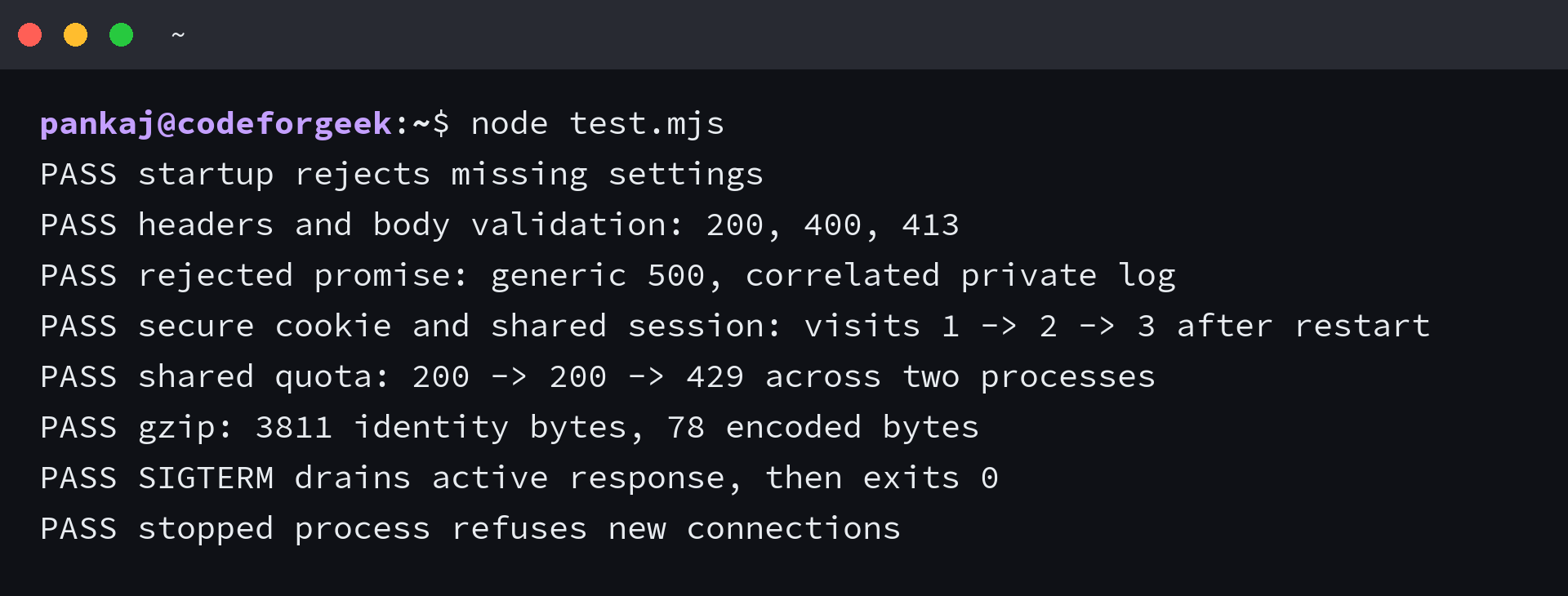
The assertions fail the command if a response or process exit disagrees with the expected behavior. The driver captures child stdout and stderr in test-process-receipts.json and terminates its child processes in a final cleanup path.
The forwarded HTTPS header in this driver simulates a trusted proxy, so the test establishes Express cookie behavior without proving a deployed TLS boundary. Repeat the same decisions through your actual proxy before release.
When a production check fails
Match a failed response to the boundary that produced it before changing middleware order. A parser rejection is different from a route rejection, and a missing cookie can indicate protocol recognition rather than storage failure.
| Symptom | Cause or boundary | Action |
|---|---|---|
| Startup exits before listening | A required setting is missing or Redis cannot connect. | Supply a generated secret and a reachable Redis URL without logging their values. |
| Status 400 for valid JSON | The message field fails semantic validation. | Send a string within the route bounds. |
| Status 413 | The JSON body exceeds 16 KB. | Reduce the body or deliberately review its permitted size. |
| Session cookie is not set | A Secure cookie requires an HTTPS request recognized by Express. | Inspect trusted proxy configuration and the overwritten protocol header. |
| All clients share a quota | The application sees the proxy address rather than distinct client addresses. | Verify req.ip through the actual trusted forwarding chain. |
| Session resets after restart | The secret, store prefix or Redis data changed. | Keep replica settings consistent and inspect Redis lifetime and persistence. |
| Termination reaches the deadline | An active connection or dependency does not finish within the drain deadline. | Bound application work and align the platform termination timeout. |
A handled request error can leave the process ready for another request, while an uncaught process-level exception can leave application state uncertain. Let your supervisor replace an unhealthy process rather than treating every crash as a route-level response.
Make termination finish an active request
Change the diagnostic slow response to wait longer than the drain deadline, then run the same driver. The termination assertion should fail, which tells you the platform timeout must be aligned with the work your application permits.
node test.mjs
Keep the deadline finite, and shorten or move work that cannot fit within it. An Express rollout must stop accepting requests without closing the session store underneath responses that are still completing.
Express production questions
These deployment questions concern the controls around the application, rather than another middleware install.
Is PM2 required to run Express in production?
Your deployment needs supervision and replacement of failed processes. PM2 is one option, but a container orchestrator or an operating-system service manager can own that responsibility.
Does Redis guarantee that sessions survive every failure?
Sessions can survive an Express restart when Redis retains the data and the application keeps its signing secret. Redis data loss, expiration or a changed secret can still invalidate the session.
Can setting NODE_ENV to production secure the application?
Production mode changes Express behavior, including default error responses. Input validation and a trusted TLS boundary remain separate responsibilities.