New to Rust? Grab our free Rust for Beginners eBook Get it free →
Express Router: A complete reference for Node.js developers

When an Express app has groups of related routes, such as everything under a project’s URL, you can keep each group in its own module. An Express Router holds those routes and their middleware, and the app mounts it under a path prefix.
This reference walks through building a Router module and mounting it, including routes nested under a parent.
What is an Express Router?
An Express Router is a mountable routing and middleware system that groups handlers under a path prefix. The application mounts it, and the Router matches paths relative to that mount.
A Router does not make a small app faster or change what an endpoint can return. Keep a direct app.get route when it is self-contained, and use a Router when related endpoints need their own prefix, middleware, or module.
For example, a child Router can define a route for a project ID while its parent supplies the account and project path segments.
| Object | What it owns | Typical job |
|---|---|---|
| Express app | Application-wide middleware and mounted routers | Start the server and connect route groups |
| Router | Routes and middleware for one feature | Define project paths and their handlers |
| Mount path | The prefix added before a child route | Place the project routes under an account URL |
What you need before mounting a router
Express 5 requires Node.js 18 or newer, and the example uses JavaScript module files ending in .mjs. The Express 5 API reference documents the runtime requirement.
If you still need a Node project, the site’s Node.js tutorial covers the initial setup.
- Node.js 18 or newer, as required by Express 5.
- A Node project. Run npm init -y when the directory does not already have a package file.
- Express installed from the project root with npm install express.
- Use three module files ending in .mjs for the Router, app, and verification program.
Step 1: Define routes in a Router module
A feature Router can own its middleware, parameter lookup, and route methods. This child Router uses mergeParams so handlers can read the accountId supplied by the parent mount.
import express from 'express';

const router = express.Router({ mergeParams: true });
const projects = new Map([
  ['42', { id: '42', name: 'Router demo' }],
]);

router.use((req, res, next) => {
  res.set('X-Route-Group', 'projects');
  next();
});

router.param('projectId', (req, res, next, projectId) => {
  const project = projects.get(projectId);
  if (!project) {
    return res.status(404).json({ error: 'Project not found' });
  }
  req.project = project;
  next();
});

router.route('/')
  .get((req, res) => {
    res.json({ accountId: req.params.accountId, projects: [...projects.values()] });
  })
  .post((req, res) => {
    res.status(201).json({ accountId: req.params.accountId, created: req.body.name });
  });

router.get('/search/:term', (req, res) => {
  res.json({ term: req.params.term });
});

router.get('/assets{/*assetPath}', (req, res) => {
  res.json({ assetPath: req.params.assetPath ?? [] });
});

router.get('/documents/:name{.:extension}', (req, res) => {
  res.json({ name: req.params.name, extension: req.params.extension ?? null });
});

router.get('/fail', async (req, res) => {
  throw new Error('Demonstration failure');
});

router.route('/:projectId')
  .get((req, res) => {
    res.json({ accountId: req.params.accountId, project: req.project });
  })
  .patch((req, res) => {
    res.json({ updated: req.project.id });
  })
  .delete((req, res) => {
    res.sendStatus(204);
  });

export default router;
The GET handlers return JSON with res.json(). The existing guide to sending JSON responses with Express covers response formatting separately.
The router.param callback runs when a matching route includes projectId, so a missing project can stop with a 404 before the route handler runs. The return before that response matters because it prevents the callback from continuing into next().
router.route(‘/’) groups GET and POST handlers for the same local path, while router.route(‘/:projectId’) groups operations on one project. If handlers grow into database operations, keep these route bindings small and move that work into controller functions, as in the site’s RESTful API with Node.js and Express walkthrough.
Step 2: Read the path Express matches
Express combines each mount path with the child Router’s local path. Route parameters capture path segments as strings, while query-string values are separate from req.params.
| Child path | Request under the mounts | Result |
|---|---|---|
| /:projectId | GET /api/v1/accounts/acme/projects/42 | accountId is acme and projectId is 42 |
| /search/:term | GET /api/v1/accounts/acme/projects/search/router | term is router |
| /assets{/*assetPath} | GET /api/v1/accounts/acme/projects/assets | assetPath is an empty array |
| /assets{/*assetPath} | GET /api/v1/accounts/acme/projects/assets/icons/logo.svg | assetPath contains icons and logo.svg |
| /documents/:name{.:extension} | GET /api/v1/accounts/acme/projects/documents/report.json | name is report and extension is json |
The accountId parameter comes from the parent path, so the child Router needs mergeParams: true to see it. The Express 5 routing guide describes how mounted routers and path parameters combine.
Step 3: Mount the Router under its resource path
The app mounts an accounts Router under /api/v1/accounts, then that parent mounts the projects Router under /:accountId/projects. Together with the child’s /:projectId path, the full request URL is /api/v1/accounts/acme/projects/42.
import express from 'express';
import projectsRouter from './routes/projects.mjs';

const app = express();
const accountsRouter = express.Router();

app.use(express.json());
accountsRouter.use('/:accountId/projects', projectsRouter);
app.use('/api/v1/accounts', accountsRouter);

app.use((req, res) => {
  res.status(404).json({ error: 'No route matches this request' });
});

app.use((err, req, res, next) => {
  if (res.headersSent) return next(err);
  res.status(500).json({ error: 'Request failed' });
});

export default app;
express.json() runs before the Router mount so a POST handler can read req.body. An unmatched request then reaches the 404 middleware, while an error passed with next(err) or rejected by an async handler reaches the four-argument error middleware.
Keep the 404 response and error response separate because they represent different control-flow paths. The site’s guide to error handling in Express middleware goes deeper into that boundary.
Step 4: Keep middleware and route order deliberate
Express processes middleware and routes in registration order, so each handler must respond, call next(), or pass an error onward.
- Use router.use() for middleware shared by a Router, or pass middleware directly to a route that needs it.
- Call next() to continue through the normal handler chain. A handler that neither responds nor calls next() leaves the request without a response.
- Put fixed paths such as /search/router before a broad parameter route such as /:projectId when the paths can overlap.
- Use next(‘route’) to skip the remaining callbacks for the current route, or next(err) to enter error handling.
Middleware passed to router.use() is not the same as a route callback, so next(‘route’) is not its escape hatch. The Express middleware guide explains the router-level chain and its mount paths.
Step 5: Handle Express 5 paths and errors
Express 5 uses named wildcards and brace-delimited optional path portions. These rules matter when a route string is copied from an Express 4 example.
| Behavior | Express 5 form | What the handler receives |
|---|---|---|
| One named path segment | /:projectId | req.params.projectId is a string |
| Wildcard after a required prefix | /files/*filepath | filepath is an array of remaining path segments |
| Wildcard that can include the base path | /files{/*filepath} | The wildcard may be absent on /files and is an array when present |
| Optional extension | /:name{.:extension} | extension is omitted when the dot and suffix are absent |
| Router options | mergeParams, caseSensitive, strict | Parent params are not merged by default, matching is case-insensitive and trailing slashes are accepted by default |
| Rejected promise from an async handler | Express 5 forwards the rejection to error middleware | The error handler receives the failure without a manual try/catch in the route |
The Router API lists mergeParams, caseSensitive, and strict as false by default. Enable mergeParams when a child needs a parent parameter, and change caseSensitive or strict only when that matching behavior is part of the route contract. See the Express 5 Router API.
Express 5 wildcard names are required, and wildcard values arrive as arrays. To match both /files and paths below it, keep the slash inside the optional braces, as in /files{/*filepath}; the Express 5 migration guide documents these path changes.
In the tested Router, /assets{/*assetPath} matched both /assets and /assets/icons/logo.svg. I replaced the braces after the first form failed to match the bare base path, and the final run returned an empty array for /assets and two segments for the nested URL.
The mount point becomes part of the public URL
A route’s public URL is the combined path from each mount and the child route, so keep a feature’s prefix in one mount declaration instead of repeating it in every handler.
I ran node verify.mjs with Express 5.2.1 on Node 26.10.0. The nested project request returned 200, an unknown project and an unknown URL each returned 404, and a rejected async handler reached the 500 error middleware.
Save this as verify.mjs beside app.mjs. It sends successful, missing-project, async-error, and missing-route requests, then closes the server.
import app from './app.mjs';

const server = app.listen(0, '127.0.0.1');
await new Promise((resolve) => server.once('listening', resolve));
const { port } = server.address();
const base = `http://127.0.0.1:${port}`;
const requests = [
  { method: 'GET', path: '/api/v1/accounts/acme/projects/42' },
  { method: 'POST', path: '/api/v1/accounts/acme/projects', body: { name: 'CLI project' } },
  { method: 'GET', path: '/api/v1/accounts/acme/projects/search/router' },
  { method: 'GET', path: '/api/v1/accounts/acme/projects/assets/icons/logo.svg' },
  { method: 'GET', path: '/api/v1/accounts/acme/projects/assets' },
  { method: 'GET', path: '/api/v1/accounts/acme/projects/documents/report' },
  { method: 'GET', path: '/api/v1/accounts/acme/projects/documents/report.json' },
  { method: 'GET', path: '/api/v1/accounts/acme/projects/404' },
  { method: 'GET', path: '/api/v1/accounts/acme/projects/fail' },
  { method: 'GET', path: '/missing' },
];

try {
  for (const { method, path, body } of requests) {
    const options = { method };
    if (body) {
      options.headers = { 'content-type': 'application/json' };
      options.body = JSON.stringify(body);
    }
    const response = await fetch(`${base}${path}`, options);
    const result = await response.text();
    console.log(`${response.status} ${method} ${path} ${result}`);
  }
} finally {
  await new Promise((resolve, reject) => {
    server.close((error) => error ? reject(error) : resolve());
  });
}
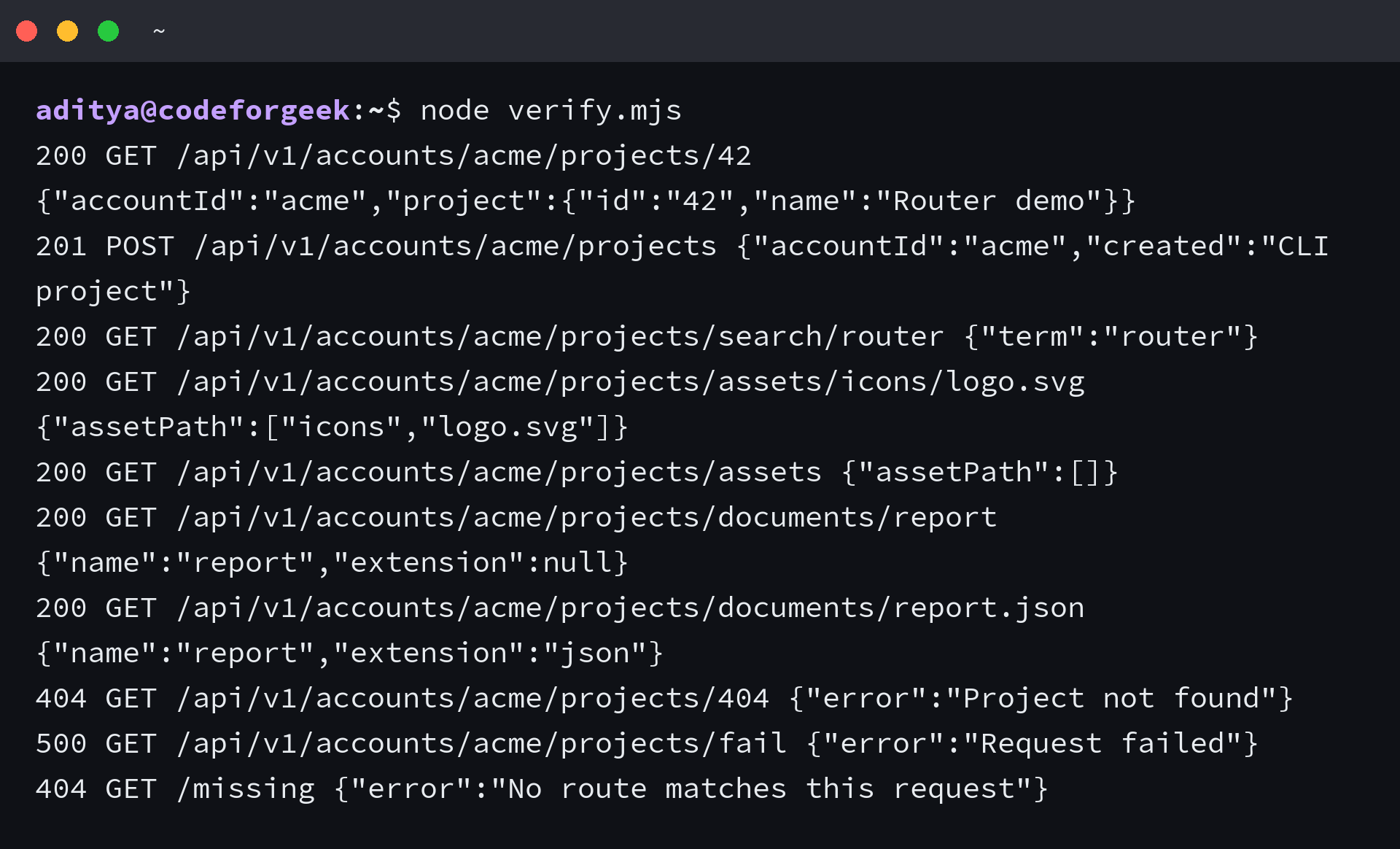
Run node verify.mjs after changing a mount path or route, then compare the returned status with the URL you meant to expose.
node verify.mjs
Keep that prefix in one mount declaration, and the child route stays reusable under another resource path.
Frequently asked questions about Express Router
How is express.Router different from app.get?
app.get() registers a route on the application. express.Router() creates a mountable route and middleware stack that you attach with app.use(), which lets you group related endpoints under a prefix.
How does a child Router read parent route parameters?
Create the child Router with mergeParams: true. Without that option, a parameter such as accountId from the parent mount is not merged into the child Router’s req.params.
How do wildcard routes work in Express 5?
Give the wildcard a name, such as *filepath, and Express puts the captured path segments in an array. Wrap the slash and wildcard in braces when the route should also match its base path.
Does Express 5 forward async route errors?
Yes. Express 5 forwards a rejected promise from a route handler to error-handling middleware, so the route does not need its own try/catch solely to call next(err).