New to Rust? Grab our free Rust for Beginners eBook Get it free →
Pandas date_range: Create date ranges and build a datetime index


Pandas date_range generates a sequence of evenly spaced dates and returns them as a DatetimeIndex.
It shows up constantly for building a timeline to test a function, creating a sample dataset or setting the index of a time series DataFrame.
This guide covers every parameter, the freq aliases people search for most and how to turn the output into a working datetime index.
Pandas date_range syntax and parameters
pandas.date_range(
    start=None, end=None, periods=None, freq=None,
    tz=None, normalize=False, name=None,
    inclusive="both", unit=None
)
- start: the first date in the range, given as a string, a datetime object or a Timestamp
- end: the last date in the range, same accepted types as start
- periods: how many dates to generate
- freq: the spacing between dates, default “D” for daily, covered in full below
- tz: a time zone name such as “Asia/Kolkata” for a timezone-aware index
- normalize: when True, strips the time portion so every value lands on midnight
- name: a label attached to the resulting DatetimeIndex
- inclusive: which end of the range counts as closed, “both”, “left”, “right” or “neither”
- unit: the datetime resolution, “s”, “ms”, “us” or “ns”, added in pandas 2.0
Only three of start, end, periods and freq can be set at once. Passing all four raises a ValueError, since pandas always derives the fourth from the other three.
The unit parameter matters most with very old or very distant future dates. Pandas infers resolution automatically, defaulting to nanoseconds in most cases.
The default nanosecond range covers roughly 1677 to 2262. Setting unit to “s” or “ms” trims memory use on a large index and avoids overflow past that window.
Name is easy to skip past. It becomes useful once a range gets passed around a codebase.
A labeled DatetimeIndex shows its purpose in output and error messages, instead of appearing as a bare, unnamed axis.
What pandas date_range does
pd.date_range() takes a starting point, an ending point or a count plus a frequency. It hands back a DatetimeIndex object.
A DatetimeIndex is not a plain list of date strings. It is a real pandas index type built on datetime64 values.
Every entry supports year, month, day and weekday lookups without extra parsing.
import pandas as pd

dates = pd.date_range(start="2024-01-01", periods=5)
print(dates)
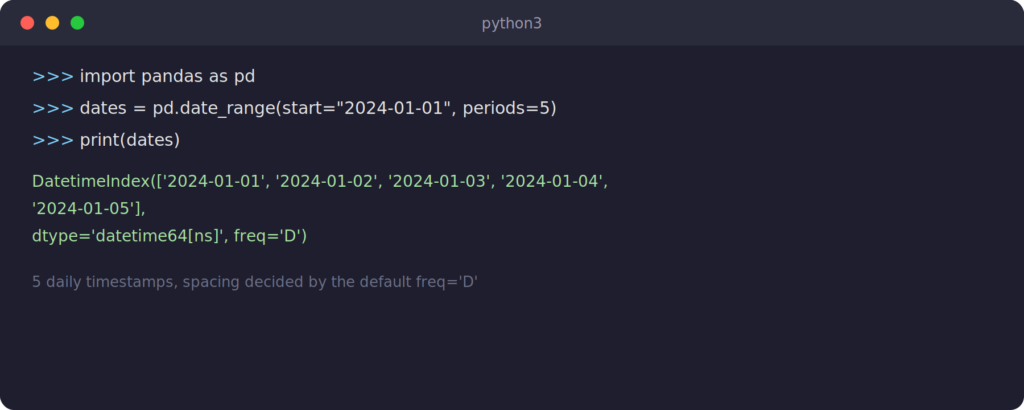
Five daily timestamps come back starting from January 1, 2024. No end date was given, so pandas used periods to work out where to stop.
Creating a date range with start and end
Passing both start and end returns every date between them at the default daily frequency.
import pandas as pd

dates = pd.date_range(start="2024-06-01", end="2024-06-05")
print(dates)
DatetimeIndex(['2024-06-01', '2024-06-02', '2024-06-03', '2024-06-04',
               '2024-06-05'],
              dtype='datetime64[ns]', freq='D')
This is the shape most people reach for first. It works fine for short ranges, a week of report dates or a month of log entries.
Once a range covers years of daily data, generating it with periods is usually faster to type and easier to scan.
Creating a date range with periods
When you know how many dates you want but not the exact end date, periods does the job. Combine it with start alone, or with end alone to count backward.
import pandas as pd

forward = pd.date_range(start="2024-01-01", periods=7)
backward = pd.date_range(end="2024-01-01", periods=7)
print(forward)
print(backward)
DatetimeIndex(['2024-01-01', '2024-01-02', '2024-01-03', '2024-01-04',
               '2024-01-05', '2024-01-06', '2024-01-07'],
              dtype='datetime64[ns]', freq='D')
DatetimeIndex(['2023-12-26', '2023-12-27', '2023-12-28', '2023-12-29',
               '2023-12-30', '2023-12-31', '2024-01-01'],
              dtype='datetime64[ns]', freq='D')
Setting end instead of start walks backward from that date. That is handy for a “last N days” query without doing the subtraction by hand.
How the freq parameter controls spacing
The freq parameter decides the spacing between dates. It is the part of date_range that trips people up, since pandas renamed several aliases in version 2.2.
Old tutorials still show ‘M’ for month end and ‘A’ for year end. Current pandas prefers ‘ME’ and ‘YE’ instead.
The old letters still run today but raise a deprecation warning, so new code should use the current aliases.
- D: calendar day
- B: business day
- h: hour
- min: minute
- W: week, anchored on Sunday by default
- MS: month start
- ME: month end
- QS: quarter start
- QE: quarter end
- YS: year start
- YE: year end
Any alias accepts a multiple by prefixing a number. ‘3D’ steps three days at a time, ‘2h’ steps two hours.
import pandas as pd

month_end = pd.date_range(start="2024-01-01", periods=4, freq="ME")
every_other_week = pd.date_range(start="2024-01-01", periods=4, freq="2W")
print(month_end)
print(every_other_week)
DatetimeIndex(['2024-01-31', '2024-02-29', '2024-03-31', '2024-04-30'],
              dtype='datetime64[ns]', freq='ME')
DatetimeIndex(['2024-01-07', '2024-01-21', '2024-02-04', '2024-02-18'],
              dtype='datetime64[ns]', freq='2W-SUN')
Month end lands on the 29th in February because 2024 is a leap year. date_range does real calendar math instead of adding a fixed number of days.
That is why freq beats manual date arithmetic for anything month or quarter based.
If freq is left out while start, end and periods are all set, pandas spaces the dates evenly between the endpoints, not by a calendar unit.
That can produce timestamps with odd hours and minutes, so check the output rather than assuming daily spacing.
Controlling range boundaries with inclusive
By default, both the start and end dates are included in the output. The inclusive parameter changes that, and it replaces the older closed parameter, which pandas deprecated.
Most reporting code never touches this parameter since the default already matches how people expect a date range to behave.
import pandas as pd

both = pd.date_range(start="2024-03-01", end="2024-03-04", inclusive="both")
left_only = pd.date_range(start="2024-03-01", end="2024-03-04", inclusive="left")
neither = pd.date_range(start="2024-03-01", end="2024-03-04", inclusive="neither")
print(left_only)
print(neither)
DatetimeIndex(['2024-03-01', '2024-03-02', '2024-03-03'], dtype='datetime64[ns]', freq='D')
DatetimeIndex(['2024-03-02', '2024-03-03'], dtype='datetime64[ns]', freq='D')
“left” drops the end date, “right” drops the start date and “neither” drops both. This helps when stitching together back-to-back ranges without a boundary date showing up twice.
Setting a timezone with tz
Pass tz to get a timezone-aware DatetimeIndex instead of a naive one. This matters once the data gets compared against or merged with timestamps that already carry timezone information.
Pandas raises an error rather than silently guessing when aware and naive values mix.
That strictness catches a common bug early, where a scheduled job runs in UTC but the report it feeds compares against a locally recorded, timezone-naive timestamp.
import pandas as pd

tokyo_dates = pd.date_range(start="2024-01-01", periods=3, tz="Asia/Tokyo")
print(tokyo_dates)
DatetimeIndex(['2024-01-01 00:00:00+09:00', '2024-01-02 00:00:00+09:00',
               '2024-01-03 00:00:00+09:00'],
              dtype='datetime64[ns, Asia/Tokyo]', freq='D')
Using date_range for datetime indexing
Most real use of date_range is not printing a DatetimeIndex on its own. It is using that index to give a DataFrame a proper time axis.
Once a DataFrame’s index is a DatetimeIndex, slicing by date string, resampling to a different frequency and pulling out a single month all become one-liners.
That is the gap between date_range as a standalone utility and date_range as the backbone of a real time series workflow.
Without a datetime index, filtering by date usually means parsing a plain column with to_datetime, then building a boolean mask by hand.
A DatetimeIndex skips that setup, since pandas already understands each row’s position in time.
Building a DataFrame with a datetime index
Generate the range first, then hand it to the DataFrame constructor as the index rather than a column.
This is a variation on creating a DataFrame from lists, except the index comes from date_range instead of default integers.
import pandas as pd

dates = pd.date_range(start="2024-01-01", periods=6, freq="D")
sales = [120, 135, 98, 142, 110, 160]
df = pd.DataFrame({"sales": sales}, index=dates)
print(df)
            sales
2024-01-01    120
2024-01-02    135
2024-01-03     98
2024-01-04    142
2024-01-05    110
2024-01-06    160
Slicing a datetime index
With a real DatetimeIndex in place, slice with a plain string instead of building a boolean mask by hand.
That is the shortcut most people are actually filtering a DataFrame for when the data is date based.
print(df["2024-01-03":"2024-01-05"])
            sales
2024-01-03     98
2024-01-04    142
2024-01-05    110
The slice is inclusive on both ends here. That surprises people coming from plain Python list slicing, where the stop value is excluded.
Pandas treats a datetime slice like a label lookup, not a positional one.
Resampling to a new frequency
Resampling groups rows by a new time interval and applies an aggregation.
That is a close cousin of a regular groupby operation, except the groups come from the time axis instead of a column value.
weekly_total = df.resample("W").sum()
print(weekly_total)
            sales
2024-01-07    765
The “W” alias defaults to weeks ending on Sunday. The label on that single output row marks the end of the week the six days fell into.
Add a second column with a different date range, and concatenating the two DataFrames works the same as any other pandas objects.
Pandas aligns rows by the shared DatetimeIndex instead of position, which keeps mismatched date ranges from silently lining up wrong.
Business day and custom frequency ranges
Passing freq="B" skips Saturdays and Sundays without any extra setup.
import pandas as pd

business_days = pd.date_range(start="2024-01-01", periods=5, freq="B")
print(business_days)
DatetimeIndex(['2024-01-01', '2024-01-02', '2024-01-03', '2024-01-04',
               '2024-01-05'],
              dtype='datetime64[ns]', freq='B')
For anything beyond weekends, such as public holidays, pandas offers a dedicated bdate_range function alongside CustomBusinessDay. Both accept a holiday calendar and a custom weekmask.
That is a wider topic on its own.
Knowing date_range hands off to those tools once your logic needs more than a plain weekday check saves a search later, especially for finance or payroll code that has to respect a real calendar.
A weekmask matters for teams whose work week does not run Monday through Friday.
Retail scheduling or markets that trade through the weekend can pass a weekmask string such as “Tue Wed Thu Fri Sat” to CustomBusinessDay for a custom pattern.
Common date_range errors and how to fix them
A few mistakes come up often enough to call out directly.
Most trace back to date_range being stricter about ambiguity than plain Python date math, which is a good thing once the checks are familiar.
Setting all four of start, end, periods and freq. Pandas raises a ValueError, since the fourth value is redundant. Drop whichever one you did not need.
Mixing a naive start with a timezone-aware end, or the reverse. Pandas raises a TypeError instead of guessing which timezone was meant. Localize both endpoints the same way first.
Assuming an old freq alias still works silently. ‘M’ and ‘A’ still run today but emit a FutureWarning pointing at ‘ME’ and ‘YE’. Update the alias now rather than waiting for pandas to remove it outright.
Expecting periods to count business days when freq defaults to daily. Set freq="B" explicitly for five workdays, since the default ‘D’ counts every calendar day including weekends.
Passing an end date earlier than start without a negative freq. Pandas returns an empty DatetimeIndex rather than an error. That can slip past a quick test and only show up later as a silently empty DataFrame. Check the order of start and end, or set a negative freq like “-1D” if walking backward is intentional.
Key takeaways
- date_range returns a DatetimeIndex, not a list of date strings
- Only three of start, end, periods and freq can be set at once
- freq aliases were renamed in pandas 2.2, use ME and YE not M and A
- inclusive replaces the deprecated closed parameter
- A DatetimeIndex as a DataFrame index enables string slicing and resample
- tz produces timezone-aware timestamps, these cannot mix with naive ones
- freq=”B” skips weekends, bdate_range handles holidays
- Skipping freq while periods is set spaces dates evenly, not by calendar unit
Frequently asked questions
What does pandas date_range return?
It returns a DatetimeIndex, a pandas index built on datetime64 values. That differs from a plain list of date strings since it supports vectorized date arithmetic.
Why did my freq=”M” code start showing a warning?
Pandas 2.2 renamed several frequency aliases. ‘M’ still works but is deprecated in favor of ‘ME’ for month end, so switch the alias to remove the warning.
Can I use date_range to build a business day calendar?
Yes, set freq="B" to skip weekends. For holidays on top of weekends, use bdate_range with a CustomBusinessDay offset built from a holiday calendar.
What replaced the closed parameter in date_range?
The inclusive parameter, which accepts “both”, “left”, “right” or “neither” and controls which boundary dates appear in the output.
How do I create a date range going backward from a date?
Pass end instead of start along with periods. Pandas counts backward that many steps from the end date.
Does date_range support timezones?
Yes, pass a tz string such as “Asia/Kolkata” and every generated timestamp becomes timezone-aware. Mixing an aware range with naive timestamps elsewhere raises an error.
Conclusion
Once a range comes out of date_range and lands as a DataFrame index, most day to day pandas time series work turns into string slicing and a resample call. Manual date filtering mostly falls away once that index is in place.