New to Rust? Grab our free Rust for Beginners eBook Get it free →
Vibe Coding: Inside the AI-First Developer Trend

Vibe coding turns a plain-language goal into working software through a conversation with an artificial intelligence (AI) coding tool. My check of a small study-timer module ran under Node.js 26.5.0 and separated a convincing demo from code you can trust.
What vibe coding actually means
Andrej Karpathy coined the term in February 2025 for a style of programming where you “forget that the code even exists” and steer a large language model (LLM) through prompts, output, and corrections. His original description was deliberately playful, but it marks a useful boundary.
Using AI to explain an error or complete a function is AI-assisted development. Vibe coding goes further because you describe the outcome, let the tool produce much of the implementation, and judge progress mainly through behavior rather than line-by-line authorship.
The distinction matters when the software leaves a prototype.
You can delegate typing and exploration, but ownership of requirements, verification, security, and maintenance stays with you.
Why the trend matters without replacing software engineering
Prompt-driven tools shorten the path from an idea to something you can click, run, and revise. That helps you explore an interface, automate a personal task, or test whether a product idea deserves more effort before you commit to a larger build.
The trend does not mean professional developers have stopped reading code. Stack Overflow’s 2025 Developer Survey found that 72% of respondents said vibe coding was not part of their professional work, while 46% distrusted AI-tool accuracy and 33% trusted it.
Those results point to a split between fast creation and accountable delivery.
AI can draft a feature, but a production change still needs a defined contract, a reviewable diff, tests that check the contract, and someone who can diagnose the failure.
A vibe coding workflow you can verify
A useful session starts with a narrow goal and ends with evidence.
If you are choosing an assistant, compare its repository access, terminal controls, review surface, and permission model rather than judging it only by chat quality in this AI coding agent comparison.
- Define success before asking for code. Name the user action, expected result, failure cases, platform, and constraints.
- Give the tool only the context and permissions it needs. Keep credentials out of prompts and restrict write access when the tool supports it.
- Ask for a plan and a small diff. Review the files it intends to touch before allowing a broad rewrite.
- Run the result early. Paste the exact error and ask for the smallest correction instead of requesting a fresh project.
- Inspect every changed file, dependency, configuration file, and test. Treat an unexpected edit as a review item, not harmless cleanup.
- Commit a working checkpoint before the next request. Small checkpoints make regression hunting and rollback much easier.
Prompt quality improves when the request names observable behavior. If you need help structuring context and follow-up requests, the examples in this ChatGPT guide transfer well to coding assistants without pretending that a prompt replaces validation.
Use acceptance criteria, not adjectives
“Build a clean timer” leaves the important choices open. A stronger request tells the agent what the timer must do and what it must reject.
Build a browser study timer with focus and break phases.
Acceptance criteria:
- Focus switches to break when the countdown reaches zero.
- Break switches back to focus.
- Pause preserves the remaining time.
- An unknown phase returns a visible error.
- Add tests for every state transition and invalid input.
Do not add a framework or external dependency.
The request gives you something to test.
An unnecessary framework, missing error state, or unrelated file edit also becomes easy to challenge during review.
Run the tests outside the chat
The generated study-timer module used Node’s built-in test runner, so the verification command needed no testing package. My Node.js 26.5.0 run covered the success, error, and invalid-input paths.
node --test
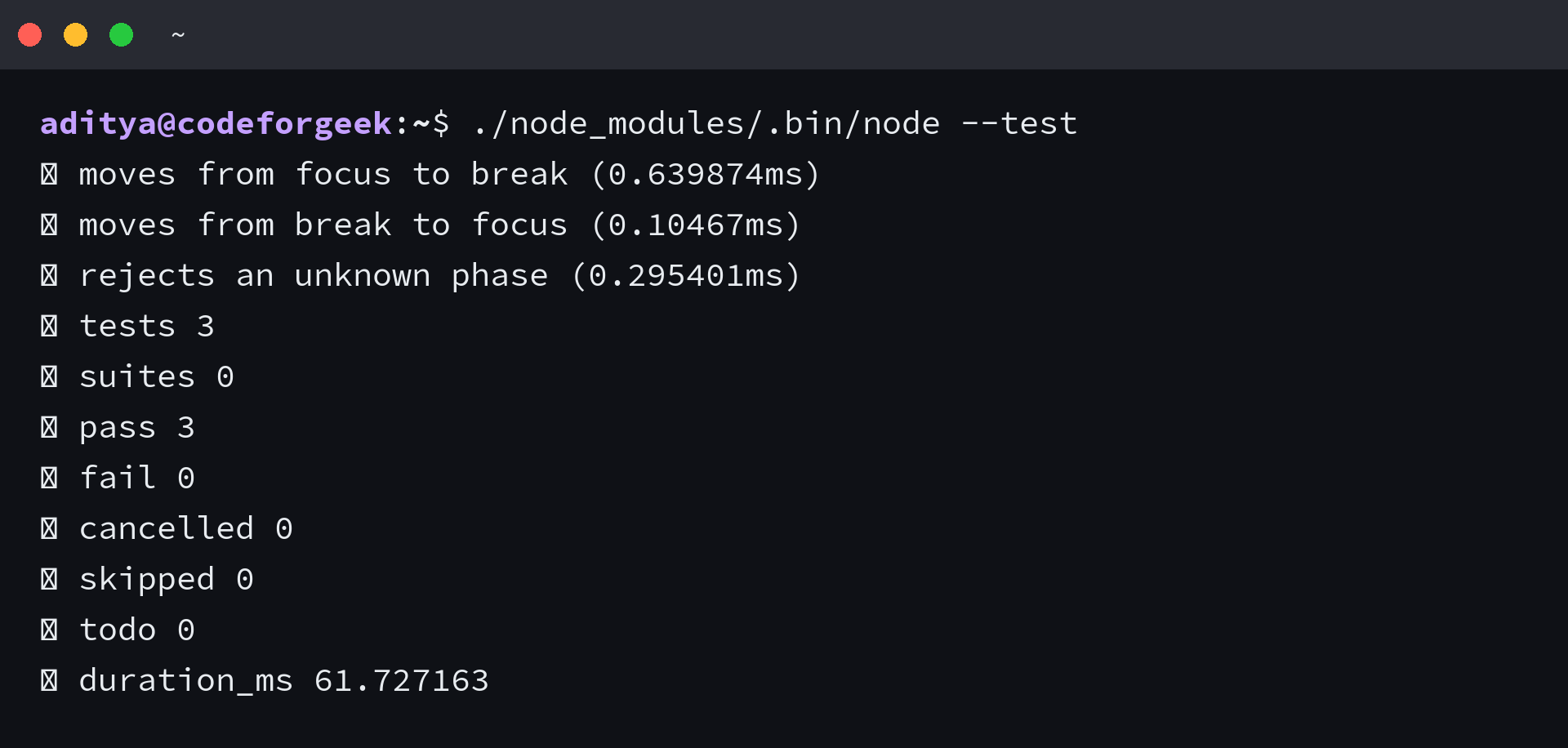
Passing tests establish that the checked cases behave as expected.
They do not prove that the requirements are complete, the implementation is secure, or the tests themselves assert the right behavior.
Where vibe coding fits and where it needs tighter control
Risk changes with the cost of a wrong answer. Use a lightweight loop for disposable experiments, then add stronger review as data sensitivity, user impact, or deployment access increases.
| Workload | Good use | Required control |
|---|---|---|
| Personal prototype | Explore an interface or automate a reversible task | Keep a working checkpoint and inspect dependencies |
| Internal utility | Draft a bounded workflow for a known team | Add an owner, tests, access limits, and code review |
| Customer-facing feature | Create a first implementation behind a controlled rollout | Require review, continuous integration, observability, and rollback |
| Authentication, payments, or sensitive data | Use AI for explanation or a narrowly scoped draft | Require independent security review and manually checked tests |
| Infrastructure or deployment | Suggest a change in a limited environment | Review every command and deny broad credentials by default |
GitHub’s responsible-use guidance says hallucinations make human review of generated output important.
The Open Worldwide Application Security Project (OWASP) goes further in its Secure Coding with AI Cheat Sheet, warning that an agent can weaken assertions, delete failing tests, or modify files outside the requested scope.
A green test run therefore belongs inside a larger review.
Check the diff, add negative cases the agent did not propose, verify new package names before installation, and keep security-critical tests independent from the code generator.
How to keep ownership of AI-generated code
Vibe coding works best when conversation accelerates exploration while engineering controls the result. Keep these boundaries visible during every session.
- You own the specification. The agent cannot infer unstated business rules or acceptable failure behavior.
- You own the permissions. Limit file, shell, network, and credential access before the agent starts.
- You own the evidence. Run tests and checks in the project environment rather than accepting a chat summary.
- You own the diff. Review every changed file, including tests, lockfiles, scripts, and continuous integration configuration.
- You own maintenance. Keep code only when your team can explain, debug, and replace it.
A useful last move is to close the AI chat and reproduce the build, test, and failure path yourself. If you cannot explain why the code passes or where it can fail, the prototype is not ready for someone else to depend on.
What is vibe coding?
Vibe coding is a prompt-driven development style where you describe an outcome to an AI coding tool, evaluate the software it generates, and steer corrections through conversation instead of writing and inspecting every line yourself.
Is vibe coding the same as using an AI coding assistant?
No. AI-assisted development includes narrow tasks such as explaining an error or completing a function. Vibe coding delegates more of the implementation and often evaluates progress through behavior.
Can you use vibe coding for production software?
You can use it to draft production changes, but the result needs the same ownership as any other code. Review the full diff, run independent tests, check dependencies, apply security controls, and keep rollback available.
What should you test after vibe coding?
Test acceptance criteria, invalid input, boundary conditions, error handling, permissions, dependency changes, and any file the agent modified. Add cases the agent did not write so the same system is not judging its own assumptions.