New to Rust? Grab our free Rust for Beginners eBook Get it free →
Session Management in Nodejs Using Redis as Session Store

An Express session has two halves: a signed identifier in the browser and server-side data attached to that identifier. Redis gives every Node.js process the same place to find that data, with an expiry timer on each session key.
I ran the application below on Node.js 26.7.0 with Express 5.2.1, express-session 1.19.0, connect-redis 10.0.0, redis 6.2.1, and Redis Server 7.0.15. The test signs in, stops one app process, reads the same session from another process, refreshes its expiry, and deletes it on logout.
What Express keeps in the cookie and in Redis
The browser cookie contains a signed session id.
It does not contain the user object, cart, permissions, or any other value assigned to req.session.
On each request, express-session verifies the signature and asks the configured store for the matching id. connect-redis translates that store operation into Redis commands.
| Location | What it holds | Who can read it | How it expires |
|---|---|---|---|
| Browser cookie | Signed session id | Browser and Express middleware | Cookie Expires or Max-Age |
| Redis key | Serialized session object | Application servers with Redis access | Redis TTL |
| Node.js heap | Request-local session object after lookup | Current process | End of request or process exit |
The default MemoryStore skips Redis and holds sessions inside one Node.js process. Express documents it as a development store because it does not scale past one process and can leak memory.
A Redis store removes that process boundary.
A restart no longer erases the session, and a second app instance can serve the next request as long as it uses the same Redis database and session secret.
Build the Redis-backed session app
Create a folder, initialize npm, and install the current package releases. npm added 84 packages and reported no vulnerabilities.
mkdir redis-session-demo
cd redis-session-demo
npm init -y
npm install express express-session connect-redis redis
The application must finish connecting to Redis before it begins accepting requests. Starting the HTTP listener first creates a window where requests arrive before the store is usable.
Save the following as server.js.
The cart route creates a guest session so the login route can demonstrate session-id regeneration rather than starting from an empty browser.
const express = require("express");
const session = require("express-session");
const { createClient } = require("redis");
const { RedisStore } = require("connect-redis");

async function start() {
  if (!process.env.SESSION_SECRET) {
    throw new Error("SESSION_SECRET is required");
  }

  const redisClient = createClient({
    url: process.env.REDIS_URL || "redis://127.0.0.1:6379",
  });
  redisClient.on("error", (error) => {
    console.error("Redis error:", error.message);
  });
  await redisClient.connect();

  const app = express();
  app.set("trust proxy", 1);
  app.use(express.json());
  app.use(
    session({
      store: new RedisStore({
        client: redisClient,
        prefix: "cfgsess:",
      }),
      name: "sid",
      secret: process.env.SESSION_SECRET,
      resave: false,
      saveUninitialized: false,
      rolling: true,
      cookie: {
        httpOnly: true,
        sameSite: "lax",
        secure: process.env.NODE_ENV === "production",
        maxAge: 15 * 60 * 1000,
      },
    })
  );

  app.post("/cart", (req, res, next) => {
    req.session.cart = ["redis-mug"];
    req.session.save((error) => {
      if (error) return next(error);
      res.status(201).json({ cart: req.session.cart });
    });
  });

  app.post("/login", (req, res, next) => {
    const { email, password } = req.body;
    if (email !== "[email protected]" || password !== "correct-horse") {
      return res.status(401).json({ error: "Invalid credentials" });
    }

    req.session.regenerate((error) => {
      if (error) return next(error);
      req.session.user = { id: 42, email };
      req.session.save((saveError) => {
        if (saveError) return next(saveError);
        res.json({ message: "Signed in", servedBy: process.env.PORT || 3210 });
      });
    });
  });

  app.get("/me", (req, res) => {
    if (!req.session.user) {
      return res.status(401).json({ error: "Authentication required" });
    }
    res.json({ user: req.session.user, servedBy: process.env.PORT || 3210 });
  });

  app.post("/logout", (req, res, next) => {
    req.session.destroy((error) => {
      if (error) return next(error);
      res.clearCookie("sid");
      res.status(204).end();
    });
  });

  app.use((error, req, res, next) => {
    console.error(error);
    res.status(500).json({ error: "Request failed" });
  });

  const port = Number(process.env.PORT || 3210);
  const server = app.listen(port, "127.0.0.1", () => {
    console.log(`Session app listening on http://127.0.0.1:${port}`);
  });

  const close = () => server.close(() => redisClient.quit());
  process.on("SIGTERM", close);
  process.on("SIGINT", close);
}

start().catch((error) => {
  console.error(error.message);
  process.exit(1);
});
The store prefix keeps this application’s session keys under cfgsess:. Use a different prefix for each application sharing the same Redis database so administrative store methods cannot cross application boundaries.
saveUninitialized false prevents an anonymous request from creating a session until the application stores something. resave false avoids writing an unchanged session at the end of every request, while connect-redis can still refresh its expiry through the store’s touch method.
Run the app and create one session
Set a secret outside the source file, then start the server.
Use a long random value and keep the same value on every app instance that must accept the same cookies.
export SESSION_SECRET="$(openssl rand -hex 32)"
node server.js
A valid login writes the user object to the session and waits for req.session.save before replying. Waiting for the save callback removes ambiguity in redirects and fast follow-up requests because the Redis write has finished before the client receives success.
- Express verifies the signed sid cookie, if one exists.
- connect-redis loads the matching cfgsess key.
- The login handler checks the credentials and regenerates the session.
- The handler writes the user object and saves the new session.
- The response sends a newly signed sid cookie.
A rejected login creates no Redis key in this app. The successful run created a new id, removed the guest key, and stored the authenticated user under the replacement key.
Rejected login: 401 Redis keys: 0
Guest cart: 201 {"cart":["redis-mug"]}
Guest Redis key exists: 1
Login: 200 {"message":"Signed in","servedBy":"3210"}
Session id changed at login: true
Guest Redis key after login: 0
Read the session in Redis
Redis makes the server-side half visible.
Scan only the application prefix, then inspect the matching value and its time to live (TTL).
redis-cli --scan --pattern 'cfgsess:*'
redis-cli GET 'cfgsess:YOUR_SESSION_ID'
redis-cli TTL 'cfgsess:YOUR_SESSION_ID'
The executed session stored user id 42 and [email protected], alongside cookie metadata with a 900000 millisecond maximum age. Redis reported a 900-second TTL immediately after login.
Redis user: {"id":42,"email":"[email protected]"}
Redis cookie maxAge: 900000 ms
TTL after login: 900 seconds
connect-redis takes the cookie expiration date as the key TTL when the cookie has one. Without a cookie expiration, its default TTL is 86400 seconds.
This sample uses rolling true, so each accepted response sends a fresh cookie expiration.
connect-redis also touches the Redis key, which keeps the browser deadline and server deadline moving together.
Prove another Node.js process can use the session
The useful property of an external session store is shared access. I stopped the process on port 3210, kept the cookie, and started the same application on port 3211 with the same secret and Redis URL.
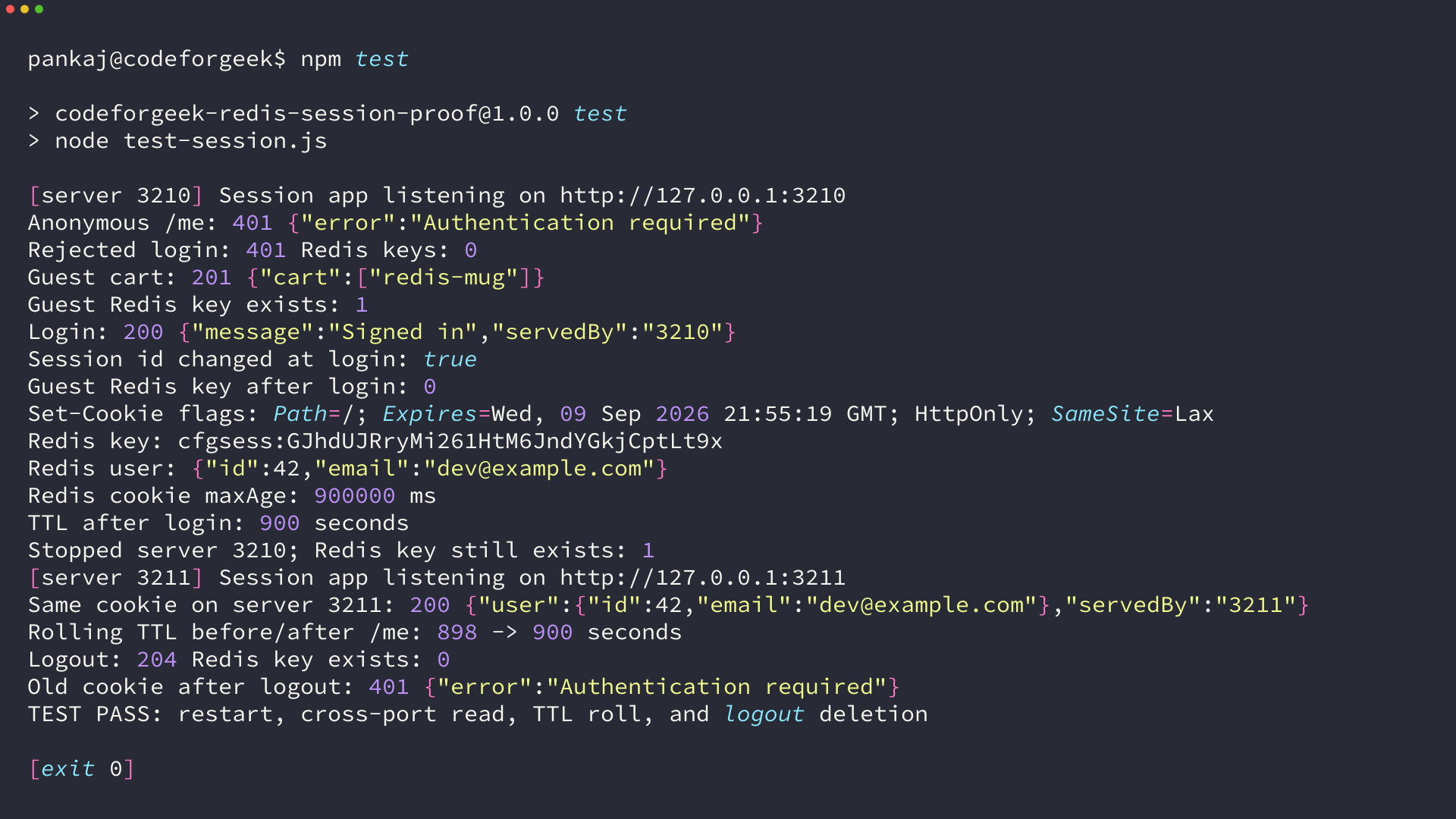
The second process returned the same user data, and the response identifies port 3211 as the server that handled it. Redis retained the key when port 3210 stopped because the key belongs to Redis, not to either Node.js heap.
Stopped server 3210; Redis key still exists: 1
Session app listening on http://127.0.0.1:3211
Same cookie on server 3211: 200 {"user":{"id":42,"email":"[email protected]"},"servedBy":"3211"}
Rolling TTL before/after /me: 898 -> 900 seconds
The TTL dropped while the application was stopped, then returned to 900 seconds after the profile request.
That result comes from the default connect-redis touch behavior and the rolling cookie setting.
Disable touch only when you want a fixed Redis deadline or need to reduce expiry writes. If you change it, decide whether the cookie can outlive the key, because that browser will present an id that Redis no longer knows.
Regenerate the session id when login changes privileges
A guest may already have a session for a cart or preferences before signing in. Reusing that id after authentication allows a fixed id to cross the privilege boundary.
The login handler calls req.session.regenerate after credential verification and before it assigns the user.
The test proves the browser received a different id and the guest key was gone after login.
req.session.regenerate((error) => {
  if (error) return next(error);
  req.session.user = { id: 42, email };
  req.session.save((saveError) => {
    if (saveError) return next(saveError);
    res.json({ message: "Signed in" });
  });
});
regenerate starts a new session object, so copy forward only the guest state you intend to preserve. A cart may survive login, while a guest-only permission flag should not.
- Guest cart saved
- A guest cfgsess key exists and the browser has a guest sid cookie.
- Credentials rejected
- No authenticated key is written and the existing guest state remains.
- Credentials accepted
- The guest key is removed, an authenticated key is saved, and the browser receives a new signed sid cookie.
- Logout
- The authenticated key is removed and the sid cookie is cleared.
Keep cookie and Redis settings aligned
Session failures often come from two correct-looking settings that disagree. Review the browser cookie, Express middleware, and Redis policy as one lifecycle.
| Setting | Use in this sample | Production decision |
|---|---|---|
| secret | Required environment variable | Same secret set across app instances, with a rotation plan |
| httpOnly | true | Keep enabled so browser scripts cannot read sid |
| sameSite | lax | Choose according to cross-site login and request flows |
| secure | Enabled in production | Requires HTTPS and correct proxy trust |
| maxAge | 15 minutes | Match the risk and user workflow |
| rolling | true | Extends active sessions on each response |
| Redis TTL | Derived from cookie expiry | Keep it equal to or longer than the accepted cookie window |
| Redis persistence | Host configuration | Choose whether sessions may be lost after a Redis restart |
secure cookies will not be set over plain HTTP.
Behind a TLS-terminating reverse proxy, Express also needs the correct trust proxy setting so it recognizes the original HTTPS request.
Express accepts an array of session secrets during rotation. Put the newest secret first so it signs new cookies, keep the previous secret after it so existing cookies still verify, and remove the old value after the longest accepted session has expired.
Redis stores live authentication state, so it belongs on a private network with authentication and transport security. Avoid exposing port 6379 to the public internet, and monitor memory eviction because an evicted session behaves like a logout.
Choose Redis persistence from the consequence of losing every active login.
If a short reauthentication event is acceptable, the durability policy can favor speed.
If session loss interrupts paid work or administrative actions, design failover and persistence before launch.
Diagnose session failures from the visible symptom
Start with the failing boundary rather than changing every option. The cookie, signature, Redis connection, key, and expiry each leave a different trace.
- No sid cookie after login. Check that the save callback completes. In production, verify HTTPS, secure, and trust proxy.
- A cookie exists but every request returns 401. Confirm every instance uses the same session secret and cookie name.
- The Redis key never appears. Wait for redisClient.connect before listen, attach RedisStore to session(), and watch the client error event.
- The key exists but disappears too soon. Compare cookie expiry with Redis TTL and inspect disableTouch.
- Sessions vanish after a Redis restart. Check the Redis persistence and managed-service failover policy. An external store still needs an availability decision.
- One app works and another rejects the cookie. Compare Redis URL, database number, key prefix, secret, and cookie configuration across both processes.
Logout should destroy the server-side record and clear the browser cookie.
In the executed run, Redis reported zero for the key immediately after logout, and replaying the old cookie returned 401.
Logout: 204 Redis key exists: 0
Old cookie after logout: 401 {"error":"Authentication required"}
TEST PASS: restart, cross-port read, TTL roll, and logout deletion
If Redis is unavailable at startup, this application exits instead of accepting requests with an unusable session store. Add health checks and an explicit availability policy before placing it behind a load balancer.
For a deeper pass over the middleware itself, see session management with Express. If Redis is not installed yet, use the Node.js Redis installation commands and confirm redis-cli PING returns PONG before starting the app.
Frequently asked questions
These answers cover the boundaries that affect this implementation without widening it into a complete authentication system.
Does express-session store user data in the cookie?
No. The cookie carries a signed session id, while the session object stays in the configured server-side store; signing detects changes to the id but does not encrypt browser-visible cookie contents.
Why use Redis instead of Express MemoryStore?
MemoryStore belongs to development because it is limited to one process and does not provide a production cleanup or scaling model. Redis gives multiple Node.js processes a shared session store with key expiry.
Does a Redis session survive a Node.js restart?
Yes, if Redis remains available and the new process uses the same Redis database, key prefix, session secret, and cookie settings. I stopped one process and read the same session from another process on a different port.
How do I remove a Redis session on logout?
Call req.session.destroy and clear the session cookie after the callback succeeds. The test confirmed the Redis key no longer existed and the old cookie received a 401 response.