New to Rust? Grab our free Rust for Beginners eBook Get it free →
bodyParser is deprecated in Express: What to use

Data sent from a form or app to your Express server needs middleware to turn it into req.body. The combined bodyParser() call that used to do this is deprecated, and Express now has express.json() and express.urlencoded() built in.
I’ll show you how to swap those parsers in before your routes.
What bodyParser deprecation means
body-parser is middleware that converts an incoming request body into a value you can read through req.body. The deprecated bodyParser() aggregate call is separate from the maintained body-parser package and its individual parsing methods.
For Express 4.16.0 and later, use express.json() for JavaScript Object Notation (JSON) and express.urlencoded() for URL-encoded form bodies.
Put those parsers before the route that reads req.body, and choose an explicit extended value for the form parser.
| Warning or requirement | Action |
|---|---|
| bodyParser() aggregate call | Replace the call with individual JSON and form parsers. |
| undefined extended warning | Pass extended: false for flat forms or extended: true when you need nested fields. |
| TypeScript marks bodyParser deprecated | Read the named declaration. The aggregate callable signature is deprecated, not each format-specific parser. |
| Your app imports bodyParser.json() | That individual parser remains supported. Switching to express.json() can remove the direct import. |
The official body-parser documentation documents the individual parsers, and its TypeScript declaration marks the aggregate signature deprecated. Express itself uses body-parser underneath, so seeing it in the dependency tree does not indicate a broken migration.
Before changing your Express app
You need Node.js and npm to run the example, plus curl to send requests from another terminal. The executed example uses Node.js 26.10.0 with Express 5.2.1, while the JSON and URL-encoded replacement APIs are also available from Express 4.16.0.
- Keep your existing application and identify the middleware registered before its POST routes.
- For a separate example folder, install Express with npm install express and save the application below as app.cjs.
- Use a free loopback port. The example listens on 3107, and Ctrl+C stops it after testing.
You do not need to upgrade an existing Express 4 application to Express 5 merely to use these parsers.
An Express major-version upgrade has its own compatibility work, so keep that decision separate from fixing the warning.
Replace the parser before your route
The /api/data endpoint accepts a name field from either JSON or a flat form body. Both parsers run before the route, but each reads only a matching Content-Type.
Fix 1. Use the format-specific middleware
Save this as app.cjs, replacing the aggregate bodyParser() call or separate parser registrations in your own application with the two app.use lines. The 100kb limit bounds accepted bodies, and extended: false suits the single flat name field.
const express = require('express');
const app = express();

app.use(express.json({ limit: '100kb' }));
app.use(express.urlencoded({ extended: false, limit: '100kb' }));

app.post('/api/data', (req, res) => {
  const body = req.body;
  if (!body || typeof body.name !== 'string' || !body.name.trim()) {
    return res.status(400).json({ error: 'name must be a non-empty string' });
  }
  res.json({ name: body.name.trim() });
});

app.use((err, req, res, next) => {
  if (err.type === 'entity.parse.failed') {
    return res.status(400).json({ error: 'Invalid JSON' });
  }
  if (err.type === 'entity.too.large') {
    return res.status(413).json({ error: 'Request body too large' });
  }
  next(err);
});

if (require.main === module) {
  app.listen(3107, '127.0.0.1', () => console.log('Listening on http://127.0.0.1:3107'));
}
module.exports = app;
express.json() creates an object from matching JSON input, while express.urlencoded() decodes matching form input.
Because these middleware functions precede app.post(), the handler receives the parsed value instead of trying to read the request stream itself.
Fix 2. Validate the parsed fields
The route accepts name only when it is a string containing non-whitespace text, then returns its trimmed value. Parsing does not make client data trustworthy, so checking the type before calling trim() prevents a numeric name from causing an exception.
Malformed JSON takes a different path because the parser passes an error onward before the route runs. The four-argument error handler returns 400 for invalid JSON and 413 for an oversized body, while forwarding other errors to Express.
I sent the same name through JSON and a form, and both returned the same object. Keeping the validation in the route means either input format must satisfy the same field rule.

Send JSON and form requests
Start the application in one terminal, then send these requests from another. The loopback address keeps this example local to your machine.
node app.cjs
The application prints Listening on http://127.0.0.1:3107 and waits for requests. A JSON request needs a matching media type, which curl sets with its –json option.
curl -sS --json '{"name":"Ada"}' http://127.0.0.1:3107/api/data
The JSON request returns the following object because the route reads the parsed name and includes it in the response.
{"name":"Ada"}
For the form request, curl -d sets application/x-www-form-urlencoded and sends a name=value pair.
The form parser converts that pair into a name property before the same route runs.
curl -sS -d 'name=Ada' http://127.0.0.1:3107/api/data
The form response is also {“name”:”Ada”}. To extend this example, add a second field with its own type check rather than copying the entire incoming object into a database.
When the replacement still rejects the request
A parser warning and a failed request require different fixes. Match the failure to the body format and middleware order before changing a dependency.
| Symptom | Cause or boundary | What to change |
|---|---|---|
| req.body is absent or unparsed | No matching parser ran, or the route ran first. | Register the parser before the route and send the matching Content-Type. |
| Invalid JSON, HTTP 400 | The body is not valid JSON. | Correct the client payload rather than bypassing parsing. |
| name must be a non-empty string, HTTP 400 | The field is absent, has the wrong type, or contains only whitespace. | Send a string that satisfies the route validation. |
| Request body too large, HTTP 413 | The payload exceeds the configured parser limit. | Reduce the payload or choose a justified limit for that endpoint. |
| A file upload is not parsed | multipart/form-data is outside these parsers. | Use dedicated upload middleware, such as Multer. |
| Nested form fields stay flat | extended: false does not decode nested objects. | Use extended: true only when nested form fields are required. |
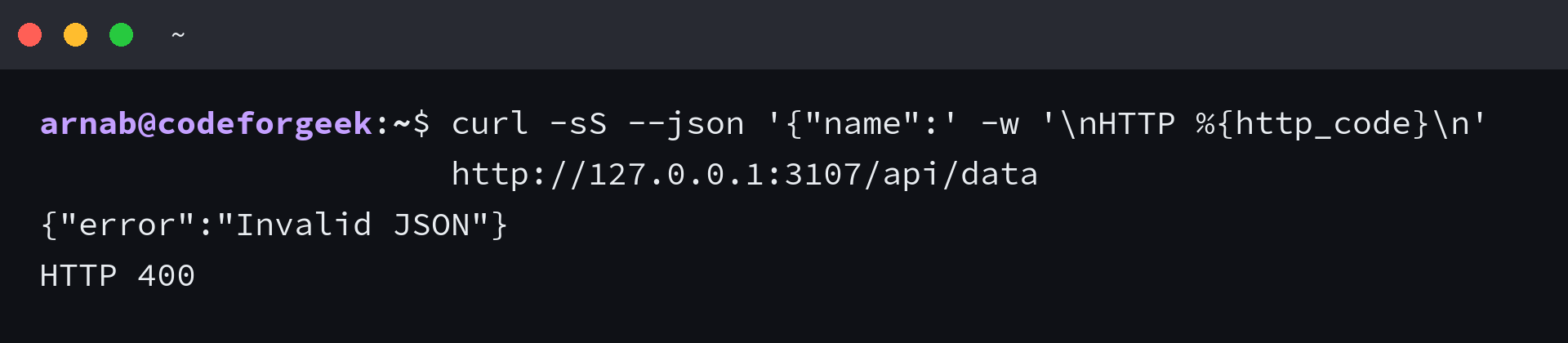
In the tested endpoint, sending JSON as text/plain produced the validation response because neither parser accepted that media type. That 400 comes from the route, whereas malformed application/json is rejected by the parser before the route can run.
curl -sS --json '{"name":' -w '\nHTTP %{http_code}\n' http://127.0.0.1:3107/api/data
I sent this incomplete JSON object and got Invalid JSON with HTTP 400. The error response is deliberate, so the client can correct the payload without receiving a parser stack trace.
If a webhook requires the original request bytes for a signature check, follow its provider’s raw-body instructions before adding JSON parsing to that route. JSON parsing transforms the body, and the request stream should not be consumed twice.
Test the request contract before removing a dependency
Inspect the installed dependency tree after replacing your direct imports. Express can continue to list body-parser as its own dependency even when your application imports only Express.
npm ls express body-parser
Remove a direct body-parser dependency only when your application no longer imports it and its request tests pass. If your next task is connecting an HTML form to this endpoint, the form-data walkthrough shows the form submission workflow.
Express body-parser questions
The warning wording determines whether you need to change a call, an option or the surrounding request handling. These questions also separate deprecated APIs from removed functionality.
Does deprecated mean the function has already been removed?
Deprecated means an API is discouraged in favor of another approach. It does not by itself establish removal, so consult the package documentation for the specific API.
Can I keep using bodyParser.json()?
Yes, the maintained body-parser package documents its individual JSON parser. In Express 4.16.0 and later, express.json() exposes that parsing functionality without a direct body-parser import.
Should I uninstall body-parser after switching to Express parsers?
You can remove your direct dependency when no application code imports it and your tests pass. Express may retain body-parser as a transitive dependency.
Does express.json() parse uploaded files?
No, the JSON and URL-encoded parsers do not handle multipart file uploads. Use upload middleware that supports multipart/form-data.