New to Rust? Grab our free Rust for Beginners eBook Get it free →
bcryptjs vs bcrypt: Which Node.js password hashing library should you use

Password hashing is one of those things developers think they understand until they hit a node-gyp compilation failure at 2 AM on a production deploy. I’ve been there. The question of bcryptjs vs bcrypt comes up every time someone sets up a new auth flow, and the answer is less obvious than most tutorials make it sound. This article covers how bcryptjs works, how it compares to the native bcrypt library and when to choose each.
What is bcryptjs?
bcryptjs is a pure JavaScript implementation of the bcrypt password hashing algorithm. It ships with zero native dependencies, which means it runs anywhere JavaScript runs: Node.js servers, Next.js API routes, serverless functions on Vercel or AWS Lambda and even directly in the browser via the Web Crypto API.
The bcrypt algorithm itself was designed by Niels Provos and David Mazières in 1999, based on the Blowfish cipher. Its defining property is that it is intentionally slow. Hashing a password takes meaningful CPU time, and the work factor (called saltRounds) is adjustable as hardware gets faster, you raise the rounds to keep the time cost stable. That slowness is the security model: brute-forcing a bcrypt hash requires running the same slow function millions of times, which is expensive even on modern GPU rigs.
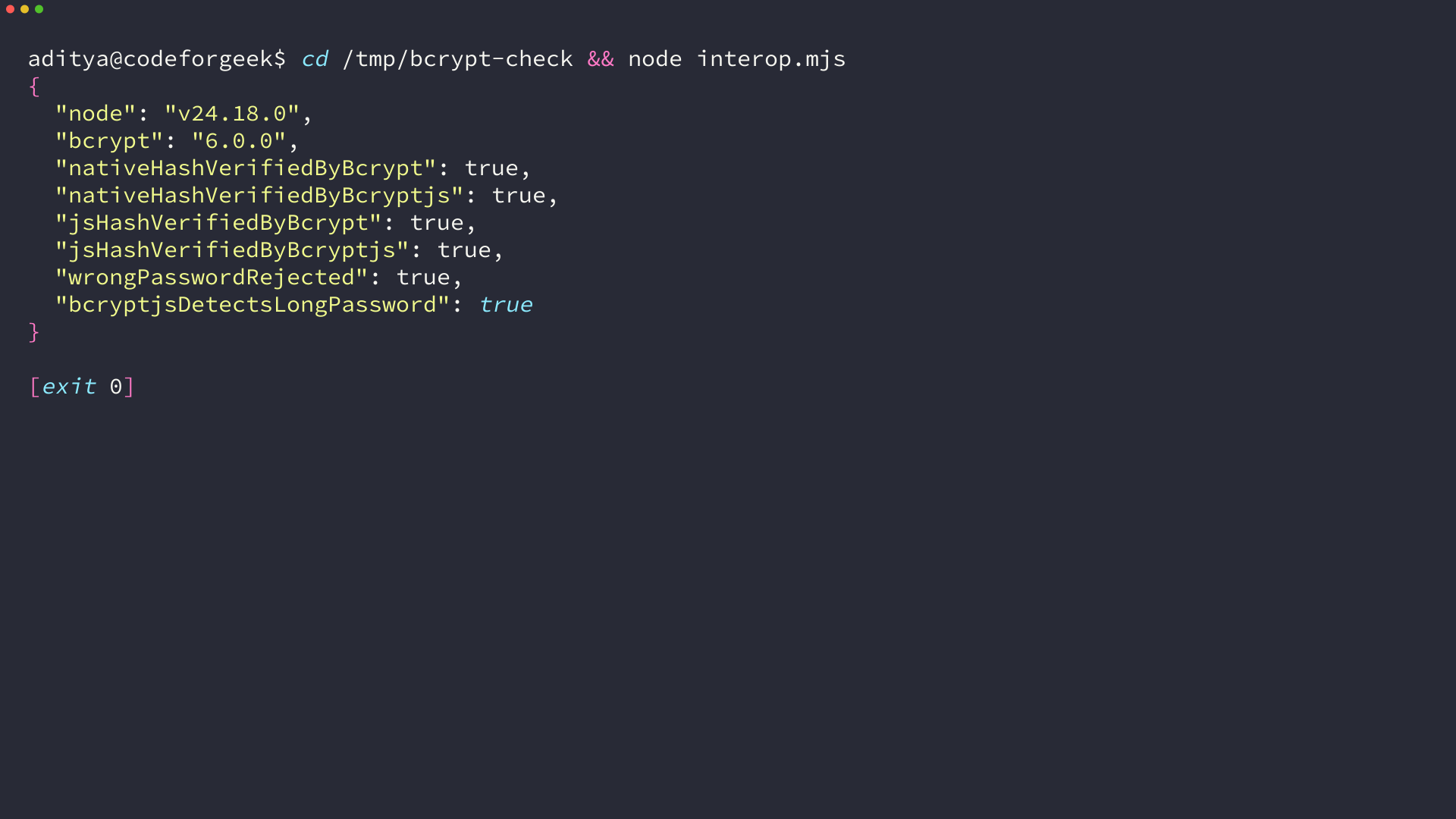
bcryptjs implements this same algorithm in plain JavaScript. The generated hashes are fully compatible with C++ bcrypt, so a hash created by bcryptjs can be verified by the native bcrypt package and vice versa.
Installing bcryptjs
npm install bcryptjs
No build step, no Python, no Visual Studio Build Tools. That’s the whole installation. Compare this to the native bcrypt package, which runs node-gyp to compile C++ bindings and can produce errors like gyp ERR! stack Error: not found: make or the Xcode CLT detection error on macOS.
How to hash a password with bcryptjs
Async hashing (recommended)
The async API is what you should use in any server application. bcryptjs splits the hashing work into small chunks and yields back to the event loop between them, so a slow hash operation at saltRounds 12 won’t block incoming requests.
const bcrypt = require('bcryptjs');
async function hashPassword(plainText) {
const salt = await bcrypt.genSalt(12);
const hash = await bcrypt.hash(plainText, salt);
return hash;
}
// Usage
const hash = await hashPassword('myS3cureP@ssword');
console.log(hash);
// $2a$12$eSh1kHbJKG1N2pCuJWPAC.vQ5e6bHmKs8rTjGDCLWjqKNZVDhN9P6
You can also pass the saltRounds number directly to hash() and skip the explicit genSalt() call:
const hash = await bcrypt.hash('myS3cureP@ssword', 12);
Both approaches produce the same result. The two-step version is useful when you want to reuse a salt or log it separately.
Sync hashing
The sync API blocks the event loop for the full duration of the hash. That’s acceptable in a CLI script or a one-off seed file but not in a web server handling concurrent requests.
const salt = bcrypt.genSaltSync(12);
const hash = bcrypt.hashSync('myS3cureP@ssword', salt);
The password hashing guide on codeforgeek.com goes deeper into why the sync API is dangerous in production server contexts.
How to verify a password with bcryptjs
async function verifyPassword(plainText, storedHash) {
const isMatch = await bcrypt.compare(plainText, storedHash);
return isMatch;
}
// Login example
const storedHash = await getUserHashFromDB(email);
const valid = await verifyPassword(req.body.password, storedHash);
if (!valid) {
return res.status(401).json({ error: 'Invalid credentials' });
}
bcrypt.compare() re-hashes the plaintext using the salt embedded in the stored hash, then does a constant-time comparison. You never extract the salt separately. It’s already encoded in the $2a$12$... string.
Detecting truncated passwords
bcrypt only processes the first 72 bytes of any input. A password that exceeds 72 bytes gets silently truncated, so password123[...lots of extra chars...] produces the same hash as password123[...first 72 bytes]. bcryptjs 3.x adds a utility to catch this:
if (bcrypt.truncates(password)) {
return res.status(400).json({ error: 'Password exceeds 72 bytes' });
}
const hash = await bcrypt.hash(password, 12);
Add that check before hashing if you accept arbitrary-length passwords.
bcrypt vs bcryptjs: the actual differences
This is where most articles get vague. Here’s the concrete breakdown.
How each is implemented
bcrypt (the npm package node.bcrypt.js) is a native C++ addon for Node.js. It ships precompiled binaries for common platforms and falls back to compiling from source via node-gyp when a precompiled binary isn’t available. The C++ code calls into OpenSSL for random bytes.
bcryptjs is pure JavaScript. It uses the Node.js crypto module for random byte generation in Node.js, and falls back to the Web Crypto API (crypto.getRandomValues) in browsers.
Performance
C++ runs faster than JavaScript. The native bcrypt library is roughly 20–30% faster for the same saltRounds value. In practice:
- At
saltRounds 10: bcrypt hashes a password in ~65ms, bcryptjs in ~80ms - At
saltRounds 12: bcrypt ~260ms, bcryptjs ~320ms
That gap rarely matters in practice. Password hashing happens once per login attempt. At saltRounds 12, you’re looking at a 60ms difference per request. That won’t bottleneck any auth endpoint.
Where the performance gap does matter: if you’re using extremely high salt rounds (14+) and hashing inside a tight loop, the C++ version is meaningfully faster. For everyone else, the difference is below the threshold you’d ever profile.
Comparison table
| bcrypt | bcryptjs | |
|---|---|---|
| Implementation | Native C++ (node-gyp) | Pure JavaScript |
| Performance | ~20–30% faster | Slightly slower |
| Installation | May require build toolchain | npm install, no extras |
| Node.js support | Requires stable Node.js release | Any Node.js version |
| Browser support | No | Yes (Web Crypto API) |
| Serverless (Vercel, Lambda) | Unreliable — native deps break | Works everywhere |
| Next.js middleware | Fails to compile | Works fine |
| Hash compatibility | $2a/$2b prefix | $2a/$2b prefix (same) |
| TypeScript types | Separate @types/bcrypt package | Built-in |
| Dependencies | @mapbox/node-pre-gyp, node-addon-api | None |
Dependencies
The bcrypt package pulls in @mapbox/node-pre-gyp, node-addon-api and a chain of additional packages used during the build. This is what causes the deprecation warnings developers often see on npm install:
npm WARN deprecated [email protected]: request has been deprecated
npm WARN deprecated [email protected]: this library is no longer supported
bcryptjs has zero dependencies. The full package is a single JavaScript file.
Runtime environment support
This is the most practically relevant difference.
bcrypt compiles to a .node binary that is platform-targeted. It works on a standard Node.js server running x86_64 Linux or macOS. It does not work in:
- Next.js edge middleware: the edge runtime doesn’t support native bindings. Importing
bcryptinmiddleware.tscauses a webpack compile error. - Vercel serverless functions: Vercel’s own documentation explicitly recommends bcryptjs over bcrypt for serverless deployments because native dependencies are unreliable in that environment.
- Cloudflare Workers: Workers use V8 isolates with no native module support.
- Browser: C++ addons can’t run in a browser context.
bcryptjs works in all of these. If you’re building anything that touches serverless, edge runtimes or Next.js middleware, bcryptjs is your only realistic option.
A note on maintenance
bcryptjs hasn’t received a commit in several years. For a security library, long gaps between updates can mean known vulnerabilities go unpatched. As of mid-2026 there are no active CVEs against bcryptjs, but it’s something to watch. If maintenance becomes a real concern, the modern alternative is bcrypt-ts, a TypeScript-native rewrite with the same API and active development, though it’s less battle-tested.
Choosing salt rounds
Salt rounds control the cost factor, which is the number of times the algorithm iterates. Each additional round doubles the time. The right value depends on your hardware:
// Calibrate for ~250ms on your production server
const bcrypt = require('bcryptjs');
async function calibrateSaltRounds(targetMs = 250) {
let rounds = 10;
while (true) {
const start = Date.now();
await bcrypt.hash('calibration-test', rounds);
const elapsed = Date.now() - start;
console.log(`saltRounds ${rounds}: ${elapsed}ms`);
if (elapsed >= targetMs) break;
rounds++;
}
return rounds;
}
A rough baseline for 2026 hardware:
saltRounds 10 → ~65ms (fine for low-traffic apps)
saltRounds 12 → ~260ms (standard production choice)
saltRounds 14 → ~1000ms (high-security, superuser accounts)
OWASP’s current recommendation is a minimum of 10 rounds. Most production apps land on 12.
Using bcryptjs in an Express login route
Here’s a complete signup and login flow using bcryptjs with JWT authentication:
const express = require('express');
const bcrypt = require('bcryptjs');
const jwt = require('jsonwebtoken');
const router = express.Router();
const SALT_ROUNDS = 12;
const JWT_SECRET = process.env.JWT_SECRET;
// Signup
router.post('/signup', async (req, res) => {
const { email, password } = req.body;
try {
const existingUser = await User.findOne({ email });
if (existingUser) {
return res.status(409).json({ error: 'Email already registered' });
}
const hash = await bcrypt.hash(password, SALT_ROUNDS);
const user = await User.create({ email, password: hash });
res.status(201).json({ id: user._id, email: user.email });
} catch (err) {
res.status(500).json({ error: 'Registration failed' });
}
});
// Login
router.post('/login', async (req, res) => {
const { email, password } = req.body;
try {
const user = await User.findOne({ email });
if (!user) {
return res.status(401).json({ error: 'Invalid credentials' });
}
const valid = await bcrypt.compare(password, user.password);
if (!valid) {
return res.status(401).json({ error: 'Invalid credentials' });
}
const token = jwt.sign({ id: user._id, email }, JWT_SECRET, {
expiresIn: '15m'
});
res.json({ token });
} catch (err) {
res.status(500).json({ error: 'Login failed' });
}
});
module.exports = router;
Note the constant error message for both “user not found” and “wrong password.” That’s intentional. Returning different messages leaks information that attackers use to enumerate valid email addresses. For the JWT side of this flow, the refresh token guide covers how to handle token rotation without logging users out.
Using bcryptjs with TypeScript
bcryptjs ships with built-in type declarations from version 2.4+, so no separate @types package is needed:
import bcrypt from 'bcryptjs';
async function hashPassword(password: string): Promise<string> {
return bcrypt.hash(password, 12);
}
async function verifyPassword(password: string, hash: string): Promise<boolean> {
return bcrypt.compare(password, hash);
}
In a Next.js project where native bcrypt causes build errors, the fix is a one-line import swap:
// Before
import bcrypt from 'bcrypt';
// After
import bcrypt from 'bcryptjs';
The API is identical. No other code changes needed.
Common errors and fixes
bcrypt.hash is not a function (in Next.js middleware)
The native bcrypt package cannot run in Next.js edge middleware. Switch to bcryptjs:
npm uninstall bcrypt
npm install bcryptjs
Then update the import in your middleware file. This is also the fix if you’re seeing webpack errors like Module not found: Can't resolve 'node-gyp' in a Next.js build.
node-gyp build failure on install
If you see errors like gyp ERR! build error or the make failed with exit code 2 during npm install bcrypt, that’s the native C++ compilation failing. Either install the required build toolchain for your OS, or switch to bcryptjs and skip the problem entirely.
Hash prefix mismatch ($2a$ vs $2b$)
Both bcrypt and bcryptjs generate $2a$ prefixed hashes by default. They also accept $2b$ hashes, which newer versions of the native library produce. Cross-library comparison works in both directions.
TypeError: bcrypt.compare is not a function
Usually means a naming conflict. You required bcrypt by name but installed bcryptjs, or you’re importing the wrong module. Check that package.json lists bcryptjs and your require/import matches.
Key takeaways
- bcryptjs is a pure JavaScript bcrypt implementation with zero native dependencies and full hash compatibility with the native C++ library
- The native
bcryptis 20–30% faster, but that difference is rarely meaningful at auth-endpoint load levels - bcryptjs works in Next.js middleware, Vercel and AWS Lambda serverless, Cloudflare Workers and browsers. Native bcrypt does not.
- Use
saltRounds 12as a starting point and calibrate against your production hardware to hit ~250ms per hash - Always use the async API on servers. Sync hashing blocks the event loop.
- Call
bcrypt.truncates(password)before hashing to catch passwords over 72 bytes - Keep the same error message for “user not found” and “wrong password” to prevent email enumeration
FAQ
Is bcryptjs safe for production?
Yes. bcryptjs implements the same bcrypt algorithm and produces hashes that are cryptographically identical to those from the native package.
Why does bcrypt fail in Next.js but bcryptjs works?
Native bcrypt requires a compiled C++ binary that Next.js edge middleware and Vercel’s bundler can’t load. bcryptjs is pure JavaScript with no such constraint.
What is the difference between bcrypt and bcryptjs hash output?
None. Both produce $2a$ or $2b$ prefixed hashes using the same algorithm. A hash from one verifies correctly with the other.
How many salt rounds should I use?
Start at 12 and benchmark on your production server. Target around 250ms per hash and adjust rounds accordingly.
Does bcryptjs work in a browser?
Yes. In a browser context it uses the Web Crypto API for random byte generation. Import the UMD bundle (bcryptjs/umd/index.js) rather than the Node.js entry point.
Can I use bcryptjs with TypeScript?
Yes. bcryptjs ships its own TypeScript declarations since version 2.4. No separate type package required.
What happens if I mix bcrypt and bcryptjs in the same codebase?
Nothing breaks. Hashes are compatible across both packages. You can hash with one and verify with the other without any migration.
The choice between bcrypt and bcryptjs comes down to your deployment target. On a stable Linux Node.js server with a predictable build environment, either works. In serverless, edge runtimes or Next.js middleware, bcryptjs is your only realistic choice. Not because it’s more secure, but because it actually runs there.