New to Rust? Grab our free Rust for Beginners eBook Get it free →
Facebook Status Box using Node.js and MySQL

A status box, like the one on Facebook, lets a user type an update and see it appear in a feed. This project builds one with Express handling the requests and MySQL saving each status so it’s still there after a reload.
I’ll walk you through saving each status from an Express form into a MySQL table, then reading the feed back.
What the status box does
A Facebook status box made with Node.js and MySQL has two jobs: accept text from a form and show saved rows in a feed. Express handles the requests, and MySQL keeps each row for a later page load.
I tested a status submission in the browser, and the next feed request returned that saved row. The interface borrows a familiar composer shape, and the app writes only to its own database.
| Stage | What happens |
|---|---|
| Browser form | Sends the status text to Express with POST. |
| Express route | Parses the form body and rejects blank or over-limit text. |
| MySQL insert | Stores the text as a parameter value in one row. |
| Feed request | Reads saved rows in descending ID order. |
| Browser display | Adds each status as text in the feed. |
The database keeps a status between requests, so Express can fetch it after a page reload.
Create the project and MySQL table
The executable sample ran on Node.js 26.10.0 against an isolated MariaDB 10.11.14 server, and no Oracle MySQL server was tested.
The Express 5 API reference documents URL-encoded request parsing and the Node.js requirement. The mysql2 Quickstart shows the promise interface and prepared statements, and the MySQL InnoDB table reference documents the table syntax used here.
Install the packages without adding fixed versions or a lockfile. The package manager resolves the registry versions when you run the command.
npm install --no-save --package-lock=false express mysql2 dotenv
cp .env.example .env
The table gives each status an automatically assigned ID and a creation timestamp. The feed orders by ID descending so a new insert appears first.
CREATE DATABASE status_box
  CHARACTER SET utf8mb4
  COLLATE utf8mb4_unicode_ci;

USE status_box;

CREATE TABLE statuses (
  id BIGINT UNSIGNED NOT NULL AUTO_INCREMENT PRIMARY KEY,
  status_text TEXT NOT NULL,
  created_at TIMESTAMP NOT NULL DEFAULT CURRENT_TIMESTAMP
) ENGINE=InnoDB DEFAULT CHARSET=utf8mb4 COLLATE=utf8mb4_unicode_ci;

CREATE USER 'status_app'@'127.0.0.1' IDENTIFIED BY 'replace-with-a-local-password';
GRANT SELECT, INSERT ON status_box.statuses TO 'status_app'@'127.0.0.1';
I gave the application account only SELECT and INSERT because its two routes never update or delete rows.
DB_HOST=127.0.0.1
DB_PORT=3306
DB_USER=status_app
DB_PASSWORD=replace-with-a-local-password
DB_NAME=status_box
PORT=3101
Keep the local environment file out of version control so its database password stays in the machine’s configuration.
node_modules/
.env
Build the form and Express routes
The table assigns one job to each project file. The status field moves from the form to Express before it reaches MySQL.
| File | Responsibility |
|---|---|
| public/index.html | Labels the text area and loads the browser script. |
| public/app.js | Sends a status and renders rows returned by Express. |
| public/styles.css | Styles the form and saved feed. |
| server.js | Parses requests, validates text and runs MySQL queries. |
Step 1. Add the status form
Name the field status so the Express route can read the submitted value. The required attribute catches an empty field in the browser.
<!doctype html>
<html lang="en">
  <head>
    <meta charset="utf-8">
    <meta name="viewport" content="width=device-width, initial-scale=1">
    <title>Status box demo</title>
    <link rel="stylesheet" href="/styles.css">
    <script src="/app.js" defer></script>
  </head>
  <body>
    <main class="page">
      <h1>Status box</h1>
      <p class="note">A small Express and MySQL example. Posts are visible to anyone who can reach this demo.</p>
      <form id="status-form">
        <label for="status">What are you working on?</label>
        <textarea id="status" name="status" rows="4" maxlength="280" required></textarea>
        <button type="submit">Post status</button>
        <p id="message" role="status" aria-live="polite"></p>
      </form>
      <section aria-labelledby="feed-title">
        <h2 id="feed-title">Recent statuses</h2>
        <ol id="feed"></ol>
      </section>
    </main>
  </body>
</html>
The label gives the text area an accessible name, and the message region announces save or error feedback.
The separate stylesheet controls the page layout and the spacing between saved rows. Save it as public/styles.css.
* { box-sizing: border-box; }
body { margin: 0; background: #edf2f7; color: #172b4d; font: 16px/1.5 system-ui, sans-serif; }
.page { max-width: 720px; margin: 3rem auto; padding: 1.5rem; }
h1, h2 { line-height: 1.2; }
form, #feed li { padding: 1rem; border: 1px solid #cbd5e1; border-radius: 0.5rem; background: #fff; }
label, textarea { display: block; width: 100%; }
textarea { margin: 0.5rem 0 1rem; padding: 0.75rem; font: inherit; }
button { border: 0; border-radius: 0.35rem; padding: 0.65rem 1rem; background: #1664c0; color: white; font: inherit; cursor: pointer; }
#message { min-height: 1.5rem; }
#feed { display: grid; gap: 0.75rem; padding: 0; list-style: none; }
#feed li p { margin-top: 0; white-space: pre-wrap; overflow-wrap: anywhere; }
#feed time, .note { color: #52637a; font-size: 0.9rem; }
The pre-wrap rule keeps line breaks in a multiline status, and overflow-wrap lets long text fit inside its card.
Step 2. Send the form and render the feed
The page requests saved rows when it opens. On submit, the script sends URL-encoded form data to Express, so the later GET can rebuild the feed from MySQL.
const form = document.querySelector('#status-form');
const input = document.querySelector('#status');
const feed = document.querySelector('#feed');
const message = document.querySelector('#message');

async function loadStatuses() {
  const response = await fetch('/api/statuses');
  if (!response.ok) throw new Error('Could not load statuses.');

  const statuses = await response.json();
  feed.replaceChildren();

  for (const status of statuses) {
    const item = document.createElement('li');
    const text = document.createElement('p');
    const time = document.createElement('time');
    text.textContent = status.status_text;
    time.textContent = `${new Intl.DateTimeFormat('en-IN', {
      dateStyle: 'medium',
      timeStyle: 'short',
      timeZone: 'Asia/Kolkata'
    }).format(new Date(status.created_at))} IST`;
    item.append(text, time);
    feed.append(item);
  }
}

form.addEventListener('submit', async (event) => {
  event.preventDefault();
  message.textContent = 'Saving status…';

  try {
    const response = await fetch('/api/statuses', {
      method: 'POST',
      headers: { 'Content-Type': 'application/x-www-form-urlencoded' },
      body: new URLSearchParams({ status: input.value })
    });
    const result = await response.json();
    if (!response.ok) throw new Error(result.error);

    form.reset();
    message.textContent = 'Status saved.';
    try {
      await loadStatuses();
    } catch (error) {
      message.textContent = 'Status saved, but the feed could not reload. Refresh the page to see it.';
    }
  } catch (error) {
    message.textContent = error.message;
  }
});

loadStatuses().catch((error) => {
  message.textContent = error.message;
});
If a successful POST is followed by a failed GET, the message says the status is saved and suggests a page refresh, so a second submission is not the only recovery.
The browser writes each status with the textContent property, so submitted tags remain text. MDN distinguishes this behavior from the innerHTML property.
The sample displays timestamps in India Standard Time (IST) by setting Asia/Kolkata. Change that zone if your audience uses another time.
Step 3. Parse, validate and store each status
Install the URL-encoded form parser before the routes so it fills req.body before the POST handler reads the status field.
require('dotenv').config();

const express = require('express');
const mysql = require('mysql2/promise');
const path = require('node:path');

const app = express();
const pool = mysql.createPool({
  host: process.env.DB_HOST,
  port: Number(process.env.DB_PORT || 3306),
  user: process.env.DB_USER,
  password: process.env.DB_PASSWORD,
  database: process.env.DB_NAME,
  waitForConnections: true,
  connectionLimit: 5
});

app.use(express.urlencoded({ extended: false, limit: '2kb' }));
app.use(express.static(path.join(__dirname, 'public')));

app.get('/api/statuses', async (req, res, next) => {
  try {
    const [rows] = await pool.execute(
      'SELECT id, status_text, created_at FROM statuses ORDER BY id DESC LIMIT 50'
    );
    res.json(rows);
  } catch (error) {
    next(error);
  }
});

app.post('/api/statuses', async (req, res, next) => {
  const status = typeof req.body.status === 'string' ? req.body.status.trim() : '';

  if (!status || status.length > 280) {
    return res.status(400).json({ error: 'Enter a status from 1 to 280 characters.' });
  }

  try {
    const [result] = await pool.execute(
      'INSERT INTO statuses (status_text) VALUES (?)',
      [status]
    );
    res.status(201).json({ id: result.insertId });
  } catch (error) {
    next(error);
  }
});

app.use((error, req, res, next) => {
  console.error('Status storage request failed:', error.code || error.name);
  res.status(503).json({ error: 'Status storage is unavailable. Check the MySQL connection.' });
});

const port = Number(process.env.PORT || 3000);
app.listen(port, () => console.log(`Status box listening on port ${port}`));
I used execute with a question-mark placeholder and a separate parameter array, so submitted text stays a value instead of changing the query. I set a 50-row cap on the GET route to keep the feed response bounded.
The insert returns the new identifier with status 201.
If you want more background on Express routing, CodeForGeek’s Express and Node.js tutorial covers the app and route basics used here.
Run the feed and see persistence
Set the database password in .env, then start the server. The console prints its selected port after Express begins listening.
node server.js
The application programming interface (API) returns status 201 over the Hypertext Transfer Protocol (HTTP) and includes the new row identifier (ID).
curl -sS -w '\nHTTP %{http_code}\n' -X POST http://localhost:3101/api/statuses -H 'Content-Type: application/x-www-form-urlencoded' --data 'status=This status survived a page reload.'
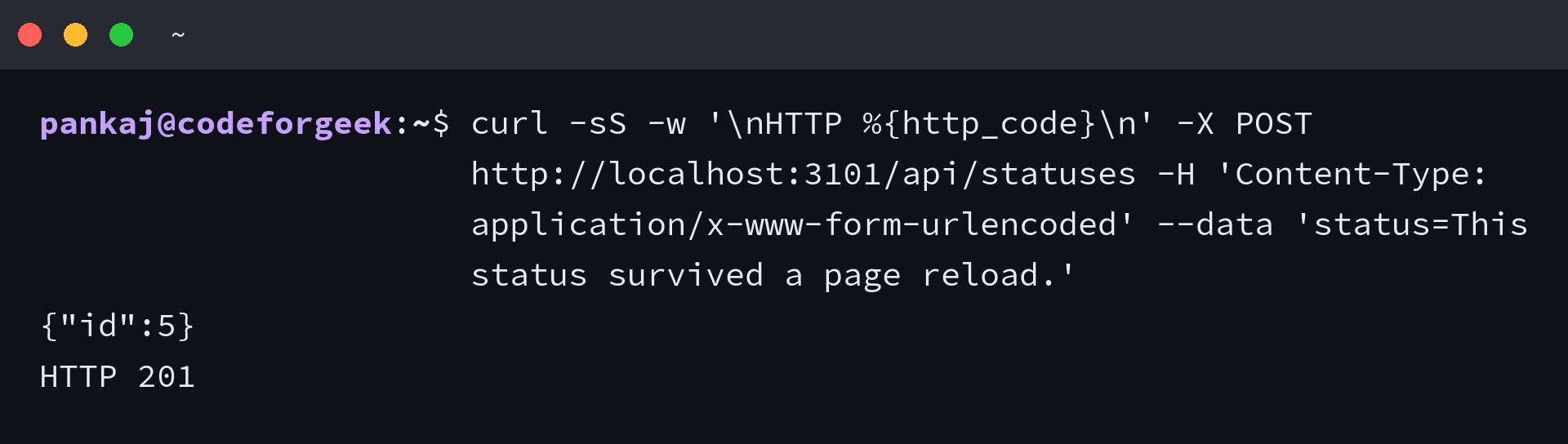
Open http://localhost:3101 to see the row returned from MySQL. A second browser submission appears above the earlier row with an IST timestamp.
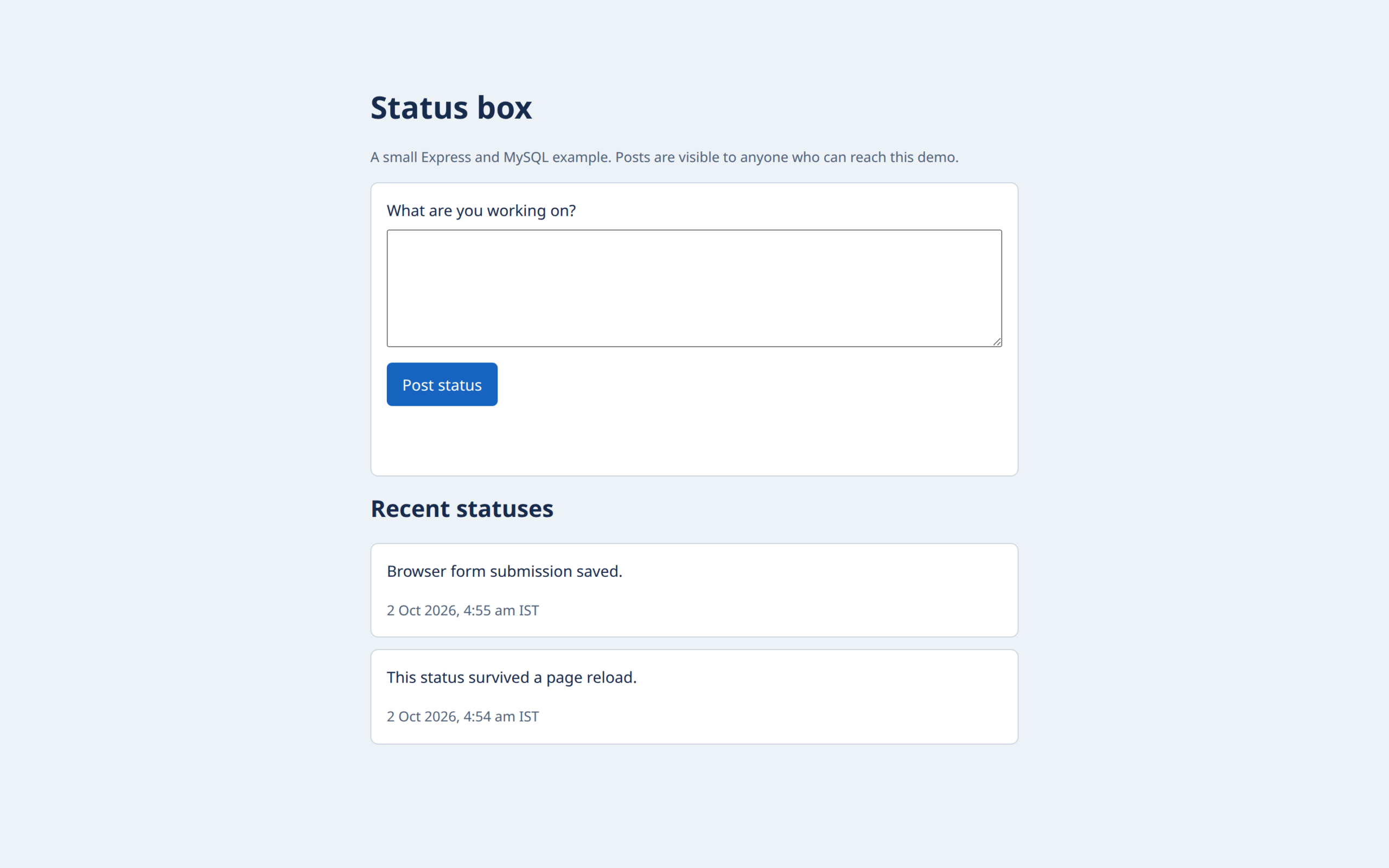
Reloading the page fetches the same text from MySQL, while a status held only in the document would disappear.
Fix the common insert failures
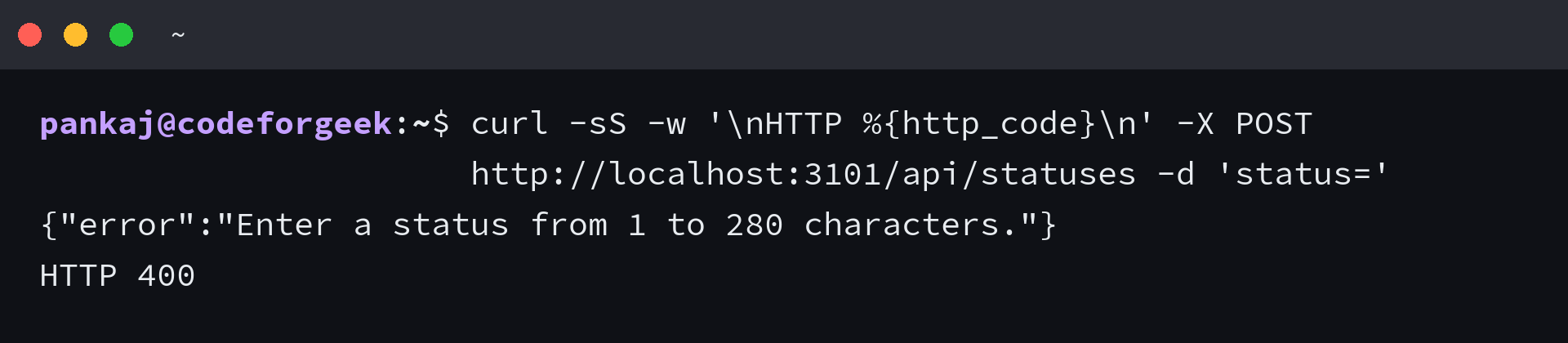
Each response points to a different layer, from a missing form value to a database connection refusal. An empty field gets caught by the browser, and Express returns 400 if a direct request skips that check.
| Symptom | Check | Next action |
|---|---|---|
| req.body.status is empty or missing | Parser order and the form field name | Keep express.urlencoded before the routes and name the text area status. |
| Response status 400 | Blank input or more than 280 JavaScript code units | Trim the text and shorten it before posting. |
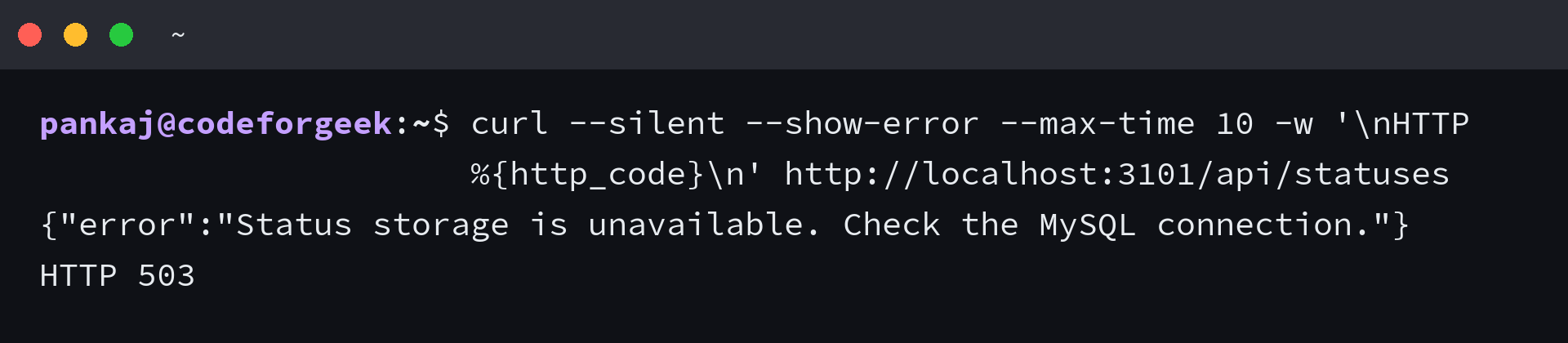
| Response status 503 | Database host, port, account grant and service state | Restore the MySQL connection, then request the feed again. |
The browser’s required check catches a blank field, and Express also returns 400 when a direct request skips that check.
curl -sS -w '\nHTTP %{http_code}\n' -X POST http://localhost:3101/api/statuses -d 'status='
A refused MySQL connection returns HTTP 503 with a generic message, so the browser can report an outage without echoing connection details. The server logs only the driver code.
curl --silent --show-error --max-time 10 -w '\nHTTP %{http_code}\n' http://localhost:3101/api/statuses
The 280-character limit counts JavaScript string units, so some symbols count as two and can make the route reject text the form accepted. An emoji can use two units even when it looks like one symbol.
Keep the demo’s trust boundary
Every visitor who can reach the app reads the same feed, so add authentication and a user ID before you treat any row as private.
Private posts need an authenticated owner on every row, and every read and insert must enforce that owner. A login screen alone does not limit which rows a user can fetch.
curl -sS http://localhost:3101/api/statuses
Frequently asked questions
These answers mark the boundary between this local status feed and a site that handles user accounts or publishes to an external service.
Does this status box publish to Facebook?
No. It inserts the text into the status_box database and displays the row in this app. It has no Facebook login or publishing request.
Do statuses survive when Node.js restarts?
Yes, an inserted row remains in MySQL while the same database and its data are available. Express reads the feed from MySQL instead of keeping statuses in process memory.