New to Rust? Grab our free Rust for Beginners eBook Get it free →
Should I Learn React or Node.js First? Node.js vs React.js for Beginners

One of the most common questions posed by beginners is, ‘Should I learn React.js or Node.js first?’ They are being used for full-stack web application development, and both use the JavaScript programming language for writing code, so confusion is obvious. But they are for different purposes. In this guide, I’ll compare Node.js vs React.js to help you decide which one to learn first.
Node.js: A Powerful Backend Runtime
If you are a JavaScript developer, you definitely used APIs, right? For example, fetching weather data or what it told us in many YouTube tutorials fetching random programming jokes. You just send a GET request using JS to the API endpoint and get a response. But you know how that API was built. It’s pretty simple and fascinating, so let me tell you.
They use Node.js and create different endpoints (programming jokes, jokes with two parts, etc.). With Node.js, you can do that using just a few lines of code. The endpoint based on the query you send searches the MongoDB database of that category and picks a random joke and sends it to you. It’s that simple. They already have millions of joke data, or maybe they used publicly available data, but yeah, that’s how it is done.
And with Node.js you can do that too. And that is just one basic example. You can create any type of API and server and power any backend application, giving it ultimate fast execution for all types of operations. That is what Node.js is.
And that’s just one use case. Node.js is used by developers for building REST APIs, web servers, real-time chat applications, streaming services, backend systems, and more. In short, Node.js is a JavaScript runtime that lets you run JavaScript outside of the browser and build powerful backend applications.
Key Features of NodeJS
- Fast execution with V8 Engine
- Non-blocking I/O operations
- Event-driven architecture
- Single-threaded processing
- Asynchronous programming support
- Cross-platform compatibility
- Large NPM package ecosystem
- Scalable for high traffic
- Real-time data handling
- Lightweight runtime environment
- JavaScript on the server side
- Microservices-friendly architecture
- Stream-based data processing
- Active developer community
- Open-source technology
Use Cases of NodeJS
- REST API development
- Web server creation
- Real-time chat applications
- Online gaming backends
- Streaming platforms
- Social media applications
- E-commerce websites
- Content management systems
- IoT applications
- Microservices development
- Serverless functions
- Dashboard and analytics tools
- Collaboration platforms
- Payment gateway integrations
- File upload and processing systems
React.js: For Building Interactive User Interfaces
Now, let’s get to the part users see and interact with.
Think of things like Facebook, Instagram, Netflix, YouTube. Click a button, open a menu, like a post, search for a video. The page is instantly updated without reloading. Ever wonder how that works?
That’s where React.js comes into play.
React.js enables developers to create interactive user interfaces by dividing the page into small reusable components like buttons, navigation bars, cards, forms, menus, etc. When data changes, React updates only what is needed on the page and does not reload the entire website.
For instance, when you press Like on a post on social media, React can immediately change the number of likes and the state of the button without refreshing the page. The same goes for shopping carts, dashboards, chat applications and countless other interactive features.
React.js is a JavaScript library that helps developers to build modern web applications that are fast, responsive and easy to maintain.
Key Features of React App
- Component-based architecture
- Reusable UI components
- Virtual DOM for performance
- Declarative programming style
- One-way data flow
- Fast UI rendering
- JSX syntax support
- Strong ecosystem support
- Easy state management
- SEO-friendly with SSR
- Cross-platform development
- Large developer community
- Easy integration with APIs
- Backed by Meta (Facebook)
- Rich developer tools
Use Cases of ReactJS
- Single Page Applications (SPAs)
- Interactive web applications
- Social media platforms
- E-commerce frontends
- Dashboard interfaces
- Admin panels
- Content management systems
- Real-time web applications
- Progressive Web Apps (PWAs)
- Video streaming interfaces
- Online learning platforms
- Project management tools
- SaaS applications
- Mobile apps with React Native
- Enterprise web applications
Node.js vs React.js: Quick Side-by-Side Comparison
| Criteria | NodeJS | ReactJS |
|---|---|---|
| Performance & Speed | Uses non-blocking I/O operations, is lightweight, and provides many asynchronous methods which increase performance. | Uses JSX and virtual DOM to provide faster performance. |
| Scalability | Easily scalable, has fast file system interaction, and supports all kinds of databases. | Complex architecture requires regular updates and bug fixes. |
| Portability | It can run on Windows, Linux, and Mac, but is limited to web apps. | Can create web apps, Android, and iOS apps using React-Native. |
| Community Support | Has a vast and active global community. | Has a vast and active global community. |
| Libraries & Tools Availability | Millions of libraries and tools are installed using Node Package Manager. | Open-source JavaScript libraries provided by Facebook. |
| Use Cases | Used for creating data-intensive server-side applications. | Used for creating single-page client-side applications with an enhanced user interface. |
| Learning Curve | Easier than ReactJS. | More complex than NodeJS. |
| Real World Examples | PayPal, Linkedin, GoDaddy, Netflix. | Dropbox, Instagram, Discord, Pinterest. |
Difference Between Node JS and React JS: Detailed Comparison
Performance and Speed
Node.js is built upon the V8 engine, which is written in C++ and provides fast execution speed. Node.js uses non-blocking I/O operations, which make it lightweight and provide many asynchronous methods that increase performance.
React, on the other hand, uses JSX, which is processed into JavaScript calls. It uses virtual DOM, which provides faster performance due to virtual components.
The performance and speed depend upon the architecture of a technology. Node.js has a simple architecture, whereas React has a complex architecture. The simple architecture of NodeJS makes it lightweight, which overall helps in boosting performance and speed.
Scalability
Node.js is highly scalable, provides fast file system interaction, and supports all kinds of Databases, relational and NoSQL. Node.js doesn’t frequently change.
Technologies like React change syntax and their implementation regularly in order to make it even better, but for a developer, it is hard to maintain as the application requires regular updates and supplies many bugs, which are stressful to make it scalable.
Portability
Node.js is used for creating data-intensive server-side applications. It can run on different operating systems such as Windows, Linux, and Mac, but it is limited to web apps.
Whereas React is used for creating client-side web apps as well as software development, Android and iOS apps that can be built using React Native (which has similar syntax), so unlike Node, where one has to create Mobile App for scratch using another language, React gives React.js for web development and React Native for Android and IOS development.
Community Support
Node and React.js both have vast and active global communities, so they can’t be compared in terms of community. Both technologies have a lot of fanbases, and their developers are active on different platforms such as StackOverflow, GitHub, etc to help you when you face any bug.
Libraries and Tools Availability
In terms of libraries and tools availability, Node.js is considered over React or any other languages or frameworks. Node.js has a bundle of libraries for creating different kinds of projects, such as Gulp, which helps in automating tasks, async, which allows you to write asynchronous JavaScript code, Cheerio for web scraping, etc. It has millions of libraries and tools that can be installed using Node Package Manager, which is the world’s largest repository of libraries.
React.js only supports open-source JavaScript Libraries provided by Facebook.
Learning Curve
Learning Node.js is much easier than learning React. Node.js is very simple, whereas React is tough as it is new,, and its structure, implementation, syntax, etc change frequently so from a beginner’s point of view it is confusing. Many advanced concepts in React are very complex to understand, such as hooks, reusable components, mapping, etc.
The best way of learning a language is to read/watch tutorials since React changes frequently the old tutorial becomes confusing whereas Node.js itself documentation is very up to date, and provide descriptive explaining about different method and module to start with Node.js, on top of this beginner can use ExpressJS (A Node.js Framework) with Node which makes it extremely simple, easy and can create an application in no time using few lines of code. In short, for a beginner, Node is much easier than React.
Real World Example
Node.js is used by many popular companies like PayPal, LinkedIn, GoDaddy, Netflix, etc. React is used by Dropbox, Instagram, Discord, Pinterest, etc.
When to Use Node.js
If you want to develop the backend of an application, Node.js is the appropriate choice. You can build APIs, do database work, handle user requests, authentication and server side programming with it.
For instance, if your project involves establishing an e-commerce site, Node.js will be suitable for product administration, user accounts, payments, and processing orders. It is also frequently used for chat applications, streaming services, content management, and REST APIs.
Opt for Node.js if your project demands server-side logic, real-time connectivity, scalability and quick processing of multiple requests.
When to Use React
If your primary goal is to create interactive and responsive user interfaces, then React is a good option. It helps developers to build modern web applications that change content dynamically without refreshing the entire page.
React is often used for dashboards, social media sites, e-commerce frontends, project management systems, and single-page applications, for example. Live search, shopping carts, notifications, and interactive forms are commonly powered by React components.
If you want to create a quick, user-friendly frontend experience with reusable UI components and smooth interactions, React is the choice.
Using Node.js and React Together For Web Development
In practical applications, there is no Node.js vs React. Developers usually use Node.js and React together, instead of picking one over the other.
The frontend part of the program is written with React. This is the part that the user sees and interacts with. For the backend, we use Node.js. It handles APIs, databases, authentication, business logic, and server-side stuff.
For example, for an online shopping application, React will be used to display products, shopping carts and user dashboards, while Node.js will be used to process orders, manage inventory, handle payments and communicate with the database.
This combo lets developers write JavaScript on the whole application stack, accelerating and unifying development.
Recommended Learning Path for Beginners
If you’re a complete newbie to web development, start with the basics of HTML, CSS, and JavaScript. These technologies are the core of React.js and Node.js development.
When you are comfortable with JavaScript, study the basics of Node.js and npm. React is a frontend library but current React projects need Node.js to install packages, operate a development server, and manage project dependencies.
When you feel confident with the basics of Node.js, switch to React.js and learn how to design components, manage state, handle events, and communicate with APIs.
Once you are comfortable building frontend apps with react, go deeper into Node.js for working with the backend. At this point you can learn Express.js, REST APIs, authentication and database integration.
Here’s a practical learning roadmap:
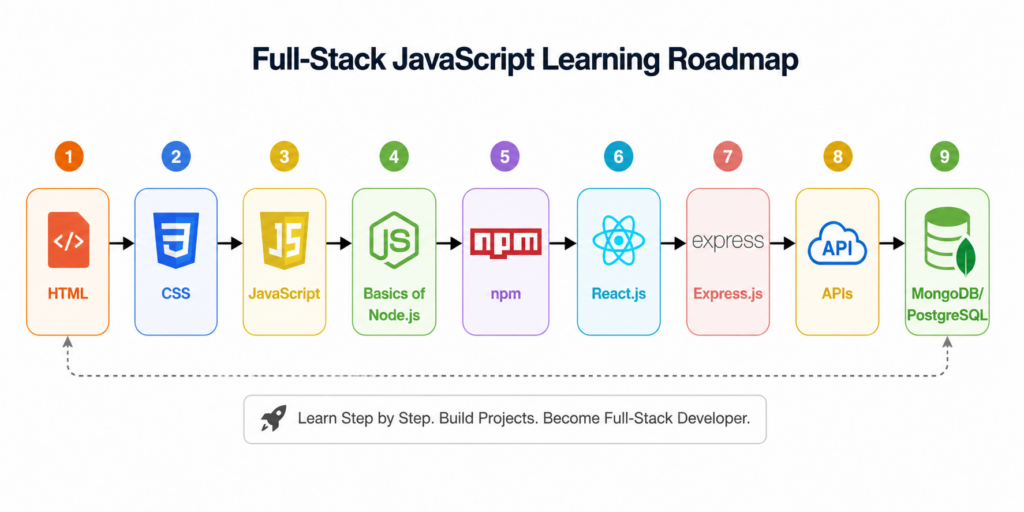
If you follow this path, you will gradually grow the skills to become a full-stack JavaScript developer that can create full web apps from frontend to backend.
Final Verdict: Should You Learn React.js or Node.js First?
React.js is a JavaScript library used to create user interfaces (interactive UI), while Node.js is a runtime environment used for backend development (APIs and servers). Which one to choose depends on your career goals and what kind of projects you want to build.
If you want to learn to create servers, APIs, microservices or real-time applications, then pick Node.js, whereas if you want to create an enhanced user interface client-side application that can handle frequent data changes, go with React.
My personal advice is to follow the above roadmap and learn both technologies. If you lack knowledge of even one of them, you cannot build a scalable full-stack application.
Frequently Asked Questions
1. What are the key differences between Node.js and React.js?
The biggest difference between Node.js and React.js is their purpose. Node.js is a JavaScript runtime that allows developers to run JavaScript outside the browser and build backend applications. React.js is a library for building user interfaces and handling user interactions in web applications.
2. Is Node.js better than React.js?
Neither Node.js nor React.js is better because they serve different purposes. Node.js handles backend logic, API services, and database operations, while React.js focuses on building the user interface. Most modern applications use React and Node.js together.
3. Should I learn Node.js or React first?
If your goal is frontend development, start with React.js. If you want to understand server-side development and APIs, start with Node.js. For most beginners, learning JavaScript fundamentals first and then exploring both technologies is the best approach.
4. Can Node.js and React be used in the same project?
Yes. In fact, using Node.js and React together is one of the most common approaches in full-stack software development. React handles the frontend while Node.js handles backend operations, authentication, APIs, and database communication.
5. Does React.js require Node.js?
React can technically work without Node.js, but most modern React projects rely on Node.js and the Node Package Manager (npm) to install dependencies, run development servers, and build production-ready applications.
6. Is Node.js a backend or frontend technology?
Node.js is primarily a backend technology. It is a runtime environment powered by Google’s V8 Engine that allows developers to run JavaScript on servers and handle backend tasks such as API services, authentication, and database operations.
7. Is React.js a frontend or backend library?
React.js is a frontend library used for creating user interfaces. React runs in the browser and uses a component-based architecture to build interactive web applications, dashboards, and single-page applications.
8. Which is easier to learn: Node.js or React?
Many beginners find React easier to learn because they can immediately see visual results while building user interfaces. Node.js introduces backend concepts such as APIs, databases, and server-side programming, which may require additional learning.
9. Is React still relevant in 2026?
Yes. React.js remains one of the most popular technologies for building user interfaces in 2026. It powers countless applications and continues to be widely used alongside frameworks like Next.js for modern web development.
10. Do companies like Netflix use React or Node.js?
Yes. Netflix uses React for parts of its frontend experience and also uses Node.js for various backend services. Many large organizations use React.js and Node.js together because they provide a powerful full-stack JavaScript development environment.