New to Rust? Grab our free Rust for Beginners eBook Get it free →
Online Base64 Decoder

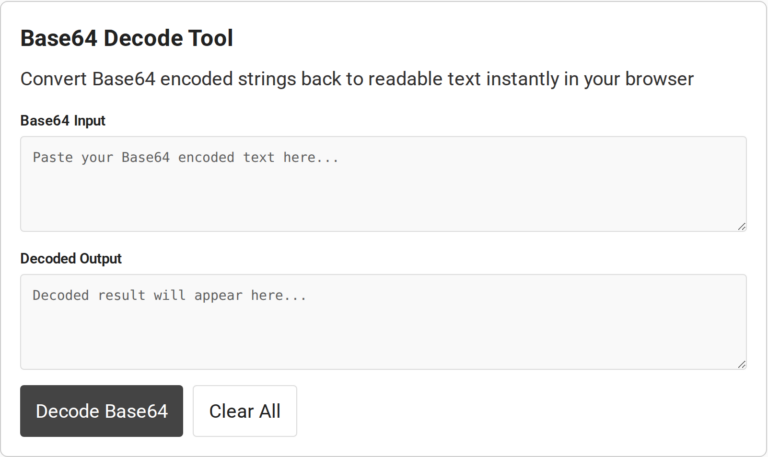
Base64 Decode Tool
When a Base64 string appears in a response or config, you may want to inspect what it contains. An online Base64 decoder turns the encoded value back into data and displays the result in a text field.
I’ll explain what Base64 decoding does and show how to use the online decoder, including how to read results that aren’t ordinary text.
TL;DR
Paste a standard Base64 value into the input field, choose Decode Base64, then read the result in the output field. Base64 turns bytes into printable characters, so the decoded bytes may represent text, a file, or data in a different character encoding.
- Standard Base64 uses letters, digits, plus and slash. Padding may end with equals signs.
- Base64URL substitutes a hyphen and underscore for plus and slash.
- Base64 is an encoding, not encryption. Anyone with the value can decode it.
What Is Base64 Decoding?
Base64 converts bytes into text characters so text-based formats can carry binary data. A group of four symbols carries up to three bytes, with padding marking an incomplete final group.
- SGVsbG8= becomes “Hello” in UTF-8.
- HTTP Basic authentication encodes a username and password in an Authorization header. Anyone who obtains it can reverse it. HTTPS protects the connection in transit.
How to Decode Base64 Online
Use the labeled fields to paste a Base64 value and read its decoded result.
Step 1: Paste the encoded value
Paste the full value into Base64 Input with its original case and order.
Some formats wrap MIME data for transport, so check the source before joining lines that may represent separate values.
Step 2: Decode the value
Choose Decode Base64. The browser’s standard decoder returns bytes, and the page displays them through UTF-8, so valid Base64 for other byte data can fail during text conversion.
The supplied handler displays “– Error –” with an error message when its catch block runs. Because the catch covers decoding and text conversion, compare the input with its source before changing characters.
Step 3: Read and copy the result
Review the decoded result before copying it, especially when you expected readable text.
- Readable JSON shows braces and key-value pairs. Use a JSON parser to check its syntax after decoding.
- Copy the result when it matches the value you meant to inspect. Clear All empties both visible fields before another decode.
- For a binary file, choose a decoder that saves bytes rather than copying text from an output box. The online Base64 encoder handles the reverse direction.
Common Base64 Decoding Errors
Unreadable output often means the decoded bytes use a different character encoding or represent binary data.
| What you see | Likely reason | What to check |
|---|---|---|
| Hyphen or underscore in the encoded value | Base64URL replaces plus and slash with hyphen and underscore. Some formats omit padding. | Use a URL-safe decoder. |
| Replacement symbols or odd characters | Alternate character encoding | Inspect bytes or select the source text encoding. |
| Symbols or blank-looking output | Binary file data | Save or inspect bytes with a file decoder. |
| Invalid input message | Unexpected characters, truncated copy or unsupported padding | Compare with the original and check the expected alphabet. |
| Changing letter case changes the output | Base64 alphabet distinguishes uppercase and lowercase | Restore the original case. |
- For a data URL, keep the media-type prefix for the complete URL or paste only the payload after the comma into a Base64-only decoder.
- Base64 adds about one third to a value’s size. Long strings take more room to copy, and the exact increase depends on input length and padding. The supplied interface shows no size limit, so check the site’s guidance before submitting a large value.
- A compact signed JWT has dot-separated header, payload and signature segments. Decode the header and payload to inspect claims, then verify the signature with the issuer’s application or library before relying on them.
- The browser-side handler does not reveal how every page component handles submissions, so check the site’s privacy terms before using an online tool for sensitive data.
- For application code, see CodeForGeek’s Node.js Base64 encoding and decoding guide.
Conclusion
An online decoder helps inspect a Base64 value.
For protocol details, consult RFC 4648, which defines the alphabets and padding rules. MDN’s Base64 reference explains browser decoding and the distinction between bytes and text. Use the encoder page to create a value, or the Node.js guide for application code.
FAQ
These answers cover common questions about the decoded result and its limits.
Is Base64 decoding the same as decrypting?
No. Base64 is an encoding, not encryption. It does not require a secret key and does not protect data from being read.
Why does my decoded text contain strange characters?
The bytes may use a different character encoding or may represent binary data rather than text. Inspect the bytes or decode with the correct text encoding.
Can I decode Base64URL with a standard decoder?
Not always. Base64URL uses hyphens and underscores instead of plus and slash, and may omit padding. Use a decoder that supports the URL-safe alphabet.
Can an online decoder turn Base64 into an image file?
Only if that tool supports binary output or file saving. A text output field cannot by itself reconstruct an image as a usable file.
Does decoding a JWT verify it?
No. Decoding can show a signed token’s claims, but it does not verify the signature or establish that the token is valid.
Can I decode a Base64 data URL?
Yes. The comma separates its metadata prefix from the encoded payload. Paste only the payload into a decoder that expects plain Base64.
Does Base64 contain the original file name?
No. Base64 represents bytes. File names and other metadata are separate unless another format includes them.
Can Base64 include line breaks?
Some formats wrap encoded text for transport, but generic decoders may reject whitespace. Follow the source format before joining or removing line breaks.
Can this page decode a binary file?
The supplied interface shows text fields rather than file upload or binary export controls. Use a file-oriented decoder that saves bytes.
Does Base64 compress data?
No. It represents bytes with text symbols and adds about one third to the value’s size. Compression is a separate step when the source format calls for it.
Is Base64 case-sensitive?
Yes. Uppercase and lowercase letters are separate characters in the Base64 alphabet, so changing a letter can change the decoded bytes.
What does the equals sign mean at the end of Base64?
Padding marks an incomplete final encoded group. Some protocols permit omitting it, so follow the format used by the system that created the value.