New to Rust? Grab our free Rust for Beginners eBook Get it free →
Code Scanning Tools for Privacy and Security

Before a code change is ready, a team may want to check it for security issues. Code scanning automatically analyzes source code or a packaged build for selected errors and security weaknesses.
This article compares code scanning tools by what they examine and explains how to check coverage and data handling in a pilot.
TL;DR
Code scanning flags selected issues in source or build artifacts, and its findings reflect the configured analysis scope.
- Pick the scan type that covers the evidence you need.
- Record source upload and findings retention before a hosted pilot.
- Review tool status before treating an empty alert list as success.
What is code scanning?
Code scanning is automated analysis of code or a build artifact for selected errors or security weaknesses. Static application security testing (SAST) examines code without running the application. Other scanners look for different evidence, so treat their results as separate inputs to a review.
| Check | What it examines | Follow-up |
|---|---|---|
| SAST | Source or compiled code against rules, queries or analysis models | Trace a reported path through safeguards |
| Secret scanning | Committed text that resembles credentials | Revoke or rotate a leaked credential |
| Software composition analysis (SCA) | Third-party packages against vulnerability records | Check whether the component is exposed |
| Dynamic testing | Application behavior while it runs | Review which paths and environments were exercised |
A SAST alert may name a source line and a rule, while a reviewer must decide whether input can reach that path. Trace the input through validation or an authorization guard before changing a rule. The GitHub code-scanning overview separates CodeQL from third-party tools that report results through SARIF.
A privacy-aware comparison traces the scanner’s own data path. Record whether source leaves the development boundary and what the service stores afterward.
Keep these questions beside the technical scope:
- Does analysis upload source or a packaged artifact?
- How long are findings retained, and who can read them?
- What evidence confirms deletion?
Code scanning tools and their fit
Cycode’s 2026 vendor-authored roundup includes a section called “Top 5 Code Analysis Tools in 2026: Key Focus Areas.” The table records those five publisher-supplied labels. The seven profiles below link to product documentation and do not rank performance.
| Tool | Focus area stated by Cycode |
|---|---|
| Cycode | AST, SCA and ASPM with code-to-cloud traceability |
| SonarQube | SAST with technical-debt and code-quality checks |
| Snyk Code | SAST for local developer workflows |
| Checkmarx | Enterprise suite spanning SAST, SCA and DAST |
| Semgrep | SAST with custom-rule creation |
Those labels describe the roundup’s own shortlist, not a head-to-head test. Check each product’s current documentation for the analysis scope that applies to your repository.
- Compare supported languages and frameworks.
- Check hosted versus self-managed deployment.
- Confirm source and findings handling before a pilot.
1. Map code-to-cloud findings with Cycode
Cycode positions its platform around code-to-cloud traceability and application-security coverage. The vendor page also describes its ASPM features, which place results in a wider platform view than one analyzer provides.
2. Query a codebase with GitHub CodeQL
CodeQL builds a database that represents a codebase, then runs queries against it. GitHub’s CodeQL documentation lists supported languages and setup options. Code scanning is available for public repositories on GitHub.com and eligible organization repositories on GitHub Team or Enterprise with Code Security enabled.
About the Tool status page
Open the repository’s Security and quality tab, then choose Code scanning > Tool status. GitHub requires write access to view the page.
For CodeQL, the analyzed-file report shows file paths and languages.
The rules report shows its configuration and alert counts by rule. Compare both files with the repository’s expected coverage before interpreting an empty alert list.
3. Write focused rules with Semgrep
Semgrep supports customizable rules. Its documentation distinguishes Community Edition from Semgrep Code, including cross-function and cross-file scope. Its privacy FAQ says findings data is retained indefinitely unless account owners request destruction.
4. Combine quality checks with SonarQube
SonarQube combines code-quality checks with static analysis. It has Cloud and self-managed Server deployment options for hosted or organization-managed use.
5. Scan application code with Checkmarx
Checkmarx markets SAST as part of a wider application-security suite. Its product page describes scanning and remediation features.
6. Analyze packaged artifacts with Veracode
Veracode’s documentation describes Static Analysis on an uploaded packaged artifact, including compiled binary or bytecode. Its Upload and Scan and Pipeline Scan options differ in workflow and available analysis.
7. Apply static rules with PMD
PMD is an extensible, open-source static analyzer with rules for multiple languages and code-quality issues. Its project page lists supported languages and release details. Secret, dependency and runtime checks remain separate scan types.
How to choose and roll out a scanner
A pilot exposes coverage and data-handling questions before a check becomes mandatory.
Choose a repository with the languages, build and sensitive flows the tool will encounter.
Step 1: Map code and sensitive data
Start by making a short inventory of the repository’s languages and frameworks, then mark generated and test paths for separate coverage checks. Those paths can affect which files the scanner analyzes, so keep them visible in the pilot record.
Step 2: Match the checks to the risk
Use the table to choose a scan type based on the evidence the review needs. In the pilot record, note the candidate’s framework and path coverage and keep the first ruleset small enough for review.
Step 3: Check data handling and deployment
The local checklist verifies whether required data-handling answers are recorded, while leaving unknown fields open rather than implying a vendor policy.
Use the record to capture evidence for each field. Keep the answer tied to a document or a test rather than relying on a general security statement.
| Field | Evidence to record |
|---|---|
| Processing location | Named service or region from the product terms |
| Source upload | Whether source is sent for analysis |
| Retention rule | Documented period for stored findings |
| Deletion evidence | Result of a tested deletion request |
| Access scope | Roles that can read the findings |
The example deliberately leaves every field unset. It makes no claim about a scanner vendor.
{
  "example_only": true,
  "processing_location": null,
  "source_upload": null,
  "retention_days": null,
  "deletion_tested": null,
  "access_scope": null
}
import json
import sys
from pathlib import Path

record = json.loads(Path(sys.argv[1]).read_text(encoding="utf-8"))
checks = [
    ("Processing location", isinstance(record.get("processing_location"), str) and bool(record["processing_location"].strip())),
    ("Source upload", record.get("source_upload") in ("yes", "no")),
    ("Retention rule", isinstance(record.get("retention_days"), int) and record["retention_days"] >= 0),
    ("Deletion evidence", record.get("deletion_tested") is True),
    ("Access scope", isinstance(record.get("access_scope"), str) and bool(record["access_scope"].strip())),
]
open_items = sum(not complete for _, complete in checks)
print("Scan review checklist")
for label, complete in checks:
    print(f"{label}: {'recorded' if complete else 'verify'}")
print(f"Decision: hold for {open_items} open checks")
Run the file with its named example input:
python3 scanner-policy-check.py scanner-review-example.json
Scan review checklist
Processing location: verify
Source upload: verify
Retention rule: verify
Deletion evidence: verify
Access scope: verify
Decision: hold for 5 open checks
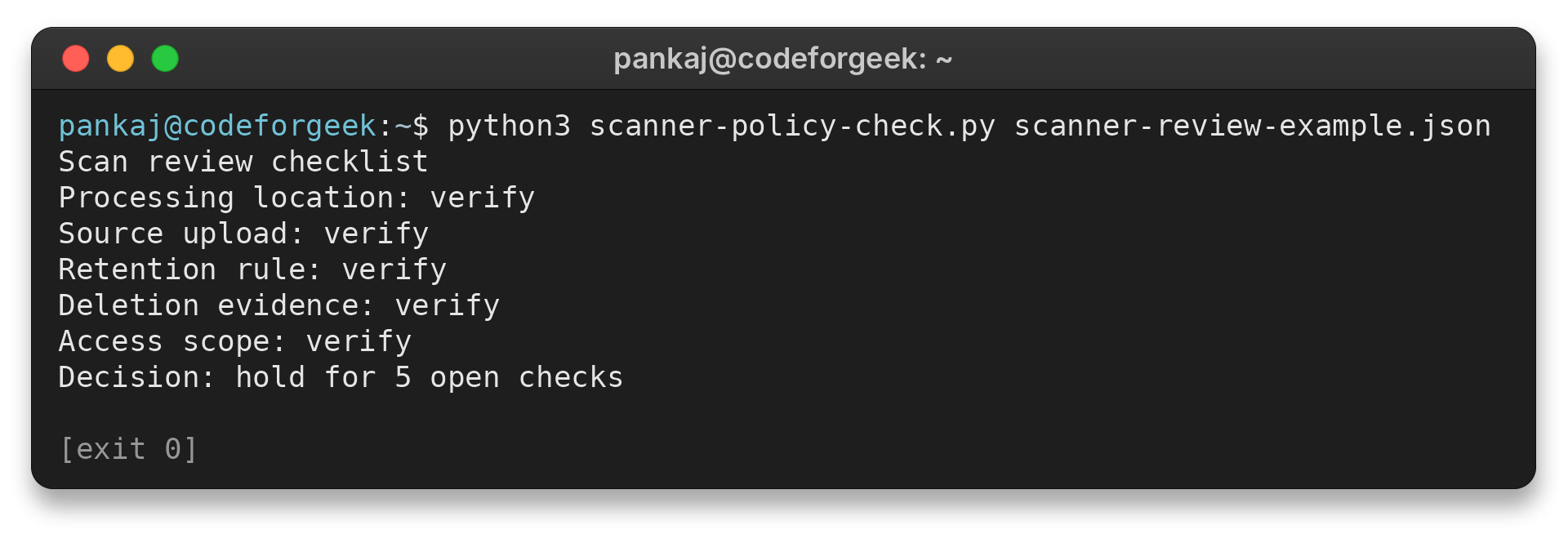
I ran the command against this example file. The five “verify” labels and hold decision leave the review record open.
Add answers only when product terms or a deletion test support them.
Step 4: Pilot, tune and assign an owner
Review findings against a few known issues. Record why a rule changed or an alert was suppressed.
Assign an owner to confirmed issues.
Make the test blocking only after failed analyses and team response are understood.
Limits and privacy checks
A scan only reports what its configuration and supported scope can detect. Use the symptom column to decide what evidence to check next instead of treating a quiet result as proof of coverage.
| Case | Symptom | Fix |
|---|---|---|
| Analysis did not cover expected files | No alerts, but source files or a language are absent from the report | Compare supported languages with the analyzed-file report |
| Alert may be a false positive | Rule flags a flow that may be unreachable or guarded | Trace the input through safeguards. Document the decision and assign an owner. |
| Credential was committed | A token appears in a repository or scan result | Revoke it first. Remove the exposed copy and review repository history. |
| Hosted scan has unclear data handling | The terms omit source handling or stored findings | Ask about processing and retention. Test deletion before signing off. |
| Workflow failed or is stale | A report looks empty or the last run predates expected commits | Open GitHub’s Tool status page and compare the latest run with expected files |
For an application that captures request addresses, see CodeForGeek’s guide to IP details in Express for the proxy-trust boundary. An address or approximate location is not proof of a person’s identity. For a wider pipeline view, read the site’s DevSecOps vulnerability-scanning guide.
Conclusion
Use the pilot to document expected file coverage, data handling and ownership for confirmed findings. Keep a check advisory until the team can respond consistently to its output.
For implementation details, read the GitHub SARIF documentation, the Semgrep Code overview, Veracode’s Static Analysis documentation and the NIST analyzer resource. NIST’s listing is informational and does not endorse a tool.
FAQ
These answers separate what code analysis can establish from the privacy and operational checks around it.
Does code scanning protect personal data?
Code scanning can flag unsafe code paths or exposed secrets. Pair its findings with a data-flow review and access controls. Then confirm the application’s operational safeguards.
Is SAST the same as code scanning?
SAST analyzes source or compiled code without running the application. A broader scanning program may also include secret and dependency checks or dynamic testing.
Can a scanner find every vulnerability?
Coverage varies with supported languages and enabled rules. It also depends on build extraction and the paths analyzed. Review alerts alongside testing and code review.