New to Rust? Grab our free Rust for Beginners eBook Get it free →
JavaScript switch statement: A complete guide with examples

If you’re writing code that checks the same variable against five or ten possible values, a chain of if-else if blocks gets messy fast. The JavaScript switch statement solves that problem. It lets you hand one expression to a single block, list every possible outcome as a case and run only the matching code. This guide covers how switch works, every gotcha worth knowing about break and fall-through and the patterns that come up most often in real projects.
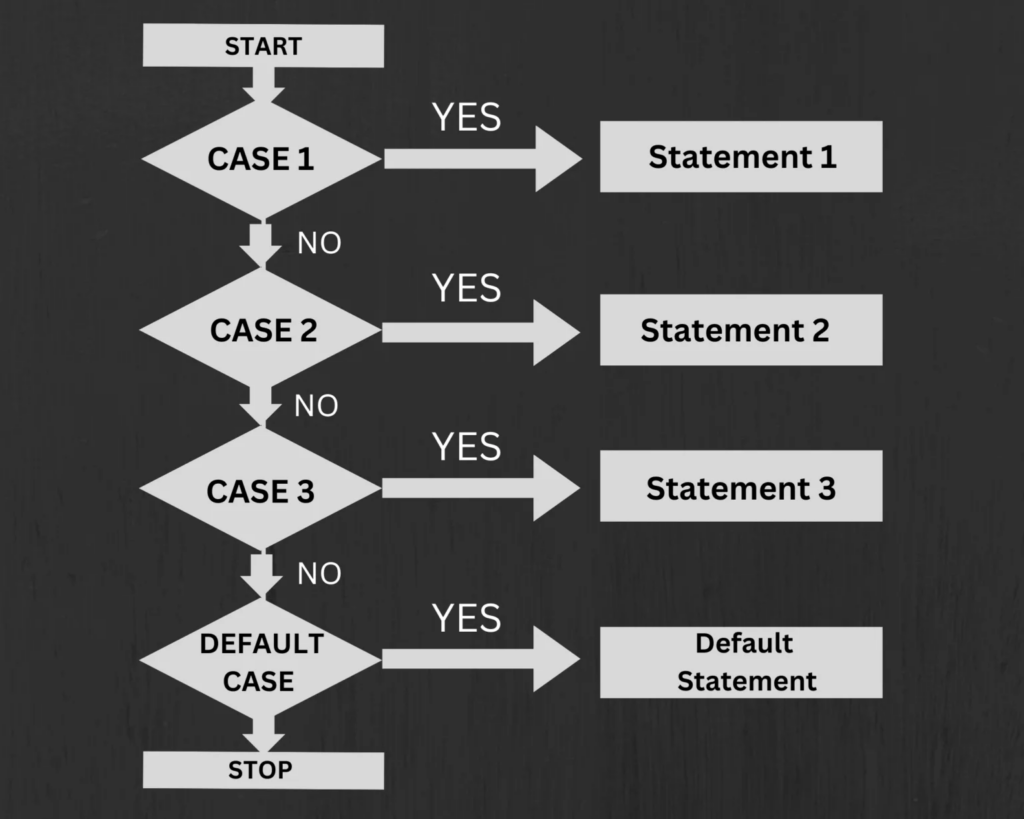
What is the JavaScript switch statement?
A switch statement evaluates an expression once, then compares the result against a list of case labels. When it finds a match, it runs the code under that label. If nothing matches, it runs the optional default block.
Think of it like a lookup table. Instead of repeating the same variable name in ten if conditions, you give switch the variable once and let it route execution to the right block. The result is code that reads more like a menu of choices than a staircase of conditions.
Switch is built into the JavaScript language spec and works in every modern browser and Node.js environment. It has been part of the language since ES1.
Switch statement syntax
Here is the basic structure:
switch (expression) {
  case value1:
    // code to run when expression === value1
    break;
  case value2:
    // code to run when expression === value2
    break;
  default:
    // code to run when no case matches
}
The parts:
expression: evaluated once. The result is compared against each case.case value:: a label. If the expression matches this value, execution starts here.break: exits the switch block. Without it, execution continues into the next case.default: optional fallback. Runs when no case matches.
A minimal working example:
const day = "Monday";

switch (day) {
  case "Monday":
    console.log("Start of the week");
    break;
  case "Friday":
    console.log("Almost there");
    break;
  default:
    console.log("Just another day");
}

// Output: Start of the week
How switch works step by step
When JavaScript hits a switch statement it does this:
- Evaluates the expression in parentheses. This happens once, not on every case.
- Compares the result against each
casevalue using strict equality (===). More on this below. - Jumps to the first case that matches and runs the code there.
- Hits
breakand exits the switch block entirely. - If no case matches, jumps to
default(if one exists) or skips the whole block.
The strict equality part matters. Switch uses ===, not ==. So "1" and 1 are different values and will not match each other:
const input = "1";

switch (input) {
  case 1:
    console.log("number 1");
    break;
  default:
    console.log("no match");
}

// Output: no match
// Because "1" !== 1
This trips people up when switch is used with user input or form values, where everything comes back as a string. The JavaScript operators article covers strict vs loose equality in more detail if you want the full picture.
Switch vs if-else: when to use which
Both do conditional branching. The difference is what kind of condition you’re checking.
| switch | if-else | |
|---|---|---|
| Best for | One variable, many exact values | Ranges, complex expressions, multiple variables |
| Comparison type | Strict equality only | Any expression |
| Readability | Cleaner with 4+ branches | Cleaner with 1-3 branches |
| Fall-through | Built in (can be useful) | Not applicable |
Use switch when you are checking one value against a list of known possibilities: status codes, day names, user roles, keyboard keys or Redux action types. Use if-else when the condition involves a range (> 100), multiple variables, or expressions that can’t be reduced to strict equality.
// Good use of switch: matching one value to many labels
switch (statusCode) {
  case 200:
    handleSuccess();
    break;
  case 404:
    handleNotFound();
    break;
  case 500:
    handleServerError();
    break;
  default:
    handleUnknown();
}

// Good use of if-else: range checks
if (score >= 90) {
  grade = "A";
} else if (score >= 70) {
  grade = "B";
} else {
  grade = "C";
}
The break keyword and fall-through
break is what stops execution after a matched case. Without it, JavaScript keeps running every case that follows, even if those cases don’t match the expression. This is called fall-through.
Fall-through without break:
switch (2) {
  case 1:
    console.log("case 1");
  case 2:
    console.log("case 2");
  case 3:
    console.log("case 3");
  default:
    console.log("default");
}

// Output:
// case 2
// case 3
// default
The match was case 2, but execution fell into case 3 and default because there were no break statements. This is one of the most common bugs beginners run into.
Intentional fall-through is a pattern you’ll see in real code. It’s useful when you want multiple cases to share the same block:
const fruit = "mango";

switch (fruit) {
  case "mango":
    console.log("Tropical fruit");
    // no break - falls through to the next case
  case "papaya":
    console.log("Also in this region");
    break;
  case "apple":
    console.log("Temperate fruit");
    break;
}

// Output:
// Tropical fruit
// Also in this region
If you use intentional fall-through, always leave a comment so the next developer knows it was deliberate and not a bug.
The return statement also exits a switch block when used inside a function, so you don’t need break in those cases:
function getLabel(code) {
  switch (code) {
    case 200:
      return "OK";
    case 404:
      return "Not Found";
    default:
      return "Unknown";
  }
}
The default keyword
default is the switch equivalent of the final else. It runs when no case matches:
const color = "purple";

switch (color) {
  case "red":
    console.log("Stop");
    break;
  case "green":
    console.log("Go");
    break;
  default:
    console.log("Unrecognized color");
}

// Output: Unrecognized color
A few things to know about default:
- It is optional. If you omit it and no case matches, the switch block is skipped entirely.
- It does not have to be last. You can place it anywhere in the block. But if it’s not last, add a
breakafter it, otherwise fall-through applies. - There can only be one
defaultper switch statement.
// default placed first - valid, but needs a break
switch (x) {
  default:
    console.log("default");
    break;
  case 1:
    console.log("one");
    break;
}
Grouping multiple cases
When several values should produce the same result, stack the case labels one after another without any code between them. They will all fall through to the first block that has code:
const httpStatus = 201;

switch (httpStatus) {
  case 200:
  case 201:
  case 204:
    console.log("Success");
    break;
  case 400:
    console.log("Bad request");
    break;
  case 401:
  case 403:
    console.log("Auth error");
    break;
  case 404:
    console.log("Not found");
    break;
  default:
    console.log("Unexpected status");
}

// Output: Success
This is clean and readable. The intent (“treat 200, 201 and 204 the same”) is visible directly in the structure of the code. Compare that to repeating the same console.log in three separate if-else branches.
A practical example using JavaScript arrays to group day names:
const days = ["Monday", "Tuesday", "Wednesday", "Thursday", "Friday", "Saturday", "Sunday"];

days.forEach(day => {
  let type;

  switch (day) {
    case "Saturday":
    case "Sunday":
      type = "weekend";
      break;
    default:
      type = "weekday";
  }

  console.log(`${day} is a ${type}`);
});
Using const and let in case blocks
Case labels are labels, not new scopes. All cases in a switch share the same block scope. That means declaring const or let with the same name in two different cases causes an error:
// This throws a SyntaxError
switch (action) {
  case "login":
    const message = "Logged in";
    console.log(message);
    break;
  case "logout":
    const message = "Logged out"; // Error: already declared
    console.log(message);
    break;
}
The fix is to wrap each case body in curly braces to create its own block scope:
switch (action) {
  case "login": {
    const message = "Logged in";
    console.log(message);
    break;
  }
  case "logout": {
    const message = "Logged out";
    console.log(message);
    break;
  }
}
This is the same strict mode behavior that applies everywhere in ES6+ code. Wrapping case bodies in braces whenever you declare block-scoped variables is good practice.
The switch(true) pattern for range checks
Normally switch compares a value against exact matches. But if you pass true as the expression, each case becomes a boolean condition and the first one that evaluates to true wins:
const score = 82;
let grade;

switch (true) {
  case score >= 90:
    grade = "A";
    break;
  case score >= 80:
    grade = "B";
    break;
  case score >= 70:
    grade = "C";
    break;
  case score >= 60:
    grade = "D";
    break;
  default:
    grade = "F";
}

console.log(grade); // B
This is equivalent to a chain of if-else if blocks, but with all the branches in one organized place. Useful when you have several overlapping ranges and want them visually aligned.
Another example, categorizing HTTP status codes into groups:
const code = 503;

switch (true) {
  case code >= 200 && code < 300:
    console.log("Success");
    break;
  case code >= 400 && code < 500:
    console.log("Client error");
    break;
  case code >= 500:
    console.log("Server error");
    break;
  default:
    console.log("Unknown");
}

// Output: Server error
Switch with object literals as an alternative
For simple value-to-result mapping, an object literal can replace a switch statement with less code:
// switch version
function getStatusText(code) {
  switch (code) {
    case 200: return "OK";
    case 201: return "Created";
    case 404: return "Not Found";
    case 500: return "Internal Server Error";
    default: return "Unknown";
  }
}

// object literal version
function getStatusText(code) {
  const labels = {
    200: "OK",
    201: "Created",
    404: "Not Found",
    500: "Internal Server Error",
  };
  return labels[code] ?? "Unknown";
}
The object approach is shorter when all you need is a lookup. The switch approach is better when each case needs to run actual logic, not just return a value. There is no strict rule, pick whichever makes the code easier to read.
Combined with JavaScript string interpolation, the object lookup pattern works well for building messages that change based on the data:
const role = "admin";

const welcomeMessages = {
  admin: `Welcome back, admin. You have full access.`,
  editor: `Welcome, editor. You can publish content.`,
  viewer: `Welcome. You have read-only access.`,
};

console.log(welcomeMessages[role] ?? "Unknown role");
Practical examples
Handling keyboard events using switch
document.addEventListener("keydown", (event) => {
  switch (event.key) {
    case "ArrowUp":
      movePlayer("up");
      break;
    case "ArrowDown":
      movePlayer("down");
      break;
    case "ArrowLeft":
      movePlayer("left");
      break;
    case "ArrowRight":
      movePlayer("right");
      break;
    case " ":
      jump();
      break;
    default:
      // ignore other keys
  }
});
Redux-style reducer using switch
Switch is the standard pattern for Redux reducers because each action type maps cleanly to a case:
function cartReducer(state = { items: [] }, action) {
  switch (action.type) {
    case "ADD_ITEM":
      return { ...state, items: [...state.items, action.payload] };
    case "REMOVE_ITEM":
      return {
        ...state,
        items: state.items.filter(item => item.id !== action.payload.id),
      };
    case "CLEAR_CART":
      return { ...state, items: [] };
    default:
      return state;
  }
}
Command dispatch using switch
const command = getUserInput();

switch (command.toLowerCase()) {
  case "start":
    startProcess();
    break;
  case "stop":
    stopProcess();
    break;
  case "restart":
    stopProcess();
    startProcess();
    break;
  case "status":
    printStatus();
    break;
  default:
    console.log(`Unknown command: ${command}`);
}
The JavaScript array find() method pairs well with patterns like this when you need to look up a matching command from a list before dispatching.
Common mistakes and how to fix them
Forgetting break
The single most common switch mistake. When break is missing, execution falls through to the next case regardless of whether it matches:
// Bug: missing break after case "A"
switch (grade) {
  case "A":
    console.log("Excellent");
    // missing break!
  case "B":
    console.log("Good");
    break;
}

// If grade is "A", output is:
// Excellent
// Good   ← unintended
Fix: add break at the end of every case that should not fall through.
Using == instead of ===
Switch always uses ===. There’s no way to change this. If your expression comes from a source that mixes types (for example, a value that could be 0 or "0"), normalize it before the switch:
const value = parseInt(userInput, 10);

switch (value) {
  case 1:
    doThing();
    break;
  default:
    doDefault();
}
Forgetting default
A switch without default silently does nothing when no case matches. For any switch that handles user input or external data, include a default that at least logs an unexpected value:
switch (event.type) {
  case "click":
    handleClick();
    break;
  case "submit":
    handleSubmit();
    break;
  default:
    console.warn(`Unhandled event type: ${event.type}`);
}
Variable declaration conflicts
Declaring const or let in two cases without block braces throws a SyntaxError. Always wrap case bodies that declare variables in {}.
Key takeaways
- Switch evaluates an expression once and compares it against case labels using strict equality (
===) - Always add
breakat the end of each case unless intentional fall-through is the goal - Stack multiple case labels with no code between them to run the same block for several values
- The
defaultcase runs when no case matches. Include it to handle unexpected values. - Wrap case bodies in curly braces when using
constorletto avoid scope conflicts - The
switch(true)pattern works for range-based conditions like score buckets or HTTP status categories - Object literals are a shorter alternative when each case just returns a mapped value with no side effects
- Switch does not work with loose equality. Coerce types before the switch if needed.
FAQ
What is the difference between switch and if-else in JavaScript?
Switch checks one expression against a list of exact values using ===. If-else can test any boolean expression. Use switch for many fixed values and if-else for ranges or complex conditions.
What happens if you forget break in a switch statement?
Execution falls through to the next case and runs its code even if the case value does not match. This is called fall-through and is a common source of bugs.
Can switch use strings in JavaScript?
Yes. Switch works with any primitive value: strings, numbers and booleans. The comparison is always strict, so "1" and 1 do not match.
Does default have to be last in a switch statement?
No. You can place default anywhere in the switch block. If it is not last, add a break after it to prevent fall-through into the next case.
Can you use return instead of break in switch?
Yes, but only inside a function. A return statement exits the function and therefore the switch block at the same time, so break is not needed in that case.
What is the switch(true) pattern?
Passing true as the switch expression turns each case into a boolean check. The first case that evaluates to true runs. This is useful for checking ranges or conditions that cannot be expressed as exact values.
When should I use an object literal instead of switch?
When every case just maps a value to another value with no side effects. Object literal are shorter and easier to read for simple mappings. Use switch when each branch needs to run logic.
The switch statement is one of those features that looks simple from the outside but has enough edge cases (fall-through, scoping, strict equality) to cause real bugs if you don’t know the rules. Work through the examples in this guide and you will have a solid enough handle on it to use it confidently in any project.