New to Rust? Grab our free Rust for Beginners eBook Get it free →
Building a Todo List CLI in Rust with SQLite

In this project, you will build a basic command-line to-do list app in Rust. It stores tasks in a SQLite database using rusqlite, and accepts commands from the user via clap. This teaches you real-world CRUD operations: create, read, update, delete.
When I first built a Rust CLI with persistent data, I wanted something minimal but functional. This project gave me that. With just one file and a few commands, I could manage tasks from the terminal, saved in a real database file I could inspect later.
What You Will Learn
- Defining CLI commands with clap
- Creating and connecting to a SQLite database using rusqlite
- Inserting, listing, marking done, and deleting tasks
- Writing clean command-based logic in Rust
Step 1: Add Dependencies
In Cargo.toml:
[dependencies]
clap = { version = "4.4", features = ["derive"] }
rusqlite = "0.30"
Step 2: Define Command-Line Arguments
use clap::{Parser, Subcommand};

#[derive(Parser)]
#[command(name = "todo")]
struct Cli {
    #[command(subcommand)]
    command: Commands,
}

#[derive(Subcommand)]
enum Commands {
    Add { task: String },
    List,
    Done { id: i32 },
    Delete { id: i32 },
}
Step 3: Setup the SQLite Database
use rusqlite::{Connection, Result};

fn init_db() -> Result<Connection> {
    let conn = Connection::open("todo.db")?;
    conn.execute(
        "CREATE TABLE IF NOT EXISTS tasks (
            id    INTEGER PRIMARY KEY,
            task  TEXT NOT NULL,
            done  INTEGER NOT NULL DEFAULT 0
        )",
        [],
    )?;
    Ok(conn)
}
Step 4: Implement Command Handlers
fn add_task(conn: &Connection, task: &str) -> Result<()> {
    conn.execute("INSERT INTO tasks (task) VALUES (?1)", [task])?;
    println!("Task added: {}", task);
    Ok(())
}

fn list_tasks(conn: &Connection) -> Result<()> {
    let mut stmt = conn.prepare("SELECT id, task, done FROM tasks")?;
    let tasks = stmt.query_map([], |row| {
        Ok((
            row.get::<_, i32>(0)?,
            row.get::<_, String>(1)?,
            row.get::<_, i32>(2)?,
        ))
    })?;

    for task in tasks {
        let (id, text, done) = task?;
        let status = if done == 1 { "[x]" } else { "[ ]" };
        println!("{} {}: {}", status, id, text);
    }

    Ok(())
}

fn mark_done(conn: &Connection, id: i32) -> Result<()> {
    let changed = conn.execute("UPDATE tasks SET done = 1 WHERE id = ?1", [id])?;
    if changed == 0 {
        println!("No task found with ID {}", id);
    } else {
        println!("Marked task {} as done", id);
    }
    Ok(())
}

fn delete_task(conn: &Connection, id: i32) -> Result<()> {
    let deleted = conn.execute("DELETE FROM tasks WHERE id = ?1", [id])?;
    if deleted == 0 {
        println!("No task found with ID {}", id);
    } else {
        println!("Deleted task {}", id);
    }
    Ok(())
}
Step 5: Main Function
fn main() -> Result<()> {
    let cli = Cli::parse();
    let conn = init_db()?;

    match cli.command {
        Commands::Add { task } => add_task(&conn, &task)?,
        Commands::List => list_tasks(&conn)?,
        Commands::Done { id } => mark_done(&conn, id)?,
        Commands::Delete { id } => delete_task(&conn, id)?,
    }

    Ok(())
}
Full Program
use clap::{Parser, Subcommand};
use rusqlite::{Connection, Result};

#[derive(Parser)]
#[command(name = "todo")]
struct Cli {
    #[command(subcommand)]
    command: Commands,
}

#[derive(Subcommand)]
enum Commands {
    Add { task: String },
    List,
    Done { id: i32 },
    Delete { id: i32 },
}

fn init_db() -> Result<Connection> {
    let conn = Connection::open("todo.db")?;
    conn.execute(
        "CREATE TABLE IF NOT EXISTS tasks (
            id    INTEGER PRIMARY KEY,
            task  TEXT NOT NULL,
            done  INTEGER NOT NULL DEFAULT 0
        )",
        [],
    )?;
    Ok(conn)
}

fn add_task(conn: &Connection, task: &str) -> Result<()> {
    conn.execute("INSERT INTO tasks (task) VALUES (?1)", [task])?;
    println!("Task added: {}", task);
    Ok(())
}

fn list_tasks(conn: &Connection) -> Result<()> {
    let mut stmt = conn.prepare("SELECT id, task, done FROM tasks")?;
    let tasks = stmt.query_map([], |row| {
        Ok((
            row.get::<_, i32>(0)?,
            row.get::<_, String>(1)?,
            row.get::<_, i32>(2)?,
        ))
    })?;

    for task in tasks {
        let (id, text, done) = task?;
        let status = if done == 1 { "[x]" } else { "[ ]" };
        println!("{} {}: {}", status, id, text);
    }

    Ok(())
}

fn mark_done(conn: &Connection, id: i32) -> Result<()> {
    let changed = conn.execute("UPDATE tasks SET done = 1 WHERE id = ?1", [id])?;
    if changed == 0 {
        println!("No task found with ID {}", id);
    } else {
        println!("Marked task {} as done", id);
    }
    Ok(())
}

fn delete_task(conn: &Connection, id: i32) -> Result<()> {
    let deleted = conn.execute("DELETE FROM tasks WHERE id = ?1", [id])?;
    if deleted == 0 {
        println!("No task found with ID {}", id);
    } else {
        println!("Deleted task {}", id);
    }
    Ok(())
}

fn main() -> Result<()> {
    let cli = Cli::parse();
    let conn = init_db()?;

    match cli.command {
        Commands::Add { task } => add_task(&conn, &task)?,
        Commands::List => list_tasks(&conn)?,
        Commands::Done { id } => mark_done(&conn, id)?,
        Commands::Delete { id } => delete_task(&conn, id)?,
    }

    Ok(())
}
Example Usage
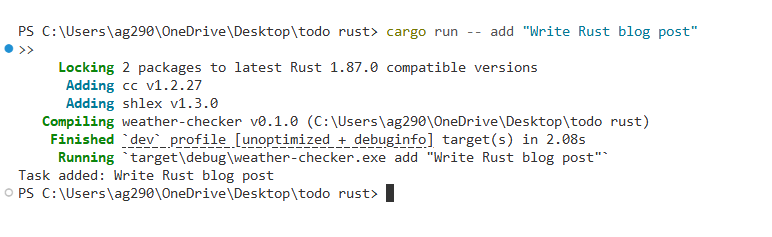
cargo run -- add "Write Rust blog post"
cargo run -- list
cargo run -- done 1
cargo run -- delete 2
Handling rusqlite Linking Error on Windows
If you try to run the project as-is on Windows, you’ll likely see this error:
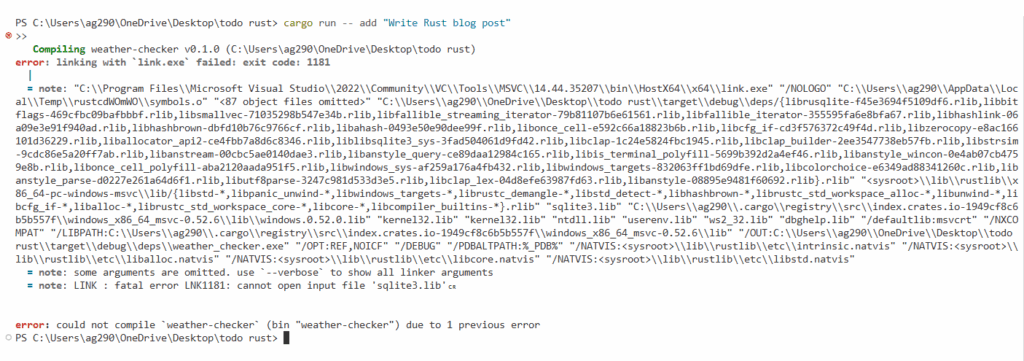
Rust’s rusqlite crate depends on the native SQLite C library. On Windows, if you are not using the bundled feature, it expects a sqlite3.lib file to already exist on your system and be accessible to the linker. But by default:
- sqlite3.lib is not included in the downloaded SQLite DLLs
- You don’t have sqlite3.lib unless you build it yourself or use a C/C++ package manager like vcpkg
- The Rust compiler can’t find or link to it, which causes the LNK1181 error
To make your project work without installing SQLite manually, just update your Cargo.toml to:
[dependencies]
clap = { version = "4.4", features = ["derive"] }
rusqlite = { version = "0.30", features = ["bundled"] }
This tells rusqlite to compile SQLite from source and include it inside your final Rust binary. It works on Windows, macOS, and Linux with no extra setup.
Final Output:
Optional Extensions
If you want to practice more, try:
- Adding a priority field (integer or enum)
- Sorting tasks by creation time or priority
- Showing only incomplete tasks by default
- Storing the database path in a config file
Summary
This project shows how to combine clap for command parsing and rusqlite for persistent data. With just a few functions, you have a real, usable CLI app that saves and retrieves information, without any external servers or tools.
Rust Intermediate Concepts
- Generic Types in Functions and Structs
- Implementing Traits for Custom Behavior in Rust
- Trait Bounds and Constraints in Rust
- Lifetimes in Rust
- Using Closures (Anonymous Functions) in Rust
- The Iterator Trait and .next() in Rust
- Higher Order Iterator Methods: map, filter, and fold in Rust
- Using impl Trait for Simplicity in Rust
- Advanced Collections: HashSet and BTreeMap in Rust
- Custom Error Types and the Error Trait in Rust
- Option and Result Combinators in Rust
- Writing Unit Tests in Rust
- Integration Testing in Rust
- Logging in Rust with the log Crate
- Cargo Tips and Tricks for Rust Projects
- CLI Argument Parsing with Clap in Rust
- File I/O and File System Operations in Rust
- Running External Commands in Rust
- Make HTTP Requests in Rust with Reqwest
- JSON Serialization and Deserialization in Rust with Serde
- Building a Weather CLI in Rust
- Date and Time Handling in Rust with Chrono
- Using Regular Expressions in Rust with the regex Crate
- Memory Management in Rust
- Understanding Borrow Checker Errors in Rust
- Interacting with Databases in Rust
- Building a Todo List CLI in Rust with SQLite
- Concurrency in Rust