New to Rust? Grab our free Rust for Beginners eBook Get it free →
JavaScript Array find Method (All Variants)

The JavaScript array find() method returns the first element in an array that passes a test function you provide. If no element matches, it returns undefined and leaves the original array unchanged. Introduced in ES6, it is now one of the most frequently used array methods in modern JavaScript. This guide covers the full syntax, every parameter, common pitfalls, related methods and practical patterns so you can use js find with confidence.
Essential details about the array find method
The find() method was introduced in ES6 and is part of the ECMAScript 2015 standard. It is supported in all modern browsers and in Node.js, so you can use it in the same way on both the client and server side.
When you call find() on a JavaScript array, it goes through each element from left to right and runs your test function on each one. The moment the test function returns true, find() stops and gives back that element. If the test never passes, you get undefined. The original array is never changed.
This early-stop behaviour is what makes find() more efficient than filter() when you only need one result. With filter(), every element is checked regardless. With find(), the loop ends as soon as a match is found.
Syntax of JS find() method
array.find(function(element, index, array), thisArg)
Here is what each parameter means:
- array — the array whose elements are being checked.
- function — the test function (also called the callback) that runs on each element.
- element — the current element being processed.
- index — the index position of the current element.
- array — the full array that
find()was called on. - thisArg (optional) — a value to use as
thisinside the callback.
Return value: The value of the first element that passes the test. If no element passes, find() returns undefined.
How the find() method works
The find() method is iterative. It runs the callback once for each element in ascending index order until the callback returns a truthy value. At that point, find() returns the matching element and stops. If the callback never returns truthy, find() returns undefined.
It visits every index, including empty slots in sparse arrays, where the value is treated as undefined. Because of this, you should write your callback to handle undefined values if your array might have gaps.
The search always runs from left to right and there is no built-in way to reverse it. For right-to-left search, use findLast() instead.
Example of find() method
Let’s better understand this with code. Let us provide the test case as a number greater than 5 and then the code will look like:
let array = [5, 2, 7, 4, 8];

function check(num) {
    return num > 5;
}

console.log(array.find(check));
Here we created an array and a test function, then passed that function into the array.find() method. Since the first element on iteration within the array that satisfies the test is 7, it returns 7.

Using arrow functions with find()
The example above uses a named function, but you will often see find() written with an arrow function because the syntax is shorter and easier to read inline:
let array = [5, 2, 7, 4, 8];

const result = array.find(num => num > 5);
console.log(result); // 7
Both versions produce the same result. The arrow function form is the most common style you will see in modern JavaScript codebases. You can use whichever style fits your team’s conventions.
Finding an object in an array
One of the most practical uses of find() is searching an array of objects by a property value. This pattern comes up constantly in real applications: looking up a user by ID, a product by SKU, or a config entry by name.
const users = [
    { id: 101, name: 'Alice' },
    { id: 102, name: 'Bob' },
    { id: 103, name: 'Charlie' }
];

const targetId = 102;
const user = users.find(user => user.id === targetId);

console.log(user);
// Output: { id: 102, name: 'Bob' }
find() stops as soon as it hits the first match. This means even if there were 10,000 users in the array, it would stop the moment it found ID 102 rather than checking every remaining entry.
You can also use destructuring directly inside the callback to make the condition cleaner:
const adult = users.find(({ id }) => id === 102);
console.log(adult); // { id: 102, name: 'Bob' }
Using find() with optional chaining
When find() returns undefined, accessing a property on that result throws a TypeError. Optional chaining with ?. is the safest way to handle this:
const posts = [
    { id: 1, title: 'Hello World' },
    { id: 2, title: 'JavaScript Basics' }
];

const post = posts.find(p => p.id === 3);

console.log(post?.title); // undefined, no error thrown
Without ?., writing post.title when post is undefined crashes your code. This combination of find() and optional chaining is common in modern React and Node.js code where data might be missing.
Other array find methods
Now we will discuss different types of array find methods. These are not subtypes but work in the same category and follow the same pattern.
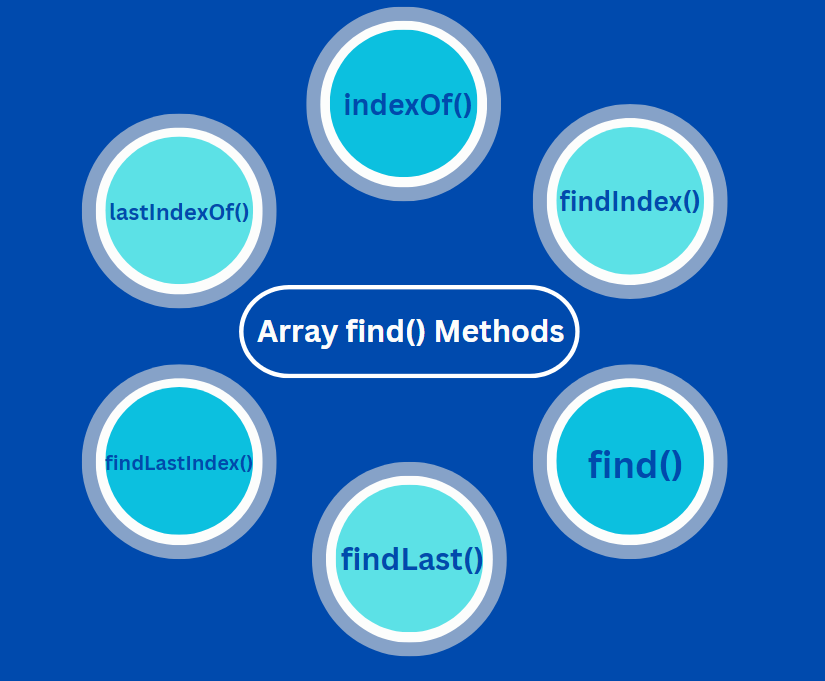
1. findLast() method
This method works like find() but returns the value of the last element in the array that passes the test.
let array = [5, 2, 7, 4, 8];

function check(num) {
    return num > 5;
}

console.log(array.findLast(check));
Here the element seen from last which passes the condition of our function is 8.

2. findIndex() method
This method returns the index of the first element in an array that passes the test function. It works like find(), the only difference being that it returns the index of that element.
let array = [5, 2, 7, 4, 8];

function check(num) {
    return num > 5;
}

console.log(array.findIndex(check));
Here we know that the first element that passes the test case is 7, so its index is printed, which is 2.

3. findLastIndex() method
This method returns the index of the last element in an array that passes the given test function.
let array = [5, 2, 7, 4, 8];

function check(num) {
    return num > 5;
}

console.log(array.findLastIndex(check));
Here we know that the last element that passes the test case is 8, so its index is printed, which is 4.

4. indexOf() method
This method returns the index position of the specified element.
const planets = ["Jupiter", "Uranus", "Mercury", "Pluto" , "Earth"];

let index = planets.indexOf("Pluto");
let index2 = planets.indexOf("Venus");

console.log("The position of Pluto starting from index 0 is ", index);
console.log("The position of Venus  ", index2);
In the given code, we have 5 elements in the array. Now, if we find the index of “Pluto,” it will turn out to be 3, as it is the 4th element, and index counting starts from 0. As for Venus, since it’s not an element in the array, the method returns -1.

5. lastIndexOf() method
This method returns the index of the element which ranks at the last.
const planets = ["Jupiter", "Pluto", "Mercury", "Pluto" , "Earth"];

let index = planets.indexOf("Pluto");
let index_last = planets.lastIndexOf("Pluto");

console.log("The position first Pluto is ",index);
console.log("The position last Pluto is ",index_last);
If we see in the given code, there are two elements named Pluto. The index of the first coming element is printed by indexOf() which is 1 and the index of the element at the last is printed by lastIndexOf() which is 3.

When to use find() vs other array methods
Choosing the right method saves time and avoids bugs. Here is a quick breakdown:
- find() — use when you need the first element that meets a condition. Returns the value or
undefined. - findIndex() — same as
find()but returns the index instead of the value. Returns -1 if no match. - filter() — use when you need all elements that meet a condition. Returns a new array, never
undefined. - some() — use when you only need a yes or no answer: does at least one element pass? Returns a boolean. See the some() method guide for more.
- includes() — use for a simple exact-value check where you don’t need a callback. Returns a boolean.
- indexOf() — use when you need the index of an exact value. Returns -1 if not found.
The short rule: reach for find() when you need one result and your check requires a function. Reach for filter() when you need all results. Use the reduce() method when you need to accumulate results across the whole array.
Mistakes developers make with the JavaScript array find() method
Using the wrong test function
One common mistake is writing a test function that does not return a boolean value. The find() method expects the test function to return true or false for each element. If the function returns another type, the method might not work as expected. For example, if we write a function that returns a string or a number instead of true or false, find() may not find the correct element.
Suppose we have an array of numbers and want to find the first number greater than 10. If the test function returns the number itself, like num => num, it will not work as intended. Instead, we should use num => num > 10.
Solution: Always make sure the test function returns true or false based on the condition you want to check.
Expecting all matches instead of the first
The find() method only returns the first element that passes the test. Sometimes you might expect it to return all matching elements, but it stops after finding the first one. This can lead to confusion if you want to collect multiple results.
For example, if you have an array of users and want to get all users with a certain role, find() will only return the first match, not all of them.
Solution: If you need all matching elements, use filter() instead of find(). This is one of the most common sources of bugs when developers are new to these methods.
Not handling undefined results
If no element passes the test, find() returns undefined. If you do not check for this, your code might throw errors when trying to use the result.
const nums = [2, 4, 6];
const result = nums.find(n => n > 10);

// Without a check, this line would throw a TypeError
if (result !== undefined) {
    console.log(result * 2);
}
Solution: Always check if the result is undefined before using it. You can also use optional chaining as shown earlier: result?.someProperty.
Searching for duplicates
find() always stops at the first match. If your array has multiple objects that match the condition, you will only get back the first one. This catches people off guard when they are working with arrays that contain repeated data. If you need to remove duplicates from an array before searching, handle that step first.
Chaining find() with other methods
You can chain find() with other array methods for more advanced search patterns. For example, filtering first to narrow the set and then finding within the result:
const items = [
  { id: 1, tags: ['a', 'b'] },
  { id: 2, tags: ['c', 'd'] }
];

const tag = items.find(item => item.tags.includes('c'))?.id;
console.log(tag); // 2
This approach reads cleanly and avoids manual loops. The optional chaining at the end protects against a missing match returning undefined.
If you are working with data that needs grouping before searching, the Object.groupBy() and Map.groupBy() methods can help you organise the data first.
Using the thisArg parameter
The optional second argument to find() sets the value of this inside your callback. This is useful when the callback is a method on an object and needs access to the object’s properties:
const search = {
    keyword: 'wrench',
    match(item) {
        return item === this.keyword;
    }
};

const tools = ['hammer', 'wrench', 'screwdriver'];
const result = tools.find(search.match, search);

console.log(result); // wrench
When using thisArg, you must use a regular function rather than an arrow function as the callback. Arrow functions do not bind their own this, so thisArg would be ignored.
Performance notes for large arrays
find() stops at the first match, so best-case performance is O(1). It finds the item at index 0 and exits immediately. Worst case is O(n) if the match is at the end or does not exist. Compared to filter(), which always runs through the entire array, find() is the better option any time you only need one result.
For very large arrays where speed matters, consider sorting the array first and using binary search. But for typical JavaScript data arrays in the thousands to low millions of items, find() is fast enough for any interactive UI or API response use case. If you are also working with structured key-value lookups, JavaScript Maps offer O(1) access and may be a better fit than searching an array every time.
Key takeaways
find()returns the first element that passes a test function, orundefinedif nothing matches- The original array is never changed by
find() - Use arrow functions for concise inline callbacks:
arr.find(x => x > 5) - Use
findIndex()when you need the position, not the value - Use
findLast()orfindLastIndex()to search from the right - Use
filter()when you need all matching elements, not just the first - Always handle the
undefinedcase. Use optional chaining or anifcheck before accessing properties on the result find()stops early at the first match, making it more efficient thanfilter()for single-result searches
Frequently asked questions
What does the JavaScript find() method do?
The find() method returns the first element in an array that passes a test function. If no element passes, it returns undefined.
How is find() different from filter() in JavaScript?
find() returns the first matching element and stops. filter() returns a new array of all matching elements and checks every item.
What does find() return when no element matches?
It returns undefined. Always check for this before using the result to avoid TypeErrors.
Can I use find() to search an array of objects?
Yes. Pass a callback that checks the property you want: arr.find(item => item.id === 5).
Does find() change the original array?
No. find() never modifies the array it is called on.
How do I get the index of the found element?
Use findIndex() instead of find(). It returns the index of the first match or -1 if nothing matches.
What is the difference between find() and indexOf()?
indexOf() checks for strict equality with a value. find() runs a callback, so it supports complex conditions and works well with arrays of objects.
How do I find the last matching element in JavaScript?
Use findLast(), which searches from right to left and returns the last element that passes the test.
Is find() supported in all browsers?
Yes. find() has been available in all major browsers since 2015 and in Node.js from version 4 onwards.
When should I use find() over some() in JavaScript?
Use find() when you need the actual element. Use some() when you only need to know whether a match exists (true or false).