New to Rust? Grab our free Rust for Beginners eBook Get it free →
How to Use Black Box AI for Coding

BLACKBOX AI gives you a browser app, a Visual Studio Code agent, a command-line interface (CLI), and an application programming interface (API), so this guide uses the current marketplace listing, official pricing, and a JavaScript acceptance test run with Node.js 26.5.0 to show how to use BLACKBOX AI for coding without trusting generated output on sight.
Choose the surface that fits the task
The browser app suits a self-contained question or a small snippet. Visual Studio Code is the better choice when BLACKBOX AI needs files, folders, Git commits, screenshots, or terminal access from an existing project.
| Surface | Use it for | Main constraint |
|---|---|---|
| Web app | Explaining code, drafting a function, or inspecting a pasted error | You must provide enough context in the prompt |
| VS Code agent | Editing several files, running tests, and working with a repository | The agent needs carefully scoped file and command permissions |
| CLI | Terminal-first work and automation inside a repository | You need to review commands before execution |
| Multi-agent execution | Comparing several implementations of a defined task | Extra agents add cost and review work |
A broad request such as “build my app” gives the agent room to invent requirements. Give it a bounded change, the files it may touch, the command that proves success, and any behavior it must preserve.
Install the BLACKBOX AI extension in VS Code
The official Visual Studio Marketplace listing is the safest installation source because it identifies the publisher as blackbox.ai and provides the current setup sequence.
- Open the Extensions view in Visual Studio Code with Ctrl+Shift+X.
- Search for BLACKBOX AI and confirm the publisher before selecting Install.
- Select the AI Agent icon on the right side of the editor.
- Connect your BLACKBOX AI account.
- Open a project and move the chat panel to a convenient part of the workspace.
The marketplace states that the initial connection does not require an API key or credit card. Paid plans still matter when you need model credits, multi-agent execution, team controls, or other plan-specific capabilities.
Give the agent an acceptance test
A useful coding prompt describes the change and the check that decides whether it works. Ask for a numeric sort that preserves the input array, handles multi-digit values correctly, and passes a supplied assertion.
Use a prompt like the following.
Create a JavaScript function named sortNumbers that returns a new array in ascending numeric order. Do not mutate the input. Add an assertion for [10, 3, 21, 2] and run the file with Node.js. Show me the command output.
The generated file should make the contract visible. Numeric subtraction in the comparator prevents JavaScript from applying lexicographic string order, which would place 10 before 2.
const assert = require('node:assert/strict');

function sortNumbers(values) {
  return [...values].sort((a, b) => a - b);
}

const input = [10, 3, 21, 2];
const output = sortNumbers(input);

console.log('Input:', input);
console.log('Sorted:', output);
assert.deepEqual(output, [2, 3, 10, 21]);
console.log('All checks passed');
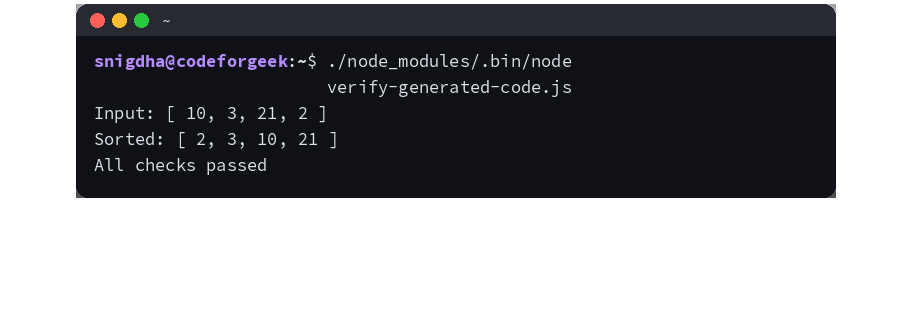
A Node.js 26.5.0 run passed the assertion and produced the following output.
Input: [ 10, 3, 21, 2 ]
Sorted: [ 2, 3, 10, 21 ]
All checks passed
One passing example does not define the whole function. Add cases for an empty array, duplicates, negative values, decimals, and any invalid input your application may receive.
Control the context and permissions
The VS Code listing says you can attach files, folders, Git commits, web URLs, and screenshots to a conversation. Attach only what the task needs because irrelevant files consume context and sensitive files may expose credentials or customer data.
Keep approval enabled for file creation, edits, reads, and command execution until you trust the proposed plan. Review shell commands for destructive flags, network calls, package installation, environment files, and paths outside the project.
- Start with a clean Git worktree so every edit appears in the diff.
- Name the files the agent may change and the files it must leave alone.
- Require the project’s existing test, lint, and type-check commands.
- Reject generated secrets, disabled security checks, and unexplained dependency changes.
- Read the final diff before accepting the change.
Agent mode can read the codebase, edit files, run terminal commands, and respond to failures, but your test suite and diff remain the acceptance boundary.
Use multi-agent mode for decisions, not routine edits
BLACKBOX AI can dispatch a task to several coding agents and use a judge layer to compare the implementations. That workflow helps when alternative designs have meaningful tradeoffs, such as a cache strategy or a database migration plan.
A typo fix or one-function change rarely earns the extra execution and review. The broader AI coding agent comparison can help you choose a workflow before you hand repository access to any agent.
Prompts that describe an entire product without acceptance criteria fall into the same failure mode associated with vibe coding. Narrow the task until a test, screenshot, response body, or measurable output can prove completion.
Check the plan before relying on a feature
The official pricing page lists Pro at $10 per month, Pro Plus at $20 per month, and Pro Max at $40 per month. Pro Plus adds multi-agent execution and the coding agent across supported editors, web, and terminal, according to the plan table checked in July 2026.
End-to-end (E2E) chat encryption appears on Pro Plus and higher plans. Enterprise adds training opt-out by default, Security Assertion Markup Language single sign-on (SAML SSO), custom service agreements, and on-premise deployment options.
Plan details can change, so verify the BLACKBOX AI pricing page before buying seats or promising a feature to a team.
Know where generated code fails
Generated code can satisfy the prompt and still violate an unstated requirement. A sorting function may mishandle non-numeric values, a database change may omit a rollback, and a network handler may ignore timeouts.
Repository access also raises the cost of a mistaken command. Use Git for recovery, keep credentials outside attached context, and require tests that cover the failure cases your application cannot tolerate.
Is BLACKBOX AI free to use for coding?
The Visual Studio Marketplace listing says you can connect a BLACKBOX AI account without an API key or credit card. The official pricing page lists paid plans for model credits, multi-agent execution, team controls, and other plan-specific capabilities.
Can BLACKBOX AI run code inside VS Code?
The marketplace listing says the agent can run terminal commands, read the output, and respond to failures. Keep command approval enabled and inspect every command before execution.
Does BLACKBOX AI replace code review and testing?
No. Treat generated code as a proposed change, then run the project tests, inspect the diff, and add cases for unstated inputs and failure conditions.
Start with one bounded repository task and define the proof before the agent edits a file. That habit makes BLACKBOX AI useful without turning its output into an unreviewed dependency.