New to Rust? Grab our free Rust for Beginners eBook Get it free →
How to detect device type in Express


An Express app can tailor small presentation choices to whether a request came from a phone or a desktop. Device detection reads the User-Agent header the browser sends and turns it into a device type like desktop or smartphone.
This guide sets up node-device-detector as middleware and returns the type from a route, and explains why that type shouldn’t control logins.
What device type means in Express
Device detection in Express parses request headers to classify a client into a type such as desktop or smartphone. The node-device-detector Express example also shows middleware that reads browser and operating-system data alongside device details.
The result describes the User-Agent string the client sent. It does not verify the physical device, and a client can change that header, so device type must not control authentication or access to protected data.
- Use the parsed type for a low-stakes presentation choice.
- Use responsive CSS for layout and feature detection for browser capabilities.
What you need before detecting device type
The tested versions are Node.js v26.7.0, Express 5.2.1, and node-device-detector 2.2.7.
- Node.js and npm are installed.
- An Express project directory is ready for package installation.
npm install express node-device-detector
I installed express-device 0.4.2 separately, and npm audit returned four findings in its dependency tree, including a regular-expression denial-of-service issue in useragent and a high-severity path-traversal issue in tmp. I chose node-device-detector for this example, and npm audit returned zero findings for its installed dependency tree.
How to detect device type in Express
Register the detector before your routes. Express runs application middleware in order, so each route receives req.device after the parser populates it.
Step 1: Create the device detector middleware
const DeviceDetector = require('node-device-detector');

const detector = new DeviceDetector({ maxUserAgentSize: 500 });

app.use((req, res, next) => {
  req.device = detector.detect(req.get('user-agent') || '');
  next();
});
The package documents maxUserAgentSize as a limit on the number of User-Agent characters it parses. The empty string fallback lets the route handle requests that omit the header.
Step 2: Return the parsed type from a route
const express = require('express');
const DeviceDetector = require('node-device-detector');

const app = express();
const detector = new DeviceDetector({ maxUserAgentSize: 500 });

app.use((req, res, next) => {
  req.device = detector.detect(req.get('user-agent') || '');
  next();
});

app.get('/device', (req, res) => {
  res.json({ type: req.device.device.type || 'unknown' });
});

app.listen(3217, '127.0.0.1', () => {
  console.log('Listening on http://127.0.0.1:3217');
});
The detector returns a structured object, so the type is nested at req.device.device.type. The fallback string covers a parser result without a device type, while the middleware still calls next() so the route can respond.
Step 3: Send requests with different User-Agent values
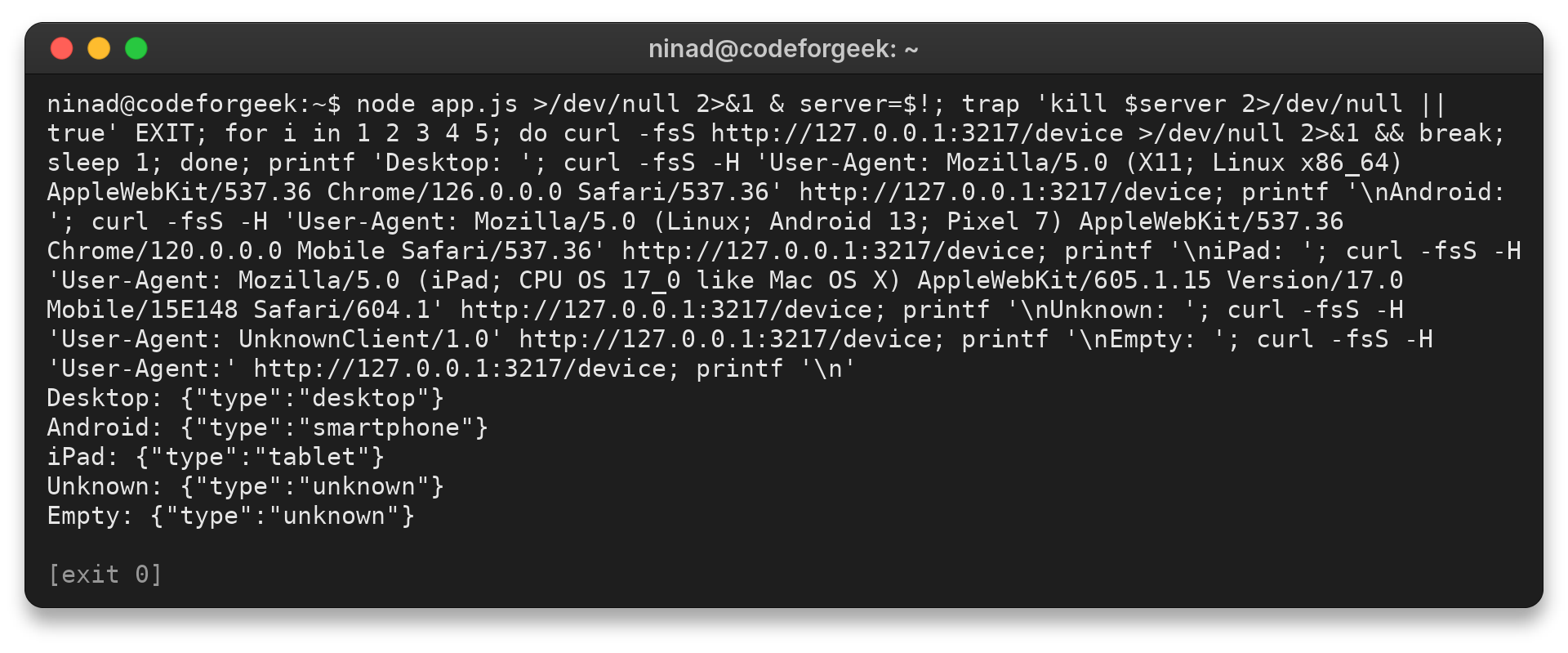
Start the server with node app.js, then send different User-Agent values to the same /device route.
curl -H 'User-Agent: Mozilla/5.0 (X11; Linux x86_64) AppleWebKit/537.36 Chrome/126.0.0.0 Safari/537.36' http://127.0.0.1:3217/device
curl -H 'User-Agent: Mozilla/5.0 (Linux; Android 13; Pixel 7) AppleWebKit/537.36 Chrome/120.0.0.0 Mobile Safari/537.36' http://127.0.0.1:3217/device
Verify the categories your route returns
For example, the route can return desktop for one request and smartphone for another. The terminal output shows the categories produced for the tested headers.
When the detected type is missing or misleading
Place the detector middleware before the route if req.device is undefined. An unknown type is a valid parser result, so keep a fallback in your route logic.
| Symptom | What to check |
|---|---|
| req.device is missing | Place the detector middleware before the route. |
| The type is unknown | Check whether the request included a User-Agent the parser recognizes. |
| The result controls page layout | Use responsive CSS to adapt to viewport size. |
| The result controls a protected action | Use authenticated identity and authorization checks, not a client header. |
Mozilla’s browser-detection guide recommends feature detection when a route depends on a browser capability. Use responsive stylesheets when the layout needs to fit different viewports.
Use device type only for a presentation choice
A parsed device type is a hint, not identity. Keep authorization tied to authenticated credentials, and use the detector only where an incorrect category cannot expose data or grant access.
req.device.device.type
Express device detection questions
The parser’s output can be unknown, and the header itself is supplied by the client. Those limits shape how the result should be used.
How does Express detect device type?
The middleware parses request headers, including the User-Agent, and stores a structured result on the request. The type is a parser classification, not verified hardware identity.
Where is the device type in the request?
In this example, read req.device.device.type inside a route after the detector middleware has run.
Can device type be used to authenticate a mobile app?
No. A client can change its User-Agent header. Use credentials and server-side authorization checks to protect an endpoint.