New to Rust? Grab our free Rust for Beginners eBook Get it free →
Handle GET and POST Requests in Express

An Express app that already reads data with GET routes may also need to accept fields sent by a form or JSON request. Express routes connect a request’s method and path to code, with GET handlers reading data and POST handlers accepting submitted data.
I’ll show how to register GET and POST routes, then read submitted values from the request body.
TL;DR: Handle GET and POST with Express Routes
Use app.get() responds to a read request. app.post() accepts submitted data. Add a matching body parser before a POST route that reads the request body.
- Read query values from req.query and path segments from req.params.
- Parse JSON with express.json() and standard HTML form data with express.urlencoded().
- Treat every submitted value as untrusted input and validate it before use.
What GET and POST Mean in an Express App
GET asks the server to return a representation, while POST sends data for the server to process. Express connects each method and URL path to a handler, where req is the incoming request and res is the response being built.
Choose GET for reading or searching, such as /products?category=books. Choose POST when a form or client submits data, such as creating a record. Query values are part of the URL, while a JSON or form payload is in the request body.
| Request | Typical use | Express value |
|---|---|---|
| GET | Read or filter information | req.query or req.params |
| POST | Submit data or create a resource | req.body after parsing |
GET should not change server state, and clients may cache or repeat it. POST can have side effects, so a repeated submission may create duplicate records.
Neither method encrypts traffic. Use HTTPS for data in transit, and keep passwords and tokens out of URLs.
How to Handle GET and POST Requests in Express
A small Express app can expose read and submit routes together. The sequence matters: register body-parsing middleware before a handler that reads req.body.
Step 1: Create the app and register routes
Install Express in your project and create an app instance. Each route method takes a path and a handler. The same path can have different GET and POST behavior.
const express = require('express');
const app = express();

app.get('/messages', (req, res) => {
  res.send('Read messages');
});

app.post('/messages', (req, res) => {
  res.send('Message submitted');
});
The first handler responds only to GET /messages and the second only to POST /messages. A request to an unregistered method and path does not run either handler.
Step 2: Parse JSON and form bodies
Express includes middleware for the common JSON and URL-encoded formats. Place the parsers before routes so matching requests have a populated req.body when they reach the handler.
app.use(express.json());
app.use(express.urlencoded({ extended: false }));
JSON clients should send Content-Type: application/json. A standard HTML form uses application/x-www-form-urlencoded by default. The parser only handles its matching format, so a wrong or missing Content-Type can leave the expected fields unavailable.
Step 3: Read path, query and body values
Express keeps URL path parameters, query parameters and parsed body fields in separate request properties. Select the location that matches how the client sends the value.
app.get('/users/:userId', (req, res) => {
  const userId = req.params.userId;
  const view = req.query.view || 'summary';
  res.json({ userId, view });
});

app.post('/messages', (req, res) => {
  const text = req.body.text;
  if (typeof text !== 'string' || text.trim() === '') {
    return res.status(400).json({ error: 'text is required' });
  }
  res.status(201).json({ text: text.trim() });
});
A request to /users/42?view=full supplies userId as a path parameter and view as a query parameter. The POST handler checks that text is a non-empty string before using it. A parser does not make client input trustworthy.
For related context, see the Express.js introduction and how to get form data in Node.js.
Step 4: Send a response and verify the route
A handler must finish the request-response cycle by sending a response or passing control onward. res.json() sends JSON, while res.send() handles simple text or other supported response bodies.
res.status(201).json({ id: 42, text: 'Hello' });
Use an HTTP client to send one request with the intended method, path and Content-Type. Check the status code and response body, then test a missing required field to confirm the handler returns its validation response.
The demo run returned:
GET 200 {"method":"GET","limit":"2"}
POST 201 {"method":"POST","text":"Hello"}
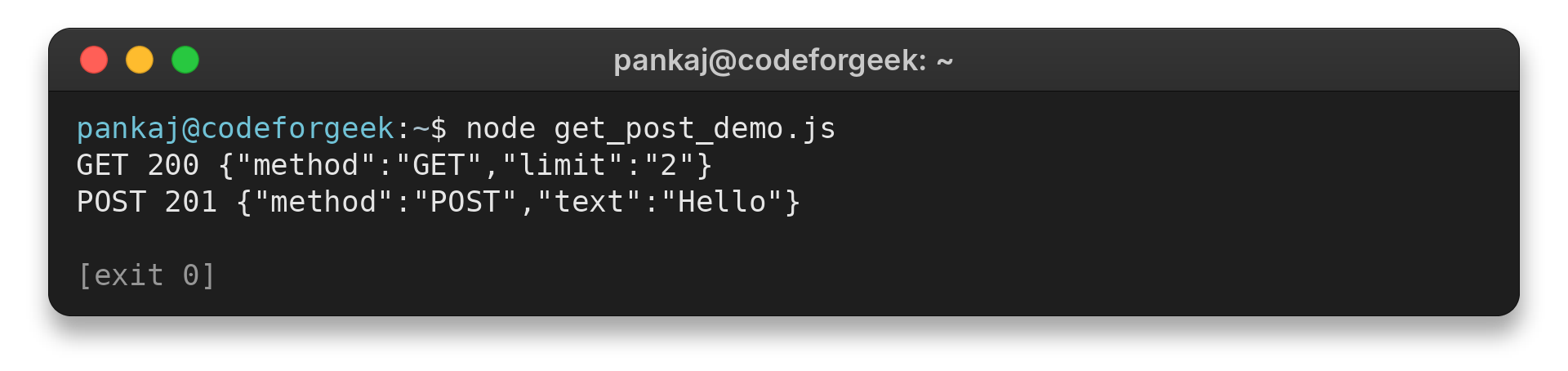
The GET response contains the query value, while the POST response contains the parsed JSON field and a 201 status.
Common GET and POST Request Problems
When a handler does not see the expected value, first check which part of the request carries it, then check middleware order and content type. These checks separate routing errors from parsing and validation errors.
| Symptom | Likely cause | Check |
|---|---|---|
| req.body is undefined or empty | Parser missing, mounted after route, or content type mismatch | Place express.json() or express.urlencoded() before routes and inspect Content-Type |
| GET handler does not match | Wrong method or pathname | Check the method and route path. Query strings do not form part of the route path |
| Field is missing | Reading from the wrong request property | Use req.params for path segments, req.query for query strings, req.body for parsed payloads |
| POST returns an error for a file upload | URL-encoded parser does not parse multipart form uploads | Use multipart-aware upload middleware and validate file type and size |
Do not put credentials or private data in a GET query string because URLs can appear in browser history and logs. POST keeps submitted fields out of the URL, but HTTPS is still required to protect traffic from interception.
Express route handlers can share a path and still differ by method. For a larger app, group related routes with express.Router() and mount the router under a prefix. Keep parsers before routes that read body fields.
Conclusion
Use GET routes to read and filter data, and POST routes to accept submitted data. Match each handler to the right method and path, parse the client’s content type before the route, and validate every value before acting on it.
For the authoritative details, see the Express routing guide and the Express API reference.
FAQ
These answers cover the common choices when connecting a client request to an Express route.
How do you get data from a POST request in Express?
Register the matching body parser before the route, then read parsed fields from req.body. The request Content-Type must match the parser.
Should a login form use GET or POST?
Use POST to submit credentials so they are not placed in the URL. Use HTTPS and never treat POST alone as encryption or authentication.
Do you need body-parser for Express POST routes?
For JSON and URL-encoded bodies, Express provides express.json() and express.urlencoded(). Add them before the routes that read req.body.