New to Rust? Grab our free Rust for Beginners eBook Get it free →
Become a Full Stack Developer: A Practical Roadmap

A long list of web technologies can make it hard to see what to learn first. Full stack development means working on both sides of a web application, from the browser interface to the server that applies rules and accesses data.
This roadmap takes one small application from its first screen through deployment and shows how to document the work for review.
TL;DR
The browser interface, server, database and deployment all contribute to a web application. Full stack developers work across the browser and server sides, while a complete project gives another developer evidence of that work.
- Learn HTML, CSS, JavaScript, Git and browser debugging first.
- Add one server framework, an API and a database.
- Test, deploy and document one original application.
- Use project evidence, not a technology checklist, to judge readiness.
What does full stack development include?
A full stack developer can work on a web application’s front end and back end. The browser displays the interface, while the server applies rules and accesses data.
HTML gives a page structure, CSS controls its presentation, and JavaScript responds to user actions. Together, these browser technologies create the interface a person uses.
HTTP carries requests and responses between browser and server. An API describes operations the front end can request, such as listing tasks or saving a change. A database keeps records after a request ends.
| Part | What it does | What to practice |
|---|---|---|
| Browser interface | Displays information and accepts input | Semantic HTML, responsive CSS, JavaScript events |
| Server | Applies rules and answers requests | Routes, validation, errors and API responses |
| Database | Stores and retrieves application records | Queries, relationships and integrity rules |
| Delivery | Makes the application usable outside your computer | Configuration, deployment and logs |
The useful measure is whether you can trace one feature from the interface through the server to stored data, then diagnose where it failed.
How to become a full stack developer step by step
Use one small web application as the thread connecting each skill. A personal reading list, appointment tracker or inventory tool can grow in stages, so each new concept solves a visible problem instead of adding another disconnected tutorial.
Step 1: Choose one stack and define a small project
Choose a server language and database that suit the project. JavaScript with Node.js is one route because it runs in the browser and on the server. Python, Java, PHP and C# are other server options.
Write down a user problem and the actions the application must support. A reading list could let someone add a title, mark it finished and filter the list. Add features after its first flow works.
| Choice | Good fit when | Decision to make |
|---|---|---|
| JavaScript and Node.js | You want one language across browser and server | Choose a server framework after HTTP basics |
| Python | You already know Python or your project benefits from it | Select a web framework and learn browser JavaScript separately |
| Java, PHP or C# | A target workplace or existing system uses that language | Learn its server conventions and matching ecosystem |
Match the stack to your project or the roles you want to pursue. Add another stack after you can explain requests, data and debugging in the first one.
Step 2: Learn HTML, CSS and browser basics
Build the first screen with semantic HTML elements and forms, then use CSS to make it readable at narrow and wide viewport sizes. Semantic elements describe the role of content, which helps assistive technology and gives browser controls their expected behavior.
Use JavaScript to read form input, update the page and respond to events. Learn arrays, objects, functions, modules and asynchronous requests as the project needs them. Browser developer tools let you inspect markup, styles, network requests and JavaScript errors.
Check the interface with a keyboard, submit valid input and read its validation feedback. Confirm the list updates without reloading, then inspect it at a narrow viewport.
Step 3: Use Git to track changes
Git records changes in a project so you can compare versions and recover from a mistake. Make small commits that explain a single change, such as adding the form validation or adjusting the list layout.
Branches let you work on a change separately before merging it into the main line. This is useful even when you work alone because an unfinished feature does not have to disrupt the version that already works.
Create a repository, commit the working interface, make a feature branch and merge it after checking the result. Keep database passwords out of tracked files and use environment configuration.
Step 4: Build a server endpoint
A server receives an HTTP request, decides what it means and returns a response. Add an endpoint for one application action, then have the browser request it. Start with the route and request flow before adding a large framework or several services.
Learn the difference between request methods, paths, headers and bodies. Validate input on the server even when the browser checks it too, because a client can send requests that bypass the interface. Return a useful status and error response when input is invalid or a record is absent.
Confirm that the browser can request a list and submit a change. Inspect requests in the network panel. When something fails, check the browser console, response and server log.
Step 5: Store data and protect its integrity
A relational database stores application records in tables and connects related records through keys. SQL lets the server create, read, update and delete those records.
Model the data your feature needs. A reading-list item might have a title and a completion state. Server validation gives users feedback, and database constraints protect records when another code path writes them.
Transactions group database operations so related changes can succeed or roll back together. For an action that updates two records, consider what happens if the second update fails. PostgreSQL documents constraints and transaction behavior.
Check persistence by restarting the server and confirming saved records remain. Test empty input, unexpected values and a missing record. Keep database credentials outside source control.
Step 6: Test behavior and handle failure
Test rules such as rejecting a blank title or returning an error for a missing record. Then test the endpoint and the complete browser-to-database action.
A unit test checks a function in isolation, while an integration test checks cooperating parts such as a route and database query. Browser-level tests follow a user flow through the interface.
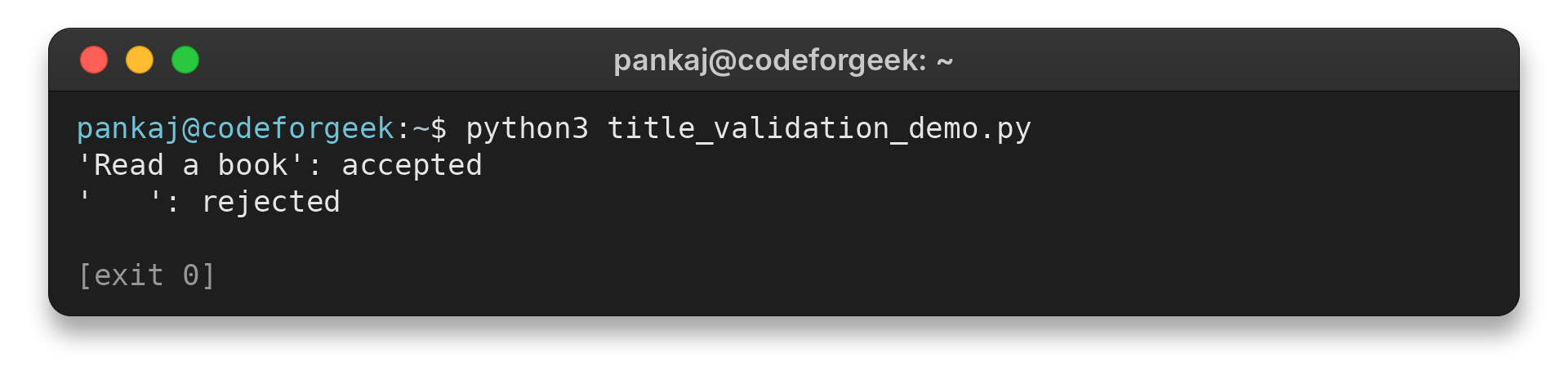
This small title-validation test accepts a non-empty title and rejects blank input:
def validate_title(title):
    return bool(title.strip())

cases = [("Read a book", True), ("   ", False)]
for title, expected in cases:
    actual = validate_title(title)
    assert actual is expected
    print(f"{title!r}: {'accepted' if actual else 'rejected'}")
The run prints:
'Read a book': accepted
'    ': rejected
Choose a test that covers the behavior you changed. A browser test fits behavior that depends on browser interaction.
When a test fails, read its assertion and isolate the failing layer. Avoid changing unrelated code while investigating. Error messages should guide corrections, and logs should not expose passwords or private session data.
Run one normal action and one failure path at each relevant layer. After changing a feature, rerun the suite and document its command.
Step 7: Deploy and observe the application
Deployment makes the application available in an environment beyond your development machine. Learn the host’s build and configuration process, set environment variables securely, and confirm that the deployed service can reach its database.
After deployment, test the public page and one complete user action. Check server logs for startup errors and failed requests. A feature that works only with local files or a local database is not yet a working deployed application.
For an application with accounts, authenticate users and enforce authorization on the server so each person can access only permitted records. Follow secure session handling and keep private credentials out of browser code.
Document how to configure, test and deploy the project, then verify the deployed flow from a clean browser session. Consult the host’s documentation when its setup steps change.
Step 8: Turn the project into evidence
A portfolio project is useful when another developer can understand what it does and how it was built. Include a short problem statement, a live link when available, setup and test instructions, and a diagram or explanation of how the browser, server and database fit together.
Describe a decision and its trade-off, such as choosing a relational database because records have a clear relationship. Report only bugs you actually investigated, and avoid claims about results you have not measured.
Completion check: a reviewer can run the project, follow its tests and understand one feature end to end. Ask someone to use the interface and report where instructions or feedback are unclear, then make a focused improvement.
Common problems while learning full stack development
Progress depends on your starting point, practice time and project scope, so a fixed number of months cannot promise job readiness. Track completed work such as a functioning feature, a test, a deployment and a clear explanation.
| Situation | What it can feel like | Practical response |
|---|---|---|
| You know the browser side already | Server and data concepts feel unfamiliar | Start with one endpoint and one database-backed action |
| You know a server language already | Layout and browser behavior take longer | Build a usable form and learn CSS through the project |
| You are new to programming | Every layer introduces new terms | Finish a small browser-only project before connecting a server |
| You are switching careers later in life | You may compare your timeline with others | Use a sustainable schedule and assess the work, not age-based assumptions |
A computer science degree can provide structured study. Employers set their own requirements, and some roles require formal credentials or specific experience. Practical projects and clear explanations can also demonstrate skills.
Roadmaps may list more frameworks than one project needs. Choose a framework when it helps solve an interface or server problem, and learn the concepts well enough to debug it. Build breadth across the request lifecycle, then deepen the area that fits your target roles.
Senior-level work involves sound trade-offs, code review, reliability and helping a team understand a system. These skills grow through maintaining software and learning from feedback.
Conclusion
To become a full stack developer, connect the browser, server and data layers in one application you can explain and maintain. Show the working features and how you tested and deployed them.
Use the full stack roadmap to spot topics you may need later. For implementation, start with MDN’s HTML learning materials and JavaScript guide, then consult the Node.js introduction when you build a server. CodeForGeek’s React or Node.js learning guide can help with that specific choice, and its Next.js introduction is a next step after you understand React’s role.
FAQ
These answers address common questions about the learning path and what counts as progress.
How long does it take to become a full stack developer?
There is no fixed timeline. It depends on your prior experience, practice time and project scope. Judge progress by whether you can build, test, deploy and explain a complete application.
Do you need a degree to become a full stack developer?
A degree is one route, but not the only way to learn web development. Requirements vary by employer and role. A portfolio can show practical work, though it does not replace credentials where a role requires them.
Which language should a beginner learn first?
Choose one language and stack that fits your goals. JavaScript with Node.js lets you use JavaScript in the browser and on the server. Python, Java, PHP and C# are also server-side options.
Can you become a full stack developer by self-study?
Self-study can teach the skills, but it requires practice and feedback. Build an original application, test it, deploy it and document decisions so others can review what you can do.