New to Rust? Grab our free Rust for Beginners eBook Get it free →
Online URL Encoder

A text value you add to a web address may include characters that also mark its structure. URL encoding represents characters in the value with percent escapes, and an ampersand can mark a separator in the address.
I’ll show how to tell a complete URL from one value, then how to encode the value in the format its destination expects.
TL;DR
Use the online encoder for text going into a URL. The right encoding depends on whether that text is a complete address or one value within it.
- Spaces can appear as %20 in a URI or as + in form-encoded query data.
- Encode a parameter value, not the full address, when you need to preserve ? and & separators.
- Check the output in its destination and avoid encoding it twice.
What Is URL Encoding?
Percent encoding represents a byte as a percent sign followed by two hexadecimal digits. Unicode text is commonly converted to UTF-8 bytes first. An ampersand used as data can be written as %26.
RFC 3986 calls letters, digits, hyphen, period, underscore, and tilde unreserved. Question marks and ampersands can delimit URL parts, so their meaning depends on position.
How to Encode a URL Value Correctly
Choose the JavaScript encoding function by the kind of input you have.
Step 1: Decide whether you have a URL or a value
Use encodeURI() for a complete URI, and encodeURIComponent() for one value. Encoding a whole address as a value can escape its colon and slashes.
Step 2: Encode the value
Paste the value into the tool’s “Text to Encode” field and select “Encode URL.” Check the result against the format expected by its destination.
The live snapshot shows separate input and output fields. Copy the result value into its destination.
The tool’s code in the live snapshot calls encodeURIComponent() and then replaces %20 with +. That makes its spaces follow form-style query encoding. The output still needs to match the receiving application, since not every URL component uses that convention.
These common characters show how a value can be represented:
| Input character | Typical percent form | Why it matters |
|---|---|---|
| space | %20 | General percent-encoded representation |
| ampersand | %26 | Prevents data from acting as a query separator |
| plus sign | %2B | Distinguishes a literal plus from a form-encoded space |
| question mark | %3F | Keeps a question mark inside a value |
Step 3: Compare a component encoding
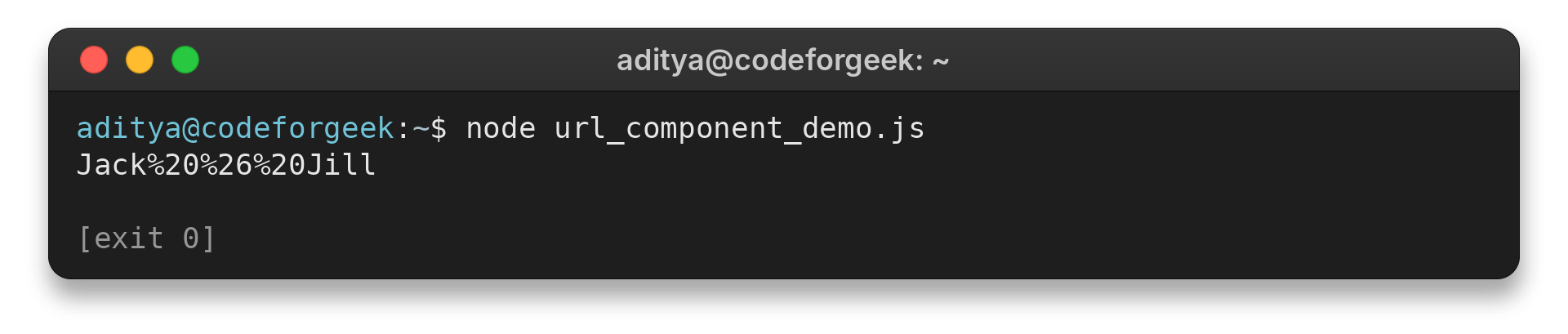
Save the example as url_component_demo.js and run node url_component_demo.js. Compare its output with the input.
const value = "Jack & Jill";
console.log(encodeURIComponent(value));
Jack%20%26%20Jill
URLSearchParams uses form-style serialization, where a space is written as + rather than %20. Encode a literal plus as %2B to keep it distinct from a space.
In a URL with several query keys, the question mark introduces the query and ampersands separate fields. Encode each dynamic value before joining it to those separators. URLSearchParams can build the query from key-value pairs when JavaScript is assembling the address.
URL Encoding Edge Cases
These cases cover formatting differences and malformed input.
| Case | What to check | Safer action |
|---|---|---|
| Space appears as + | Is the destination using form-encoded query data? | Use the convention expected by that endpoint. |
| A literal + is data | Could a form parser read it as a space? | Represent the plus as %2B. |
| Output contains %25 | Was an existing percent escape encoded again? | Start from the original text and encode once. |
| A slash or question mark changes meaning | Is it URL structure or part of a value? | Encode data components and preserve intended delimiters. |
| Unicode output has several escapes | Are the bytes part of one UTF-8 character? | Keep the sequence intact and decode as UTF-8. |
| An escape has one hex digit | Is the percent triplet complete? | Check the original input and correct the malformed escape. |
Double encoding changes %20 to %2520 because the percent sign itself becomes %25. If output begins with %25 unexpectedly, check whether the input was already encoded.
A percent escape needs two hexadecimal digits after %. Correct incomplete escapes at the source. JavaScript encodeURIComponent() throws URIError for a lone UTF-16 surrogate, an invalid Unicode value.
Encoding does not encrypt or hide the value. Percent escapes are a representation for transport within URI syntax, and anyone who receives the string can decode them. Avoid placing secrets in a URL because addresses can be retained in browser history, logs, or referrer data.
Conclusion
Use the encoding format that the receiving system expects.
For decoding, use CodeForGeek’s online URL decoder. To encode binary data instead, see its Base64 encoder. RFC 3986 defines the URI character categories, and MDN documents encodeURIComponent().
FAQ
These answers cover common choices when encoding values for URL use.
Should spaces be encoded as + or %20?
Use %20 for general percent encoding. In form-encoded query data, spaces are commonly serialized as +. Follow the format expected by the destination.
What is the difference between encodeURI and encodeURIComponent?
encodeURI preserves characters used to structure a complete URI. encodeURIComponent encodes a value intended to occupy one URI component, such as a query parameter value.
Why does an encoded value contain %25?
A percent sign is represented as %25. This can indicate double encoding when the original input already contained percent escapes.