New to Rust? Grab our free Rust for Beginners eBook Get it free →
5 Cloud Deployment Best Practices You Should Know About


A release carries three separate things to production: the artifact you built, the configuration the process reads at startup, and the instance that takes traffic. I ran all three on this server with a small Node.js service and a router in front of it.
The image with a token baked into it handed that token to anyone who ran the container, and my own traffic flip pointed users at a port with nothing behind it.
Where Cloud Deployments Break
Local success and production success depend on different things. Between your checkout and a user request sit four handoffs, and a check that covers one of them says nothing about the next.
The artifact is whatever you ship: a container image, a package, a build the platform makes for you. Configuration is what that artifact reads when it starts, and readiness is the answer the new instance gives about itself.
The switch is the single moment the router stops pointing at the old instance, and by then the other three have already decided the outcome.
| Handoff | What it depends on | What a local test shows | What I measured here |
|---|---|---|---|
| The artifact | One image, built once, started everywhere | Nothing, because you run from the working copy | Three containers, one image ID |
| Runtime configuration | Values supplied at start, not stored in the artifact | Nothing, because your own file exists on your machine | A token printed out of the image built with it |
| Instance readiness | The new instance answering yes on its own health path | A request to your dev server returns 200 | An instance serving 200 with a missing database URL |
| The traffic switch | The moment the router points at the new instance | Nothing, because the request went to your one process | 39 responses out of 60 came back as 502 |
Each handoff is cheap to check and expensive to skip. The last one decides whether anyone noticed.
What You Need Before You Start
The rehearsal needs a container runtime, a router whose upstream you can rewrite, and a service that reports its own state. I used the current stable release of each tool on this host and pinned nothing.
Ports matter more than they look. The router needs one, each instance needs one, and I kept a spare for the deliberately broken copy that appears later.
- Docker with the BuildKit build path, version 29.8.0 here
- nginx 1.24 as the switchable router, or any proxy whose upstream line you can rewrite and reload
- Node.js 26 on the host for reading the source, since the image brings its own runtime
- Free ports: one for the router, two for the instances and one more for the broken copy
- The single service file below, which is everything the image contains
If your user is not in the docker group, put sudo in front of the container commands. The screenshots below run that way.
Build One Image and Run It Everywhere
The artifact is the one thing you want identical in every environment, because everything after it is a comparison between what you tested and what your users received.
The service answers on two paths. Its main path returns the version it was given and the host it runs on, and its readiness path answers 503 until the configuration it needs is present.
That second path separates a process that is up from an instance that should take traffic, and the code keeps the two apart on purpose.
const http = require("node:http");
const os = require("node:os");

const port = Number(process.env.PORT || 3000);
const version = process.env.APP_VERSION || "dev";

const required = ["APP_VERSION", "DATABASE_URL"];
const missing = required.filter((name) => !process.env[name]);
const ready = missing.length === 0;

const server = http.createServer((req, res) => {
  if (req.url === "/healthz") {
    if (!ready) {
      res.writeHead(503, { "content-type": "application/json" });
      return res.end(JSON.stringify({ status: "unready", missing }));
    }
    res.writeHead(200, { "content-type": "application/json" });
    return res.end(JSON.stringify({ status: "ok", version }));
  }
  res.writeHead(200, { "content-type": "application/json" });
  res.end(JSON.stringify({ version, host: os.hostname() }));
});

server.listen(port);
The required list near the top is what makes the split work, because a process can be alive and still unusable. It starts, binds its port and answers normal requests while its readiness reply stays a 503, so a router that reads readiness never treats it as usable.
The Dockerfile copies that file and declares how Docker should test the container it starts.
FROM node:26-alpine
WORKDIR /app
COPY server.js ./
ENV PORT=8080
EXPOSE 8080
HEALTHCHECK --interval=2s --timeout=2s --retries=10 CMD node -e "fetch('http://127.0.0.1:8080/healthz').then(r=>process.exit(r.ok?0:1)).catch(()=>process.exit(1))"
CMD ["node", "server.js"]
The HEALTHCHECK line repeats the readiness check from inside the container, and Docker records the result on the container itself. That record is the health column in the next screenshot.
Build once, then start two instances from that image with different version values.
sudo docker build -t demo-api:1.4.0 .
sudo docker run -d --name demo-blue -p 127.0.0.1:3100:8080 \
  -e APP_VERSION=1.4.0 -e DATABASE_URL=postgres://[email protected]:5432/shop \
  demo-api:1.4.0
sudo docker run -d --name demo-green -p 127.0.0.1:3101:8080 \
  -e APP_VERSION=1.5.0 -e DATABASE_URL=postgres://[email protected]:5432/shop \
  demo-api:1.4.0
sudo docker ps --filter name=demo- --format '{{.Names}} {{.Image}} {{.Status}}'
A tag resolves when a container starts, so two names can point at one build and still come up on different values. The digest stays fixed, which is why a release record should name the digest rather than the tag.
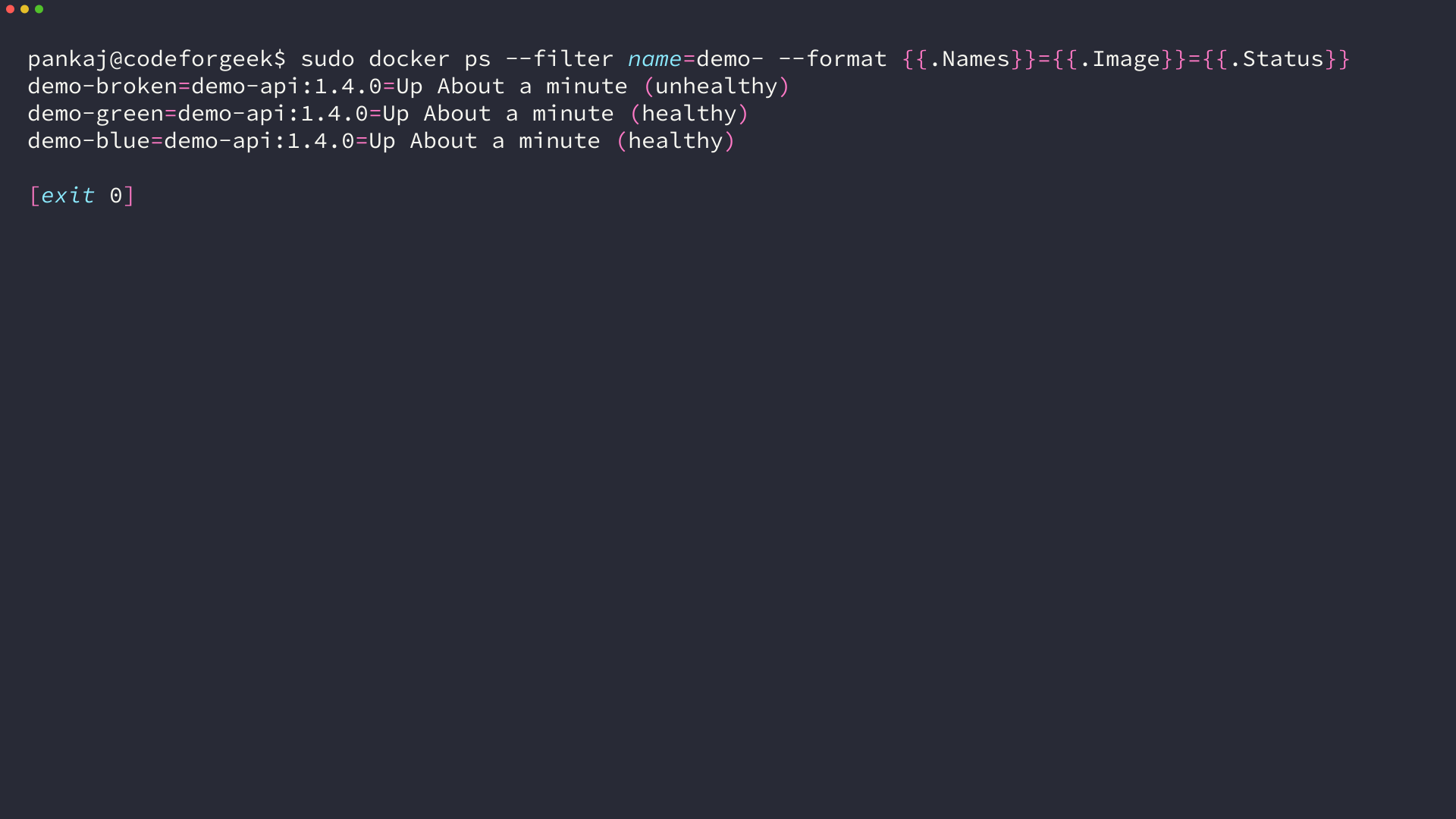
The third container answers on its port and still reports unhealthy, and that state is the subject of the readiness section below. A container image is one artifact format among several, and a static site rolled out on a cloud platform uses the platform’s own build as its artifact. The same four handoffs apply to that path.
Send Configuration In, Never Bake It In
A build argument is the shortest path from a secret to a public layer, and walking it takes one line.
FROM node:26-alpine
ARG API_TOKEN
ENV API_TOKEN=$API_TOKEN
WORKDIR /app
COPY server.js ./
ENV PORT=8080
CMD ["node", "server.js"]
ARG accepts a value during the build and ENV stores it inside the image, which is the combination that writes the value into the layer record. Build that file with a token and read the image’s own layer list back.
sudo docker build -f Dockerfile.baked \
  --build-arg API_TOKEN=sk_live_51H8xDoNotShip_0123456789 \
  -t demo-api:baked .
sudo docker history --format '{{.CreatedBy}}' demo-api:baked
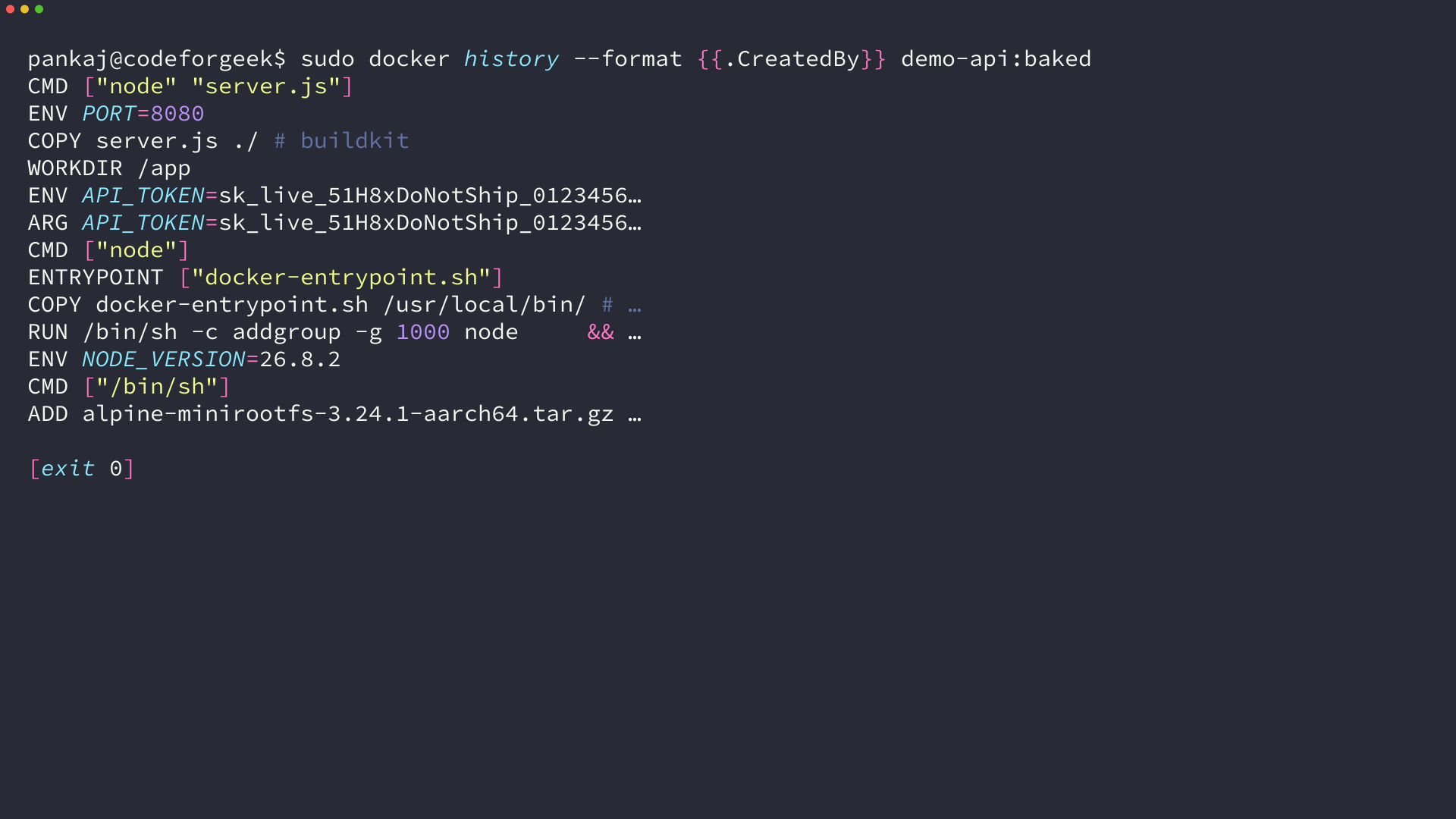
I expected the value to exist only as an environment variable inside a running container, and the layer entry showed the instruction and its value sitting together in a file that anyone who can pull the image can read.
The same command gets it back out of the finished container, with no shell required. The image carried the token, the runtime handed it to the process, and the process printed it.
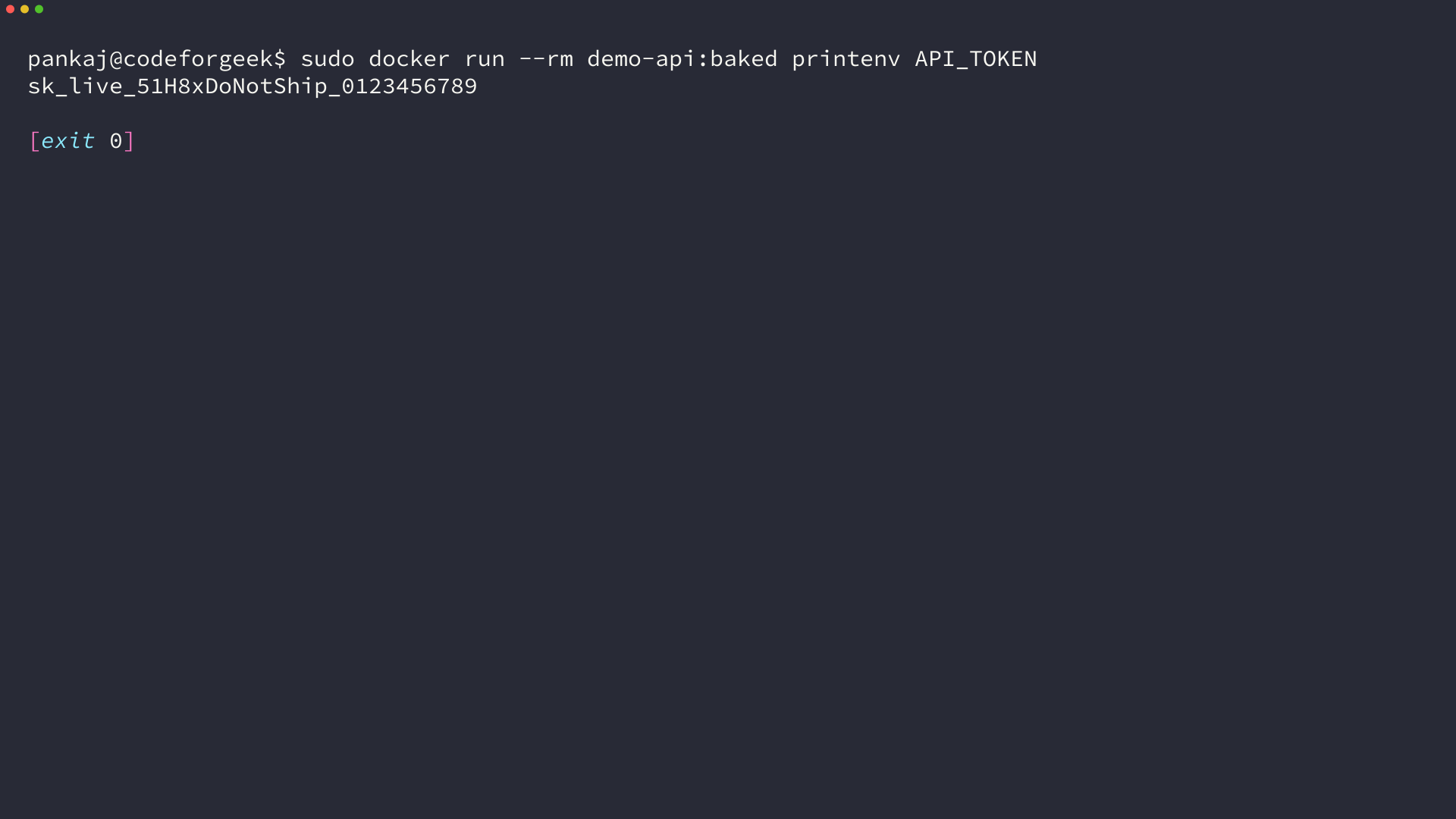
I ran the same printenv against the image built without a build argument, and it returned nothing with exit status 1. That empty result is what a clean image looks like when its configuration arrives at start time.
Supplying config at run time keeps the artifact free of it, so one image moves from staging to production without a rebuild.
sudo docker run -d --name demo-green -p 127.0.0.1:3101:8080 \
  -e APP_VERSION=1.5.0 \
  -e DATABASE_URL=postgres://[email protected]:5432/shop \
  demo-api:1.4.0
A value can live in two places, and only one of them travels with the image.
- In the image: the runtime, the source, and defaults that are safe to publish to anyone who pulls it
- At start: credentials, connection strings, feature flags, and the version label this instance reports
- Nowhere: anything the build writes into a layer, because a layer stays with the image after the build ends
Some builds genuinely need a credential, such as a token for a private package registry. Docker’s documented answer is a build secret mounted for the step that reads it, rather than a build argument that persists in the layers.
Let the New Instance Declare Itself Ready
A listening port is not readiness, and the difference is why a smoke test can pass while a release is already broken.
I started a third container from the same image with no database URL. Its main path answered 200 because the process was up, and its readiness path answered 503 with the name of the value it was missing.
| Request | Instance with incomplete config | Instance with full config |
|---|---|---|
| GET / | 200, with an empty database field | 200, with the connection string it was given |
| GET /healthz | 503, status unready with DATABASE_URL missing | 200, status ok with the running version |
I checked all three ports rather than trusting the container status, and the readiness reply is the one that named the missing value. The deploy script reads exactly that. A check that only confirms the process is listening would have waved the instance through.
The gate is a loop with one decision inside it. It asks the new instance whether it is ready and moves the router only on a 200.
#!/bin/bash
port="${1:?usage: release.sh port [tries]}"; tries="${2:-10}"
for i in $(seq 1 "$tries"); do
  code=$(curl -s -o /dev/null -w '%{http_code}' "http://127.0.0.1:${port}/healthz")
  echo "check $i: /healthz on $port -> $code"
  if [ "$code" = "200" ]; then
    ./switch.sh "$port"
    echo "flipped to $port"
    exit 0
  fi
  sleep 1
done
echo "instance on $port never reported healthy, traffic stays on the previous release"
exit 1
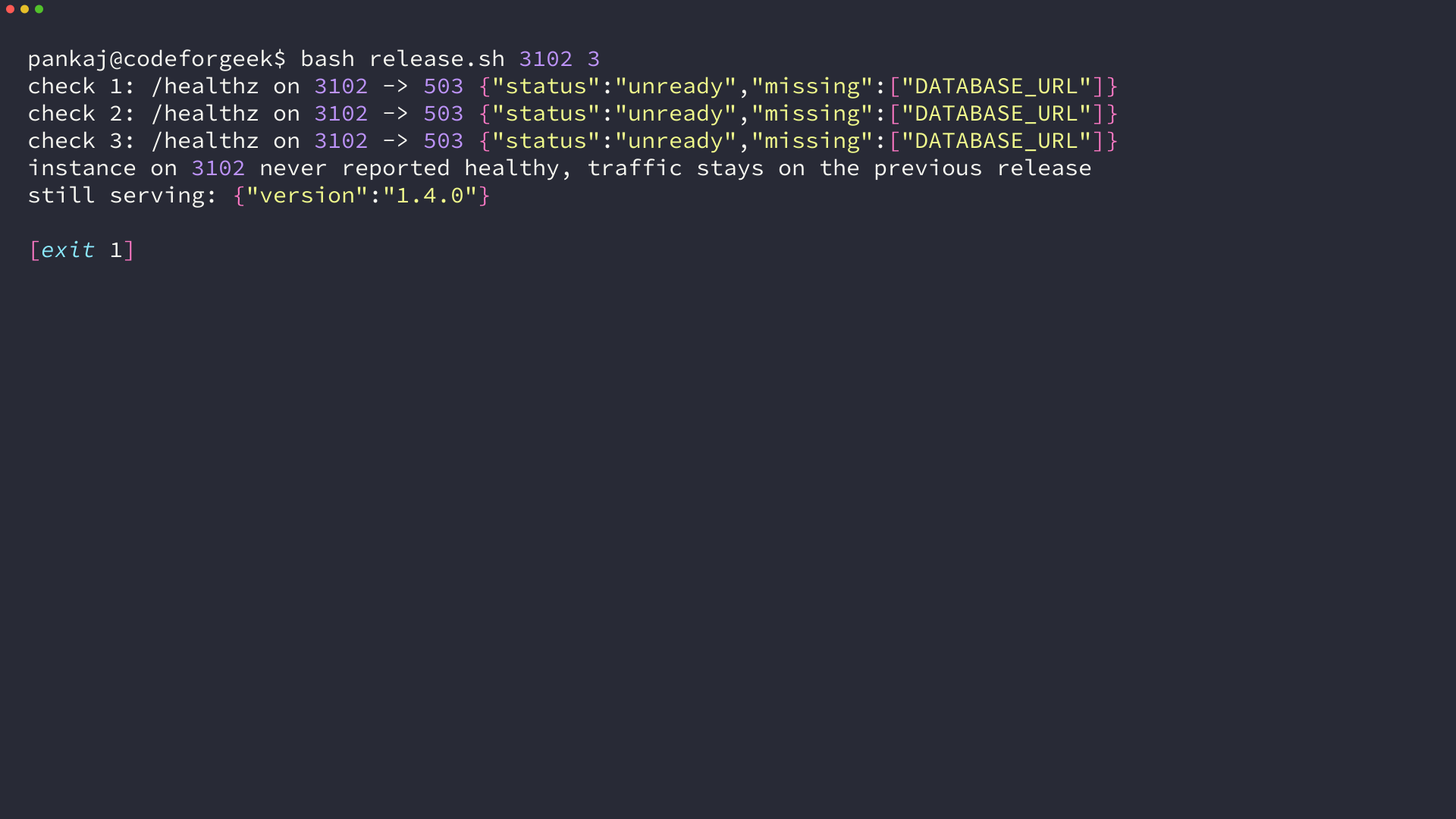
The gate refused three times and the old release kept serving. Without that loop the switch turns into a guess about whether the new instance finished starting, and the next section measures what the guess costs.
Switch Traffic Under Load and Keep the Way Back
The switch is one line of configuration, so the useful measurement is what the responses look like while it happens. I moved the upstream the way a deploy script does and counted every status code that came back.
#!/bin/bash
# switch.sh: point the router at another instance and reload
port="${1:?usage: switch.sh port}"
sed -i "s/server 127.0.0.1:[0-9]*;/server 127.0.0.1:${port};/" nginx.conf
sudo nginx -c "$PWD/nginx.conf" -s reload
#!/bin/bash
# loadtest.sh: count statuses while the upstream changes
count="${1:-120}"; switch_at="${2:-40}"; port="${3:-3101}"
echo "before: $(curl -s http://127.0.0.1:8080/ | jq -c '{version}')"
ok=0; failed=0
for i in $(seq 1 "$count"); do
  code=$(curl -s -o /dev/null -w '%{http_code}' http://127.0.0.1:8080/)
  if [ "$code" = "200" ]; then
    ok=$((ok + 1))
  else
    failed=$((failed + 1)); echo "request $i -> $code"
  fi
  if [ "$i" -eq "$switch_at" ]; then
    echo "flipping upstream to 127.0.0.1:$port on request $i"
    ./switch.sh "$port"
  fi
  sleep 0.05
done
echo "after:  $(curl -s http://127.0.0.1:8080/ | jq -c '{version}')"
echo "requests $count   200 $ok   non-200 $failed"
Pointing the upstream at a port with nothing listening is what a deploy does when it flips before the process is up. The result shows up immediately.
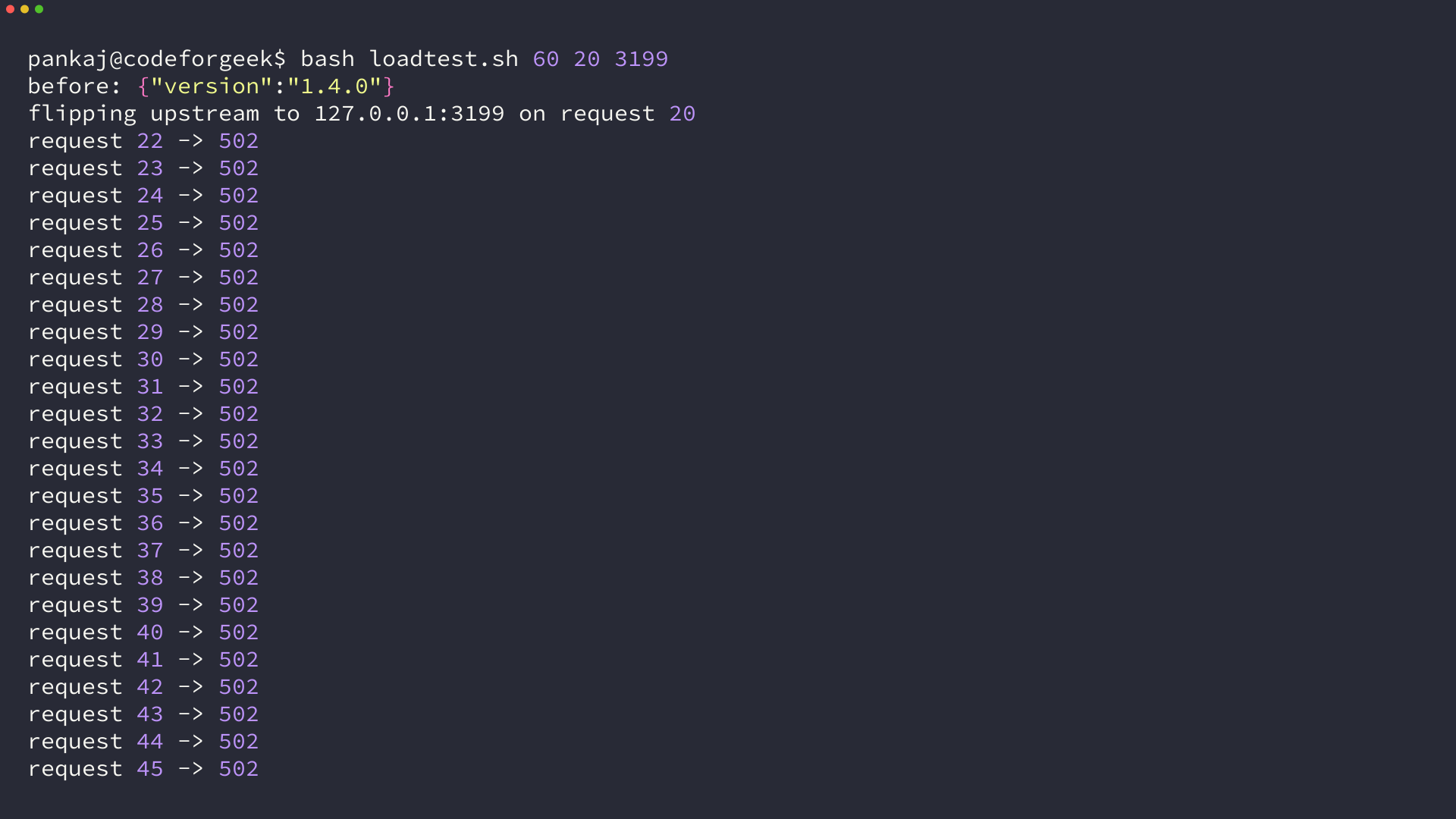
The old instance served 21 requests, the flip happened at request 20, and the remaining 39 came back as 502. Even the version read at the end failed, because an error page is not JSON and the parser said so in one line.
The same script with the readiness gate in front of it produced a different count.
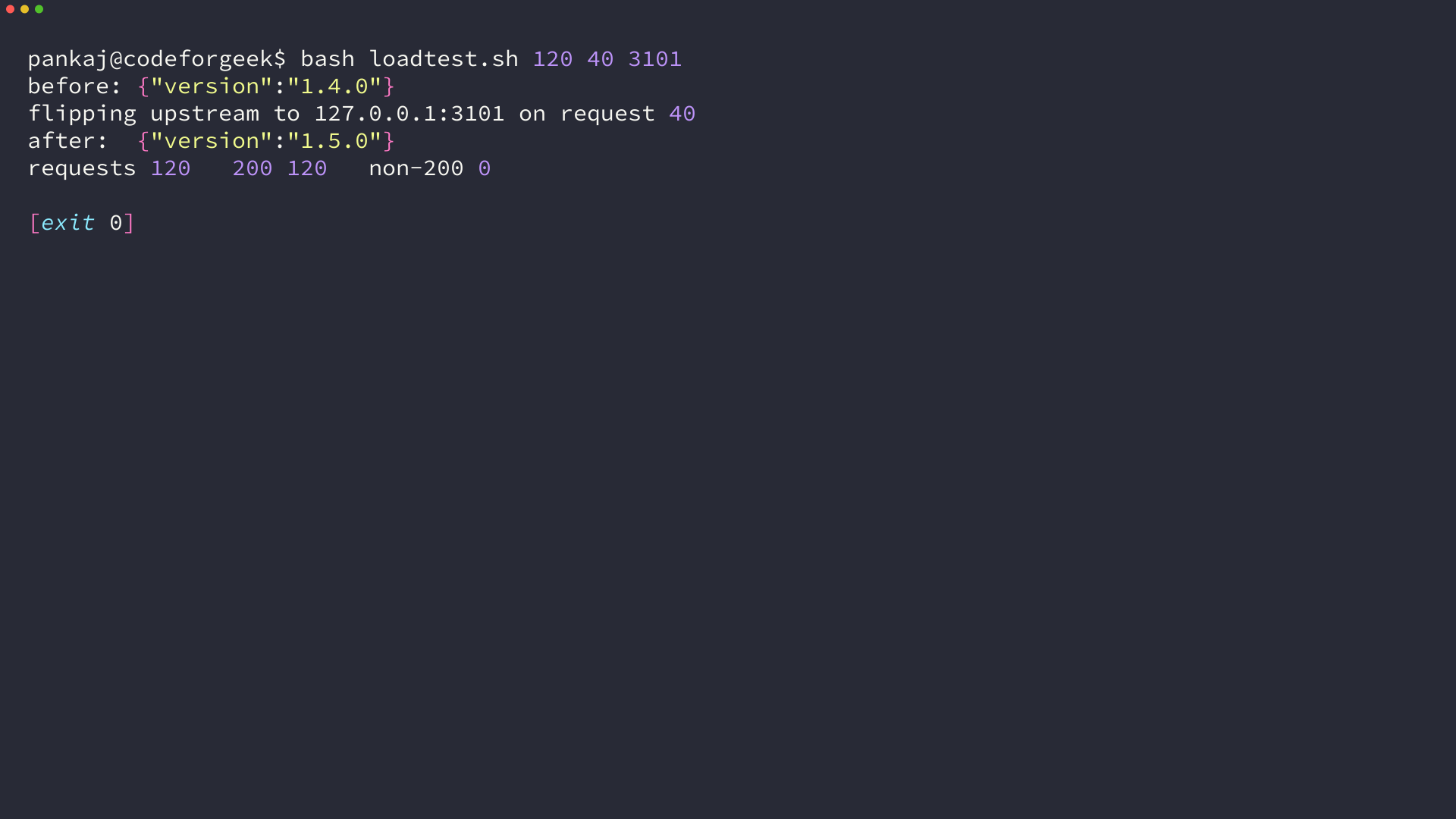
All 120 requests returned 200, and the version in the response changed from 1.4.0 to 1.5.0 at request 40. I read that version before and after the flip instead of trusting the script’s exit status, since a switch can succeed at the router and still leave the old instance answering.
The window between the flip command and the first response from the new instance is the proxy reload, and it is why the gate runs before the switch rather than after. A reload takes a fraction of a second on this host and longer on a busy one, and during that window the old upstream keeps answering.
The way back is the same command. I kept demo-blue running through the whole change, so a rollback is one more call to switch.sh with the old port instead of a rebuild and a second release.
A pipeline that builds the artifact on every commit is where this sequence usually starts, and the Jenkins walkthrough on this site covers that half.
When This Process Does Not Hold
The approach stops working at four boundaries, and each one is visible before anything is switched.
| Boundary | What changes the decision |
|---|---|
| Schema migrations | Both versions talk to one database during the switch, so the migration has to stay compatible with the running release. A traffic flip cannot undo a dropped column. |
| Session state held in memory | Requests arriving at the old instance after the flip lose their session. A shared store, or routing that keeps a user on one instance, is a prerequisite rather than a later fix. |
| Mutable tags | A tag can point somewhere else tomorrow while the running containers keep their bytes. Name the digest in the release record. |
| Readiness that only proves the process started | The readiness check here proves configuration arrived. It says nothing about the database reachable over the network, so a partition can still pass the gate. |
Running two instances at once also costs two instances at once. Where that doubles the bill, a rolling replacement inside one set of capacity is the cheaper option, and the readiness gate moves with it.
The process covers the release of code and configuration, not the reversal of data changes. That boundary is worth writing down before the first flip.
Run the Same Release on a Second Port
A release stops being a leap once the previous version keeps serving until the new one answers. That property belongs to the deployment process rather than to any cloud provider.
The next command is the readiness check against the instance you just started, run before anything points at it.
curl -s http://127.0.0.1:3101/healthz
FAQ
What is the difference between a readiness check and a liveness check?
A readiness check answers whether an instance should receive traffic, so a failed check takes it out of rotation while the process keeps running. A liveness check answers whether the process should be restarted. Kubernetes documents both, and a service that returns 503 because a configuration value is missing belongs in the readiness path.
Does a blue-green deployment remove downtime on its own?
The switch removes downtime when both instances are already running and the router points at one of them. What the switch cannot cover is the database migration between the two versions, so a change that breaks compatibility with the running release still needs a staged migration before the flip.
How do I keep a secret out of an image when the build needs it?
Pass it as a build secret instead of a build argument. A build argument is stored with the image layer history, which is what the docker history output above shows, while a build secret is mounted only for the step that reads it and stays out of the layers.
Do I need Docker to follow this?
No. The four decisions are the artifact, the configuration, the readiness answer, and the switch. A package on a virtual machine, a function version on a serverless platform, or a platform-managed build all make the same four decisions, and the same four checks move with them.