New to Rust? Grab our free Rust for Beginners eBook Get it free →
Install Zig: What It Is and How to Run a Program


When you set up Zig, you need a compiler that can build the program you want to run. Zig is a systems programming language, and its compiler can build Zig programs as well as C code.
This article explains how to match a release to your operating system and processor, then run a Zig source file.
TL;DR
Choose a stable Zig bundle for your operating system and CPU, expose its folder on PATH, verify the version, then run a source file.
- Use a tagged release unless a project requires another version or you are testing development builds.
- Download the archive for your operating system and processor architecture, or use a package manager already available to you.
- Open a new terminal after changing PATH, then check the compiler version.
- Run a named Zig source file to confirm that the compiler and its library files work together.
What Is Zig?
Zig is a general-purpose systems programming language and compiler toolchain. A compiler translates source code into a program a computer can run, and Zig can compile Zig programs as well as C code.
Zig leaves memory allocation and allocation failure handling to the program, and functions can receive an allocator value that supplies memory.
| Work | How Zig fits | First decision |
|---|---|---|
| Systems software | The Zig overview lists desktop applications, servers and operating-system kernels. | Can the team maintain the compiler version? |
| WebAssembly | Zig can produce code for a browser or another WebAssembly host. | Which host interface will call the module? |
| C interfaces | Zig can use C libraries and expose a C application binary interface. | Which headers and ABI does the project use? |
The C interface can matter to JavaScript developers building native add-ons. CodeForGeek’s Node-gyp guide explains that build path, while its Rust introduction for JavaScript developers offers a systems-language comparison.
Zig is useful for native programs, C integration and WebAssembly, so a first install can lead into several kinds of projects.
How to Install and Run Zig Step by Step
The example uses the official stable 0.17.1 archive for Linux on aarch64. The terminal output below shows the version and both ways of running hello.zig.
Step 1: Choose a Stable Release and Match Your Processor
A tagged release has a fixed version name, while a development build follows the Zig project’s moving master branch. Zig’s Getting Started guide says tagged releases are the better fit for projects that need stability, and development builds suit people helping with Zig itself.
On November 10, 2026, the official download page listed 0.17.1 as the stable release, dated November 2. Check the official release list when choosing a version.
| Release choice | Use it when | Trade-off |
|---|---|---|
| Tagged stable release | A project needs a named compiler version. | Examples written for a newer compiler may differ. |
| Development build | You are contributing to Zig or need a change on master. | The build moves and code can change with it. |
Match both the operating system and the processor architecture shown on the download page. For example, x86_64 and aarch64 are different CPU targets, so a Linux archive for x86_64 will not run on an aarch64 machine.
On Linux, uname -m reports the machine architecture. On Windows, Zig’s guide lists archive filenames for x86_64 and aarch64 processors.
Step 2: Pick an Installation Route for Your Operating System
The official archive gives you a version to choose directly, while a package manager uses its own package source. Zig’s Getting Started guide lists package-manager routes on Windows and macOS, while Linux packages depend on the distribution.
| System | Direct download | Package route | PATH step |
|---|---|---|---|
| Windows | Choose the ZIP matching Windows and the CPU. | WinGet, Chocolatey or Scoop are listed in Zig’s guide. | Add the extracted folder that contains zig.exe to the user Path, then open a new PowerShell window. |
| macOS | Choose the tar.xz archive for Intel or Apple silicon. | Homebrew’s formula lists brew install zig. | Add the extracted Zig folder to PATH in the shell startup file, then reload it or start a new terminal. |
| Linux | Choose the tar.xz archive for the CPU architecture. | Check the distribution’s package source and its Zig version. | Add the extracted Zig folder to PATH in the shell startup file, then reload it or start a new terminal. |
The guide lists the manager commands but does not publish one shared success message.
If you choose a direct archive, extract it into a folder you control and keep the compiler beside its lib directory. Zig describes each installation as a self-contained archive, and the compiler locates its libraries relative to its own files.
Step 3: Put Zig on PATH and Check the Version
PATH is the list of directories a shell searches when you type a command. Add the extracted compiler directory there, then start a new terminal so the shell reads the change.
On Linux and macOS, Zig’s guide shows a startup-file export for PATH. Windows uses a user Path entry in Environment Variables. Keep the compiler directory intact so Zig can find the library files beside it.
Run zig version in a fresh terminal to see which compiler the shell finds.
zig version
0.17.1
This output matches the tagged release selected above. A different value points to another compiler on PATH.
Step 4: Run a Zig Source File
A small source file checks the path from the compiler to the program’s output. Save this example as hello.zig in a project folder.
const std = @import("std");

pub fn main() void {
    std.debug.print("Hello, Zig!\n", .{});
}
With Zig available in the terminal, run the file and then build a separate executable from the same source.
zig version && zig run hello.zig && zig build-exe hello.zig -femit-bin=hello-built && ./hello-built
0.17.1
Hello, Zig!
Hello, Zig!
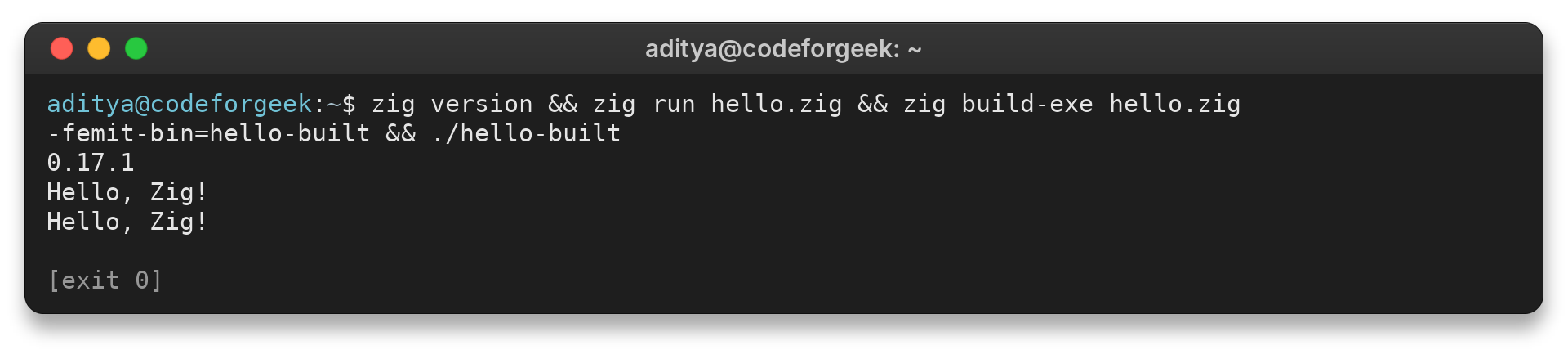
The first Hello line comes from zig run, which uses temporary compiler output instead of leaving a hello executable in the project folder. I checked that folder and found no hello file, while zig build-exe created hello-built and running it printed the second line. Use zig run for a source-file check, then build-exe when another tool needs a named binary.
Common Zig Installation Errors and What to Do Next
The compiler stops when it cannot load the source path, before it checks the program.
zig run missing.zig
missing.zig:1:1: error: unable to load "missing.zig": FileNotFound
zig-aarch64-linux-0.17.1/lib/std/std.zig:116:22: note: file imported here
const root = @import("root");
            ^~~~~~~
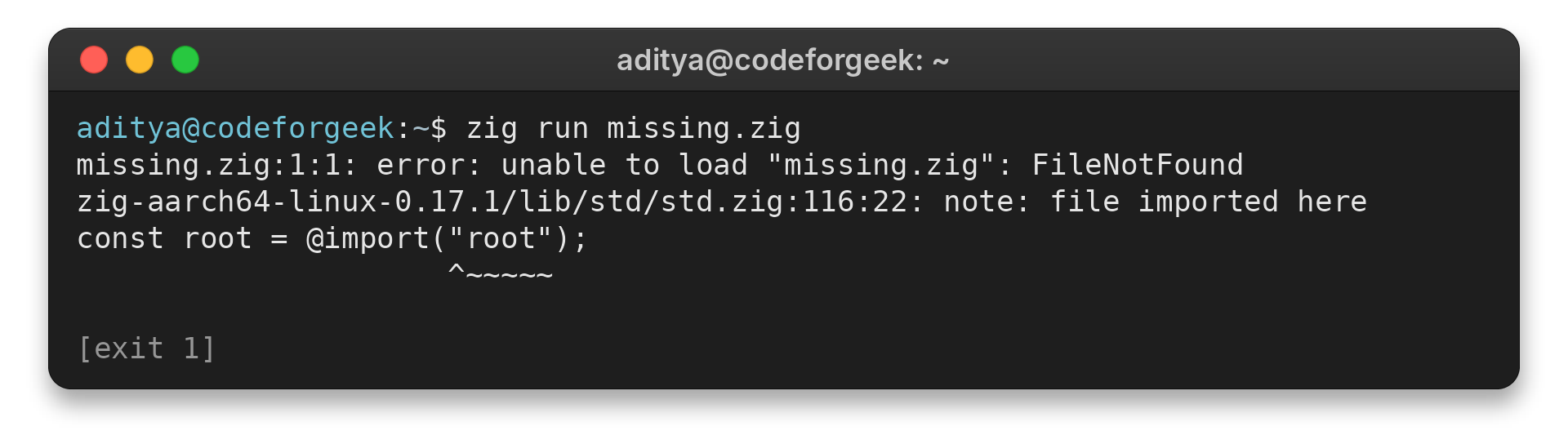
The first line names the file Zig tried to load. Run the command from the folder containing hello.zig, or give Zig the file path.
| Symptom | Likely cause | Next check |
|---|---|---|
| The shell cannot find the zig command. | The compiler directory is absent from PATH, or the shell has an older environment. | A Zig forum reply says to “modify PATH and restart the terminal.” |
| zig version prints an older release. | Another Zig executable appears earlier on PATH. | Check the executable location and compare it with the project requirement. |
| The archive’s executable will not start. | The download targets another operating system or CPU architecture. | Compare the archive filename with the machine’s OS and architecture. |
The versioned zig.guide page documents Zig 0.15.2, while the official download page listed 0.17.1 on November 10, 2026. Before following an older example, check which compiler version its instructions target.
For a shared project, record the compiler version and installation route in its setup notes. That gives contributors a concrete version to compare when an example behaves differently.
When the terminal cannot find zig, use the shell’s command lookup to see which executable it resolves. On Linux and macOS, command -v zig prints its path. PowerShell’s Get-Command zig reports the selected command.
command -v zig
This check identifies command resolution. After changing PATH, open another shell and repeat zig version. Confirm the PATH entry points to the folder containing the executable, rather than its parent directory.
A project that needs more than one source file can start with the scaffold created by zig init. Zig’s Getting Started guide pairs it with zig build run, which builds and runs the project using its build description.
zig init
zig build run
Initialize an empty project directory because the command creates files there. Review the generated build configuration before adding application logic.
A Zig compiler can build C code and work with C libraries, but it does not replace every CMake or Visual Studio project with one universal command. Check its build files, dependencies, target platform and compiler assumptions. A native dependency may require its own compiler or SDK.
For an interview, distinguish Zig’s explicit allocation model from automatic garbage collection, then explain who handles allocation failure and cleanup.
Conclusion: Verify the Compiler Before You Code
A Zig installation is ready for a first project when the terminal finds the compiler and a source file prints its output. The next step is to explore the build configuration created by zig init.
| Next question | Resource | Use it for |
|---|---|---|
| Which archive should I download? | Official Zig download page | Current release, operating system and architecture. |
| How do I set up PATH? | Zig Getting Started | Platform installation and first project steps. |
| Which syntax matches this compiler? | Zig 0.17.1 documentation | Reference for the version used in the example. |
FAQ
These answers cover version choice, Zig’s work with C, and concepts that come up when explaining the language.
Should I install the stable Zig release or a development build?
Choose the tagged stable release for a project that depends on a fixed compiler version. Use a development build when you are working on Zig itself or need a change from master, and expect the version to move.
What is Zig used for?
Zig is a general-purpose systems programming language. Its compiler can build Zig and C code, and Zig can work with C libraries, so it fits native tools and components that use existing C interfaces.
Can Zig compile C code?
Yes. Zig’s official overview documents using the Zig compiler to build C code and using C libraries from Zig. Check the project’s target and C dependencies before changing its build command.
How does Zig handle memory without a garbage collector?
Zig does not add a tracing garbage collector that automatically reclaims objects. A Zig program chooses its allocation and cleanup points, so resource lifetime is visible in the code and remains the programmer’s responsibility.
What does comptime mean in Zig?
comptime marks work the compiler evaluates during compilation rather than while the program runs. It lets Zig use compile-time values and types in code generation, which is one of the language’s interview topics.