New to Rust? Grab our free Rust for Beginners eBook Get it free →
Online Gray to Decimal Converter

When you have a Gray bit string and need its decimal value, you first have to decode it. The online Gray to Decimal Converter takes a Gray bit string and shows its unsigned base-10 value.
I’ll explain how Gray code relates to binary, then show how to use the converter.
TL;DR: Convert Gray Code to Decimal
Gray code 1101 decodes to binary 1001, which is decimal 9.
- Copy the Gray bits in their original left-to-right order.
- Keep the first bit, then XOR each following Gray bit with the previous decoded binary bit.
- Read the resulting binary digits as a base-2 value and convert that value to base 10.
What Is Gray Code, and How Does It Relate to Binary?
Gray code assigns a bit string to each position in its sequence. Decoding changes that code word into an ordinary binary value. Gray input and ordinary binary use the same digits but assign them different meanings.
NIST describes Gray-code sequences with multiple forms at widths of four bits or more. Check which form the encoder or protocol specifies before decoding its readings.
| Decimal position | Binary | Three-bit Gray code |
|---|---|---|
| 0 | 000 | 000 |
| 1 | 001 | 001 |
| 2 | 010 | 011 |
| 3 | 011 | 010 |
For the common binary-reflected form, adjacent values differ in one bit. This is useful when a mechanical encoder moves between neighboring positions. Confirm the encoder’s code family before decoding its readings.
XOR, or exclusive OR, returns 1 when two input bits differ and 0 when they match. For Gray bits 1, 1, 0, 1, the decoded result is 1, 0, 0, 1.
How does binary 1001 become decimal 9?
The example table summarizes the decoded result. Use the same three-stage record for another input so a reviewer can tell whether a disagreement began in Gray decoding or decimal arithmetic.
| Check | Question | Action |
|---|---|---|
| Source | Does this device use binary-reflected Gray code? | Confirm the code family in its documentation |
| Input | Are all characters bits, in the recorded order? | Remove labels and separators before conversion |
| Decoded value | Does the binary sequence match a prefix-XOR trace? | Compare intermediate bits from left to right |
| Decimal value | Does the binary place-value sum match? | Evaluate only the decoded binary digits |
This checklist separates encoding, transcription, decoding, and arithmetic checks. It is useful when the converter gives a value that seems inconsistent with an encoder display.
For Gray input 1101, the decoded binary value is 1001. Its place-value sum is 8 + 1 = 9.
| Stage | Value | Meaning |
|---|---|---|
| Gray input | 1101 | Encoded bit sequence |
| Decoded binary | 1001 | Ordinary base-2 digits |
| Decimal output | 9 | Base-10 value of binary 1001 |
I include the intermediate binary value in a check because it separates bit decoding from the base-10 arithmetic.
How to Use the Online Gray to Decimal Converter
The page provides the “Gray Code Input” and “Decimal Output” fields. The source also defines a Clear All control.
Step 1: Copy the Gray bit string
Copy the code word without changing its order. Compare the first and last bits with the original reading before entering it, especially if you copied it from a table or log.
Step 2: Enter the bits
Paste or type the sequence into the Gray Code Input box. The live page source trims whitespace at the beginning and end, then checks that every remaining character is a zero or one. Separators between bits are not documented as valid input.
Step 3: Convert and read the decimal value
Choose Convert to Decimal and read the value shown in Decimal Output. I ran a Python example separately on input 1101 to demonstrate a manual check.
aditya@codeforgeek:~$ python3 gray_to_decimal_demo.py
Gray:    1101
Binary:  1001
Decimal: 9

[exit 0]
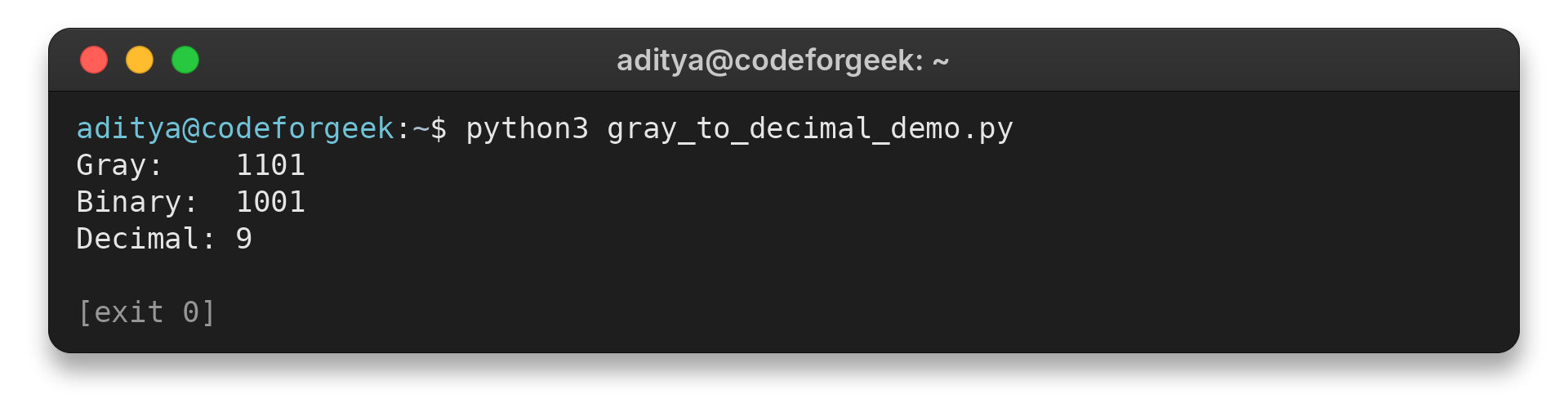
The output shows both the decoded bits and their base-10 value, so you can check the calculation in two stages. The example was run from a terminal rather than through the page form.
Step 4: Clear the fields before another value
Clear All empties both fields. This keeps an earlier decimal result from being mistaken for the result of a later bit string.
Common Input Errors and Numeric Limits
Check the accepted characters and the numeric range before using the decoded value. The page source trims outer whitespace and checks for a nonempty binary string, while JavaScript Number conversion can lose precision for large integers.
| Case | Symptom | Check or fix |
|---|---|---|
| Empty input | Fails the nonempty input check | Confirm that a bit string was copied |
| Letters, punctuation, or an internal separator | Fails the character check | Remove extra characters and verify each bit |
| Whitespace at either end | Trimmed before validation | Keep any spacing outside the sequence |
| Leading zeroes | Unsigned value stays the same | Retain the original width if a protocol needs it |
| Value above JavaScript’s safe integer range | Number may lose precision | Use an exact integer representation such as BigInt |
| Signed measurement | Conversion does not establish signedness | Check the producing device’s encoding convention |
The page source’s validation details appear in the table. I did not test the form in a browser.
For example, the first decoded binary bit is copied from the first Gray bit. Each later decoded bit depends on the previous decoded bit, not the previous Gray bit, so keep those two columns separate while checking a longer reading.
A useful manual check is to compare adjacent decoded prefixes as they grow. If a Gray input has eight bits, write eight decoded bits in order and compare the final string with the converter result. A mismatch near the left edge changes all later prefix calculations, while a mismatch near the right edge affects fewer positions.
The three-bit table earlier shows one complete cycle of four values. Its Gray words are ordered so consecutive rows change one bit.
When a reading comes from a specification, preserve the original field width and any accompanying metadata. A decimal integer alone cannot tell a later reader whether omitted leading zeroes carried width information or whether the source applied a sensor calibration.
For a quick consistency check, decode the input first and then evaluate the binary place values. Gray 1101 becomes binary 1001, which evaluates to 1 × 8 + 0 × 4 + 0 × 2 + 1 × 1. This gives 9 without treating the Gray digits as ordinary binary weights.
Input validation and numeric precision are separate concerns. A string containing only zeroes and ones can pass character validation but still represent an integer too large for an exact JavaScript Number. For large fields, use arithmetic that retains each bit or constructs a BigInt rather than converting through an imprecise Number.
The binary digits and decimal answer do not identify the application’s measurement range or units. Check the device documentation before treating the number as a physical quantity.
Leading zeroes leave an unsigned value unchanged, but can preserve a fixed signal width. Keep them in the source record if another device or protocol requires that width.
MDN documents that JavaScript integer results outside the safe range, which ends at 9,007,199,254,740,991, may lose precision. For values above that limit, use a decoder that retains bits as BigInt or another exact integer type. See the MDN parseInt() reference.
Gray-to-binary conversion recovers the encoded bits but does not identify a signed measurement or its units. Check the source system’s convention before applying a sign, offset, or scale.
Conclusion: Decode the Bits Before Using the Number
Keep the original Gray word beside the decoded binary and decimal values so another reader can trace the conversion.
| Record | Why it helps |
|---|---|
| Original Gray bits | Lets you compare the source reading with the conversion |
| Decoded binary | Separates Gray decoding from decimal arithmetic |
| Decimal value and source units | Connects the integer to the device-defined meaning |
For the formal Gray-code property, see the NIST Dictionary of Algorithms and Data Structures entry. The CMU Gray-code FAQ describes the inverse rule.
For the reverse direction, use CodeForGeek’s online decimal-to-Gray-code converter. Its decimal-to-BCD converter handles a different digit encoding.
FAQ
These answers clarify input formatting and the meaning of a decoded number.
Can I enter spaces between the bits?
The page source trims whitespace at the start and end, then accepts only 0 and 1. It does not establish that internal spaces are accepted.
Does Gray code convert directly to decimal?
Decode Gray code to ordinary binary with prefix XOR, then interpret the binary value in base 10.
Do leading zeroes change the decimal value?
Leading zeroes do not change an unsigned integer value, but may preserve a fixed bit width needed by your system.
Does Gray-to-decimal conversion define signedness?
No. Signedness comes from the source system’s encoding convention, not from the Gray-to-binary conversion itself.