New to Rust? Grab our free Rust for Beginners eBook Get it free →
Low-Code Platforms: 3 Open-Source Picks and NocoDB

Building an internal app starts with deciding how people will view and update its data. A low-code platform lets you build software through visual components and settings, then add code where the platform allows it.
I’ll compare the options by the work they support and show how to test one workflow before choosing.
TL;DR: Which Options Fit?
For an internal app, choose a platform by the shape of its data and logic, not by the number of drag-and-drop controls in its demo.
- Choose Budibase when you want to assemble a business app around workspace data and automations.
- Choose Appsmith when developers need a visual interface with JavaScript, queries, and Git-based change control.
- Choose ToolJet when its visual canvas, datasource options, and plan limits match your app.
- Choose NocoDB for database-first work, but treat its Fair Code license as a separate category from open-source licenses.
What Is a Low-Code Platform?
A low-code platform lets you build software through visual components and configuration, then add code where its extension points allow.
No-code tools aim to let someone build without writing code in the ordinary workflow. That label does not establish which validation rules, connectors, or deployment routes a given product supports. An extension may only run at selected events, so check whether the required behavior is available without moving state or credentials into client-side code.
| Work surface | What you build | Question to test |
| App builder | Forms, dashboards, internal pages and actions | Can the UI read and write the records your app needs? |
| Database interface | Views and pages over existing tables | Can each role see and change only its intended records? |
| Workflow automation | Actions triggered by events or schedules | Can you inspect failures and safely retry an action? |
For record maintenance, choose a grid because it puts fields and filters beside the records. Use an app builder when users need different screens or actions.
Low-code runtimes supply reusable components and connections, while a conventional framework leaves the team responsible for more of the UI, services, tests, and deployment pipeline.
| Approach | What the team builds | Where behavior lives | What to verify |
| No-code | Visual components, settings, and built-in actions for routine work | Product-provided rules and event actions | Confirm each required validation, connector, and export is available without custom code |
| Low-code | Visual screens plus code or queries at documented extension points | Bindings, queries, scripts, or connected services | Check how custom behavior is reviewed, tested, and deployed with the app |
| Conventional development | Application code, UI, service integrations, and deployment configuration | Components and services maintained by the team | Account for framework updates, tests, release automation, and runtime ownership |
Deployment options also differ by product. Check whether the route you plan to use is managed or self-hosted, and who will operate it.
A request form can use a built-in action for basic validation or a script for a rule that depends on another system. Decide where that rule should live and how the team will test it.
When a form can trigger a rule in another system, check how the user sees a rejected or delayed response. The page should communicate what needs correction without showing a system credential.
Open-Source Picks and NocoDB
This comparison covers Budibase, Appsmith, ToolJet, and NocoDB through the data model and user task each one supports.
| Platform | Start here when | What to verify | Boundary to test |
| Budibase | You want a workspace-based business app and workflow | Datasource access, roles, package feature scope and hosting owner | Check the selected connector and whether automations cover the required event |
| Appsmith | Developers need queries, JavaScript and Git-oriented changes | Deployment capacity, user permissions and release process | Test query behavior, custom bindings, and the handoff between environments |
| ToolJet | You want a visual internal-tool canvas and supported connectors | Edition, version limits, datasource support and upgrade path | Check datasource actions and whether the selected plan covers the workflow |
| NocoDB | You need a record grid or configured app pages over project data | Classic App access, external hosting requirements and plan controls | Compare the Grid and app-page interactions with the task users perform |
This is a shortlist, not a universal 2026 ranking.
Project docs list Budibase as GPLv3 overall with package exceptions, Appsmith as Apache 2.0, ToolJet Community as AGPL-3.0, and NocoDB Community under Fair Code Sustainable Use. Budibase says apps built with its builder need not be open source, NocoDB permits internal use but says third-party managed hosting may need commercial terms, and ToolJet documents version-specific Basic, Trial, and Paid limits.
1. Budibase: Workspace Apps and Automations
Budibase suits a team that wants to assemble an internal business app around workspace data and routine actions.
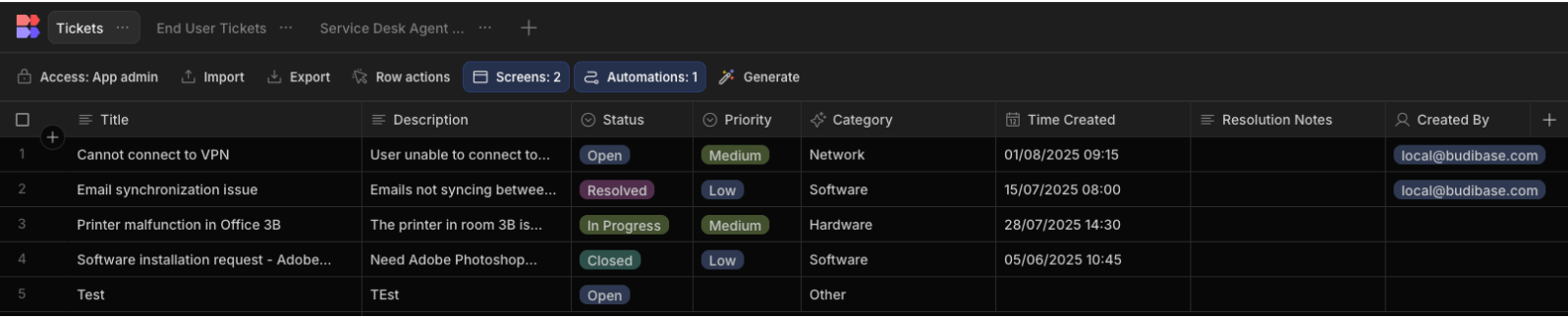
In the official ticketing walkthrough, a Tickets table feeds role-specific screens, form blocks, bindings, and an automation that sends email after a row is created. Check whether your version of the workflow needs additional states or fields.
2. Appsmith: Developer-Controlled Internal Apps
Appsmith fits a team that wants developers to control queries and page behavior in an internal app.
A typical page can display a query result in a table, use a selected row to populate a form, and run a query when someone submits that form. Check how the selected row and submitted values are handled when the query returns an error.
Appsmith’s self-hosting docs list Docker and Kubernetes among deployment routes, along with cloud-specific options. The documentation gives baseline sizing for getting started and says production capacity depends on workload and concurrency, so test your own usage rather than treating a starter configuration as a production estimate.
Test an empty input, an invalid value, and a successful record to compare the query result with what the user sees.
3. ToolJet: Visual Canvas for Internal Tools
ToolJet is aimed at internal applications such as dashboards and operational tools, built on a visual canvas with connected data sources. Its Canvas documentation describes components that can be dragged into a page, grouped in layouts, and arranged with a grid.
| ToolJet surface | Pilot check |
| Canvas and layout | Arrange the screen at the width and theme your users need |
| Datasource and query | Read and write through the connector used by the app |
| License and edition | Confirm builder, end-user, app, and workflow limits for your version |
The canvas can group components in containers or forms, and its theme modes include automatic, light, and dark settings. Check how the selected theme looks on the actual screen size your users will use.
The vendor’s ToolJet App Builder quickstart walks through creating an app, a table, a query, and a UI binding.
4. NocoDB: Database-First Work and Classic Apps
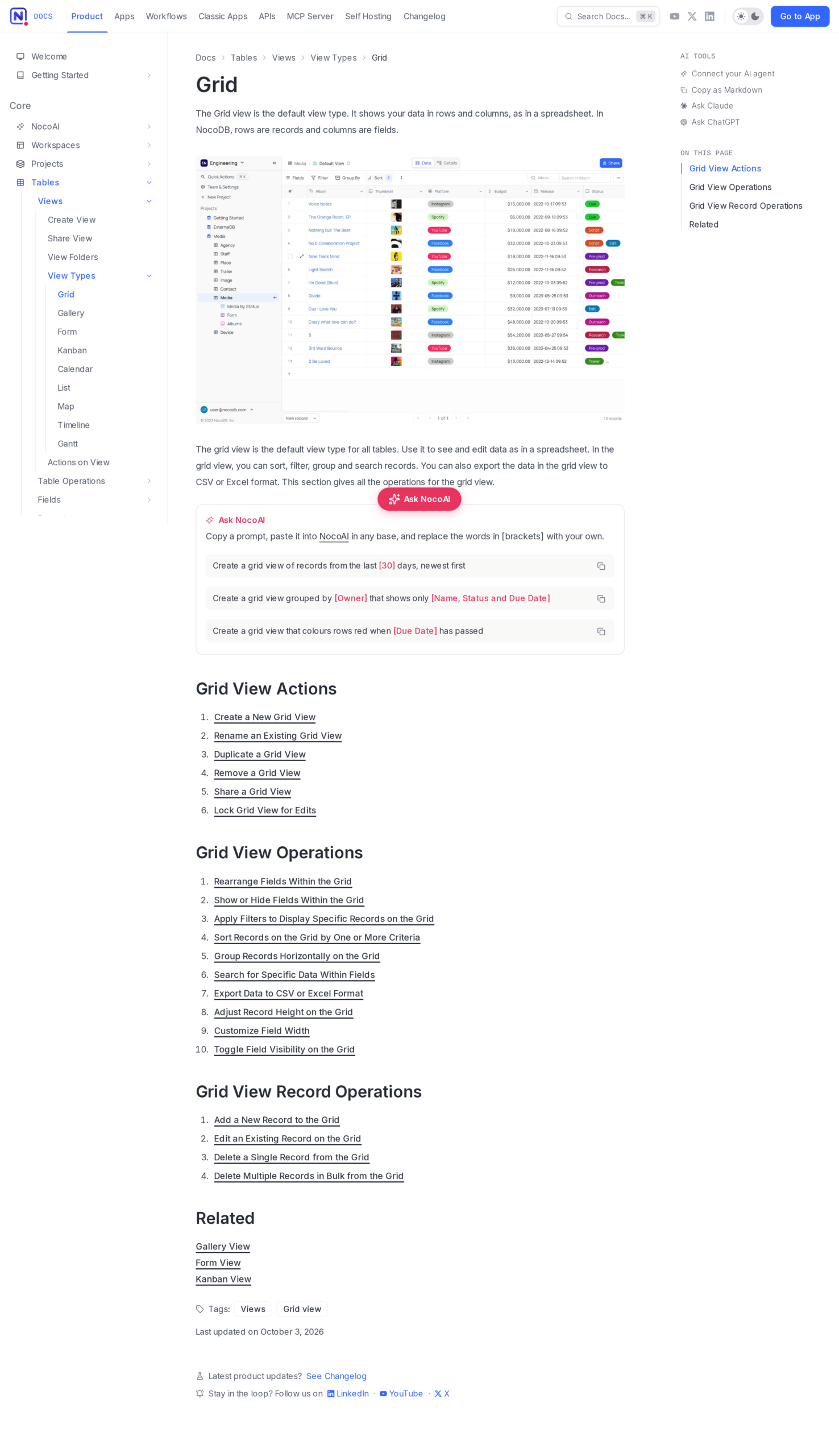
NocoDB is a fit when the starting point is a database you want to view and work with through a spreadsheet-style interface. Its Grid view displays records as rows and fields as columns, with controls for sorting, filtering, grouping, searching, and exporting.
NocoDB also documents Classic Apps, the product name for its former Interfaces. A Classic App lets you configure pages over project data and set the information and actions an audience needs. The vendor distinguishes Classic Apps from AI apps, so compare their build models and access controls.
Build the same sample records in a Grid view and a Classic App page. Note whether each intended user can perform the required actions. This makes access differences visible.
How to Choose a Low-Code Platform Step by Step
Compare candidates against one task because a consistent scenario shows where their workflows differ. Keep the pilot to one screen and a complete read-and-write path.
1. Name the User Task and Its Owner
Describe one task in terms a user would recognize, such as reviewing a support request or updating an order. Name who submits, changes, and reads the record, then define the starting state, expected result, and one failure case.
Include external users and connected systems in that scope because they can change access and hosting requirements.
2. Trace the Data and Every Action
Identify where the records live and list the operations required: reads, inserts, edits, deletes, file access, and API calls that change another system.
Connect a test datasource, exercise one required action, check credentials and network reachability, and confirm the user-facing result.
Name one authoritative system per field. If a support request spans ticket and identity services, specify who owns status and assignment, then document how conflicting edits are resolved.
Check the schema before connecting screens. Required fields, allowed status values, date formats, and default values can affect what a user can submit. Use both ordinary and boundary records in the test so an empty value or an unexpected status does not fail only after rollout.
Define what a timed-out API or notification action should do before anyone retries it. If a retry can create a second record or send another message, use an idempotency key or check the event identifier before repeating the operation. Show whether the action is pending, complete, or failed so the user does not guess whether to submit again.
3. Assign Roles, Hosting, and Recovery
Map each user type to the records and actions it should receive. Test the permissions in the app and its data source, since an interface control does not replace database-side authorization.
Shadow IT becomes a risk when teams publish useful apps without a known owner or approved data source. Keep a lightweight app inventory with an owner, purpose, data classification, and review date so a prototype does not become an untracked dependency.
Let teams test in a sandbox, then register an app before it reaches shared or sensitive data. Use synthetic records for early experiments when the data owner has not approved access to production information.
For self-hosting, assign an owner for upgrades, backups, monitoring, authentication, and restore tests. If the team cannot assign that work, compare a managed plan or another service before rollout.
4. Plan for Change, Export, and Recovery
Make a small change after the first screen works. Can a second developer review it? Check whether a test environment can verify the update before release and whether the previous version can be restored after a failed change.
List the objects that may need to move: records, queries, uploaded files, app definitions, and access rules.
During the trial, export sample records and inspect whether field names and relationships survive in the destination format.
Record the edition, version, test results, and next owner so a later reviewer can see what the pilot covered.
Limits to Check Before You Build
Visual building can reduce hand-written screen work, but permissions, operating load, and recovery still need review. Confirm the controls against the planned deployment because a prototype may not expose every operational requirement.
Governance covers who can create, change, approve, and operate apps that share a datasource. A permission change can affect several screens, so set review boundaries before another team deploys.
Identify who receives alerts when a connector or scheduled action fails after release.
- Use separate credentials for development and production, and grant each connection only the actions the app requires.
- Record the date, reviewer, and reason for changes to shared app permissions.
- Keep an inventory of app owners and data sources so an abandoned screen does not retain access after its team changes.
These checks do not replace the platform’s own security features or an organization’s review process. They make the owner and the expected access visible, which is useful when an app grows beyond its original builder.
| Case | What to inspect | Next move |
| Open-source and free are being treated as synonyms | License for the community edition, paid features, package, and generated app | Read the license that applies to each part and record the edition used |
| A vendor hosts the app for a customer | Self-hosting and third-party service rights | Check license terms before offering it as a managed service |
| The app depends on a private database | Network route, credential handling, datasource actions, and firewall rules | Test read and write operations from the environment that will run the app |
| The app owner changes teams | Named owner, datasource contacts, and pending changes | Transfer ownership and check access before offboarding |
| Only a few roles are visible in the demo | Builder permissions, end-user access, data permissions, and audit needs | Test allowed and denied actions with separate accounts |
| A move-off plan depends on exporting everything | App definitions, files, query logic, data schema, and access rules | Export a sample and list what must be recreated elsewhere |
| Results slow down as the table grows | Page size, filters, query duration, API limits, and expected concurrent users | Test with representative records and check where time is spent |
| An automation can run more than once | Retry behavior, event identifiers, and duplicate writes or messages | Replay a failed action safely before using it with production records |
| Several teams maintain related apps | Shared datasource owners, dependency list, and permission-change history | Review the inventory when an owner or role changes |
| A prototype uses sensitive records | Data classification, access approval, and retention after the test | Replace with synthetic records until the data owner approves access |
A platform that fails a license or access requirement does not meet the deployment’s constraints. Record the unmet requirement and remove that candidate from this project’s shortlist.
Measure the full user action with representative row counts, filters, and concurrent users. Record read and write response times, failed requests, and the slowest query, then repeat after changing a datasource or permission.
Duplicating a validation rule across pages can leave conflicting status checks or stale bindings. Give each rule one owner and retest dependent screens after a change or upgrade.
Write down the support hours and named owner expected after rollout, especially when the app becomes part of a daily operation.
Conclusion: Test the Workflow Before Committing
Budibase, Appsmith, and ToolJet each address a different developer workflow. Choose the one whose configuration and release process your team can maintain.
For a conventional service, the CodeForGeek guides on Dockerizing a Node.js application and cloud deployment checks cover adjacent implementation work.
FAQ
These answers cover common questions that change the shortlist or deployment decision.
Can a low-code app be used in production?
Yes, if it meets the application’s requirements for data access, permissions, capacity, support, backups, and recovery. Test those with representative users and data before rollout, and assign someone to maintain the platform.
Does self-hosting mean there are no ongoing costs?
No. A self-hosted instance still needs infrastructure, upgrades, monitoring, backups, authentication, and an owner. License and support charges may also apply depending on the platform, edition, and use.
Is NocoDB licensed like Budibase, Appsmith, and ToolJet?
No. NocoDB Community uses the Fair Code Sustainable Use License. Its self-hosting documentation allows internal use and says a hosted or managed service for third parties may require a commercial license, so check the terms for your deployment.
Can a low-code tool replace a custom application framework?
It can fit an internal app when its built-in screens, data connections, and extension points cover the task. A custom framework may suit a product with specialized behavior, portability needs, or deployment constraints that the platform cannot meet.
Can low-code handle a complex business workflow?
It can when the platform supports the required data connections, rules, user roles, and load. Keep complex or business-critical logic in a layer your team can test independently when that makes review and maintenance clearer.
What should a pilot test before a team adopts a platform?
Test a complete read-and-write task, denied access for an unintended role, an update path, and a recovery or rollback action. Also confirm the license, the team’s maintenance owner, and what can be exported.
What is the difference between low-code and no-code?
No-code focuses on visual settings and built-in actions in the ordinary build. Low-code exposes custom queries or scripts at documented extension points. Check the product documentation for the extensions it supports.
How can a team reduce low-code technical debt?
Keep each business rule in one layer, avoid duplicating bindings, review changes, and rerun dependent screens after upgrades.
How should a team test platform performance?
Use expected row counts, filters, and concurrent users. Measure query duration and failed requests under the workload the app will face, rather than relying on starter sizing.