New to Rust? Grab our free Rust for Beginners eBook Get it free →
Express Complete Tutorial Part 2: Render EJS Views


The browser should get an order list, not a dump of the data your Express route holds. I’m drawn to EJS’s split between JavaScript that controls a template and tags that print values.
Pass the route’s title and order data into an EJS view. Begin by connecting those values to the HTML your Express response sends.
What EJS changes in an Express response
An EJS template is an HTML file with tags that let JavaScript insert values or choose which markup to render. Express calls the view engine from a route, then sends the generated HTML to the browser.
Express chooses the template and supplies its data, so EJS can render that page with the route’s values. The Express template-engine guide and EJS documentation explain the view settings and template tags behind that step.
| Tag | What it does |
|---|---|
| <% … %> | Runs JavaScript without writing its value into the HTML. |
| <%= … %> | Writes a value after HTML escaping it. |
| <%- … %> | Writes unescaped output, which is useful for trusted template markup such as an include. |
What you need before rendering a view
Start with a running Express app, then add a views directory beside the app file. If you still need the server setup, Part 1 of this Express series handles that step.
- Node.js and npm installed on your machine.
- An app file that creates an Express application.
- A page at views/home.ejs and a partial at views/partials/navigation.ejs.
Render an EJS view from an Express route
The route passes named values to EJS, and two order rows make the locals, template, and included navigation visible in one response.
Step 1. Install Express and EJS
Run npm from the project directory to add both packages. The command leaves package versions unpinned.
npm install express ejs --no-package-lock
Step 2. Configure the view engine and route
Express needs an EJS view engine and a directory for its templates. This route passes a title, a user name, and order records as locals, which are the values available to the rendered view.
const express = require('express');
const path = require('node:path');

const app = express();

app.set('view engine', 'ejs');
app.set('views', path.join(__dirname, 'views'));

const orders = [
  { id: 104, status: 'Shipped' },
  { id: 105, status: 'Processing' },
];

app.get('/', (_req, res) => {
  res.render('home', {
    pageTitle: 'Orders',
    userName: 'Maya',
    orders,
  });
});

const port = 3187;

app.listen(port, () => {
  console.log(`Listening on http://localhost:${port}`);
});
The views path is built from the app file’s location, so starting Node from another working directory does not change where Express looks. With the view engine selected, res.render(‘home’, …) resolves home.ejs and sends the rendered HTML.
Step 3. Write the page template
The second argument to res.render() becomes the template’s locals. An escaped-output tag prints values as text, while a scriptlet runs the loop without adding JavaScript to the response.
<!doctype html>
<html lang="en">
  <head>
    <meta charset="utf-8">
    <meta name="viewport" content="width=device-width, initial-scale=1">
    <title><%= pageTitle %></title>
  </head>
  <body>
    <header>
      <h1><%= pageTitle %></h1>
      <p>Signed in as <%= userName %></p>
    </header>
    <%- include('partials/navigation', { pageTitle }) %>
    <main>
      <h2>Open orders</h2>
      <ul>
        <% orders.forEach((order) => { %>
          <li>Order <%= order.id %>: <%= order.status %></li>
        <% }); %>
      </ul>
    </main>
  </body>
</html>
Each callback runs once for an order and emits its identifier and status through escaped-output tags in the surrounding HTML. I tested the tag with script input, and EJS returned encoded text instead of markup.
Step 4. Reuse markup with an EJS include
The home view calls EJS include() to insert its navigation file. The include returns markup, so the raw-output tag keeps its HTML intact, while values inside the partial still use escaped output.
<nav aria-label="Main navigation">
  <a href="/">Home</a>
  <span>Current view: <%= pageTitle %></span>
</nav>
The include path is relative to home.ejs, so partials/navigation points to views/partials/navigation.ejs. The call passes pageTitle explicitly, making the partial’s data requirement visible where it is included.
Step 5. Start the server
Start the server in a terminal beside app.js and leave it running while you request the page from another terminal.
node app.js
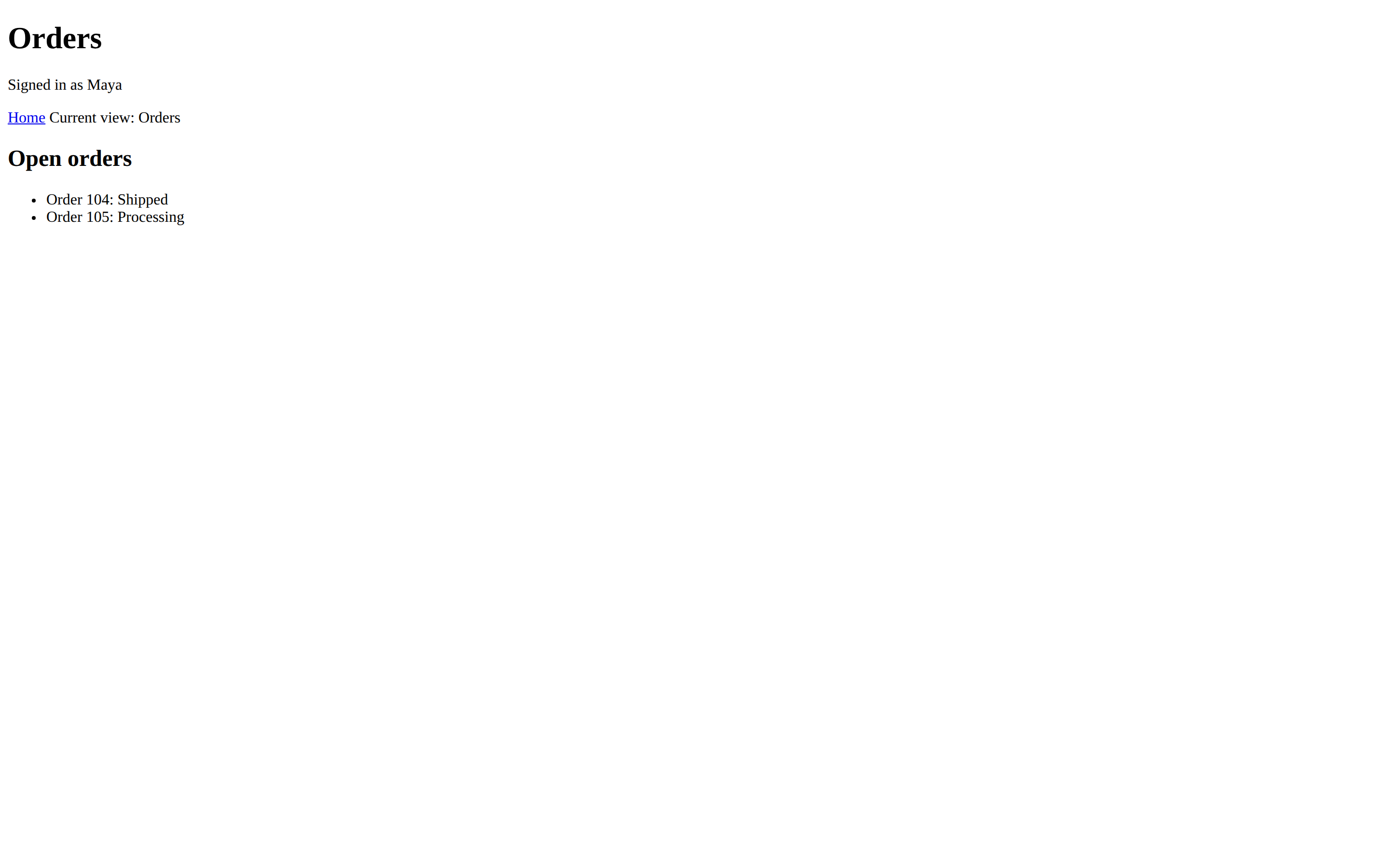
The served page shows the route locals in the heading and greeting, then the included navigation and both order rows. Express sends HTML to the browser, not the EJS source file.
Fix the view errors that stop rendering
When a page fails to render, check the file lookup and the names shared between the route and template before changing the view engine.
| Symptom | Check | Repair |
|---|---|---|
| Express cannot find the home view. | The configured views directory and the file name. | Keep home.ejs inside that directory, or point the views setting at the folder that contains it. |
| A value is missing in the page. | Names such as pageTitle, userName, and orders in the route and template. | Pass the matching key in the locals object given to res.render(). |
| The navigation include cannot be found. | The partial path relative to the template that calls include(). | Place navigation.ejs under views/partials for the path used above. |
| User text is treated as markup. | Whether the template uses escaped or raw output. | Use escaped output for dynamic values. Reserve raw output for trusted template markup, and do not pass an entire request query object as EJS locals. |
A misspelled key stays missing. EJS exposes values from the locals object under the names the route passed, and its security guidance warns against handing request query data directly to rendering.
Keep route data separate from template output
Let the route choose and validate the values a page needs, then let EJS format those values as HTML. Passing the entire query object to res.render() gives request data more influence over rendering than this view needs.
curl --fail --silent --show-error http://127.0.0.1:3187/
The response should contain the Orders title, Maya greeting, included navigation, and both order statuses. Once this view works, continue to Part 3 on handling Express routes.
This post is part of the Express Complete Tutorial series.
Part 1: Express setupPart 2: Templating with EJS
Part 3: Handling routes
Part 4: Handling sessions
Part 5: Finalizing the app
Frequently asked questions
EJS’s current include syntax also clears up the partial helper error that appears in older examples.
Why does EJS report that partial is not defined?
The view calls partial(), but that helper is not defined in this EJS template context. Use include() inside the template and check that the file path is relative to the template making the call.
Does Express look in the views directory by default?
Yes. Express uses a views directory rooted in the application by default. Set the views application setting when you want to use a different folder.