New to Rust? Grab our free Rust for Beginners eBook Get it free →
Express Complete Tutorial Part 3: Route Requests

Every Express app has to decide which code handles each URL a visitor requests. A route pairs an HTTP method, such as GET or POST, with a URL path and runs its handler when both match.
This part of the series shows you how to read input from the URL and from a JSON body.
What an Express route matches
An Express route pairs an HTTP method with a URL path and runs its handler when both match.
The Express 5 routing reference documents this method-and-path match and how handlers read named path segments. Part 1 of the series sets up the Express app that receives those routes.
| Request part | Example | Read it from | Use it for |
|---|---|---|---|
| Path segment | /profiles/42 | req.params.id | Identify the requested profile |
| Query string | ?view=compact | req.query.view | Choose an optional view |
| JSON body | {“text”:”route input”} | req.body.text | Read submitted data |
A query string supplies optional handler input without changing the path Express matches.
What you need before writing a route
Express 5 requires Node.js 18 or newer. The example uses CommonJS and the built-in JSON parser, so you do not need a separate body-parsing package.
- Use a project directory with Node.js and npm available.
- Start with an empty package manifest so the install command can add Express.
- Keep the sample files together because the test script imports the app file.
From the project directory, initialize the package manifest and install Express without a version suffix.
npm init -y
npm install express
Add handlers for path, query, and JSON input
Because Express runs middleware in order, register the JSON parser before the routes that read req.body.
Step 1: Define the request handlers
The GET endpoint reads a required profile ID from the path and an optional view from the query string, while the POST endpoint validates submitted JSON. Blank or missing text gets status 400, and accepted text comes back trimmed.
const express = require('express');
const app = express();

app.use(express.json());

app.get('/profiles/:id', (req, res) => {
  const view = req.query.view ?? 'summary';
  res.json({ id: req.params.id, view });
});

app.post('/preview', (req, res) => {
  const text = req.body?.text;

  if (typeof text !== 'string' || !text.trim()) {
    return res.status(400).json({ error: 'text must be a non-empty string' });
  }

  return res.json({ preview: text.trim() });
});

if (require.main === module) {
  const port = process.env.PORT || 3100;
  app.listen(port, () => {
    console.log(`Express listening on http://localhost:${port}`);
  });
}

module.exports = app;
The request object reference describes req.params for path values and req.query for the optional view. The default keeps the response useful when the query value is absent.
Express 5 can leave req.body undefined when a request has no body. Optional chaining lets this handler return a 400 response instead of throwing while it reads the submitted text.
The POST handler returns a preview and does not authenticate a user or save data.
If you need a rendered page, use the EJS setup from Part 2 of the series. Part 4 covers session handling.
Step 2: Exercise the routes
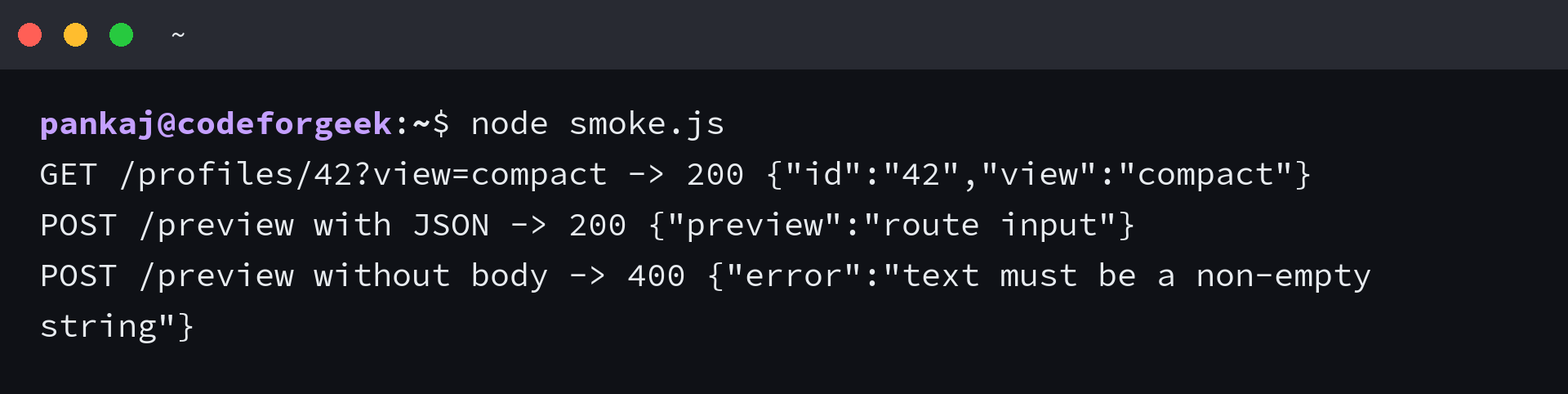
This smoke check starts the exported app on a temporary port, sends HTTP requests through the server, and asserts each status and JSON response. It covers a path parameter, a query value, a valid JSON body, and a POST with no body.
const assert = require('node:assert/strict');
const app = require('./app');

async function run() {
  const server = app.listen(0);
  await new Promise((resolve) => server.once('listening', resolve));
  const baseUrl = `http://127.0.0.1:${server.address().port}`;

  try {
    const profileResponse = await fetch(`${baseUrl}/profiles/42?view=compact`);
    const profile = await profileResponse.json();
    assert.equal(profileResponse.status, 200);
    assert.deepEqual(profile, { id: '42', view: 'compact' });
    console.log(`GET /profiles/42?view=compact -> ${profileResponse.status} ${JSON.stringify(profile)}`);

    const previewResponse = await fetch(`${baseUrl}/preview`, {
      method: 'POST',
      headers: { 'Content-Type': 'application/json' },
      body: JSON.stringify({ text: '  route input  ' })
    });
    const preview = await previewResponse.json();
    assert.equal(previewResponse.status, 200);
    assert.deepEqual(preview, { preview: 'route input' });
    console.log(`POST /preview with JSON -> ${previewResponse.status} ${JSON.stringify(preview)}`);

    const missingBodyResponse = await fetch(`${baseUrl}/preview`, { method: 'POST' });
    const missingBody = await missingBodyResponse.json();
    assert.equal(missingBodyResponse.status, 400);
    assert.deepEqual(missingBody, { error: 'text must be a non-empty string' });
    console.log(`POST /preview without body -> ${missingBodyResponse.status} ${JSON.stringify(missingBody)}`);
  } finally {
    await new Promise((resolve, reject) => {
      server.close((error) => error ? reject(error) : resolve());
    });
  }
}

run().catch((error) => {
  console.error(error);
  process.exitCode = 1;
});
Save smoke.js beside app.js and run it with Node after copying the code above.
The test opens the app on an available port and checks the responses. A finally block closes the server even if an assertion fails.
node smoke.js
When a route or request does not match
Match the method and path first, then validate optional query and body values inside the handler.
| Request | What Express matches | Result in this example |
|---|---|---|
| GET /profiles/42 | GET route matches, and view is absent | Returns the default summary view |
| GET /preview | No GET route matches this path | Express returns its default 404 response |
| POST /preview without a body | POST route matches with req.body possibly undefined | Handler returns 400 instead of reading a missing field |
| POST /preview with text set to spaces | POST route matches, but blank text fails validation | Handler returns the same 400 error |
A Stack Overflow question described the symptom as “But the handler isn’t getting called! Any suggestions?” after its route included query parameters.
Keep those values out of the route path and read them from req.query.
Another Stack Overflow post described the mismatch as “this code is not working when I try to get year and month as typing in url”. Its URL used path segments while the handler read query values, so the route path and request property need to agree.
An Express 5 report says “req.body is undefined when not explicitly including a request body.” The handler guards that absence and returns 400 instead of trying to read a missing field, as the issue describes.
Let the URL shape name the input
After changing a route, send the same request again and compare its status and JSON response.
node smoke.js
Express routing questions
Route parameters, query values, and parsed JSON arrive in different request fields. Use express.Router() when related handlers need a shared mount path.
Can a query string be part of an Express route path?
No. Express matches the request method and path, then the handler reads optional query values from req.query.
Why can req.body be undefined in Express 5?
A request may have no body, or the JSON parser may not handle its content type. Put express.json() before the route and validate the body before reading fields.
When should routes move into express.Router()?
Use express.Router() when a group of route handlers belongs together and can share a mount path. A single small example can keep its handlers on the app instance.