New to Rust? Grab our free Rust for Beginners eBook Get it free →
JS Redirect: Every way to redirect a webpage with JavaScript

A JS redirect sends a visitor from one URL to another using code in the browser instead of a server response. I use window.location.href for most cases, location.replace when I don’t want the old page sitting in browser history and setTimeout when I need a short delay before the jump. This guide covers every method I have shipped, plus the SEO tradeoffs, the Next.js pattern and how to stop an open redirect vulnerability before it ships.
What a JS redirect actually is
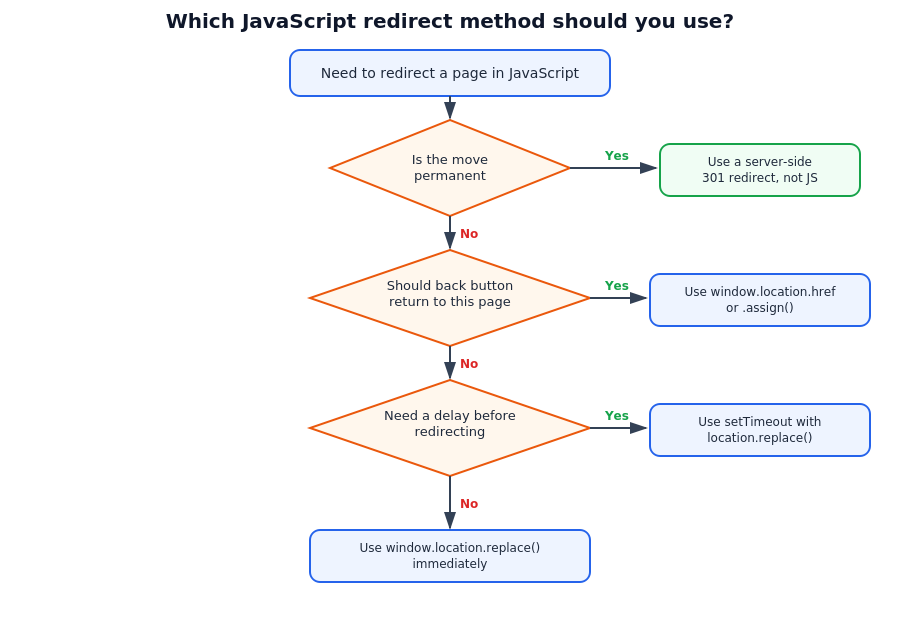
A JS redirect happens entirely in the browser. Your script changes the location object and the browser loads a new URL, no server round trip decides where the visitor goes. Compare that to an HTTP redirect (a server response carrying a 3xx status code and a Location header) which happens before the page even renders. A JS redirect only fires after the page has loaded and the script has run, which puts it after HTTP redirects and after most HTML redirects in the execution order. That timing gap matters more than it looks. It’s why JS redirects work well for anything conditional, like checking login state, screen size or a feature flag, but poorly for anything permanent, like moving a page to a new URL for good.
Three ways to redirect with window.location
Three methods change the current page from JavaScript. All of them assign a URL to window.location or one of its methods and all three trigger a real page navigation. The difference is what happens to browser history afterward, not the redirect itself.
window.location.href
window.location.href = "https://example.com";
Setting href adds the current page to history the same way clicking a link would. The back button takes the visitor to the page they redirected from. Use this for regular navigation and any redirect the visitor should be able to reverse, like moving between steps of a checkout flow.
window.location.assign
window.location.assign("https://example.com");
assign() does exactly what setting href does. It exists as a named method rather than a property assignment and some codebases prefer it for readability or because it’s easier to spy on in tests. There is no functional difference from href, so pick whichever reads better in your codebase and stay consistent.
window.location.replace
window.location.replace("https://example.com");
replace() swaps the current document out of the session history instead of adding to it. Pressing back after a replace() redirect skips over the redirecting page entirely and lands the visitor on whatever came before it. Use this after a login, after a form submit or anywhere landing back on the redirecting page would create a loop or show stale state. It’s the method I reach for after any action that shouldn’t repeat when someone presses back.
Delaying a redirect with setTimeout
Sometimes the visitor needs to see a message before the page moves on, like a payment confirmation or a countdown before a session times out. setTimeout delays the redirect by a set number of milliseconds.
setTimeout(() => {
  window.location.href = "https://example.com/dashboard";
}, 3000);
The callback fires once after the delay, then the browser navigates. If you need the same code to run on a fixed schedule instead of a single delayed jump, that’s setInterval territory instead. I cover the gap between the two, including how to cancel a scheduled redirect with clearTimeout, in my setInterval guide. For a redirect specifically, keep the delay short. Anything past three or four seconds starts to feel broken rather than intentional.
Redirecting on a button click or event
Most real redirects don’t fire on page load, they fire in response to something the visitor does. Attach the redirect inside an event listener instead of running it immediately.
document.getElementById("checkout-btn").addEventListener("click", () => {
  window.location.href = "/checkout";
});
This is the same pattern I use for window.open() when a click should open a new tab instead of replacing the current page, which I cover in my guide to opening links in a new tab. The difference is intent. location.href replaces the current page, window.open() creates a new browsing context. Pick based on whether the visitor should be able to get back to where they started without a back-button trip.
Conditional redirects based on device or app state
Conditional redirects check something before deciding where to send the visitor. Device detection, authentication state and feature flags are the three I hit most often.
if (/Mobi|Android/i.test(navigator.userAgent)) {
  window.location.replace("https://m.example.com");
} else if (!isLoggedIn) {
  window.location.replace("/login");
}
Keep the check itself cheap. Parsing the user agent string or reading a cookie is fine on every page load, but don’t fetch a remote config just to decide a redirect, since that adds a network round trip before the visitor sees anything. If the condition depends on data from your backend, like a subscription tier or an experiment bucket, render it into the page as a variable at build or request time and read that variable client-side instead of calling out again.
The meta refresh redirect
Before JavaScript runs at all, HTML has its own redirect mechanism. A meta refresh tag in the head of the document tells the browser to load a new URL after a set delay.
<meta http-equiv="refresh" content="0; url=https://example.com/" />
Set the delay to 0 for anything meant to redirect immediately, since a visible delay confuses visitors and search engines alike. Meta refresh works even with JavaScript disabled, which is its one real advantage. Its downsides are bigger. It disables the back button in most browsers, older browser versions ignore it entirely and Google’s own guidance recommends against relying on it for anything permanent. I only reach for it as a fallback inside a script tag that has already failed to load.
JS redirects vs HTTP redirects
An HTTP redirect happens on the server before any HTML reaches the browser. The server responds with a 3xx status code and a Location header and the browser loads the new URL without ever rendering the old one. A js redirect can only run after the page has already loaded, which means the browser fetches, parses and renders the old page first.
| Redirect type | Status code | Fires | Best for |
|---|---|---|---|
| 301 Moved Permanently | 301 | Server | Permanent URL changes |
| 302 Found | 302 | Server | Temporary URL changes |
| 307 Temporary Redirect | 307 | Server | Temporary, preserves request method |
| 308 Permanent Redirect | 308 | Server | Permanent, preserves request method |
| JavaScript redirect | 200 (page loads first) | Browser | Conditional, client-only logic |
A 301 tells crawlers and browsers the move is permanent and to update their records. A 302, 307 or 308 signals the move is temporary and the old URL stays canonical. A js redirect carries none of that signal, since the response code for the initial page load is a plain 200. Search engines have to render the page and execute the script before they even see where it points.
Why JS redirects hurt SEO
Three reasons come up whenever this question gets asked. First, rendering delay. Search engines need to execute JavaScript to find the redirect, which takes longer than reading a header and isn’t guaranteed to happen on every crawl pass. Second, authority transfer is unreliable. A 301 tells Google exactly how much ranking signal to pass to the new URL. A JS redirect gives no such guarantee. Third, the visitor experience takes a hit, since the old page flashes on screen before the script fires, which reads as a slower and janky transition compared to a redirect that happens before anything paints.
None of this means never use a js redirect. It means don’t use one for a permanent URL change you control server-side. Reserve JavaScript for redirects that depend on something only the browser knows, like login state or viewport width.
Redirecting in React and Next.js
Framework apps complicate this because most navigation should stay client-side rather than trigger a full page reload. Setting window.location.href inside a React component still works, but it throws away the single-page-app benefit of not reloading the document.
In Next.js, use the router instead:
import { useRouter } from "next/navigation";

const router = useRouter();
router.push("/dashboard");    // adds to history, like href
router.replace("/dashboard"); // no history entry, like location.replace
router.push and router.replace map directly onto the href and replace() behavior covered earlier, just routed through the framework’s client-side router instead of a full navigation. For redirects built into a page’s initial render rather than triggered by an event, the redirect() function from next/navigation runs on the server before anything ships to the client, which is the framework’s closest equivalent to an HTTP redirect. For plain link-based navigation without any conditional logic, my Next.js Link component guide covers the declarative version of the same thing.
Avoiding redirect loops
A redirect loop happens when two URLs keep sending the visitor back to each other, or a page redirects to itself under a condition that’s always true. Browsers detect this and stop with an error rather than hang forever, but by then the visitor has already bounced back and forth.
if (window.location.pathname !== "/new-page") {
  window.location.replace("/new-page");
}
Guard every conditional redirect with a check like this, confirming the visitor isn’t already at the destination before firing the redirect. This matters most in redirects driven by shared state, such as a cookie or a query param, where the condition can flip unexpectedly between the check and the navigation.
Validating redirect targets
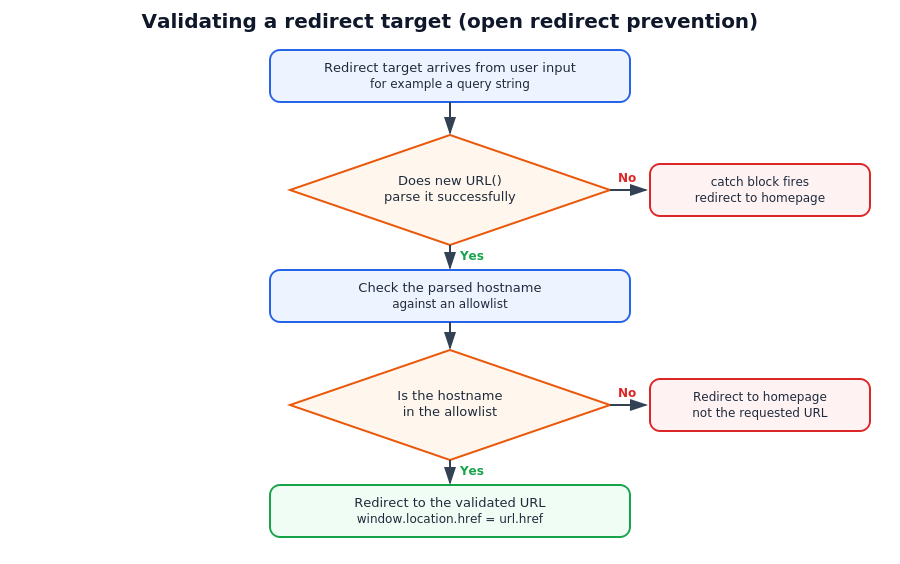
An open redirect vulnerability happens when a redirect target comes from user input, like a query string or a form field, without validation. An attacker crafts a link that looks like it points to your domain but redirects through it to a phishing page, borrowing your site’s trust to disguise the real destination.
const allowedHosts = ["example.com", "app.example.com"];

function safeRedirect(target) {
  try {
    const url = new URL(target, window.location.origin);
    if (allowedHosts.includes(url.hostname)) {
      window.location.href = url.href;
    } else {
      window.location.href = "/";
    }
  } catch {
    window.location.href = "/";
  }
}
Wrap the URL parsing in a try/catch, since a malformed string passed to the URL constructor throws rather than failing quietly. I go into more detail on structuring try/catch blocks for cases like this in my error handling guide. Never redirect to a raw and unvalidated string pulled straight from the URL.
Order of precedence when multiple redirects are in play
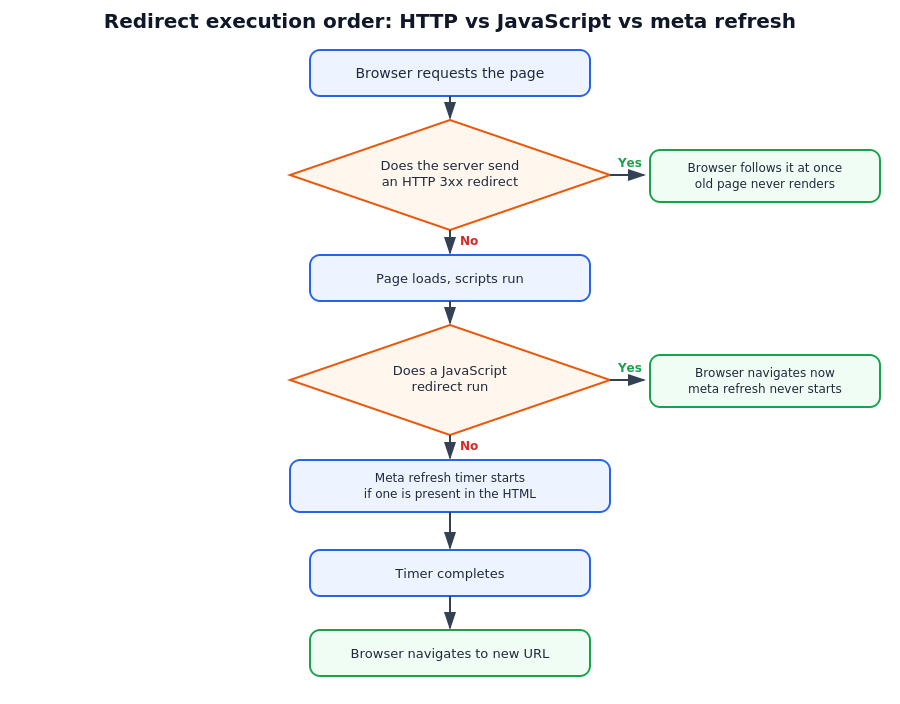
If a page has an HTTP redirect, a meta refresh and a JavaScript redirect all configured, only one wins and the order is fixed. HTTP redirects fire first, since they happen before the browser even receives HTML. JavaScript redirects fire next, during page execution. Meta refresh fires last, because it only triggers once the page has fully loaded and every script has run. In practice a JS redirect will always beat a meta refresh tag sitting on the same page, so there’s rarely a reason to ship both at once.
Key takeaways
- window.location.href and location.assign() behave the same and add to browser history
- location.replace() skips history so the back button bypasses the redirect entirely
- Use setTimeout for a delayed redirect not a loop of setInterval
- Meta refresh works without JavaScript but disables the back button
- HTTP redirects beat JS redirects for SEO and page speed every time
- HTTP redirects fire first then JS redirects then meta refresh
- In Next.js router.push and router.replace mirror href and replace() client-side
- Always validate redirect targets pulled from user input to avoid open redirect bugs
FAQ (Frequently Asked Questions)
What is the difference between location.href and location.replace in JavaScript?
location.href adds the current page to browser history so the back button returns to it. location.replace() removes that entry, skipping the old page entirely.
Does a JavaScript redirect hurt SEO?
Yes for permanent moves. Search engines must render the page and run the script before finding the target. Ranking signal transfer is also less reliable than a 301 redirect.
How do I redirect after a delay in JavaScript?
Wrap the redirect inside setTimeout and pass the delay in milliseconds. window.location.href fires once the timer completes, after showing a message or countdown to the visitor.
Can I redirect a user on a button click instead of on page load?
Yes. Attach the redirect inside a click event listener on the button instead of running it immediately, so the navigation only fires when the visitor interacts.
What causes a JavaScript redirect loop?
Two pages redirecting to each other, or a condition that’s always true firing a redirect back to the same page. Guard conditional redirects by checking the current path first.
Is window.location.href the same as window.location.assign?
Functionally yes, both add the current page to history and navigate to the new URL. assign() is a named method, href is a property assignment, pick either.
How do I redirect in Next.js without a full page reload?
Use useRouter from next/navigation and call router.push or router.replace with the destination path, which navigates client-side instead of reloading the document.
Conclusion
A JS redirect is simple to write and easy to misuse. Pick href or assign() for reversible navigation, replace() for anything that shouldn’t reappear on back and leave permanent URL changes to a server-side 301 wherever you control the server.