New to Rust? Grab our free Rust for Beginners eBook Get it free →
Online JWT Decoder

Paste a compact JSON Web Token into this free online JWT decoder to inspect its header and payload while the browser decodes the segments locally and makes no network request.
Decode a JWT without sending it to a server
A JSON Web Token, or JWT, has three Base64URL-encoded segments separated by dots. The first two segments contain JSON, while the third segment is the cryptographic signature value.
header.payload.signature
Encoding is not encryption. Anyone who holds a JWT can decode its header and payload, so do not place confidential data in claims just because the token looks opaque.
What this online JWT decoder checks
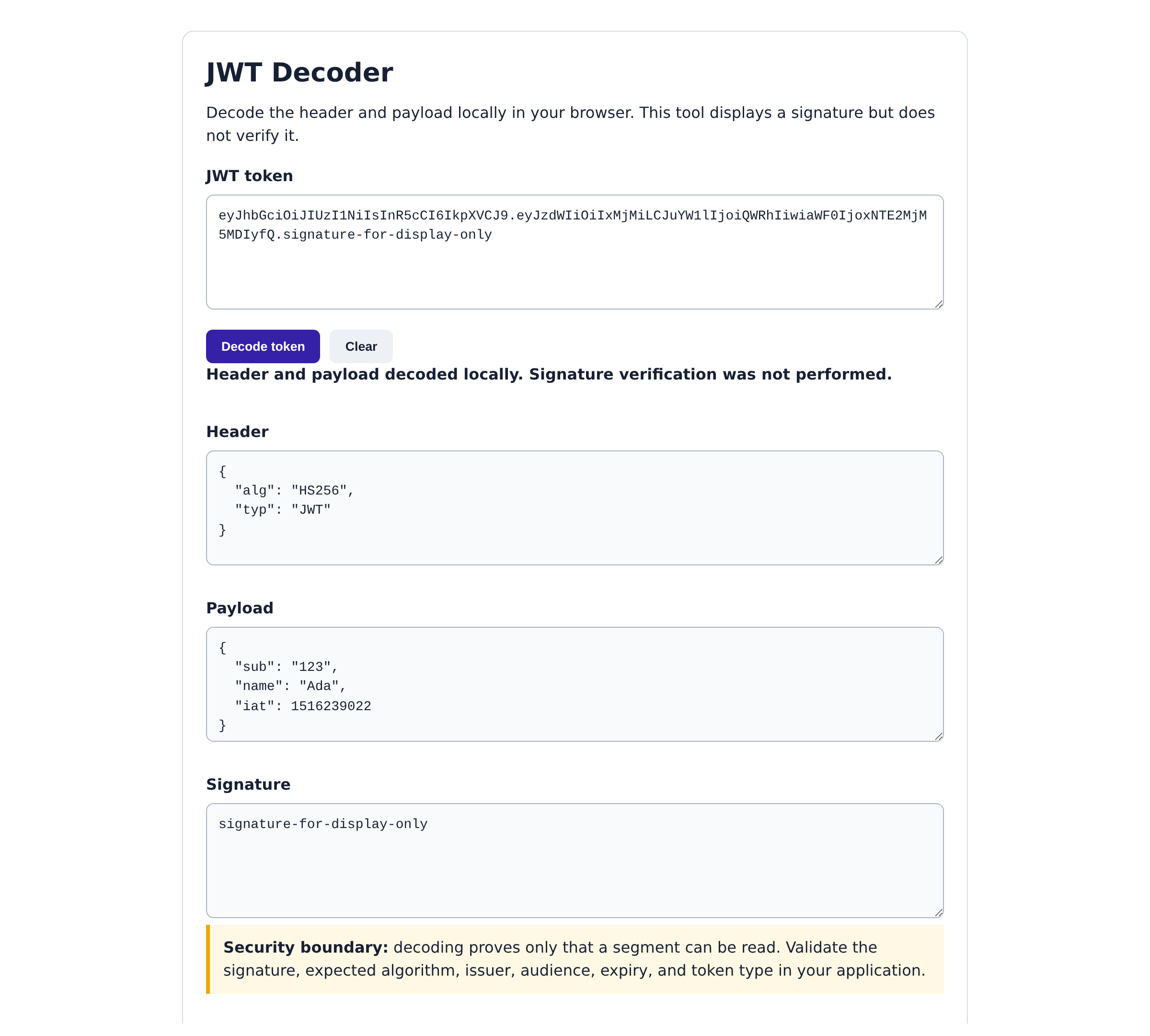
The tool checks that the input contains three non-empty segments, converts Base64URL characters to standard Base64, then parses the header and payload as UTF-8 JSON. I exercised that path with a token whose header declares HS256 and whose payload contains a subject, name, and issued-at claim.
The output is useful for finding a malformed claim name, an unexpected algorithm label, or a token that belongs to the wrong environment. It is not an authentication decision.
- Header: Shows metadata such as typ and alg.
- Payload: Shows claims such as sub, iss, aud, exp, and iat when the token contains them.
- Signature: Shows the third compact segment exactly as supplied.
What decoding cannot tell you
Reading a JWT does not prove that its signature matches a trusted key. Your server must verify the allowed algorithm and signature, then validate claims such as issuer, audience, expiration, and token type before it authorizes a request.
RFC 8725 recommends explicit validation rules because accepting an unexpected algorithm or token type can turn a readable token into a security flaw. Treat decoded fields as untrusted input until your application completes verification.
Use the decoder to inspect a safe sample
Use a token created for development or a deliberately non-sensitive sample. Avoid pasting a production bearer token into any browser tool unless your security policy permits it.
eyJhbGciOiJIUzI1NiIsInR5cCI6IkpXVCJ9.eyJzdWIiOiIxMjMiLCJuYW1lIjoiQWRhIiwiaWF0IjoxNTE2MjM5MDIyfQ.signature-for-display-only
The sample decodes to a header with alg set to HS256 and typ set to JWT. Its payload has sub, name, and iat fields, while the final segment remains a display-only value.
Build verification into your Node.js API
If you need to issue and verify tokens in an application, follow our JWT authentication API in Node.js tutorial. It moves from token structure to a server-side authentication flow, where signature and claim checks belong.
Keep this decoder for inspection and debugging. Keep authorization on the server that owns the key material and the policy.
Does this JWT decoder verify a signature?
No. It decodes the Base64URL header and payload and displays the signature segment. Your application must verify the signature with a trusted key.
Does a JWT decoder send my token anywhere?
This tool runs in the browser and contains no fetch or other network request. Your browser still loads this page from CodeForGeek, so follow your organization’s security policy before handling a production token.
Are JWT payloads encrypted?
Not in an ordinary signed JWT. Header and payload segments are encoded and can be decoded by anyone who has the token.