New to Rust? Grab our free Rust for Beginners eBook Get it free →
Fully Automate Twitter Account With JavaScript

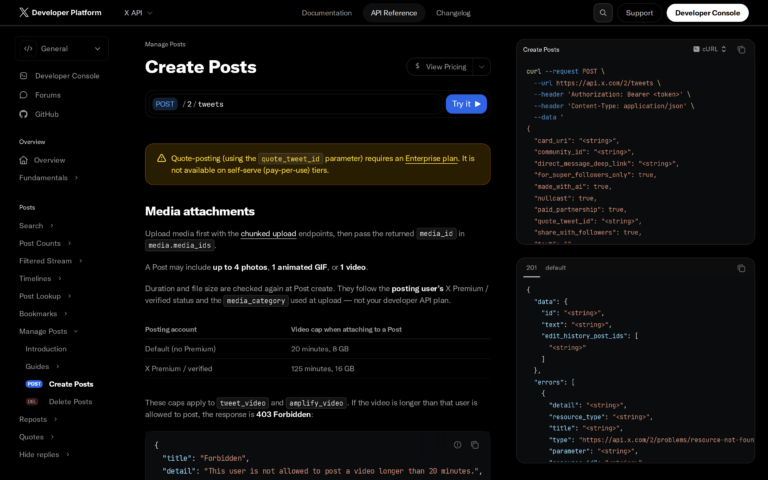
Writing an update for every planned X post can take time when you want the account to publish on a schedule. This JavaScript workflow uses Gemini to draft text and sends a post to X through the account owner’s authorized connection.
I’ll connect Gemini drafting with X publishing, then walk through OAuth setup and a scheduled run.
TL;DR
JavaScript can connect AI drafting to original X posts, but the two services need separate setup. Gemini may have a free quota for your project. X charges for API writes, so an AI key does not make posting free.
- Generate a draft with Gemini and save it for review.
- Use OAuth 2.0 user access with the tweet.write permission to publish on the authorized account.
- Use –publish to send the saved draft, or –auto-publish to generate and send a new post in one run.
- The included –demo mode makes no network request.
- Use X’s official API and disclose automation as its policy requires. Do not automate unsolicited replies or spam.
What does it mean to automate an X account?
X account automation uses software to create posts or run them on a schedule. Here, JavaScript asks Gemini for a concise software tip. I ran the no-network demo because it checks local output without posting.
The sample focuses on one text post per run. Topic discovery, reply reading, image upload, and multiple accounts need separate code.
Gemini generates text, while the X API receives the user-authorized post request.
| Part | Credential or tool | What it does |
|---|---|---|
| Drafting | Gemini API key | Generates proposed post text. |
| Publishing | X OAuth 2.0 user access | Creates a post on the authorized account. |
| Scheduling | Cron or a job scheduler | Starts the script. It does not grant API access. |
If the owner revokes consent or the approved scopes change, the saved token may stop working. Use the documented authorization flow again rather than substituting a different account’s token.
Step by step: build a JavaScript X posting bot
Follow the steps in order, starting with X cost and ending with the scheduled command. The script uses Node.js built-in fetch and requires no extra package.
1. Check the X API cost first
The X API pricing page lists $0.015 for a standard post and $0.200 for a post with a URL, so multiply the current rate by your planned writes.
2. Create the Gemini key
Create an API key in Google AI Studio. The code uses the Gemini Interactions REST endpoint and defaults to gemini-3.8-flash, which the model catalogue listed as stable during this refresh. Select a model available to your project and confirm its name in the Gemini model list.
Google’s current Gemini rate limits vary by model and project, so check the quota shown for your project before setting a schedule.
On Unix-like machines, keep Gemini values in .env rather than source code and restrict both .env and x-tokens.json to mode 0600.
GEMINI_API_KEY=your-gemini-key
X_CLIENT_ID=your-public-oauth-client-id
# Optional: select a model supported by your project
GEMINI_MODEL=gemini-3.8-flash
# .gitignore
.env
x-tokens.json
pending-post.txt3. Authorize the X user account with OAuth 2.0
Create an X developer project and app. Enable Authorization Code Flow with PKCE and register a callback URL you control.
Request the scopes below. offline.access lets the authorization flow return a refresh token for a scheduled process.
- tweet.write
- offline.access
Use a public-client flow for the sample and follow X’s OAuth 2.0 PKCE guide for initial authorization. This source handles refresh and posting after that callback. Confidential clients have additional requirements documented by X.
Register the exact callback URL you will use in the app settings and send that same URL in both authorization and token requests. PKCE binds the returned code to the original verifier. The state value lets your callback reject an unrelated authorization response.
- Redirect the account owner to X’s consent page with the client ID, callback URL, scopes, state, and PKCE challenge.
- When X redirects to the registered callback, compare the returned state before accepting its authorization code.
- Exchange the code with the original verifier and the same redirect URL.
Confirm the account name during consent, then exchange the code for access and refresh tokens. Store the refresh token in x-tokens.json as {“refresh_token”:”YOUR_REFRESH_TOKEN”}. The program saves a replacement if X rotates it.
Send the account’s user-context bearer token with tweet.write to POST https://api.x.com/2/tweets. X’s Create Posts documentation lists the fields, and the scheduled job needs permission to replace the token file.
4. Save and run the Node.js script
Save the following source as auto_post_x.mjs beside the environment and token files. The Gemini call drafts the text. The refresh function gets a user access token and saves any rotated refresh token before publishing.
The X request sets its made_with_ai field because the post text came from a model. The script checks for an API error before reporting the created post ID.
import { open, readFile, rename } from "node:fs/promises";
import { dirname, join } from "node:path";
import { fileURLToPath } from "node:url";

const ROOT = dirname(fileURLToPath(import.meta.url));
const TOKEN_FILE = join(ROOT, "x-tokens.json");
const PENDING_FILE = join(ROOT, "pending-post.txt");
const MODEL = process.env.GEMINI_MODEL || "gemini-3.8-flash";
const DEMO_TEXT = "A small, repeatable automation starts with a preview.";

async function generateDraft() {
  const apiKey = process.env.GEMINI_API_KEY;
  if (!apiKey) throw new Error("Set GEMINI_API_KEY before generating a draft.");
  const response = await fetch("https://generativelanguage.googleapis.com/v1beta/interactions", {
    method: "POST",
    headers: { "Content-Type": "application/json", "x-goog-api-key": apiKey },
    body: JSON.stringify({
      model: MODEL,
      input: "Write one concise, original X post with a practical software-engineering tip. " +
        "Use plain language, no hashtags, no unsupported claims, and no replies or mentions. " +
        "Return only the post text."
    })
  });
  const data = await response.json();
  if (!response.ok) throw new Error(`Gemini request failed (${response.status}).`);
  const text = data.output_text ?? (data.steps ?? [])
    .filter(step => step.type === "model_output")
    .flatMap(step => step.content ?? [])
    .filter(part => part.type === "text")
    .map(part => part.text)
    .join("");
  const draft = text.trim();
  if (!draft) throw new Error("Gemini returned no post text.");
  return draft;
}

async function saveTokens(tokens) {
  const temp = `${TOKEN_FILE}.${process.pid}.tmp`;
  const handle = await open(temp, "w", 0o600);
  try {
    await handle.writeFile(JSON.stringify(tokens, null, 2) + "\n", "utf8");
    await handle.chmod(0o600);
  } finally {
    await handle.close();
  }
  await rename(temp, TOKEN_FILE);
}

async function savePendingDraft(text) {
  const temp = `${PENDING_FILE}.${process.pid}.tmp`;
  const handle = await open(temp, "w", 0o600);
  try {
    await handle.writeFile(text + "\n", "utf8");
    await handle.chmod(0o600);
  } finally {
    await handle.close();
  }
  await rename(temp, PENDING_FILE);
}

async function refreshAccessToken() {
  const clientId = process.env.X_CLIENT_ID;
  if (!clientId) throw new Error("Set X_CLIENT_ID for the public OAuth 2.0 app.");
  const tokens = JSON.parse(await readFile(TOKEN_FILE, "utf8"));
  if (!tokens.refresh_token) throw new Error("x-tokens.json needs an OAuth refresh_token.");
  const form = new URLSearchParams({
    grant_type: "refresh_token",
    refresh_token: tokens.refresh_token,
    client_id: clientId
  });
  const response = await fetch("https://api.x.com/2/oauth2/token", {
    method: "POST",
    headers: { "Content-Type": "application/x-www-form-urlencoded" },
    body: form
  });
  const data = await response.json();
  if (!response.ok || !data.access_token) {
    throw new Error(`X token refresh failed (${response.status}). Re-authorize the app if needed.`);
  }
  await saveTokens({
    access_token: data.access_token,
    refresh_token: data.refresh_token || tokens.refresh_token,
    token_type: data.token_type,
    scope: data.scope
  });
  return data.access_token;
}

async function publish(text) {
  const accessToken = await refreshAccessToken();
  const response = await fetch("https://api.x.com/2/tweets", {
    method: "POST",
    headers: {
      Authorization: `Bearer ${accessToken}`,
      "Content-Type": "application/json"
    },
    body: JSON.stringify({ text, made_with_ai: true })
  });
  const data = await response.json();
  if (!response.ok || !data.data?.id) {
    throw new Error(`X post failed (${response.status}). Check app access, scopes, credits, and post rules.`);
  }
  console.log(`Published post ID: ${data.data.id}`);
}

async function main() {
  if (process.argv.includes("--demo")) {
    console.log("Demo mode: no network request was made.");
    console.log(`Draft: ${DEMO_TEXT}`);
    console.log("No X post was created.");
    return;
  }
  const publishSaved = process.argv.includes("--publish");
  const autoPublish = process.argv.includes("--auto-publish");
  if (publishSaved && autoPublish) {
    throw new Error("Choose --publish or --auto-publish, not both.");
  }
  if (publishSaved) {
    let draft;
    try {
      draft = (await readFile(PENDING_FILE, "utf8")).trim();
    } catch (error) {
      if (error.code === "ENOENT") {
        throw new Error("Create and review pending-post.txt before using --publish.");
      }
      throw error;
    }
    if (!draft) throw new Error("pending-post.txt is empty.");
    console.log("Publishing the saved draft from pending-post.txt.");
    await publish(draft);
    return;
  }
  const draft = await generateDraft();
  if (autoPublish) {
    console.log(`Auto-publishing generated draft:\n${draft}`);
    await publish(draft);
    return;
  }
  await savePendingDraft(draft);
  console.log(`Draft preview:\n${draft}`);
  console.log("Saved to pending-post.txt. Review or edit it before using --publish.");
}

main().catch(error => {
  console.error(error.message);
  process.exitCode = 1;
});
The exact demo command and its complete output appear below. This path reads no tokens and makes no network request, so the output verifies only the local branch.
ninad@codeforgeek:~$ node auto_post_x.mjs --demo
Demo mode: no network request was made.
Draft: A small, repeatable automation starts with a preview.
No X post was created.

[exit 0]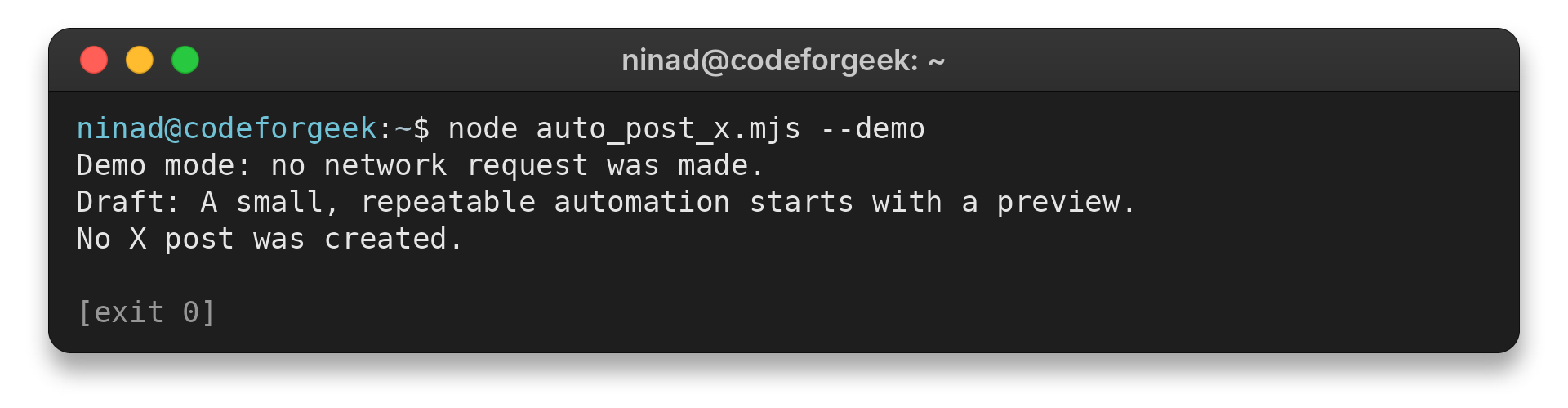
Run node –env-file=.env auto_post_x.mjs to save a draft in pending-post.txt for review or editing, and –publish refreshes the X token then submits that same text without another model call. The separate –auto-publish flag generates and sends a fresh response immediately, so enable it only when the account owner has chosen unattended posting.
- Replace the sample prompt’s generic software tip with a topic approved for the account.
- The script checks that Gemini returns text and a successful status.
- It does not verify facts, citations, account voice, or policy compliance.
- The default run replaces pending-post.txt with its newest response. Save any draft you need before generating another.
5. Schedule one controlled run
A scheduler can start the process at a chosen interval. Replace the directory and Node path in this example, then check the timezone used by the host’s cron.
0 9 * * * cd /path/to/x-bot && /usr/bin/node --env-file=.env auto_post_x.mjs --auto-publish >> bot.log 2>&1- Set a spend limit and choose a trusted topic source before enabling unattended posts.
- Cron provides a limited environment, so set the working directory and Node executable explicitly.
- Prevent overlapping runs and choose an interval that fits the API quota. The script makes no automatic retry after a connection failure.
- Configure the scheduler to alert an operator when the script exits unsuccessfully.
6. Verify and maintain the workflow
Cron follows the machine’s configured timezone, including daylight-saving changes, so calculate expected run times accordingly.
- Record the run time, returned post ID, prompt version, and status. Leave token values out of that record.
- Check the X Developer Console for app access and credit state before changing publishing code.
- Keep the prompt and topic source documented for the next maintainer.
- Document who owns the scheduled entry and how to pause it for maintenance.
Common X automation errors and policy limits
A failed bot run often points to a credential, permission, or access mismatch. Read the API response because its status helps identify which layer needs attention.
| Symptom | What to check | Safe next step |
|---|---|---|
| Unauthorized (HTTP 401) | Expired or wrong token, invalid refresh token, or a missing bearer header. | Confirm the user-token flow and refresh it. If refresh is rejected, re-authorize through PKCE. |
| Forbidden (HTTP 403) | App access, user authorization, endpoint eligibility, scope, credit balance, or policy restriction. | Read the structured API error and Developer Console. A 403 points to access checks rather than a different token format. |
| Gemini returns an error or no text | Key, model name, project quota, request format, or temporary service error. | Check the model and rate-limit pages, then fix the cause. Do not call X with an empty draft. |
| Post may have succeeded but the client timed out | Connection ended before the response was read. | Check the account’s recent posts before retrying to avoid duplicates. |
| Image posting does not work | This script sends text only. Media uses a separate upload step. | Use the official media workflow before adding an image. |
A 429 response marks a rate limit rather than an invalid token. X’s rate-limit guide explains the x-rate-limit-reset header and recommends waiting for the reset or using backoff. Check the remaining-request header too, then schedule writes below the documented limit.
X requires automated accounts to disclose the automation and operator. The Developer Guidelines describe restrictions on replies, including prior approval for AI-generated automated replies.
Conclusion: automate drafts, keep publishing deliberate
A reliable automation keeps its topic source, OAuth permissions, and schedule within the account’s rules. Check the official API documentation again before adding new actions.
For model setup, see CodeForGeek’s Gemini API setup guide or DeepSeek API setup guide.
FAQ
Before scheduling, confirm who pays for an X write, which token grants permission, and what to check after an API error.
Is the X API free for posting?
X writes use pay-per-usage credits. The pricing page lists $0.015 for a standard post and $0.200 for one with a URL at the time of research. Check live rates before scheduling.
Can I use a free Gemini API key to automate posts?
Gemini access and any free quota depend on your Google project and model. Its limits can change. X still needs separate user authorization and API credits for posts.
Which X token can create a post?
X post creation requires a user-context OAuth 2.0 token with tweet.write for the account that authorized the app.
Can this script post images?
The example creates text posts. Image posting needs a separate media-upload workflow that follows current X documentation.
Why does the X API return 401 or 403?
A 401 usually points to missing, expired, or invalid authentication. A 403 can indicate a permission, scope, access, credit, or policy issue. Read the API error before retrying, since a timed-out post might already have succeeded.
Does the script keep previous drafts?
No. A normal run replaces pending-post.txt with the latest response. Copy approved text to a private archive if you need to retain it.
Does this code perform the initial X authorization?
No. It refreshes a token already issued by an OAuth 2.0 PKCE flow. Use X’s documented consent flow or an OAuth library for the initial exchange.
Can I schedule drafts without auto-posting?
Yes. Schedule the default command without –auto-publish. It saves a local draft for someone to inspect, while the unattended flag posts a new response immediately.