New to Rust? Grab our free Rust for Beginners eBook Get it free →
Ajax in Node.js: How to Build a Live Search Feature

Adding live search to a Node.js and MySQL app takes a query, an endpoint, and a little front-end code. The last step is a search box that filters the table as you type.
Express 5.2.1, mysql2 3.24.4 and MariaDB 10.11 served that run, and the row counts come from EXPLAIN rather than a stopwatch.
Load a searchable table into MySQL
A demo table with four rows hides the cost of a bad query. The planner needs a table big enough to tell you the truth about what you asked it to do.
Create the database and the table first, and note the index I put on the first name column.
CREATE DATABASE ajax_search CHARACTER SET utf8mb4;
USE ajax_search;

CREATE TABLE users (
  id INT AUTO_INCREMENT PRIMARY KEY,
  first_name VARCHAR(50) NOT NULL,
  last_name  VARCHAR(50) NOT NULL,
  email      VARCHAR(120) NOT NULL,
  KEY idx_first_name (first_name)
) ENGINE=InnoDB;
That index is deliberate. It is the control in the comparison further down, and without it every query plan in this article would read the same.
Then the rows. The named users are the ones you will see in the results, and the generated block brings the table up to a size where a planner decision is visible.
INSERT INTO users (first_name, last_name, email) VALUES
('John', 'Doe', '[email protected]'),
('Jane', 'Smith', '[email protected]'),
('Alice', 'Johnson', '[email protected]');

INSERT INTO users (first_name, last_name, email)
SELECT CONCAT('User', n), CONCAT('Family', n), CONCAT('user', n, '@example.com')
FROM (
  SELECT a.N + b.N*10 + c.N*100 + d.N*1000 + 1 AS n
  FROM (SELECT 0 AS N UNION SELECT 1 UNION SELECT 2 UNION SELECT 3 UNION SELECT 4
        UNION SELECT 5 UNION SELECT 6 UNION SELECT 7 UNION SELECT 8 UNION SELECT 9) a
  CROSS JOIN (SELECT 0 AS N UNION SELECT 1 UNION SELECT 2 UNION SELECT 3 UNION SELECT 4
        UNION SELECT 5 UNION SELECT 6 UNION SELECT 7 UNION SELECT 8 UNION SELECT 9) b
  CROSS JOIN (SELECT 0 AS N UNION SELECT 1 UNION SELECT 2 UNION SELECT 3 UNION SELECT 4
        UNION SELECT 5 UNION SELECT 6 UNION SELECT 7 UNION SELECT 8 UNION SELECT 9) c
  CROSS JOIN (SELECT 0 AS N UNION SELECT 1) d
) seq
WHERE n <= 20000;
The volume insert builds User1 through User20000 from a cross join against a ten-row sequence, which is the shortest route I found to a large row count without shipping a fixture file.
LIKE matches case-insensitively here only because the column uses a case-insensitive collation. Declare the same column with a binary collation and the query stops matching John when the reader types john, which is a bug that surfaces long after the schema has shipped.
The three columns the app touches are worth knowing before you write the route.
| Column | Type | Role in the search |
|---|---|---|
| first_name | VARCHAR(50) | Indexed, and the column the range scan uses |
| last_name | VARCHAR(50) | Matched with LIKE, never indexed here |
| VARCHAR(120) | Matched with LIKE, unique per user |
Build the search endpoint in Express
Express 5 needs two packages and neither of them is body-parser. Both parsers ship with the framework now, and a GET route does not need a parser at all.
npm init -y
npm install express mysql2
The server below keeps one pool rather than one connection, because a search box fires a request as the reader types and a single connection serialises them.
const express = require('express');
const mysql = require('mysql2/promise');
const path = require('path');

const app = express();
const pool = mysql.createPool({
  host: '127.0.0.1',
  user: process.env.DB_USER,
  password: process.env.DB_PASSWORD,
  database: 'ajax_search',
  waitForConnections: true,
  connectionLimit: 10,
});

app.use(express.static(path.join(__dirname, 'public')));

// % and _ are wildcards inside a LIKE string, so a literal one has to be escaped.
function escapeLike(value) {
  return value.replace(/[!%_]/g, (ch) => '!' + ch);
}

app.get('/search', async (req, res) => {
  const term = String(req.query.term || '').trim();

  if (term.length === 0) {
    return res.json([]);
  }
  if (term.length > 50) {
    return res.status(400).json({ error: 'Search term is too long' });
  }

  const like = `%${escapeLike(term)}%`;

  try {
    const [rows] = await pool.execute(
      `SELECT id, first_name, last_name, email
         FROM users
        WHERE first_name LIKE ? ESCAPE '!'
           OR last_name  LIKE ? ESCAPE '!'
           OR email      LIKE ? ESCAPE '!'
        LIMIT 10`,
      [like, like, like]
    );
    res.json(rows);
  } catch (err) {
    console.error('Search failed:', err.code || err.message);
    res.status(500).json({ error: 'Search is unavailable' });
  }
});

app.listen(3000, () => {
  console.log('Search app listening on http://localhost:3000');
});
That route calls pool.execute, which sends a prepared statement to the server instead of interpolating a string into SQL. It also answers an empty term with an empty array rather than running a query that would match every row.
The LIKE value itself comes from escapeLike, so a percent sign typed by the reader stays a character.
Connection pooling has its own settings worth understanding before you tune them, and the connection pool walkthrough on CodeForgeek covers what each option changes.
The pool opens up to ten connections and hands each query the first free one. I set connectionLimit to cap how many the pool opens and waitForConnections so a request queues for a free connection instead of failing.
I capped the result at ten rows so the payload stays small enough for the browser to render inside one frame, and the route selects only the four columns the interface shows. Selecting every column from a wide table spends the reader’s bandwidth on fields nothing on the page displays.
Escape the wildcard before it reaches LIKE
A LIKE string treats the percent sign as an instruction to match any characters rather than as a character to find. Interpolating a search term straight into that string means a reader who types a percent sign asks the database for every row it has, and a question mark placeholder does not prevent it.
// A literal ! has to be escaped too, otherwise it would swallow the next character.
function escapeLike(value) {
  return value.replace(/[!%_]/g, (ch) => '!' + ch);
}

const term = '%';
const like = `%${escapeLike(term)}%`;   // %!%%
The ESCAPE clause names the escape character, and I used an exclamation mark rather than the default backslash so the rule survives a server running with NO_BACKSLASH_ESCAPES set.
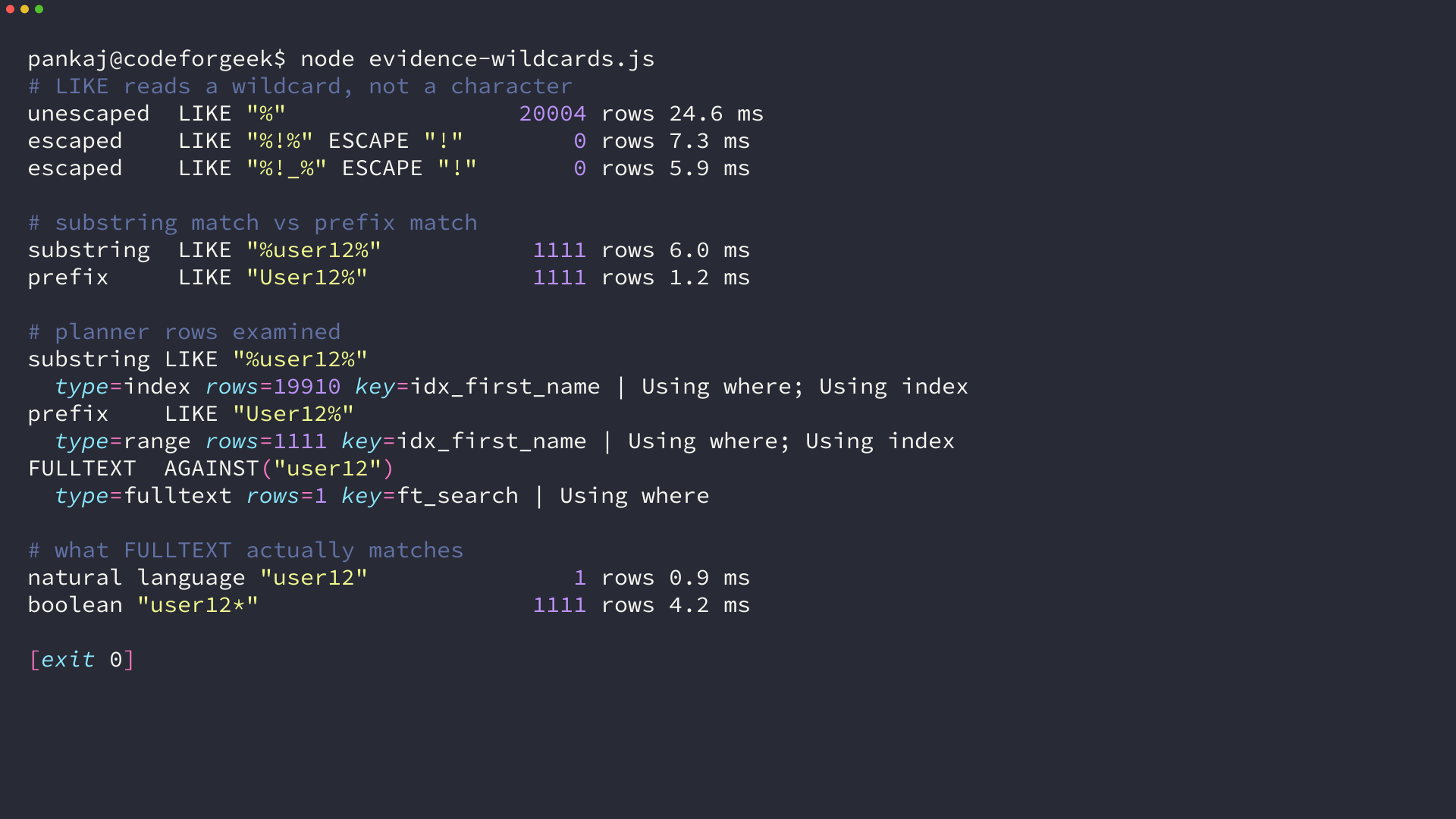
Against the table I seeded, an unescaped percent sign matched 20,004 rows and the escaped version matched none, because no user is literally named with a percent sign.
Underscore is the quieter of the two wildcards, since one underscore matches exactly one character and a term like a_b silently matches acb as well. Escaping both characters is the rule, and stripping them instead would change what the reader searched for.
What LIKE asks the query planner to do
A leading wildcard forces a full scan, and EXPLAIN states it without ambiguity on the same 20,004 rows.
| Query | Plan type | Rows examined | Key used |
|---|---|---|---|
| LIKE ‘%user12%’ | index | 19,910 | idx_first_name |
| LIKE ‘User12%’ | range | 1,111 | idx_first_name |
| MATCH … AGAINST (‘user12’) | fulltext | 1 | ft_search |
Substring matching rejected the index and read 19,910 rows. Prefix matching used a range scan on the same index and read 1,111, and the full-text index answered the same query from a single row.
I timed both queries on the same 20,004 rows and they finished in single-digit milliseconds, so treat the planner row as the evidence rather than the stopwatch. Multiply the row count by the shape of your own table and the difference stops being small.
A range scan on a text index works because the string is anchored at the start of the column. Drop that anchor and the engine has no ordered position to seek to, so it walks every index entry and then every row behind it.
An InnoDB full-text index is the honest alternative when you need to match the middle of a string. It changes the query language, and it brings its own boundaries.
ALTER TABLE users
  ADD FULLTEXT INDEX ft_search (first_name, last_name, email);

SELECT id, first_name FROM users
 WHERE MATCH(first_name, last_name, email) AGAINST ('user12' IN NATURAL LANGUAGE MODE);

SELECT id, first_name FROM users
 WHERE MATCH(first_name, last_name, email) AGAINST ('user12*' IN BOOLEAN MODE);
Natural language mode matched one row for a query that LIKE answered with 1,111, because full-text indexes whole tokens and there is no substring search in that mode. Boolean mode with a trailing asterisk is the closest equivalent, and the asterisk is only permitted at the end of a word.
Full-text also drops stopwords and ignores tokens shorter than the minimum word length, so you trade a slow scan for a different set of surprises.
Debounce the input and cancel the request that lost the race
The naive version fires a request on every keystroke, and most of those requests are wasted. The one that returns last is not always the one the reader asked for.
let timer;
let controller;

input.addEventListener('input', () => {
  clearTimeout(timer);
  timer = setTimeout(runSearch, 250);
});

async function runSearch() {
  const term = input.value.trim();
  if (controller) controller.abort();
  controller = new AbortController();

  if (term === '') {
    list.replaceChildren();
    status.textContent = '';
    return;
  }

  try {
    const response = await fetch(`/search?term=${encodeURIComponent(term)}`, {
      signal: controller.signal,
    });
    if (!response.ok) throw new Error(`Request failed with ${response.status}`);
    renderRows(await response.json());
  } catch (err) {
    if (err.name === 'AbortError') return;
    status.textContent = 'Search failed. Try again.';
  }
}
The abort call before each new request is what fixes the ordering. A slow answer to an earlier term cannot land on top of a fast answer to a later one, and 250 ms keeps the list feeling live while a normal typist produces one request per word rather than one per letter.
- Idle before the delay: nothing has been requested
- Typing inside the delay: the timer restarts
- Delay expired: one request, previous one aborted
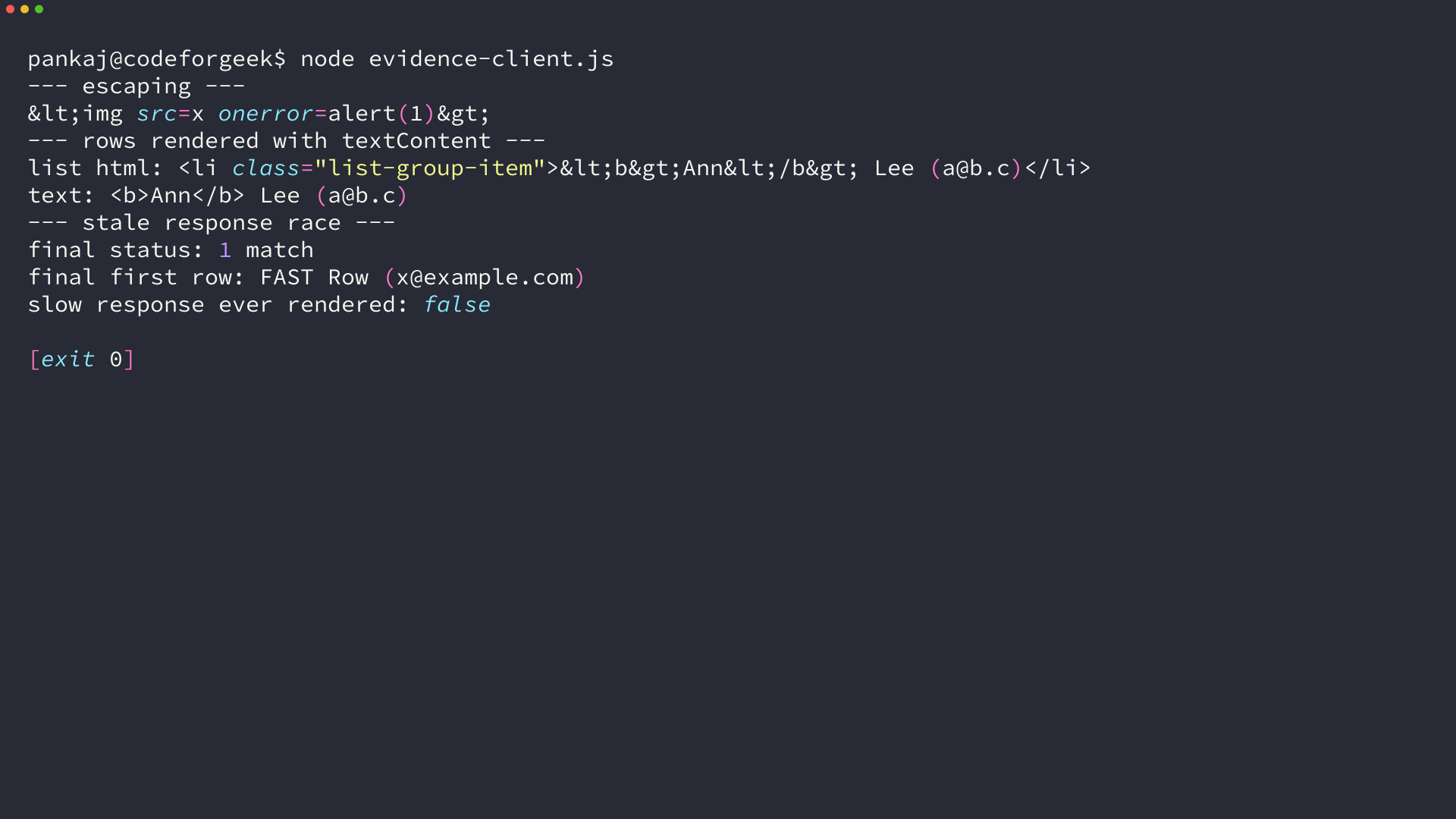
The test I ran asks for slow, waits 260 ms, then asks for fast, and the slow response never reaches the list no matter how long it takes to arrive. The Angular version of this feature covers the same cancellation problem in more depth.
Render what the database returned as text, not markup
A search result is data. The moment you concatenate it into an HTML string you have handed the database control of your page, because the browser cannot tell a name from a tag once that string reaches innerHTML.
Typeahead.js was built on exactly that concatenation, and its own issue tracker now opens by stating the project is no longer maintained. I stored a first name containing an image tag to see what a template string does with it.
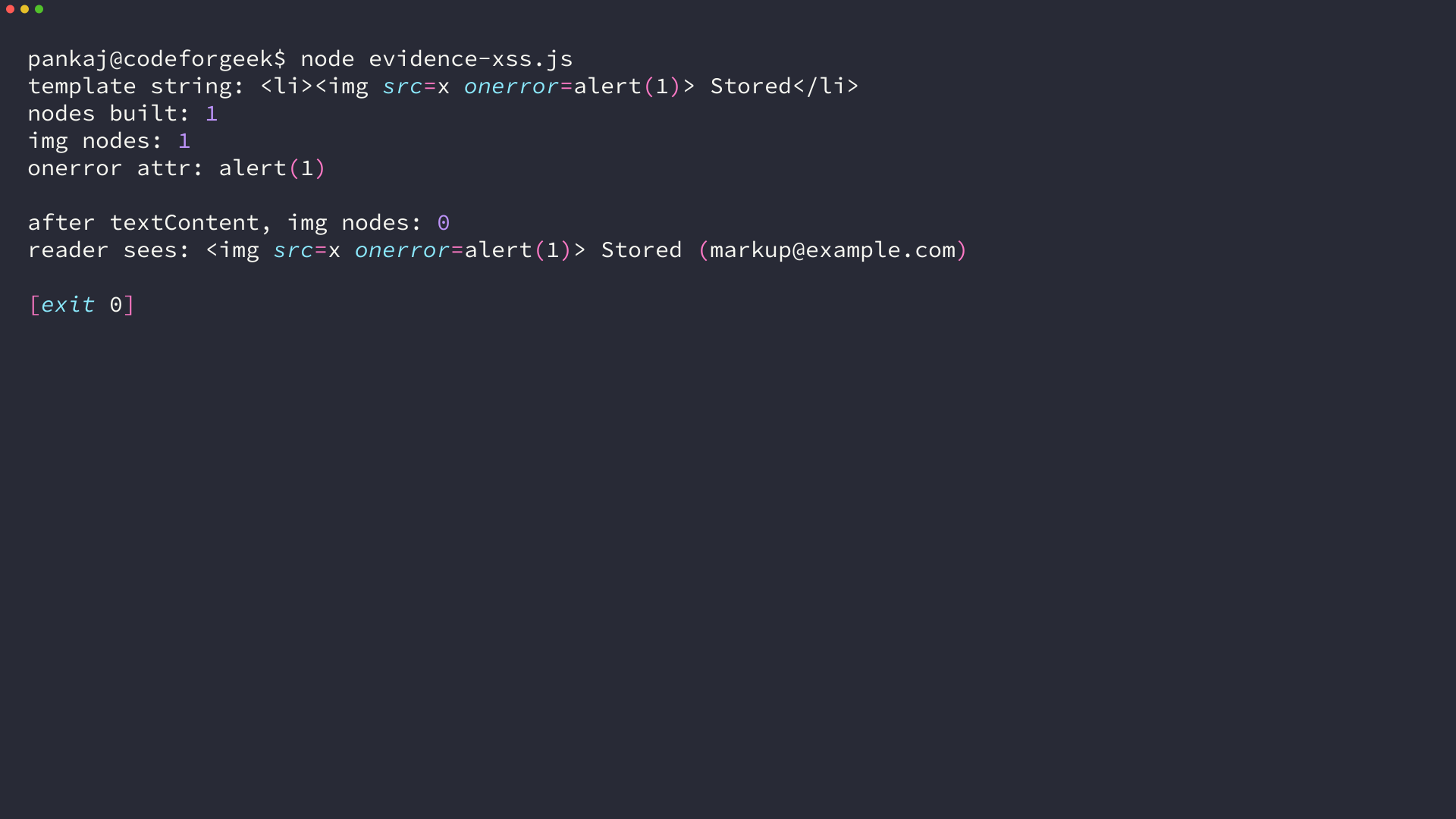
Building the row with a template string produced one image node with an onerror attribute taken from stored data. Setting textContent on the same value produced zero image nodes, and the reader saw the characters.
function renderRows(rows) {
  list.replaceChildren();
  if (rows.length === 0) {
    status.textContent = 'No matches';
    return;
  }
  status.textContent = rows.length + ' match' + (rows.length === 1 ? '' : 'es');
  for (const user of rows) {
    const item = document.createElement('li');
    item.className = 'list-group-item';
    item.textContent = `${user.first_name} ${user.last_name} (${user.email})`;
    list.append(item);
  }
}
The list is rebuilt with replaceChildren, so an error state cannot leave stale rows behind a new one.
An escapeHtml helper also works, and the DOM version is shorter because the browser does the escaping for you. The rule that decides the outcome is that the value never passes through innerHTML on its way to the screen.
Handle a failed query without taking the server down
Calling throw inside a MySQL callback does not reach Express, and it does end the process. A dropped connection or a misspelled table name turns a search box into an outage.
Express 5 forwards a rejected promise from an async handler to error middleware, so the route only needs a try block and a status code.
// Express 5 forwards a rejected promise from an async handler to error middleware.
app.get('/search', async (req, res) => {
  try {
    // query and respond
  } catch (err) {
    console.error('Search failed:', err.code || err.message);
    res.status(500).json({ error: 'Search is unavailable' });
  }
});
The catch logs the driver’s error code and returns a 500 with a short message, so the client can show a retry line instead of an empty list. A 400 for an over-long term is separate from a 500, because the reader can fix the first one.
Run it and check the result
Export the two connection variables, start the server, then ask it a question from the command line before you open a browser. Splitting the request from the interface is what makes every debugging story above possible.
export DB_USER=search_app
export DB_PASSWORD=a-long-local-password
node server.js
curl -s 'http://localhost:3000/search?term=john'
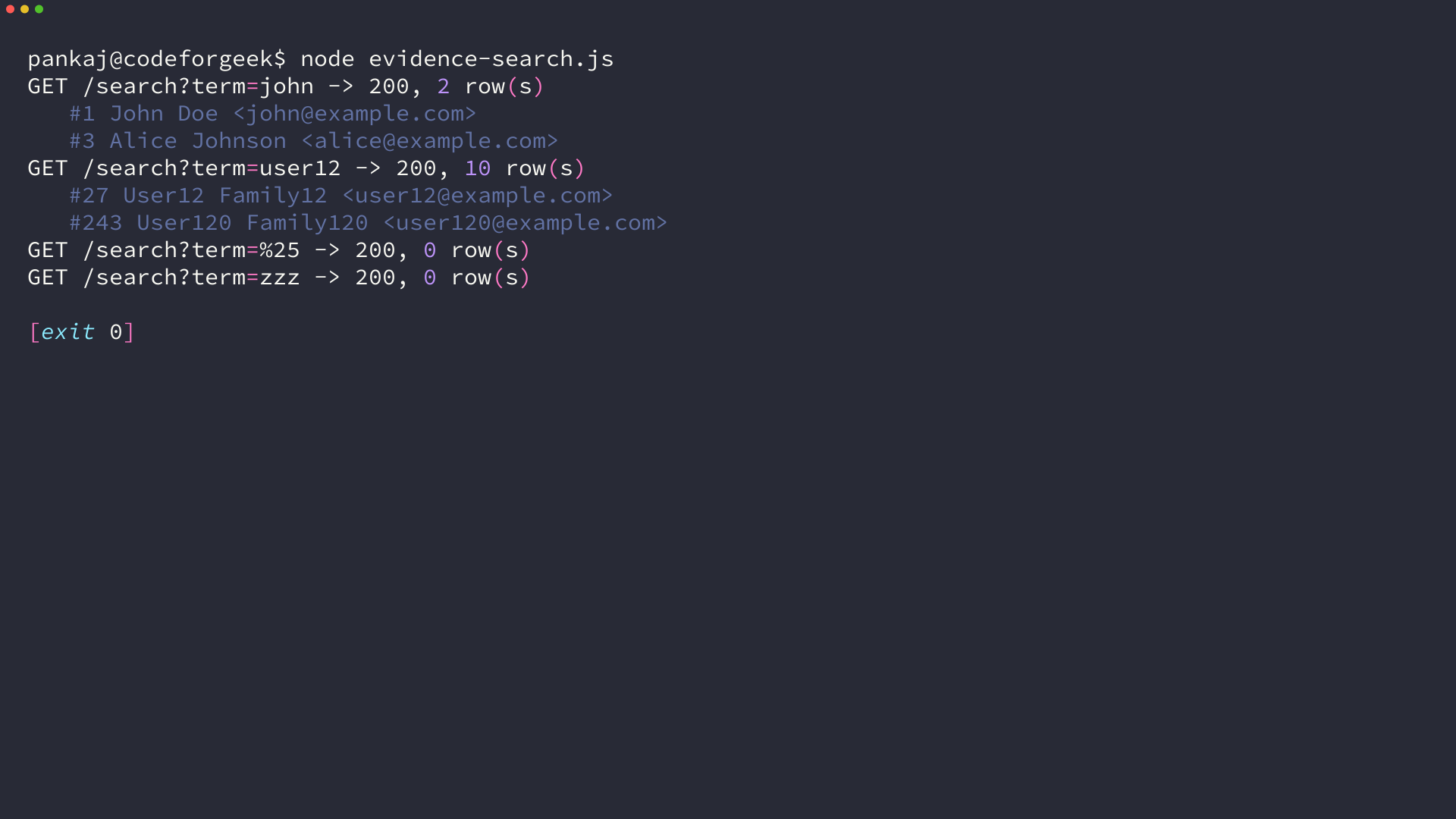
The same endpoint returns nothing for a literal percent sign, which is the visible consequence of the escape from earlier.
A successful request from the command line tells you the route, the credentials and the query all work before any client code is involved. If the browser then shows nothing, the fault is in the client, and one command has halved the search space.
Troubleshoot the failures this design produces
Almost every failure in a search box of this shape lands in one of five places.
| Symptom | Cause | Fix |
|---|---|---|
| Every row comes back | The term contains an unescaped percent or underscore | Escape both before building the LIKE string |
| One keystroke, several requests | The input has no debounce | Wait 250 ms after the last keystroke before fetching |
| Results flicker or arrive out of order | An older request resolved after a newer one | Abort the previous request with AbortController |
| The server exits on a query error | throw inside the callback, outside Express | Catch in the handler and return a status code |
| Search is slow on a large table | A leading wildcard forces a full scan | Move to an InnoDB full-text index or a dedicated search service |
LIKE with a leading wildcard stays the right tool while the table is small and the terms are short. Once the table reaches millions of rows, or you need word stems, ranking or typo tolerance, the honest move is a search index built for that job rather than a cleverer LIKE.
How do I search a MySQL column for part of a word in Node.js?
Use LIKE with a percent sign on each side of the term, pass the term as a parameter, and escape any percent or underscore inside it first. The query works, but a leading wildcard stops MySQL using the index, so it reads every row in the table.
Why does my search return every row when the term contains a percent sign?
The percent sign is a LIKE wildcard, so an unescaped one matches any characters. Escape the percent sign and the underscore inside the search term before you build the LIKE string.
Do I still need body-parser with Express 5?
No. express.json and express.urlencoded ship with the framework, and a GET search route needs neither of them because the term arrives in the query string.
Why do my search results sometimes appear in the wrong order?
An older request can finish after a newer one and overwrite the list. Keep one AbortController, abort the previous request whenever the input changes, and ignore the rejection that an abort produces.