New to Rust? Grab our free Rust for Beginners eBook Get it free →
Ajax Live Search in Angular with Node.js and RxJS

Live search feels instant only when the client controls request volume and stale responses. You’ll build it with modern Angular, RxJS, and a Node.js and Express API that validates each query.
What you’ll build
The finished page searches an article list as you type. It waits 300 milliseconds, requires at least two characters, and replaces an older request when the query changes.
AJAX originally meant Asynchronous JavaScript and XML, but this implementation exchanges JSON over HTTP. The API validates the query before returning that JSON response.
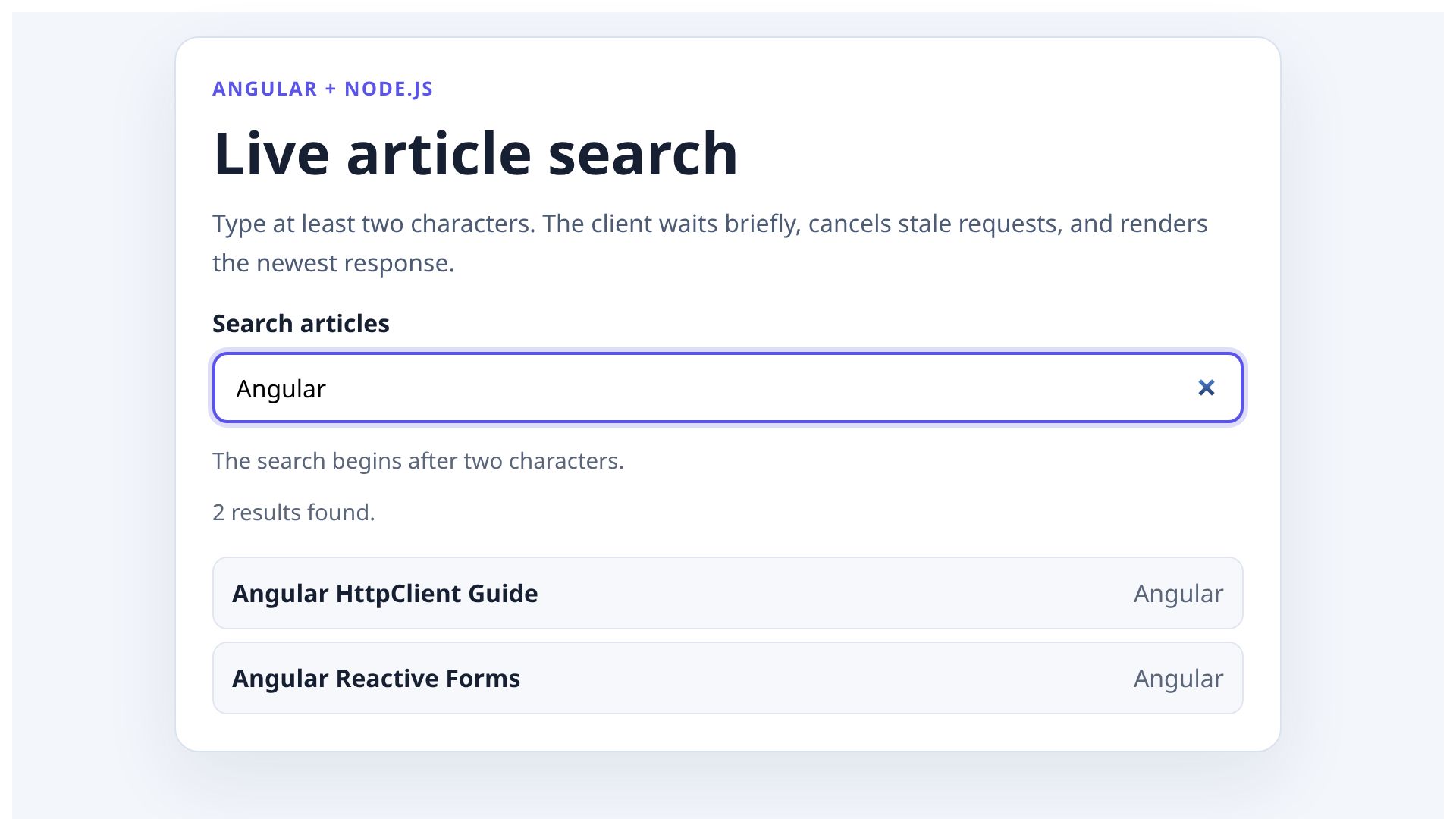
This is modern Angular with standalone components, signals, reactive forms, and HttpClient. It is not AngularJS.
If you maintain a 1.x application, use the separate AngularJS tutorial and learning hub instead.
How the live search request flow works
- The user changes a reactive FormControl.
- An outer switchMap cancels the previous debounce timer or HTTP request immediately.
- A 300 millisecond timer prevents a request for every keystroke.
- Angular HttpClient sends the trimmed query as a URL parameter.
- Express validates the query, searches the data, and returns JSON.
- The component renders loading, error, empty, or success state.
The order matters because putting the debounce before the only switchMap can leave an older request active during the new debounce window. An outer switchMap cancels both the timer and request as soon as a new value arrives.
Prerequisites
This build was tested with Node.js 22.23.2, npm 10.9.8, Angular 22.1.0, RxJS 7.8.2, and Express 5.2.1. Angular’s version compatibility table lists Node.js 22.22.3 or newer in the Node 22 line for Angular 22.
Create the Angular application without pinning an old CLI release:
npx --yes @angular/cli new live-search-client \
  --standalone \
  --routing=false \
  --style=css \
  --skip-git \
  --skip-tests \
  --defaults
Next to that directory, create the API:
mkdir live-search-api
cd live-search-api
npm init -y
npm install express
npm pkg set type=module
npm pkg set scripts.start="node server.js"
Build the Node.js search API
Create live-search-api/server.js:
import express from 'express';
import { pathToFileURL } from 'node:url';

export const products = [
  { id: 1, title: 'Angular HttpClient Guide', category: 'Angular' },
  { id: 2, title: 'Angular Reactive Forms', category: 'Angular' },
  { id: 3, title: 'RxJS Operator Reference', category: 'JavaScript' },
  { id: 4, title: 'Node.js API Design', category: 'Node.js' },
  { id: 5, title: 'Express Routing', category: 'Node.js' },
  { id: 6, title: 'TypeScript Basics', category: 'TypeScript' },
];

export function searchProducts(rawQuery) {
  const query = rawQuery.trim().toLocaleLowerCase();
  if (query.length < 2) return [];

  return products.filter(({ title, category }) =>
    `${title} ${category}`.toLocaleLowerCase().includes(query),
  );
}

export const app = express();

app.get('/api/search', (request, response) => {
  const rawQuery = typeof request.query.q === 'string' ? request.query.q : '';

  if (rawQuery.length > 80) {
    return response.status(400).json({ error: 'Search query is too long.' });
  }

  return response.json({
    query: rawQuery.trim(),
    results: searchProducts(rawQuery),
  });
});

if (process.argv[1] && import.meta.url === pathToFileURL(process.argv[1]).href) {
  const port = Number(process.env.PORT ?? 3000);
  app.listen(port, () => {
    console.log(`Search API listening on http://localhost:${port}`);
  });
}
The route follows the documented Express route shape. The app.get handler processes the GET request, while request.query.q reads the query string.
The 80-character boundary prevents unbounded input, while the minimum length check avoids work for single-character searches.
The in-memory array keeps the example reproducible. In a production application, replace searchProducts() with a parameterized database query or a search service.
Do not interpolate the raw query into SQL.
Start the API in one terminal:
cd live-search-api
PORT=4311 npm start
In another terminal, request the Angular matches:
curl "http://localhost:4311/api/search?q=angular"
The response contains two Angular records:
{
  "query": "angular",
  "results": [
    {
      "id": 1,
      "title": "Angular HttpClient Guide",
      "category": "Angular"
    },
    {
      "id": 2,
      "title": "Angular Reactive Forms",
      "category": "Angular"
    }
  ]
}
Configure Angular HttpClient
Angular’s current HttpClient setup guide uses provideHttpClient() in the application providers. Replace src/app/app.config.ts with the following configuration:
import { ApplicationConfig, provideBrowserGlobalErrorListeners } from '@angular/core';
import { provideHttpClient } from '@angular/common/http';

export const appConfig: ApplicationConfig = {
  providers: [provideBrowserGlobalErrorListeners(), provideHttpClient()],
};
If you want a focused explanation of requests, typed responses, and errors before continuing, read making HTTP calls in Angular with HttpClient. The live-search component applies that client to a debounced stream rather than repeating the full API.
Create the debounced Angular search component
Reactive forms expose input changes as an observable stream. The official Angular reactive forms guide documents the same FormControl and ReactiveFormsModule approach used here.
Replace src/app/app.ts with:
import { ChangeDetectionStrategy, Component, DestroyRef, inject, signal } from '@angular/core';
import { FormControl, ReactiveFormsModule } from '@angular/forms';
import { HttpClient } from '@angular/common/http';
import { takeUntilDestroyed } from '@angular/core/rxjs-interop';
import { catchError, distinctUntilChanged, map, of, switchMap, timer } from 'rxjs';

interface SearchResult {
  id: number;
  title: string;
  category: string;
}

interface SearchResponse {
  query: string;
  results: SearchResult[];
}

type SearchState =
  | { kind: 'idle'; results: SearchResult[] }
  | { kind: 'loading'; results: SearchResult[] }
  | { kind: 'success'; results: SearchResult[] }
  | { kind: 'error'; results: SearchResult[] };

@Component({
  selector: 'app-root',
  imports: [ReactiveFormsModule],
  templateUrl: './app.html',
  styleUrl: './app.css',
  changeDetection: ChangeDetectionStrategy.OnPush,
})
export class App {
  private readonly http = inject(HttpClient);
  private readonly destroyRef = inject(DestroyRef);

  readonly searchControl = new FormControl('', { nonNullable: true });
  readonly state = signal<SearchState>({ kind: 'idle', results: [] });

  constructor() {
    this.searchControl.valueChanges
      .pipe(
        map((query) => query.trim()),
        distinctUntilChanged(),
        switchMap((query) => {
          if (query.length < 2) {
            return of<SearchState>({ kind: 'idle', results: [] });
          }

          this.state.set({ kind: 'loading', results: [] });

          return timer(300).pipe(
            switchMap(() =>
              this.http.get<SearchResponse>('/api/search', { params: { q: query } }),
            ),
            map(({ results }) => ({ kind: 'success', results }) as SearchState),
            catchError(() => of<SearchState>({ kind: 'error', results: [] })),
          );
        }),
        takeUntilDestroyed(this.destroyRef),
      )
      .subscribe((state) => this.state.set(state));
  }
}
distinctUntilChanged() skips consecutive duplicate queries. The outer switchMap() cancels the previous timer or HTTP observable whenever the input changes.
Angular HttpClient aborts the superseded browser request when its observable is unsubscribed, although the server may still finish work it already received.
takeUntilDestroyed() binds the subscription to the component lifecycle. The component also keeps error, loading, and results state explicit, so the template never has to infer what happened from an empty array.
Render accessible search states
Replace src/app/app.html with:
<main>
  <section class="search-card" aria-labelledby="search-heading">
    <p class="eyebrow">Angular + Node.js</p>
    <h1 id="search-heading">Live article search</h1>
    <p class="intro">Type at least two characters. The client waits briefly, cancels stale requests, and renders the newest response.</p>

    <label for="search-input">Search articles</label>
    <input
      id="search-input"
      type="search"
      [formControl]="searchControl"
      placeholder="Try Angular or Node.js"
      autocomplete="off"
      maxlength="80"
      aria-describedby="search-help search-status"
      aria-controls="search-results"
    />
    <p id="search-help" class="help">The search begins after two characters.</p>

    <p id="search-status" class="status" aria-live="polite">
      @switch (state().kind) {
        @case ('idle') { Enter at least two characters. }
        @case ('loading') { Searching… }
        @case ('error') { The search request failed. Edit the query and try again. }
        @case ('success') {
          {{ state().results.length }} result{{ state().results.length === 1 ? '' : 's' }} found.
        }
      }
    </p>

    <ul
      id="search-results"
      class="results"
      [attr.aria-busy]="state().kind === 'loading'"
    >
      @for (result of state().results; track result.id) {
        <li>
          <strong>{{ result.title }}</strong>
          <span>{{ result.category }}</span>
        </li>
      } @empty {
        @if (state().kind === 'success') {
          <li class="empty">No matching articles for “{{ searchControl.value.trim() }}”.</li>
        }
      }
    </ul>
  </section>
</main>
The visible label gives the input an accessible name. The polite live region announces loading, errors, and result counts without moving focus.
The results retain list semantics, the loading state sets aria-busy, and both the input and API enforce the 80-character boundary.
If your design needs to emphasize the matching text, adapt the rendering approach in highlighting search results with an Angular filter. That article targets legacy AngularJS, so bring the highlighting idea across rather than copying its framework-specific filter code into this modern component.
Style the search states
Replace src/app/app.css with the styles below. The visible focus state, status text, result spacing, and responsive card are part of the tested interface rather than decorative extras.
:host {
  color: #172033;
  display: block;
  font-family: Inter, ui-sans-serif, system-ui, sans-serif;
}

main {
  background: #f3f6fb;
  min-height: 100vh;
  padding: 1rem;
}

.search-card {
  background: #ffffff;
  border: 1px solid #dbe2ef;
  border-radius: 16px;
  box-shadow: 0 18px 50px rgba(33, 51, 84, 0.09);
  margin: 0 auto;
  max-width: 680px;
  padding: 1.5rem;
}

.eyebrow {
  color: #5b54e8;
  font-size: 0.8rem;
  font-weight: 700;
  letter-spacing: 0.08em;
  margin: 0 0 0.5rem;
  text-transform: uppercase;
}

h1 {
  font-size: clamp(2rem, 4vw, 2.6rem);
  margin: 0;
}

.intro {
  color: #4d5b75;
  line-height: 1.6;
  margin: 0.5rem 0 1rem;
}

label {
  display: block;
  font-weight: 700;
  margin-bottom: 0.5rem;
}

input {
  border: 2px solid #aeb9cc;
  border-radius: 10px;
  box-sizing: border-box;
  font: inherit;
  padding: 0.65rem 0.85rem;
  width: 100%;
}

input:focus {
  border-color: #5b54e8;
  box-shadow: 0 0 0 3px rgba(91, 84, 232, 0.2);
  outline: none;
}

.help,
.status {
  color: #5b667a;
  font-size: 0.92rem;
}

.status {
  min-height: 1.5rem;
}

.results {
  display: grid;
  gap: 0.5rem;
  list-style: none;
  margin: 0.75rem 0 0;
  padding: 0;
}

.results li {
  background: #f7f8fc;
  border: 1px solid #e1e6f0;
  border-radius: 10px;
  display: flex;
  justify-content: space-between;
  padding: 0.75rem;
}

.results span {
  color: #5b667a;
}

.results .empty {
  display: block;
  text-align: center;
}
Proxy API requests during development
Create live-search-client/proxy.conf.json:
{
  "/api": {
    "target": "http://localhost:4311",
    "secure": false
  }
}
Keep the API terminal running. Start Angular from the project parent in another terminal:
cd live-search-client
npm start -- --proxy-config proxy.conf.json --host 127.0.0.1
Open http://localhost:4200 and search for Angular or Node.js to see HttpClient encode the query while the development server forwards /api to Express.
For production, route the Angular site and API through the same origin when possible. If they use different origins, configure CORS for the exact frontend origin instead of allowing every site.
If you deploy the frontend separately, the Angular deployment guide for Firebase Hosting covers the client build. The Node.js API still needs its own runtime or serverless endpoint.
Add server-side authentication, rate limits, result limits, and query bounds when searches expose private data or trigger expensive backend work.
What was tested
The finished sample was run end to end rather than checked as isolated snippets. Every implementation file shown below matches the executed fixture.
A separate test harness covers API behavior without changing the application code.
| Check | Observed result |
|---|---|
| Node API tests | 6 of 6 passed, including the 80-character boundary |
| Angular production build | Passed |
| Browser search for Angular | 2 expected results rendered |
| Short input, loading, no results, API error, and rapid query replacement | All expected UI states rendered, and the stale response did not replace the newest result |
| Browser console on the successful search path | 0 errors |
| axe-core accessibility scans | 0 violations in the result and state-matrix checks |
| Production dependency audit | 0 known vulnerabilities in the Angular or Express production dependencies |
The API tests covered case-insensitive matching, minimum query length, URL-encoded input, blank input, and the maximum query boundary. The browser check exercised the proxy, HTTP request, rendered count, and both result rows together.
Common live search mistakes
Three failure modes change the result: response order, data placement, and UI state.
Debouncing without canceling stale requests
Debouncing reduces request count. It still cannot guarantee response order, so cancellation belongs in the observable chain and prevents a slower old query from replacing a newer result.
Downloading the entire database to the browser
Client-side filtering is appropriate only for a tiny public list, while private data, large collections, ranked search, pagination, and authorization boundaries belong behind a server query.
Treating an empty list as every possible state
An empty array can mean several things. The user may still be typing, the request may be running, or the request may have failed.
Model these states separately so the interface gives the reader the right next step.
Next step
Replace the in-memory search function with your parameterized database or search-service query, then keep the same client contract: bounded input, immediate cancellation, explicit states, and a JSON response the UI can test.