New to Rust? Grab our free Rust for Beginners eBook Get it free →
How to Deploy an Angular App to Firebase Hosting

Verification with a fresh Angular 22.1 application and Firebase CLI 15.25.1 confirmed that the Hosting emulator served both / and /settings/profile with HTTP 200, so deploying an Angular app to Firebase Hosting requires the browser build directory, the single-page application rewrite, a local deep-route test, and a final publish step.
Choose the right Firebase hosting product
Firebase Hosting fits a client-rendered Angular application whose build produces static HTML, CSS, JavaScript, and media files.
It adds HTTPS, Firebase subdomains, custom-domain support, and content delivery network (CDN) distribution without requiring a Node.js server.
Firebase recommends App Hosting for server-rendered Angular applications.
App Hosting builds the application through Cloud Build, runs it on Cloud Run, supports GitHub rollouts, and requires the Blaze plan, so do not follow the static Hosting setup below for an application that needs server-side rendering (SSR) at request time.
Angular also supports deployment through AngularFire and the ng deploy command.
That route is valid when you want AngularFire in the application, but the manual Hosting configuration keeps the static output directory and rewrite behavior visible, which makes deployment failures easier to diagnose.
Check the prerequisites
Angular requires an active or maintenance Long Term Support (LTS) release of Node.js.
You also need npm, a Google account, and a Firebase project created in the Firebase console.
| Requirement | Check or action |
|---|---|
| Node.js and npm | Install a supported Node.js LTS release, then check both commands below. |
| Firebase project | Create a project in the Firebase console. Google Analytics is optional for Hosting. |
| Local shell | Run all commands from the Angular workspace root. |
node --version
npm --version
Create and test the Angular application
The Angular command-line interface (CLI) can create the workspace without a global installation.
The flags below enable routing, select CSS, accept the standard prompts, and avoid creating a Git repository for this demonstration.
npx @angular/cli new firebase-angular-demo --routing --style=css --defaults --skip-git
cd firebase-angular-demo
Run the generated unit tests before adding deployment configuration.
A clean starter generated during this check passed both tests with Vitest.
npm test -- --watch=false
Install the Firebase CLI and sign in
Install Firebase Tools as a development dependency so the project records the CLI it uses.
The npx prefix then runs that project-local executable.
npm install --save-dev firebase-tools
npx firebase login
The login command opens a browser and asks you to authorize the Firebase CLI.
It cannot finish inside a non-interactive continuous integration (CI) job, so authenticate in your local shell and confirm the account when the browser returns you to the terminal.
Do not put a downloaded service-account key in the Angular source tree.
For automated deployment, use the identity mechanism offered by your CI platform and grant only the Firebase permissions that job needs.
Build the production files
Angular uses the production configuration when you run ng build through the generated npm script.
The fresh build in this check produced a 215.99 kB initial bundle and wrote the browser files under dist/firebase-angular-demo/browser.
npm run build
The final browser segment matters.
Pointing Firebase at dist or dist/firebase-angular-demo can expose the wrong directory because the deployable index.html sits inside the browser folder with the application builder used by Angular 22.
Initialize Firebase Hosting
Run the Hosting-specific initializer from the workspace root.
It creates firebase.json for Hosting behavior and .firebaserc for the project association.
npx firebase init hosting
Choose the Firebase project you created, then enter dist/firebase-angular-demo/browser as the public directory.
Answer Yes when the CLI asks whether to configure a single-page application, and choose whether you want its optional GitHub workflow.
Your project name changes the directory after dist.
Check the output location printed by npm run build instead of copying firebase-angular-demo blindly.
Verify the Hosting configuration
The generated file should name the browser output and include a rewrite to index.html.
The rewrite lets Angular Router handle direct visits and refreshes on routes that do not map to physical files.
{
  "hosting": {
    "public": "dist/firebase-angular-demo/browser",
    "ignore": [
      "firebase.json",
      "**/.*",
      "**/node_modules/**"
    ],
    "rewrites": [
      {
        "source": "**",
        "destination": "/index.html"
      }
    ]
  }
}
Firebase applies this rewrite only when an exact file or directory does not exist.
Requests for hashed JavaScript and CSS assets therefore keep reaching those files, while /settings/profile receives index.html and lets Angular choose the routed view.
Test the build with the Hosting emulator
Start the Hosting emulator before publishing.
The emulator reads the same firebase.json file and normally listens on localhost port 5000.
npx firebase emulators:start --only hosting
Open the root page, then request a nested route from another terminal.
The nested request must return HTTP 200 and text/html rather than a Firebase 404 page.
curl -I http://127.0.0.1:5000/settings/profile
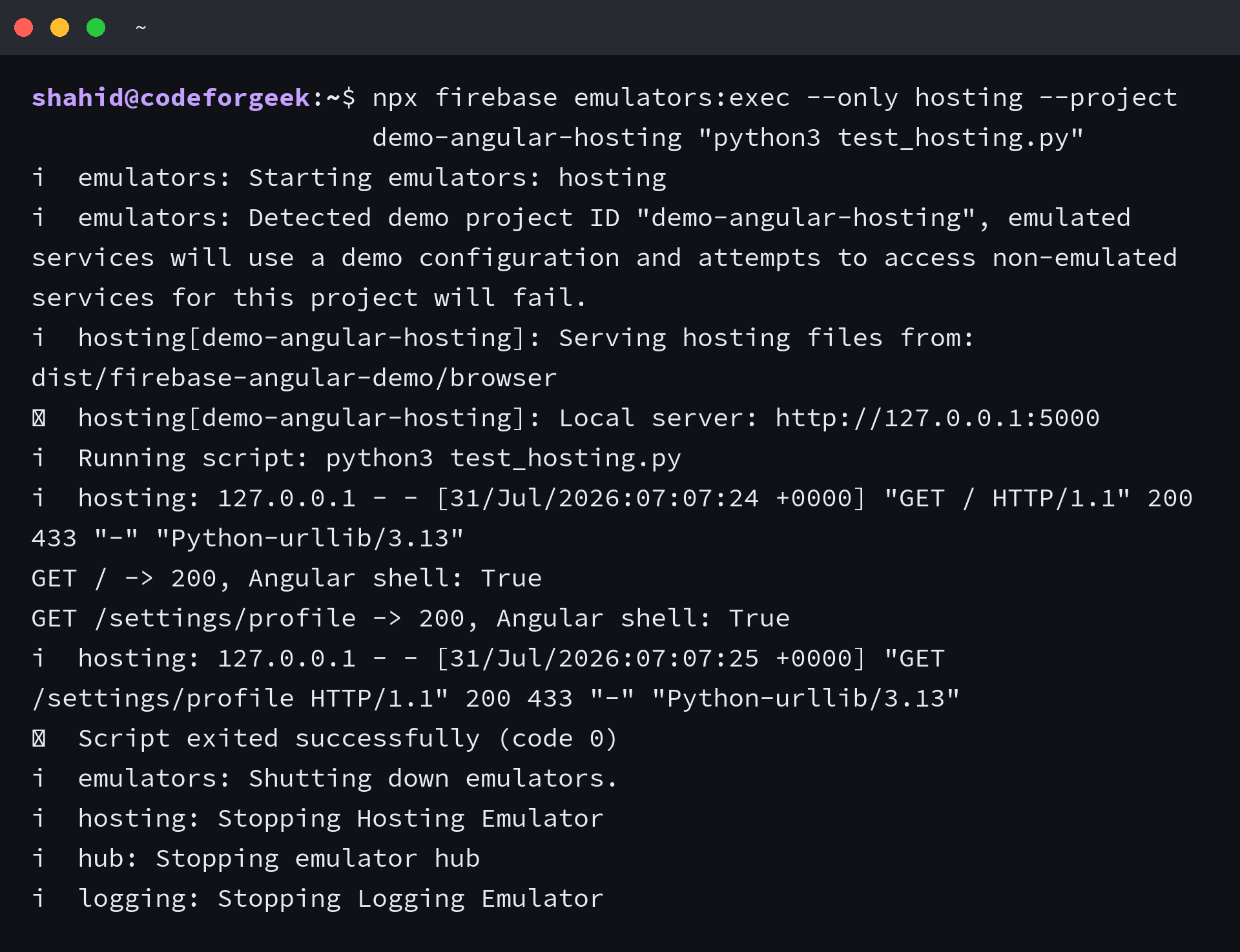
Local verification tested the root path and /settings/profile against the generated Angular build.
Both requests returned HTTP 200 and served the Angular shell, which confirms that the public directory and fallback rewrite agree.
Deploy a preview before the live channel
A Hosting preview channel gives you a temporary public URL for the exact content and configuration you plan to release.
Preview URLs are public to anyone who has the URL, so do not use them for secret data.
npx firebase hosting:channel:deploy review
Check the root page, refresh a nested route, and inspect the browser console.
If those checks pass, deploy only the Hosting target to the live channel.
npx firebase deploy --only hosting
Firebase prints the web.app and firebaseapp.com addresses after a successful deployment.
A live deployment requires the authenticated account to have access to the selected Firebase project.
Fix common Angular and Firebase deployment failures
Each failure below points to a different boundary.
Change the smallest relevant setting, rebuild when the output changes, and rerun the emulator before another deployment.
Firebase shows its default welcome page
The public directory does not point at the Angular browser build, or the build did not run before deployment.
Run npm run build, copy the printed output location into firebase.json, and deploy again.
A page refresh returns 404
The Hosting configuration is missing the catch-all rewrite to /index.html.
Angular Router can handle a route after the application loads, but the server must return the host page for a direct request first.
Firebase reports an authentication failure
Run npx firebase login in an interactive local shell and select an account that can access the project.
In CI, configure the platform-supported Firebase identity instead of expecting browser login to work.
The application loads but API requests fail
Hosting the Angular files does not grant a separate API permission to accept browser requests.
If the API uses another origin, its server must return the required cross-origin resource sharing (CORS) headers.
The Angular HTTP calls walkthrough covers the client request side.
The application needs server execution
Static Hosting cannot execute an Angular server bundle for each request.
Use Firebase App Hosting for full-stack or server-rendered Angular, or redesign the application as a client-rendered build before using this configuration.
Deployment checklist
Keep this boundary intact on every release.
The build produces the files, Hosting serves that browser directory, and the rewrite returns index.html for Angular routes.
- The Node.js release satisfies Angular compatibility guidance.
- npm test and npm run build finish successfully.
- firebase.json points to the browser output printed by the build.
- A nested route returns HTTP 200 in the Hosting emulator.
- The preview channel behaves correctly before the live deploy.
- The live Firebase project and account are the intended ones.
If a routed refresh fails, return to firebase.json before changing Angular code.
If the application needs request-time rendering, move to App Hosting instead of forcing a server bundle into static Hosting.
Should I use Firebase Hosting or App Hosting for Angular?
Use Firebase Hosting for a client-rendered Angular build that deploys static browser files. Use Firebase App Hosting when the application needs server-side rendering, request-time server code, managed rollouts from GitHub, or Cloud Run execution.
What public directory should Firebase use for Angular?
Use the directory that contains the built index.html file. With the Angular 22 application builder tested here, a project named firebase-angular-demo writes that file to dist/firebase-angular-demo/browser.
Why does an Angular route return 404 after deployment?
A direct request reaches Firebase before Angular Router starts. Add a Hosting rewrite whose source is ** and whose destination is /index.html, then test the nested route with the Hosting emulator.
Do I need AngularFire to deploy an Angular app to Firebase Hosting?
No. Firebase Hosting can deploy the static Angular browser build through Firebase Tools alone. Add AngularFire when the application also needs Angular integrations for Firebase services or when you prefer its ng deploy builder.