
New to Rust? Grab our free Rust for Beginners eBook Get it free →
Email Queue Design

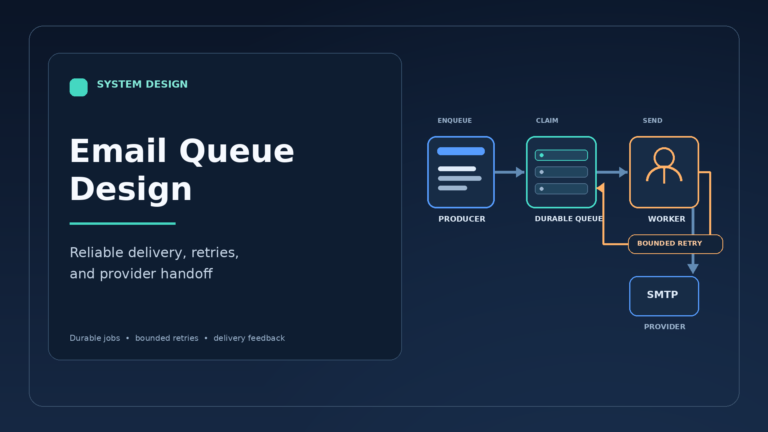
Signup and password-reset requests may need to send an email without keeping the application request open while the provider responds. An email queue is a durable buffer that holds the send request for a worker to process later.
I’ll explain how to store one intent for each logical email and schedule retries for temporary provider failures.
TL;DR
An email queue stores a send request durably so the application can return before a worker calls the email provider.
- Write the send intent durably, ideally in the same database transaction as the business change that caused it.
- Give each logical email a stable idempotency key, then claim work with a lease or broker visibility timeout.
- Limit retries to temporary failures, pace workers to the provider account limit, and retain exhausted jobs for review.
- Treat provider acceptance as a handoff, not proof that the message reached an inbox.
What Is an Email Queue?
An email queue is a durable buffer between the application that asks for a message and the service that sends it. For a request tied to a database update, choose an outbox-backed worker because both records can commit in the same transaction.
| Part | Responsibility | Design choice |
|---|---|---|
| Producer | Creates the send intent beside the business event. | Choose a durable handoff that fits the application database. |
| Queue or outbox | Keeps work available for a later attempt. | Choose a database-backed worker or a broker whose delivery and acknowledgement rules you can state. |
| Worker | Claims one job, checks policy, renders a template, and calls the provider. | Keep claim state and attempt count durable. |
| Email provider | Accepts or rejects an API or SMTP request. | Throttle to the account quota and provider response. |
| Feedback handler | Records bounces, complaints, and delivery events. | Update suppression and reporting separately from the send attempt. |
Apply an expiry check to any job whose message becomes unsafe after a deadline.
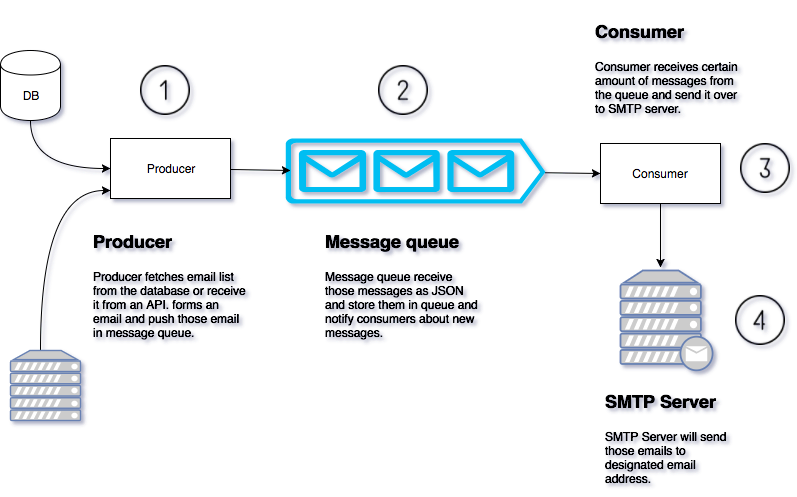
The AWS transactional outbox guide covers the dual-write failure and explains why relay consumers must tolerate publication after a crash.
How to Design an Email Queue Step by Step
Start with one durable job and make every later state change explicit. The named Python file below stores local SQLite state because it demonstrates the worker lifecycle without a provider account.
Step 1: Store One Intent for Each Logical Email
Track an application event ID beside the job so support can identify which update produced it.
Store message bodies and attachment data outside the broker, then pass a protected reference. If a worker needs recipient data, restrict who can read it and remove it after the retry and audit window.
| Job field | Why it belongs in the record |
|---|---|
| Recipient reference | Resolve the destination under the application’s access controls. |
| Template ID and version | Render the intended message after a deployment changes templates. |
| Variables and expiry time | Supply the message data and reject stale verification links. |
| Attempt count and next-attempt time | Track retries and eligibility for scheduled work. |
| Provider ID and terminal status | Correlate a provider response with the job’s stored state. |
Pin the template version at enqueue when a queued email must retain its intended wording across deployments. A rendered snapshot is another option when version compatibility is impractical. Expire one-time tokens before a worker sends stale credentials.
The file stores state in SQLite across command invocations, and the screenshots below show its recorded transitions.
import argparse
import sqlite3
from pathlib import Path

DB = Path(__file__).with_name("email-queue-demo.sqlite3")
JOB_ID = "welcome-42"
IDEMPOTENCY_KEY = "signup:42:welcome"


def main():
    parser = argparse.ArgumentParser()
    parser.add_argument("action", choices=("enqueue", "claim", "temporary-failure", "accept"))
    action = parser.parse_args().action

    with sqlite3.connect(DB) as db:
        db.execute("""CREATE TABLE IF NOT EXISTS jobs (
            job_id TEXT PRIMARY KEY,
            idempotency_key TEXT NOT NULL UNIQUE,
            state TEXT NOT NULL,
            attempts INTEGER NOT NULL DEFAULT 0,
            next_attempt TEXT,
            last_failure TEXT
        )""")

        if action == "enqueue":
            cursor = db.execute(
                "INSERT OR IGNORE INTO jobs (job_id, idempotency_key, state) VALUES (?, ?, 'queued')",
                (JOB_ID, IDEMPOTENCY_KEY),
            )
            state = db.execute("SELECT state FROM jobs WHERE job_id = ?", (JOB_ID,)).fetchone()[0]
            result = "created" if cursor.rowcount == 1 else "deduplicated"
            print(f"enqueue={result} id={JOB_ID} state={state}")

        elif action == "claim":
            with db:
                cursor = db.execute(
                    "UPDATE jobs SET state = 'sending', attempts = attempts + 1 "
                    "WHERE job_id = ? AND state IN ('queued', 'retry')",
                    (JOB_ID,),
                )
                if cursor.rowcount != 1:
                    raise SystemExit("job is not available to claim")
                attempts = db.execute("SELECT attempts FROM jobs WHERE job_id = ?", (JOB_ID,)).fetchone()[0]
            print(f"claim={JOB_ID} state=sending attempt={attempts}")

        elif action == "temporary-failure":
            with db:
                cursor = db.execute(
                    "UPDATE jobs SET state = 'retry', next_attempt = 'demo-backoff-60s', "
                    "last_failure = 'temporary provider error' WHERE job_id = ? AND state = 'sending'",
                    (JOB_ID,),
                )
                if cursor.rowcount != 1:
                    raise SystemExit("job is not being sent")
                attempts = db.execute("SELECT attempts FROM jobs WHERE job_id = ?", (JOB_ID,)).fetchone()[0]
            print(f"result=temporary-error state=retry attempt={attempts} backoff=60s-demo-label")

        else:
            with db:
                cursor = db.execute(
                    "UPDATE jobs SET state = 'accepted_by_provider', next_attempt = NULL "
                    "WHERE job_id = ? AND state = 'sending'",
                    (JOB_ID,),
                )
                if cursor.rowcount != 1:
                    raise SystemExit("job is not being sent")
                attempts = db.execute("SELECT attempts FROM jobs WHERE job_id = ?", (JOB_ID,)).fetchone()[0]
            print(f"provider_response=accepted state=accepted_by_provider attempt={attempts}")


if __name__ == "__main__":
    main()
python3 email_queue_demo.py enqueue && python3 email_queue_demo.py enqueue
enqueue=created id=welcome-42 state=queued
enqueue=deduplicated id=welcome-42 state=queued
[exit 0]

Give one key to the logical email and scope it to the event and purpose. Reuse that key for every attempt.
Step 2: Claim a Job Before Provider Work
Set a bounded claim interval that matches expected provider latency, and extend it when a long request remains active.
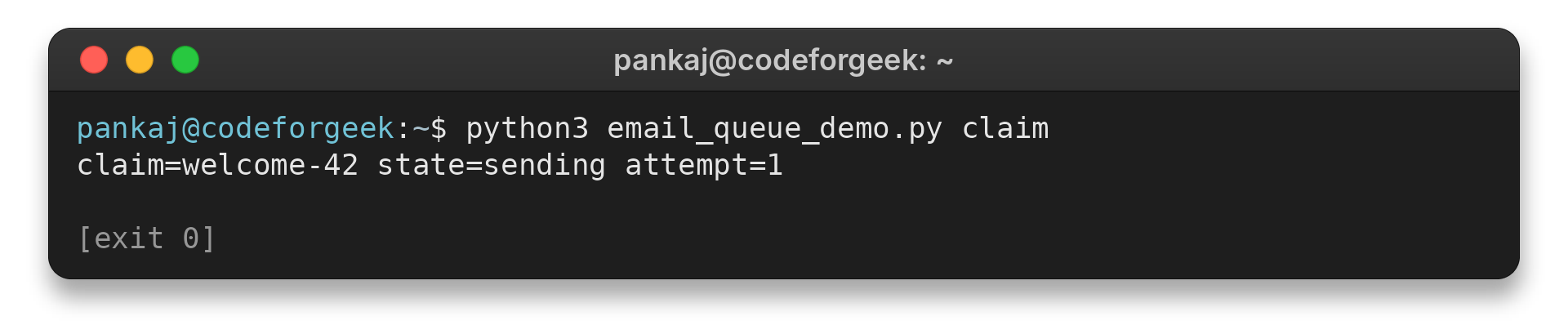
A claim changes the status to sending and advances its attempt counter. Render a versioned template from stored data, then check recipient eligibility and expiry before submission. Write the terminal state after the processing result is durable.
Keep prefetch small when the queue mixes priorities or expiry times so a slow provider call cannot hold urgent work behind it.
python3 email_queue_demo.py claim
claim=welcome-42 state=sending attempt=1
[exit 0]
The site’s Redis Streams guide shows consumer groups and pending-entry recovery. Those stream mechanics help inspect abandoned work, while email-specific duplicate handling belongs at the provider boundary.
Step 3: Classify the Provider Response and Schedule a Retry
A temporary network timeout can be retried. Route malformed addresses and permanent rejections to corrective or terminal handling. Provider codes vary, so follow the chosen API’s error documentation and relevant SMTP response classes.
Use exponential backoff with jitter for repeated temporary failures, and honor a provider-supplied retry delay when its API defines one. The program records a fixed 60-second demo label. A production scheduler should compare the stored next-attempt timestamp with the current time and enforce that deadline.
python3 email_queue_demo.py temporary-failure
result=temporary-error state=retry attempt=1 backoff=60s-demo-label
[exit 0]
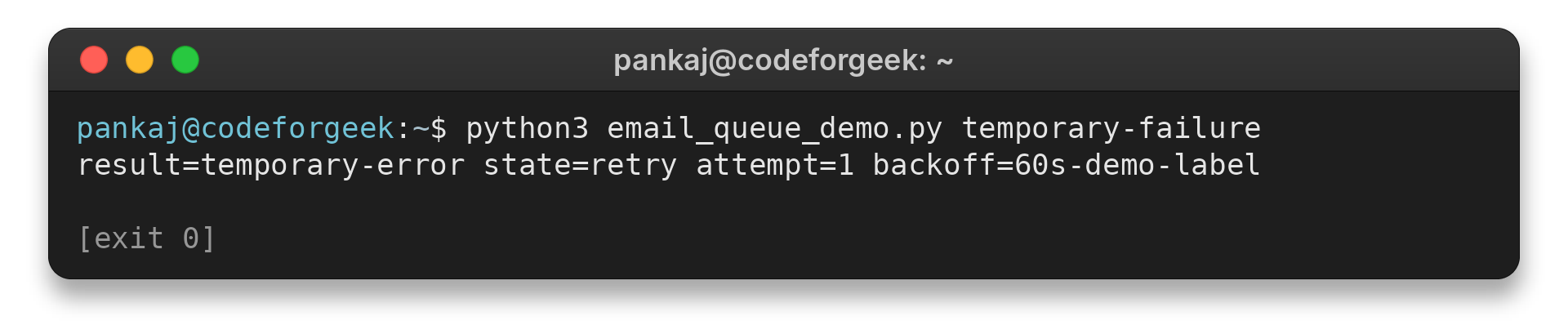
The script uses a local state transition. It never calls a provider. A production failure record should preserve the provider response and the job’s retry history for diagnosis.
Step 4: Record Acceptance, Then Acknowledge the Job
After the provider accepts a request, persist its response ID and job status before acknowledging the queue message. A crash between acceptance and local persistence can cause redelivery. Use provider-documented request deduplication when available, and log the possible duplicate when it is not.
The command below claims the job and invokes the local accept action, which writes accepted_by_provider to SQLite.
python3 email_queue_demo.py claim && python3 email_queue_demo.py accept
claim=welcome-42 state=sending attempt=2
provider_response=accepted state=accepted_by_provider attempt=2
[exit 0]
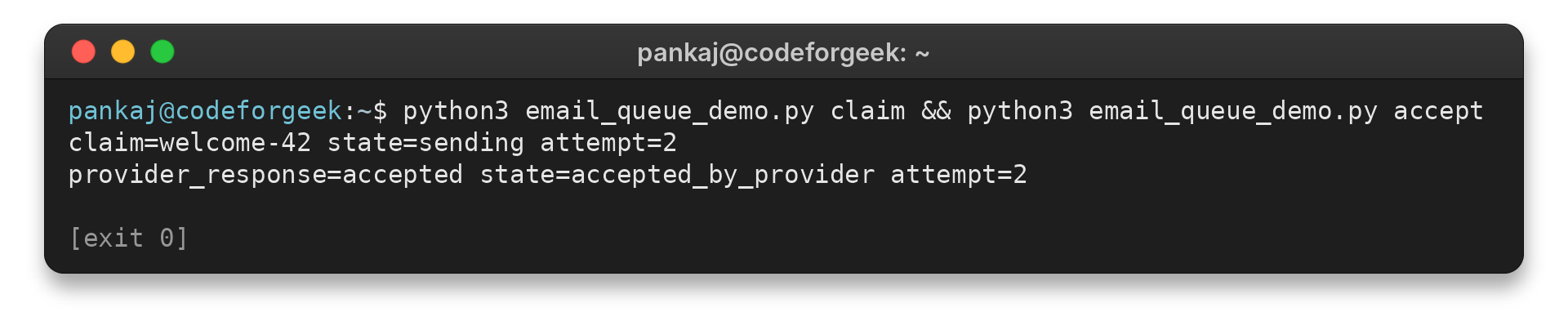
The demo’s accept action only updates SQLite. In a production sender, keep a correlation record for the provider request so support can investigate a disputed send without storing the full message body.
Email Queue Failure Cases to Plan For
Set a shared per-provider send budget because separate worker processes can exceed an account-wide rate. Check the account’s SES sending limits because quotas vary by account and Region and recipient count affects the daily total.
| Failure | What the system can observe | Response |
|---|---|---|
| Application commits an order but stops before publishing | Business row exists but broker message does not. | Write an outbox row in the same transaction and relay it later. |
| Worker stops before provider acceptance | Job remains unacknowledged or its lease expires. | Allow redelivery, reclaim the job, and increment a durable attempt count. |
| Provider accepts, then the worker crashes before storing the response | The queue still looks unfinished although the external side effect may have happened. | Use provider-documented request deduplication where available. Log and review any duplicate risk. |
| Provider applies a sending limit | Rate responses or increasing oldest-job age. | Use a token bucket or paced workers based on the account limit, then honor any documented retry delay. |
| Bounce or complaint feedback arrives | The provider reports an address that is no longer eligible. | Update the suppression record and prevent later sends to that address. |
| Template version is missing | The worker cannot render the requested message. | Record the template error, correct the stored reference, and redrive the job through an explicit operation. |
The SQS visibility-timeout documentation explains why an unacknowledged message can reappear, while the dead-letter queue guide covers redrive after a configured receive limit.
For workflows that require order, assign a key to the account or conversation and sequence only those related jobs. Keep unrelated recipients parallel so one slow provider response cannot block the rest of the queue.
Track the oldest-job age against the email latency goal. Use the supporting signals below to investigate a change.
| Signal | Question it helps answer |
|---|---|
| Visible and delayed jobs | Is work waiting or scheduled for later? |
| In-flight jobs and attempt count | Are workers active, stuck, or repeatedly receiving jobs? |
| Provider response class and accepted requests | Is the provider accepting work at the expected rate? |
| Bounce events and DLQ size | Are recipients ineligible or jobs reaching terminal failure? |
AWS notes that some SQS CloudWatch values are approximate, so use them to identify trends rather than as exact job counts.
| Workload | Queue decision | Provider guardrail |
|---|---|---|
| Password resets and verification links | Keep time-sensitive mail out of a campaign backlog. | Set a lane budget within the account-wide rate. |
| Product announcements | Use a separate queue or provider stream when it isolates bulk work. | Apply unsubscribe and suppression rules before enqueue. |
Keep a feedback path for bounces and complaints, then apply provider-specific suppression before later sends. The SES event-notification guide and Postmark Message Streams document delivery events and separate transactional from broadcast traffic. Feedback can repeat or arrive out of order, so store each event ID once and apply the provider’s documented status transitions.
Conclusion
Persist the send intent before acknowledging work. Set retry and rate limits from the chosen queue and provider documentation.
- AWS transactional outbox guide for committing send intent beside application data.
- RabbitMQ publisher confirms and consumer acknowledgements for the distinction between broker receipt and consumer completion.
- Building Email Verification System Using Node and Redis for the application flow that can enqueue a verification message.
- Redis Streams Tutorial: XADD, Consumer Groups, and Recovery for one possible queue implementation.
FAQ
These answers focus on the boundary between queue processing and the external email service.
Does an email queue guarantee delivery to the inbox?
No. A queue can preserve a send request and retry it. Provider acceptance confirms that the provider took the request, while mailbox filtering remains outside the queue’s control.
Should transactional and marketing email share a queue?
They can use one provider, but give time-sensitive transactional mail an isolated queue or provider stream when bulk traffic could delay it. Keep all lanes within the account rate limits and honor unsubscribe and suppression rules for the message type.
Can a queue prevent duplicate emails on its own?
No. A worker can send successfully and crash before saving its result, so redelivery can send the email again. Design for at-least-once processing and use provider request deduplication when the provider documents it.
When should an email job enter a dead-letter queue?
Move a job to a dead-letter queue or failure store after a configured retry ceiling or maximum age, preserving its last error. Correct the cause before using an explicit redrive process.