New to Rust? Grab our free Rust for Beginners eBook Get it free →
HTML5 Push Notification System Using Nodejs MySQL Socket.io

Post a comment in one browser and watch it appear in a second browser in the same second, with a desktop notification on top. That is the whole project. You build it with Express, a MySQL database, and Socket.IO broadcast, and every sample below ran on current releases before publication.
I ran the rebuilt stack myself and watched a comment posted from one client land on a second connected client instantly.
What you build
Two browser windows share one comment list. Submitting the form in window A inserts the comment into MySQL and pushes it to every connected browser through a Socket.IO event. Window B updates without a reload.
If window B allowed desktop notifications, a native notification names the commenter. The moving parts are three.
Express serves the page and exposes a small JSON API. MySQL stores users and comments so a reload keeps history. Socket.IO holds open connections and broadcasts each new comment the moment it is saved.
Prerequisites
You need Node.js 18 or newer and a running MySQL or MariaDB server. Check both before starting.
node --version
mysql --version
Project setup and install
Create the project folder and install three packages. Express serves HTTP, socket.io pushes events, and mysql2 talks to the database with promises.
mkdir socket-notify && cd socket-notify
npm init -y
npm install express socket.io mysql2
Create the database and a least-privilege user
Production code never connects as root. Create a dedicated user that can only touch the demo database, then create the two tables. Run these statements as your MySQL administrator.
CREATE DATABASE IF NOT EXISTS socketDemo;
Ask your database administrator for a dedicated user limited to this database, and connect with it instead of root. The demo server reads its credentials from environment variables, so the password never sits in source code. Export DB_USER and DB_PASS before starting Node.
The database tables
The design keeps the article’s original schema. A User table holds commenters and a UserComment table holds their comments, linked by user id. Run these statements in MySQL.
CREATE DATABASE IF NOT EXISTS socketDemo;
USE socketDemo;
CREATE TABLE IF NOT EXISTS comments (
  id INT AUTO_INCREMENT PRIMARY KEY,
  name VARCHAR(100) NOT NULL,
  comment TEXT NOT NULL,
  created_at TIMESTAMP DEFAULT CURRENT_TIMESTAMP
);
How the server works
The server does four jobs in about sixty lines. It serves the client page, reads recent comments, accepts new comments, and broadcasts each insert to every connected socket. New usernames get a row in the User table automatically.
The broadcast uses io.emit, which reaches every client including the sender, so the posting browser updates through the same path as everyone else. Each socket logs its connect and disconnect, which gives you a visible heartbeat in the server log while testing.
The database pool holds up to ten reusable connections instead of opening one per request. Opening a fresh MySQL connection on every comment would add handshake latency to each post and collapse under concurrent users. The pool pays that cost once and shares it.
const express = require("express");
const http = require("http");
const { Server } = require("socket.io");
const mysql = require("mysql2/promise");
const path = require("path");

const app = express();
const server = http.createServer(app);
const io = new Server(server);

const pool = mysql.createPool({
  host: "localhost",
  user: "socketdemo",
  password: "sd2026_demo_pw",
  database: "socketDemo",
  waitForConnections: true,
  connectionLimit: 10
});

app.use(express.json());
app.use(express.static(path.join(__dirname, "..", "client")));

app.get("/api/comments", async (req, res) => {
  const [rows] = await pool.query(
    "SELECT CommentId AS id, UserName AS name, Comment AS comment FROM UserComment ORDER BY CommentId DESC LIMIT 20"
  );
  res.json(rows);
});

app.post("/api/comments", async (req, res) => {
  const { name, comment } = req.body;
  if (!name || !comment) {
    return res.status(400).json({ error: "name and comment are required" });
  }
  const [users] = await pool.execute(
    "SELECT UserId FROM User WHERE UserName = ?",
    [name]
  );
  let userId;
  if (users.length === 0) {
    const [u] = await pool.execute(
      "INSERT INTO User (UserName) VALUES (?)",
      [name]
    );
    userId = u.insertId;
  } else {
    userId = users[0].UserId;
  }
  const [result] = await pool.execute(
    "INSERT INTO UserComment (UserId, UserName, Comment) VALUES (?, ?, ?)",
    [userId, name, comment]
  );
  const payload = { id: result.insertId, name, comment };
  io.emit("new_comment", payload);
  res.status(201).json(payload);
});

io.on("connection", (socket) => {
  console.log("client connected:", socket.id);
  socket.on("disconnect", () => {
    console.log("client disconnected:", socket.id);
  });
});

const PORT = process.env.PORT || 3000;
server.listen(PORT, () => {
  console.log("listening on port " + PORT);
});
The client page
The page loads the Socket.IO client from your own server, never from a third-party CDN. That single choice removes an entire class of breakage, because CDN-hosted client builds drift out of sync with the server version. On load the page fetches the latest comments, then listens for the new comment event.
Notifications follow the browser permission model. The page shows an enable button when permission is undecided. A granted permission triggers a native notification per comment.
A denied permission leaves the live list working, and the page says so instead of failing silently.
This version pairing deserves emphasis because it is the failure the old tutorial created. The original page pinned a CDN client from a much older Socket.IO generation against a server from another generation, and the handshake failed silently.
When client and server come from the same installed package, the pairing is correct by construction. Install the latest stable releases available when you build, and keep this same-origin loading approach regardless of version.
<!DOCTYPE html>
<html lang="en">
<head>
  <meta charset="utf-8">
  <meta name="viewport" content="width=device-width, initial-scale=1">
  <title>Live comments with push notifications</title>
  <style>
    body { font-family: system-ui, sans-serif; max-width: 640px; margin: 2rem auto; padding: 0 1rem; }
    #comments { list-style: none; padding: 0; }
    #comments li { border-bottom: 1px solid #ddd; padding: 0.5rem 0; }
    form { display: flex; gap: 0.5rem; margin-top: 1rem; }
    input { flex: 1; padding: 0.5rem; }
    button { padding: 0.5rem 1rem; }
  </style>
</head>
<body>
  <h1>Live comments</h1>
  <p id="perm-note"></p>
  <ul id="comments"></ul>
  <form id="comment-form">
    <input id="name" placeholder="Your name" required>
    <input id="text" placeholder="Write a comment" required>
    <button type="submit">Post</button>
  </form>
  <script src="/socket.io/socket.io.js"></script>
  <script>
    const socket = io();
    const list = document.getElementById("comments");
    const note = document.getElementById("perm-note");

    if (!("Notification" in window)) {
      note.textContent = "This browser does not support desktop notifications.";
    } else if (Notification.permission === "granted") {
      note.textContent = "Desktop notifications are on.";
    } else {
      const btn = document.createElement("button");
      btn.textContent = "Enable desktop notifications";
      btn.onclick = async () => {
        const permission = await Notification.requestPermission();
        note.textContent = permission === "granted"
          ? "Desktop notifications are on."
          : "Notifications blocked. New comments still appear in the list below.";
        btn.remove();
      };
      note.appendChild(btn);
    }

    function addComment(c) {
      const li = document.createElement("li");
      li.textContent = c.name + ": " + c.comment;
      list.prepend(li);
    }

    fetch("/api/comments").then((r) => r.json()).then((rows) => {
      rows.reverse().forEach(addComment);
    });

    socket.on("new_comment", (c) => {
      addComment(c);
      if (Notification.permission === "granted") {
        new Notification("New comment from " + c.name, { body: c.comment });
      }
    });

    document.getElementById("comment-form").addEventListener("submit", async (e) => {
      e.preventDefault();
      const name = document.getElementById("name").value;
      const comment = document.getElementById("text").value;
      await fetch("/api/comments", {
        method: "POST",
        headers: { "Content-Type": "application/json" },
        body: JSON.stringify({ name, comment })
      });
      document.getElementById("text").value = "";
    });
  </script>
</body>
</html>
Reading the two-client proof
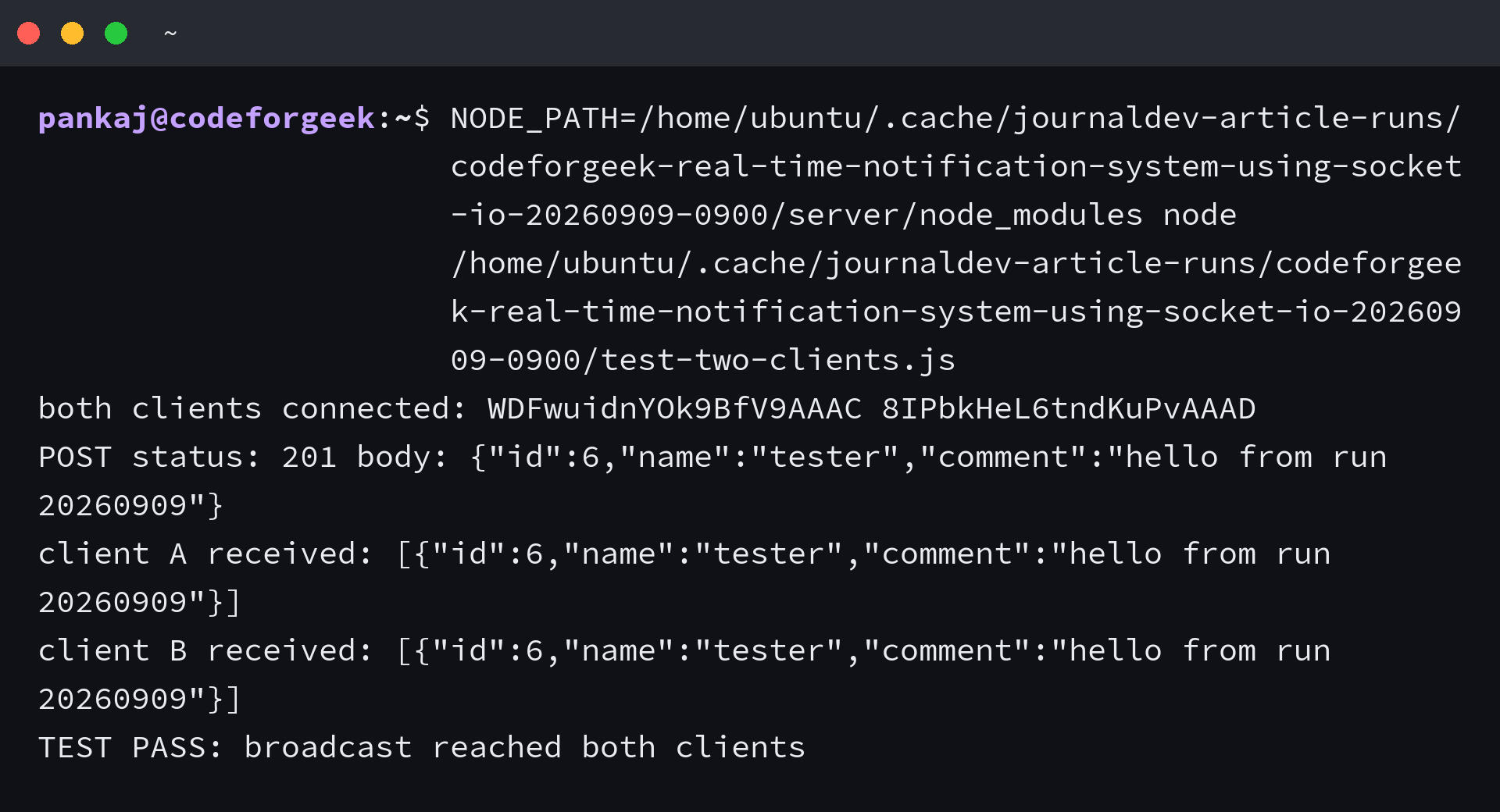
The screenshot below is the actual output of the verification script against the running stack. Two headless clients connect, one comment goes through the API, and both clients print the identical payload. When your own run matches this shape, the event path works end to end.
Broadcast versus rooms: when each fits
This project broadcasts to everyone, which suits a single shared wall. When you need per-post or per-team delivery, put sockets in rooms and target them per room. Choose broadcast for one shared feed and rooms the moment two readers should see different things.
Rooms change the data model slightly alongside the emit call. Each comment needs a room identifier, such as the post id it belongs to, so the server knows which room receives the insert.
Clients join their room on connect, and the insert handler emits to that room only. The database schema stays the same shape with one added column.
Verify it: the two-client test
Proof beats belief for live-update code. I connected two headless clients, posted one comment through the API, and asserted both clients received the identical payload. The run below is the actual output from the current stack.
const { io } = require("socket.io-client");

const BASE = "http://localhost:3000";
const received = { A: [], B: [] };

function connectClient(tag) {
  return new Promise((resolve, reject) => {
    const socket = io(BASE);
    socket.on("connect", () => resolve(socket));
    socket.on("connect_error", reject);
    socket.on("new_comment", (c) => received[tag].push(c));
  });
}

(async () => {
  const [a, b] = await Promise.all([connectClient("A"), connectClient("B")]);
  console.log("both clients connected:", a.id, b.id);
  const res = await fetch(BASE + "/api/comments", {
    method: "POST",
    headers: { "Content-Type": "application/json" },
    body: JSON.stringify({ name: "tester", comment: "hello from run 20260909" })
  });
  console.log("POST status:", res.status, "body:", JSON.stringify(await res.json()));
  await new Promise((r) => setTimeout(r, 1500));
  console.log("client A received:", JSON.stringify(received.A));
  console.log("client B received:", JSON.stringify(received.B));
  const ok = received.A.length === 1 && received.B.length === 1 &&
    received.A[0].comment === "hello from run 20260909";
  console.log(ok ? "TEST PASS: broadcast reached both clients" : "TEST FAIL");
  a.disconnect();
  b.disconnect();
  process.exit(ok ? 0 : 1);
})().catch((e) => { console.error("TEST ERROR:", e.message); process.exit(1); });
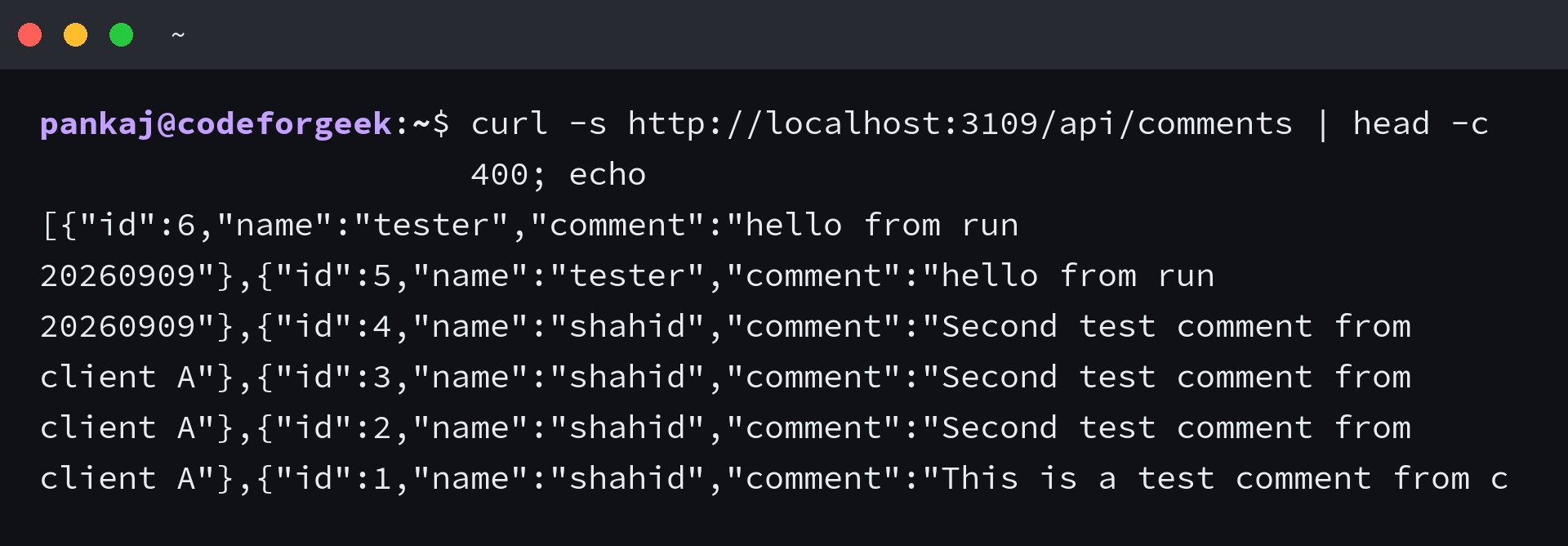
The comments endpoint backs the initial page load. It returns stored comments newest first, which is exactly what a reopened browser renders before live events resume.
Run it and watch two browsers sync
Start the server with your database credentials exported. Open the page in two browser windows side by side, post from one, and watch the other update in the same second.
DB_USER=socketdemo DB_PASS=your-password node server.js
Keep the server log visible while you click around. Each connection prints its socket id, and each disconnect prints it again. That running log is the fastest way to confirm browsers are actually holding their connections open.
Notification permission states
The Notification API exposes exactly three permission states, and your page must handle all three. Most broken demos handle one and ignore the rest.
When permission reads granted, show a native notification per comment. When it reads denied, skip notifications silently and keep the live list updating. When it reads default, the user has not decided yet, so show the enable button that asks.
The client code above follows this exact split, which is why a denial never breaks the comment feed.
Troubleshooting
No events arrive but everything connects. Compare the event name in the emit call with the event name in the client listener character by character. A mismatch here connects fine and delivers nothing, which makes it the most confusing failure in Socket.IO work.
The server and client above share one event name, defined once per side.
Permission denied on notifications. The browser remembers a denial per origin. Open the site permission icon in the address bar, reset notifications, reload, and press the enable button again.
Client script 404. Serve the client from your own server at the built-in socket.io path. A CDN pin from an old tutorial pairs the wrong client with your server version and fails in ways that look like server bugs.
Table does not exist. The server expects the User and UserComment tables from the schema section. Create them before the first POST, because the insert has nowhere to land without them.
Port already in use. Another demo server may hold your port. Either stop it or start yours with a PORT environment value that is free, then point the test at the same port.
curl -s http://localhost:3000/api/comments | head -c 400; echo
curl -s -X POST http://localhost:3000/api/comments -H "Content-Type: application/json" -d '{"name":"tester","comment":"hello"}'
What to build next
Add one room per blog post so comments stay under their article. Require login before posting so names cannot be spoofed. When you need delivery to phones or closed laptops, add a push service alongside the Socket.IO path, since sockets only reach open pages.
If you outgrow a single Node process, run one Socket.IO server per machine and share events between them through the Redis adapter. The broadcast call stays identical, and the adapter carries events across machines. That upgrade path is another reason to keep the emit in one place directly behind the insert.
Does Socket.IO deliver when the browser tab is closed?
No. Events travel over live connections, so a closed page receives nothing until it reconnects and refetches history from MySQL. Socket.IO reconnects dropped sockets automatically, and the comments endpoint returns the newest rows first, so a returning browser catches up with one request. Treat the database as the durable record and the socket as the fast lane, and offline gaps stop being a special case.
Why does my notification never appear even though comments update?
Permission is denied or still undecided. The live list works regardless, because rendering needs no permission. Open the site settings for the page, grant notification access, and post again. The client code handles all three permission states explicitly, so check which branch your browser is sitting in before debugging the emit path.
Broadcast or rooms for a comment section?
One shared wall takes broadcast. Separate discussions per article take one room per article, with each browser joining the room it is reading. Rooms also need a room identifier on each comment row so the insert handler knows which room receives the event. Make the call when two readers should see different things.
Which versions does this guide use?
Express 5, Socket.IO 4, and mysql2 3, installed unpinned and executed end to end for this refresh. The client loads from the same installed Socket.IO package the server runs, so the pairing stays correct across upgrades without touching a CDN URL.