New to Rust? Grab our free Rust for Beginners eBook Get it free →
8 Application Performance Monitoring Tools to Consider

A request that slows down or fails can leave you unsure which service is involved. Application performance monitoring (APM) collects information about how an application handles requests and helps connect slow or failed requests to the services involved.
I’ll explain how to assess an APM tool for your workload and use a trace, a record of timed work for one request across services, to investigate a delay.
TL;DR
Choose an application performance monitoring tool by checking its runtime support, telemetry detail, deployment model, and data costs against the work your team needs to diagnose.
- New Relic, Datadog, Dynatrace, Splunk AppDynamics, Elastic APM, and IBM Instana cover broad application monitoring needs.
- Sentry focuses on developer-facing errors and performance, while groundcover emphasizes Kubernetes-oriented, eBPF-based collection.
- Check runtime compatibility, sampling, retention, hosting, and OpenTelemetry feature limits before rollout.
What Is Application Performance Monitoring?
Application performance monitoring (APM) collects signals about how an application behaves while it handles requests, then helps connect slow or failed requests to the services and dependencies involved.
A trace follows one request across services. It contains spans, which record timed work such as a database call or an HTTP request.
Metrics summarize behavior across many requests, including request rate, latency percentiles, and error rate. Logs add event detail. A useful APM view links these signals where the product and instrumentation support that connection.
Observability is the broader practice of using telemetry to understand a system from its outputs. OpenTelemetry is an open-source framework and toolkit for generating, collecting, and exporting telemetry. It does not itself provide the storage and visualization backend, so a team still chooses where exported data is analyzed.
Which APM Tool Fits Your Workload?
The best fit depends on your application stack and who will operate the monitoring system. Compare tools on instrumentation, signal coverage, data control, and ownership rather than relying on a single feature checklist.
| Tool | Starting point | Deployment and telemetry notes | Trade-off to check |
|---|---|---|---|
| New Relic | Teams wanting hosted APM across several languages | Language agents and OpenTelemetry paths. Verify agent support for your runtime | Ingest, retention, and plan boundaries |
| Datadog | Teams already using Datadog or needing correlated signals | APM integrates with its wider monitoring products. OTel paths have different feature coverage | Agent configuration and telemetry charges |
| Dynatrace | Complex environments where automatic discovery matters | OneAgent and supported technology integrations. Deployment choices vary | Agent and platform fit for the environment |
| Splunk AppDynamics | Organizations tracking application and business transaction health | Hybrid and enterprise use cases. Check supported deployment and agents | Scope, licensing, and integration work |
| Elastic APM | Teams using or operating the Elastic stack | APM Server and OpenTelemetry options. Self-managed operation is available | Storage, upgrades, and telemetry volume |
| IBM Instana | Teams seeking automated discovery across services | Product offers SaaS and self-hosted options. Verify OTel and runtime support | Deployment model and data governance |
| Sentry | Developers focused on errors and application performance issues | Connects performance data with issue context. Verify infrastructure coverage | May need another platform for broad infrastructure monitoring |
| groundcover | Kubernetes-oriented teams evaluating eBPF collection | Vendor describes BYOC and OpenTelemetry support | Validate cluster coverage, ownership, and actual cost model |
1. New Relic
New Relic suits teams that want application traces and related telemetry in a hosted platform. Its APM documentation provides a starting point for agent-based setup, while the vendor also documents OpenTelemetry ingestion. Check the agent compatibility requirements for the language and framework you run, especially for older .NET workloads.
Before adopting it, decide which telemetry to retain and how much detail to collect. Sampling can reduce volume, but it may affect which requests appear in a trace view. Confirm the current plan’s ingest and retention rules against your expected traffic instead of assuming that every signal has the same limits.
2. Datadog
Datadog is a practical candidate when a team wants APM alongside infrastructure metrics, logs, or user experience signals in one product family. Its documentation describes distributed tracing and several OpenTelemetry ingestion paths, but feature coverage depends on the instrumentation route.
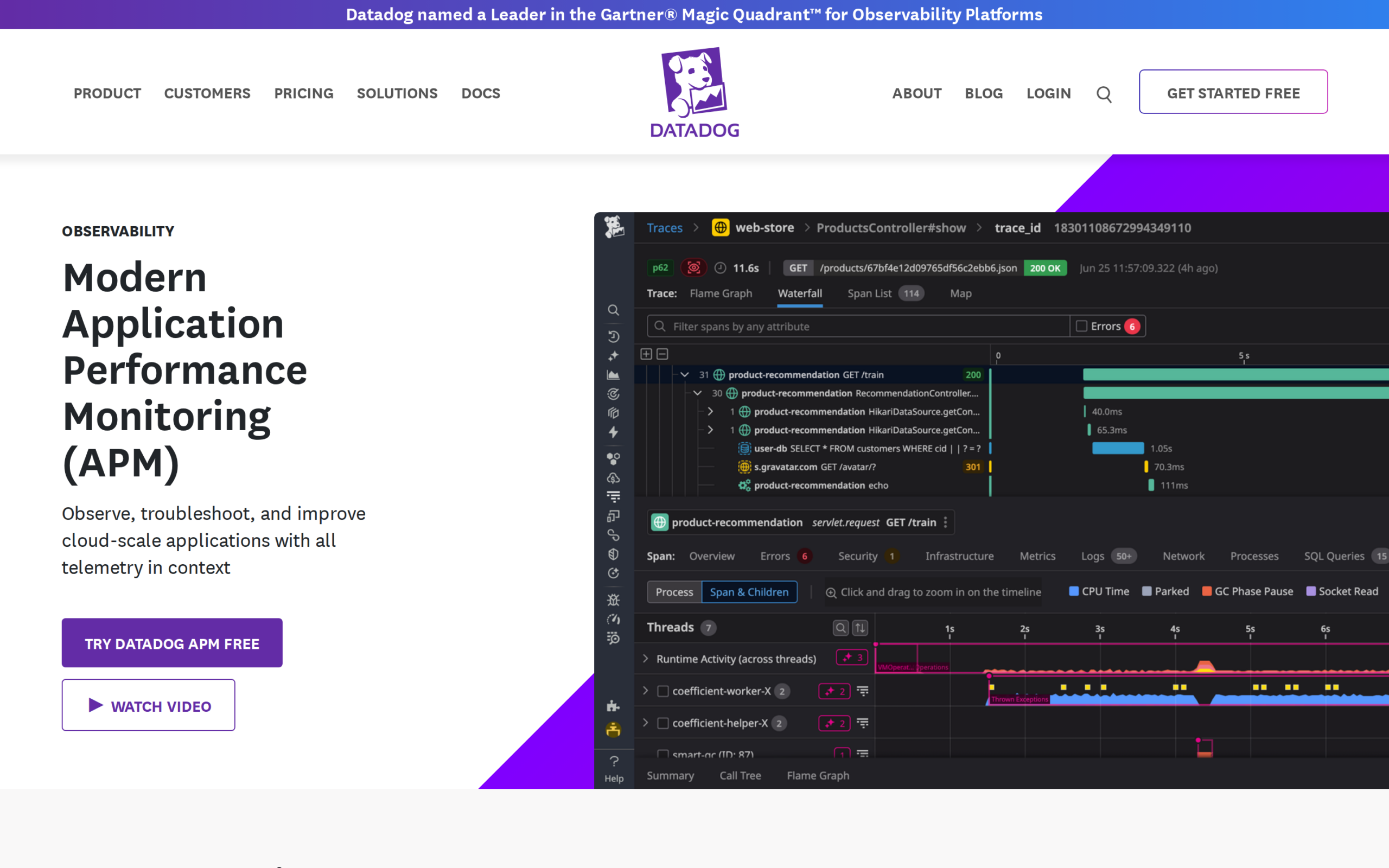
The product page shown above pairs its APM description with a trace waterfall interface. A trace view can help follow a request across spans, but it is only as useful as the context your application propagates. Review ingestion controls, sampled data behavior, and billing dimensions before enabling every integration.
3. Dynatrace
Dynatrace is worth evaluating in distributed environments where automatic process discovery and broad technology coverage are priorities. Its OneAgent documentation describes discovery and instrumentation based on detected technologies, while the support matrix lists the combinations that are covered.
Use the support matrix to verify the exact runtime, framework, and deployment model before selecting it.
4. Splunk AppDynamics
Splunk AppDynamics targets organizations that need application performance context alongside business transaction visibility. The current product page describes hybrid and enterprise monitoring, so it belongs on a shortlist where application behavior must be related to business services. Check the published deployment and agent details for your environment.
Confirm the product’s current deployment options, licensing, and agent support for your environment with the vendor. These details vary. Treat the name and product scope as Splunk AppDynamics in current documentation rather than relying on older AppDynamics-only descriptions.
5. Elastic APM
Elastic APM fits teams already using Elastic or willing to operate the Elastic observability stack. Its APM components collect request and dependency information, and the documentation describes OpenTelemetry options for sending telemetry into Elastic. Check the deployment path first.
Elastic APM can run in a self-managed or managed deployment. Teams should compare storage, upgrades, access controls, availability, price, and data limits before choosing who operates the backend. The operating model affects ongoing work.
6. IBM Instana
IBM Instana is an option for teams that want automated service discovery and application telemetry across a distributed environment. Its product information describes both SaaS and self-hosted purchase options, which makes the ownership question part of the product choice.
Check the technology support and OpenTelemetry documentation for the components you run. Avoid treating automatic discovery as a substitute for confirming that the important transaction paths are instrumented.
7. Sentry
Sentry links performance traces and spans with issue investigation across supported application types.
Check whether Sentry covers the host, network, and infrastructure signals your team needs. Add a separate platform when those signals fall outside your chosen Sentry configuration.
8. groundcover
groundcover is a candidate for Kubernetes teams evaluating eBPF-based collection and a bring-your-own-cloud deployment. Its product materials describe an eBPF sensor and OpenTelemetry support, which may fit teams looking to collect application signals while keeping the data plane in their cloud environment.
Confirm exactly which signals and cluster configurations are supported, and how data is stored and billed. A vendor’s architecture and cost claims should be checked against your own workload and current contract. The deployment model can change who controls the data, but it does not remove the need to plan for retention and alert quality.
How Do Traces Help Pinpoint an Issue?
Distributed tracing links timed operations from one request across the services that handle it. Find the span that accounts for a delay, then check what that span was waiting on.
A trace usually has a parent span for the incoming request and child spans for downstream work. Compare their start and end times, status, and service names. A long database span points investigation toward query behavior or the database path, while a long outbound HTTP span suggests checking the remote dependency and network path.
Context propagation carries the trace identity between instrumented services. If an asynchronous queue, proxy, or custom client drops that context, the trace can split into unrelated pieces. Check the SDK and agent guidance for the framework and transport in use, then inspect one request through each boundary before adding more services.
Thread-level tracing can expose work performed on a particular request-handling thread, but it is not a universal feature name or guarantee across these products. Where a vendor offers thread or continuous profiling views, verify which runtime and agent support them and whether the view links samples back to a trace. Sampling and instrumentation overhead also affect what the view can show.
Use a trace waterfall to separate queue time, application work, and downstream calls. A trace with missing child spans is a signal to inspect propagation and instrumentation, not proof that the omitted dependency was idle.
| Trace evidence | What to inspect |
|---|---|
| Long database span | Query behavior and database path |
| Long outbound HTTP span | Remote dependency and network path |
| Missing child spans | Context propagation at queues, proxies, and clients |
How Can You Track Release Changes as They Happen?
Monitoring catches changed behavior only after its signals reach an alert or a person watching the service. Pair deployment markers with service-level alerts so a latency or error change can be compared with the release that preceded it.
Record a deployment version, commit identifier, or release marker as a telemetry attribute when the instrumentation supports it. Then compare request rate, latency, and errors before and after rollout. Keep the attribute consistent across services so a distributed trace and its metrics can be grouped by the same release.
Alert on a user-facing service objective, such as an error budget burn or a latency threshold measured over a defined window. A single slow request may be noise, while a sustained change in a critical endpoint can justify rollback or investigation. Choose thresholds from the service’s own baseline and impact, not a copied default.
Check notification ownership and escalation during the pilot. An alert without a route to the engineer responsible for the affected service adds a dashboard event but does not shorten response. Verify that release annotations, alert links, and trace context are visible to the on-call role.
- Attach a consistent release identifier to telemetry.
- Compare latency and errors across a defined window.
- Test alert ownership and links during a pilot.
What Does Watchdog AI Do During Incident Triage?
Some APM vendors use the Watchdog name for automated detection or investigation features. Their scope differs by product and plan, so check the current product documentation for the signals analyzed, supported services, and the evidence shown with a finding.
An automated finding is a lead for investigation, not a substitute for the trace, deployment, and service context. Confirm that the suggested change is present in the underlying telemetry and that the time window includes the incident. Missing instrumentation, sampling, or a noisy baseline can affect the result.
During evaluation, compare the time required to move from alert to a verified cause with and without the feature. Use the same incident replay or test scenario and record which evidence the system surfaced. Do not treat a generated explanation as a confirmed root cause until an engineer checks it against service behavior.
What Should You Check Before Choosing an APM Tool?
Run a small evaluation against one important request path before instrumenting an entire fleet. That test can reveal whether traces are connected across service boundaries, whether sensitive fields are captured, and whether the resulting alerts are actionable.
| Case | Symptom | Fix |
|---|---|---|
| Unsupported runtime | Agent does not start or expected spans are absent | Check the exact language, framework, and runtime combination in the vendor matrix before rollout |
| Broken trace propagation | One request appears as separate traces across services | Inspect context propagation through proxies, queues, and custom clients |
| Sampling hides an event | An incident request has no retained trace | Review sampling rules and incident-time retention, then test with representative traffic |
| Unexpected telemetry cost | Ingest or storage grows beyond the pilot estimate | Measure signal volume and retention, then narrow collection or adjust the deployment plan |
| Sensitive data captured | Trace attributes contain user or credential data | Apply documented redaction at instrumentation or collection and verify the exported payload |
| Unowned alert | Notifications have no responder or service owner | Assign an escalation route and test it before production rollout |
OpenTelemetry can reduce dependence on one instrumentation API, but exporting to an OTel-compatible backend does not promise identical dashboards or features. Validate the signals and resource attributes you need, and verify what happens to sampling, profiling, and vendor-specific metadata along the selected path.
For a .NET service, compare the supported runtime and framework versions in each vendor’s agent matrix before installing anything. If the application runs in Kubernetes, the CodeForGeek guide to application performance monitoring in Kubernetes covers cluster-specific considerations. For Node.js, PM2 monitoring covers process health, which answers a different question from tracing a slow request through application dependencies.
To estimate return on investment, use your own incident and engineering baselines. Compare the value of reduced diagnosis time, avoided incidents, and recovered capacity with license and ingest charges, instrumentation work, migration effort, and ongoing operations. Track the assumptions separately so a pilot does not turn an estimate into a claimed result.
Conclusion: Match the Tool to the Work You Need to Diagnose
Shortlist two or three products that support your runtime and ownership requirements, then test them against the same request path and data-retention needs. APM is useful when it connects a user-visible symptom to the work happening across services, not just when it adds another dashboard.
For technical details, start with the OpenTelemetry project documentation and each shortlisted vendor’s agent compatibility and ingestion guides. Recheck lifecycle notices and plan limits before committing to a long-term rollout.
FAQ
These answers address common implementation and cost questions that affect an APM shortlist.
Which APM tools can monitor .NET applications?
Several vendors publish .NET agents, but supported runtime and framework versions differ. Check the vendor’s current compatibility matrix for your exact application before choosing.
Does OpenTelemetry include an APM backend?
No. OpenTelemetry provides APIs, SDKs, and collection components for telemetry generation and export. You still need a backend to store, query, and visualize the data.
How can I estimate ROI for an APM tool?
Compare measured savings from diagnosis time, incidents, and capacity against license, telemetry, implementation, migration, and operating costs. Use your own baseline and state assumptions; there is no universal payback figure.