New to Rust? Grab our free Rust for Beginners eBook Get it free →
AI-Powered Web Scraping for Japanese Websites with Python

Japanese text can look correct in a browser and become mojibake as soon as a scraper guesses the wrong character encoding. My executed Shift JIS fixture returned both Japanese records as structured Unicode.
Separate extraction from AI
A dependable pipeline gives each stage one job, with the HTTP client fetching bytes, the parser selecting fields, normalization making text consistent, and an artificial intelligence (AI) model classifying or summarizing the resulting records.
Do not ask a model to discover every field on every run when stable Cascading Style Sheets (CSS) selectors can extract them, since deterministic selectors are cheaper to test and give the model compact records instead of an entire page full of navigation, scripts, and duplicate text.
If you need a JavaScript service around the model stage, the AI wrapper architecture keeps credentials on the server. Batch the extracted records before inference, then apply the same AI application programming interface cost controls you use elsewhere.
Check permission before fetching pages
Review the site terms, the page license, and its robots.txt file before collecting anything. RFC 9309 defines the Robots Exclusion Protocol and states that its rules control crawler access, though robots.txt is not access authorization.
Japanese personal data also falls under the Act on the Protection of Personal Information (APPI). The Personal Information Protection Commission publishes the consolidated law and guidance, so check the intended fields, retention period, and lawful use before storing names, accounts, contact details, or behavioral data.
A scraper should identify itself, limit its request rate, cache unchanged pages, and stop on denial responses. Proxies and browser automation are not permission to bypass authentication, CAPTCHAs, or access controls.
Build a Japanese text scraper
Create a fresh environment and install Requests plus Beautiful Soup. The install command leaves dependency resolution to the package index instead of forcing old releases.
python -m venv .venv
. .venv/bin/activate
python -m pip install requests beautifulsoup4
The sample expects article cards with a title, summary, category, and link. Replace those selectors after inspecting the target page in browser developer tools.
import json
import sys
import unicodedata
from urllib.parse import urljoin

import requests
from bs4 import BeautifulSoup


def clean(text):
    return unicodedata.normalize("NFKC", " ".join(text.split()))


def scrape(url):
    response = requests.get(
        url,
        headers={"User-Agent": "CodeForGeekTutorialBot/1.0 (+https://codeforgeek.com/)"},
        timeout=15,
    )
    response.raise_for_status()

    soup = BeautifulSoup(response.content, "html.parser")
    items = []
    for card in soup.select("article.story"):
        title = card.select_one("h2")
        summary = card.select_one(".summary")
        link = card.select_one("a[href]")
        if not all((title, summary, link)):
            continue
        items.append(
            {
                "title": clean(title.get_text()),
                "summary": clean(summary.get_text()),
                "category": card.get("data-category", "unknown"),
                "url": urljoin(url, link["href"]),
            }
        )

    if not items:
        raise ValueError("No story cards matched the expected selectors")
    return {"detected_encoding": soup.original_encoding, "items": items}


if __name__ == "__main__":
    result = scrape(sys.argv[1])
    print(json.dumps(result, ensure_ascii=False, indent=2))
Why this code keeps Japanese text intact
Requests exposes the response body as bytes through response.content, and the Requests documentation recommends inspecting those bytes when the document body declares an encoding rather than trusting an early text guess.
Beautiful Soup reads the meta charset from the byte stream and records its decision in original_encoding. Its documentation also explains CSS selection, tree navigation, parser differences, and the Unicode conversion performed during parsing.
The clean() function collapses whitespace and applies Unicode Normalization Form KC (NFKC), which makes full-width ASCII and several compatibility characters consistent. Omit it when exact glyph distinctions matter to archival, legal, or linguistic work.
Run the scraper and inspect the output
The executed fixture declares Shift JIS and contains two Japanese article cards, so the parser reports shift_jis and writes readable Japanese JSON because ensure_ascii is false.
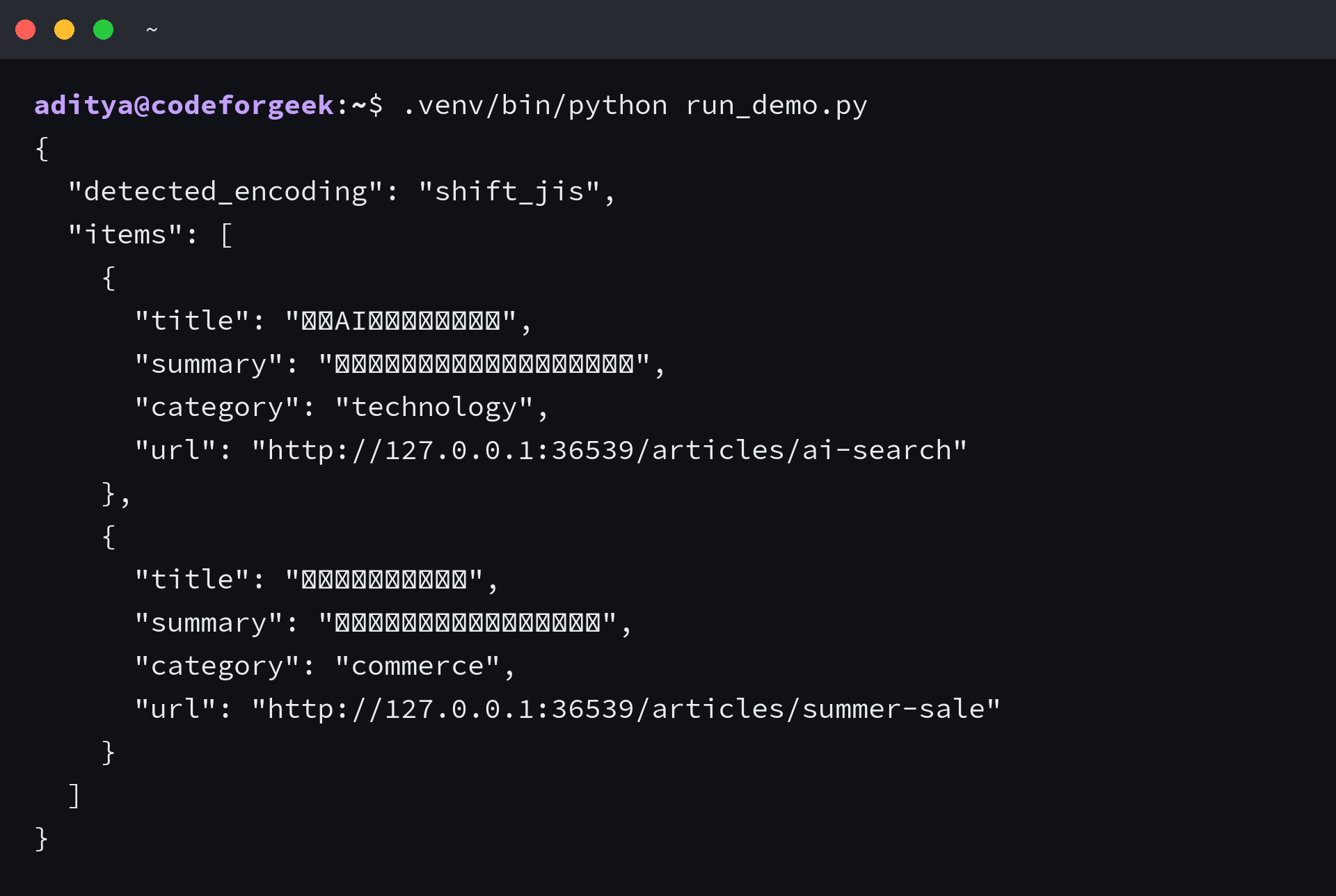
The script also fails when no cards match, since an empty successful run can hide a redesigned page or a JavaScript-rendered response.
Add the AI stage after validation
Send the structured items to a model only after checking required fields, record counts, and text length, then let a large language model (LLM) classify topics, produce search summaries, translate selected fields, or map varied labels into a controlled taxonomy.
Require structured JSON output and validate it against your own schema before storage, keeping the source title, source URL, capture time, and model output in separate fields so you can trace a result back to the fetched page.
A model can misread sarcasm, named entities, dates, and domain-specific Japanese. Human review remains appropriate for consequential classifications, and an extraction test remains necessary even when the downstream model appears to produce plausible JSON.
Know where the pipeline stops working
Requests cannot execute client-side JavaScript, so an empty response shell that the browser later fills calls for an official application programming interface (API) or permitted browser automation.
Selectors also expire when a site changes its markup. Save a small permitted fixture, test required fields, and alert on sharp count changes so a redesign produces a visible failure instead of an incomplete dataset.
- Use response.content when the document may declare Shift JIS, EUC-JP, or another encoding.
- Write JSON with UTF-8 and ensure_ascii set to false when people must read the saved Japanese text.
- Keep deterministic extraction separate from model classification and translation.
- Store provenance beside model output, then delete personal data when its approved purpose ends.
Frequently asked questions
Can Beautiful Soup scrape Japanese websites?
Yes. Beautiful Soup parses Japanese text once the source bytes are decoded correctly. Pass response.content to the parser, inspect original_encoding, and write the result as UTF-8.
Does web scraping need AI?
No. CSS selectors are usually the better tool for stable fields. Add AI when you need classification, translation, summarization, or schema mapping after extraction.
Why does Japanese text turn into mojibake?
The byte sequence was decoded with the wrong character encoding. Read the declared charset from the page bytes, then verify the parser decision against known Japanese text.
Can Requests scrape JavaScript-rendered pages?
Requests fetches the server response but does not run browser JavaScript. Use an official API when available, or permitted browser automation when rendered content is required.