New to Rust? Grab our free Rust for Beginners eBook Get it free →
How to Check If a String Contains a Substring in JavaScript

A program that searches text may need to know whether a smaller string occurs inside a larger one. In JavaScript, includes() checks for that substring and returns a boolean.
The examples show how includes() handles a missing query and an empty query.
TL;DR: Use includes()
Call String.prototype.includes() to test whether one string contains another, and use indexOf() when you need the first match’s position.
- Boolean answer: text.includes(query) returns true or false.
- Position: text.indexOf(query) returns a zero-based index or -1.
- Both searches are case-sensitive. Normalize both strings only when case-insensitive matching is intended.
What Is a Substring in JavaScript?
A substring is a run of characters found inside a larger string. JavaScript provides built-in methods to search for one.
For example, “script” occurs inside “JavaScript”. A substring can appear inside a longer word, such as “art” inside “article”.
Both methods accept an optional starting position.
How to Check If a String Contains a Substring Step by Step
My example compares both methods, then checks case and empty-query behavior.
Step 1: Call includes() for a true-or-false result
Store the larger text and the query in string variables, then call includes() on the larger value. The returned boolean can go directly into a conditional.
const phrase = "Hello, JavaScript developer!";
const found = phrase.includes("JavaScript");

console.log(found);
The output is true, so the query occurs in phrase.
Step 2: Check a missing substring
The sample uses a query absent from phrase.
false
const phrase = "Hello, JavaScript developer!";
const found = phrase.includes("Python");

console.log(found);
The sample run printed false as its second output line, the value for its missing-marker branch.
Step 3: Use indexOf() when the position matters
I used indexOf() for the position check because the caller needs an offset for later processing.
const phrase = "Hello, JavaScript developer!";
const position = phrase.indexOf("JavaScript");

console.log(position);
The third output line is 7, the starting index in the sample. A match at index zero is valid, so a truthiness check would miss it.
Step 4: Run and inspect the complete example
Save the example as contains_substring_demo.js, then run node contains_substring_demo.js. The output is true, false, 7, false, true and true, in that order.
const phrase = "Hello, JavaScript developer!";
const target = "JavaScript";
const missing = "Python";

console.log(phrase.includes(target));
console.log(phrase.includes(missing));
console.log(phrase.indexOf(target));
console.log("JavaScript".includes("javascript"));
console.log("JavaScript".toLowerCase().includes("javascript"));
console.log("JavaScript".includes(""));
The command I ran printed these lines in order. The image records the same execution.
true
false
7
false
true
true
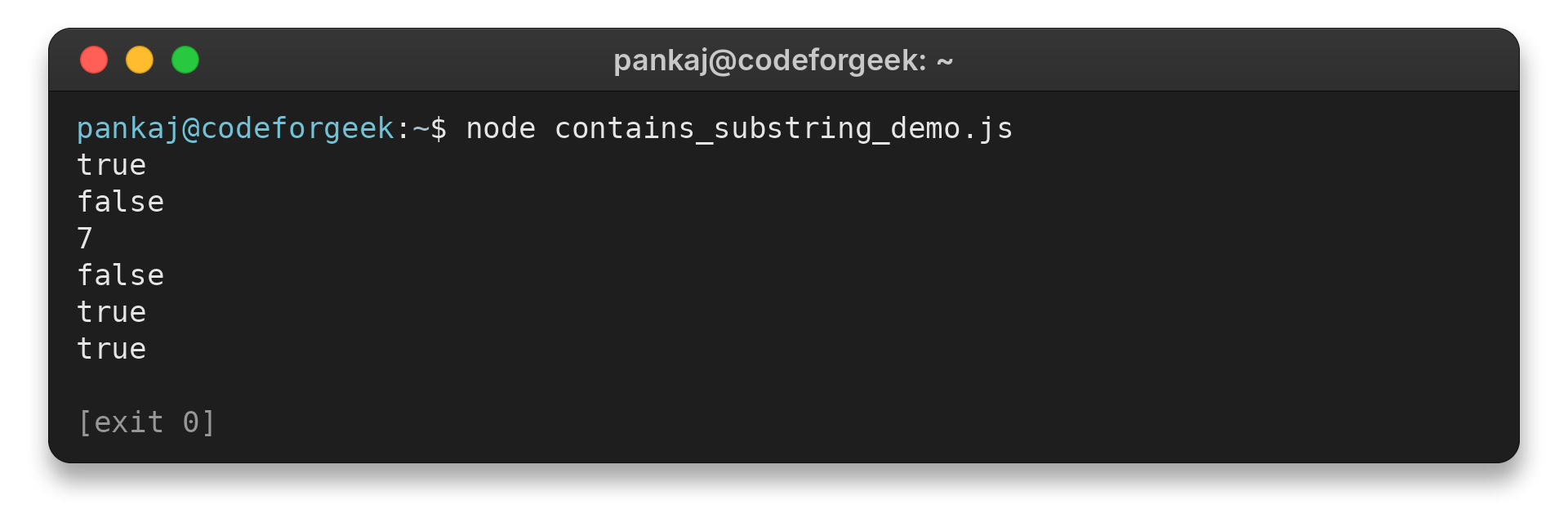
The fourth line is false because the letter case differs. Lowercasing both values changes the fifth result.
The code is plain JavaScript and uses only string methods, so it needs no package installation. Run it from the directory where the file is saved. If node is not on your PATH, use the JavaScript runtime available in your environment or test the same expressions in a browser console.
Keep form and API values in the type the application expects. The form expects text, so reject values of another type before searching.
Edge Cases and Choosing the Right Search
Search behavior depends on the exact strings and method arguments. I kept these cases together because each changes what counts as a match or where the search begins.
| Situation | Behavior | What to do |
|---|---|---|
| Query appears with matching case | includes() returns true | Use the direct boolean result |
| Query is absent | includes() returns false or indexOf() returns -1 | Handle the no-match branch |
| Only letter case differs | The search does not match | Normalize both strings if the task ignores case |
| Query is empty | includes(“”) returns true | Reject empty input if it should not count as a match |
| Search begins at a later position | The optional position sets where searching starts | Pass a position only when earlier matches should be ignored |
| Query is a regular expression | includes() throws TypeError for RegExp input | Use RegExp.test() for a rule |
Handle case deliberately
const text = "JavaScript Guide";
const query = "javascript";
const found = text.toLowerCase().includes(query.toLowerCase());
Locale-specific casing needs a comparison rule suited to the application’s language.
Decide what an empty query means
Reject an empty query when the application requires a search term. Keep it only when blank has a defined meaning.
if (query.length === 0) {
  throw new Error("Enter text to search for");
}
const found = text.includes(query);
Use the position parameter for a later search
Both includes() and indexOf() accept an optional position from which to begin searching. With indexOf(), the returned position refers to the original string, even when the search starts later.
const text = "red blue red";
const first = text.indexOf("red");
const next = text.indexOf("red", first + 1);
console.log(first, next);
The first search finds the match at index 0. Starting the next search at first + 1 skips that occurrence and finds the later one at index 9. Use this approach when you need a later occurrence rather than a single contains check.
Use a regular expression for a rule
A fixed query such as a filename fragment is literal text. A regular expression describes a rule, such as requiring one or more digits.
const hasDigits = /\d+/.test("order 42");
For a digit check, RegExp.test() returns a boolean. Global and sticky flags update lastIndex, so repeated tests with that expression can depend on earlier calls.
includes() treats its search argument as a string, so validate dynamic values before using them as a query.
For a whole-word rule, define which characters count as word boundaries and test punctuation from the data.
Use startsWith() or endsWith() when the location itself matters.
The common problem is deciding which operation matches the next step in the program. A display filter may only need to include or exclude a record, while a parser may need the location to read or replace the following characters. Pick the return value the caller can use directly.
For a boolean test, call includes() directly in the condition or store its result in a descriptive variable.
When working with form data, trim surrounding whitespace only if whitespace is not part of the intended query. Trimming changes the value being searched for, so it should be a deliberate input rule rather than an automatic fix for every search.
Put the larger text before the query in the method call. Reversing them asks whether the larger text occurs inside the shorter query.
Offsets from these methods count JavaScript string positions, not visible symbols in every case. Some Unicode characters use more than one UTF-16 code unit, so an offset may not match the count a person makes by looking at a screen. For ordinary ASCII markers this distinction does not affect the examples here.
If the query is assembled from user input for a regular expression, escape characters that have special meaning before building the expression. Otherwise a dot, bracket or asterisk may change the rule instead of being searched literally.
A whole-word check needs a definition of “word” that fits the language and data. A space-boundary rule may fail beside punctuation, while a regex word boundary follows its own character rules. Test representative inputs such as a word beside a comma or apostrophe before using that result to filter data.
For repeated searches through a list of strings, put the check in the filtering condition and keep the query outside the callback. That makes the target value visible and avoids rebuilding it for each item. This is a readability choice, without making a speed claim.
Before changing the implementation, reduce a failure to a small pair of strings. Print the receiver and query separately, then inspect leading and trailing spaces, capitalization and punctuation. This helps distinguish a missing substring from a mismatch in the values passed to the method.
If the strings look identical but the result surprises you, inspect their code points or compare their lengths. Visually similar characters can have different Unicode representations, and a composed character may differ from the same character typed as a base letter followed by a combining mark.
Intl.Collator compares strings according to locale-sensitive rules. Normalization can also make equivalent encoded text comparable.
When highlighting a match, check that a match exists before passing its offset to a later string operation.
A regular expression can express alternatives or character classes that a fixed substring cannot describe. Keep such expressions small, name the rule in a variable and test both a matching input and a near miss. That helps a reviewer check when the rule changes.
For a large collection, the string method still checks one receiver at a time. The surrounding application decides how to iterate, whether matching should stop at the first result and how to handle non-string records. Keep that data-handling policy separate from the substring check.
When reviewing a search condition, verify three concrete inputs: a clear match, a clear non-match and a boundary case such as a query at the beginning. Add case or empty-input examples when those values can arrive from the source. These checks exercise the behavior the caller actually relies on.
A substring check answers whether characters occur, not whether they form a complete token. Use a defined token rule when surrounding punctuation changes the meaning.
For example, report.csv.backup contains “.csv” but does not end with that extension, so endsWith() expresses the filename rule.
For URL or identifier prefixes, startsWith() checks the beginning. Normalize case only when the format defines it as irrelevant.
An absent optional filter differs from a supplied blank query.
Conclusion
Choose the method by the value the caller needs. Decide how the application treats case differences and blank search terms before accepting dynamic input.
For exact behavior, consult MDN’s String.prototype.includes(), String.prototype.indexOf() and RegExp.prototype.test() references. CodeForGeek’s JavaScript resources lead to related topics. The guide to JavaScript boolean values explains conditional results, while reading a text file in JavaScript covers one way to supply the searched text.
FAQ
These answers cover the short choices developers commonly make when searching within a JavaScript string.
How do I check if a string contains a substring in JavaScript?
Call string.includes(substring). It returns true when the exact, case-sensitive sequence occurs and false when it does not.
Is includes() case-sensitive in JavaScript?
Yes. For a simple case-insensitive check, convert both strings to the same case before calling includes().
What does indexOf() return when a substring is missing?
It returns -1. A match at the start returns 0, so compare the result with -1 instead of using it as a truthy value.
Can includes() search with a regular expression?
No. includes() accepts a string search value and throws TypeError for a RegExp. Use RegExp.test() when you need a pattern.