New to Rust? Grab our free Rust for Beginners eBook Get it free →
RESTful API: Build One with Node.js and Express

A task app needs a way for other programs to read and change its tasks. A REST API exposes task data at URLs and uses HTTP methods to describe each request, while Express connects those requests to JavaScript handlers in a Node.js app.
In this piece, I’ll build task routes with Express and show how the API responds when a task or request data is missing.
TL;DR
A REST API in Express maps resource URLs and HTTP methods to JavaScript handlers that read or change data and return a status code with JSON.
- Use GET to read, POST to create, PUT to replace, and DELETE to remove a resource.
- Register express.json() before routes that read JSON request bodies.
- Return 201 after creation, 204 after deletion, 400 for invalid input, and 404 when a requested item does not exist.
What Is a REST API in Express?
A REST API exposes application resources at URLs and uses HTTP methods to describe the requested operation. Express handles those requests in a Node.js process.
For a task resource, /api/tasks is the collection and /api/tasks/2 identifies one task.
| Request | Meaning | Typical success status |
|---|---|---|
| GET /api/tasks | Read the collection | 200 OK |
| GET /api/tasks/2 | Read one task | 200 OK |
| POST /api/tasks | Create a task | 201 Created |
| PUT /api/tasks/2 | Replace task fields | 200 OK |
| DELETE /api/tasks/2 | Remove a task | 204 No Content |
The simple resource model has three fields: an integer ID, a text title, and a boolean completion state. This example sends the ID in the URL and the editable values in the JSON body.
If you are new to Express routing, the site’s Express.js Hello World tutorial shows the first request handler. Use that route-and-response foundation to add a resource collection and its CRUD operations here.
How to Build a REST API with Express Step by Step
The small API below implements all five task operations and returns JSON with explicit HTTP statuses. I ran the named demo across create, list, update, delete, and missing-item requests and captured the results below.
Step 1: Create the Node.js project
Install Node.js, then create a folder and add Express as a project dependency. Express 5 requires Node.js 18 or later. Choose a supported runtime before installing the framework.
mkdir task-api && cd task-api && npm init -y && npm install express
Save the server as app.js. Keep the entry point small enough to find the middleware, routes, and listener when you return to the project.
This sample uses CommonJS require syntax. If package.json sets type to module, use import syntax instead so the file does not mix module systems. The package.json module setting tells Node how to interpret .js files.
The package manifest records the dependency for this project, rather than relying on a global install. That makes it clear which framework the application imports when another developer installs the project. Keep generated files such as node_modules out of source control and retain the package lock created by npm for repeatable installation.
The setup commands create a working directory before initializing npm. Run them from the parent directory where you want the project folder to live. If npm reports that a package is missing later, check that the shell is inside this directory and that the install command completed there.
Step 2: Add the task collection routes
The sample starts with one task so the collection request returns data before you create anything.
const express = require('express');
const app = express();
const tasks = [{ id: 1, title: 'Read Express routing docs', done: false }];
let nextId = 2;

app.use(express.json());

app.get('/api/tasks', (req, res) => res.json(tasks));
app.get('/api/tasks/:id', (req, res) => {
  const task = tasks.find((item) => item.id === Number(req.params.id));
  if (!task) return res.status(404).json({ error: 'Task not found' });
  res.json(task);
});
app.post('/api/tasks', (req, res) => {
  const title = typeof req.body?.title === 'string' ? req.body.title.trim() : '';
  if (!title) return res.status(400).json({ error: 'title is required' });
  const task = { id: nextId++, title, done: false };
  tasks.push(task);
  res.status(201).json(task);
});
app.put('/api/tasks/:id', (req, res) => {
  const task = tasks.find((item) => item.id === Number(req.params.id));
  if (!task) return res.status(404).json({ error: 'Task not found' });
  const title = typeof req.body?.title === 'string' ? req.body.title.trim() : '';
  if (!title || typeof req.body?.done !== 'boolean') {
    return res.status(400).json({ error: 'title and boolean done are required' });
  }
  task.title = title;
  task.done = req.body.done;
  res.json(task);
});
app.delete('/api/tasks/:id', (req, res) => {
  const index = tasks.findIndex((item) => item.id === Number(req.params.id));
  if (index === -1) return res.status(404).json({ error: 'Task not found' });
  tasks.splice(index, 1);
  res.status(204).end();
});
The list and item handlers return different representations. POST stores a task with a server-assigned ID, and PUT expects the complete editable representation, returning 400 before changing the task when required fields are missing or invalid.
For PATCH, specify allowed fields and whether omitted or null values represent different requests. Validate only supplied values, handle unknown keys by policy, and avoid resetting fields that were omitted.
DELETE removes the matching array entry and ends with 204, which means the response has no body.
Before exposing write routes, check the caller’s identity and permissions for the task. Authentication identifies a caller, while authorization decides whether that caller may make the requested change.
For a larger codebase, move the task router into its own file with express.Router(), then mount it at /api/tasks in the main app. Router-level middleware can then apply shared behavior to that resource’s endpoints.
The item and update handlers use find(), which returns undefined when no record matches. The delete handler uses findIndex() and checks for -1 before splicing. Splicing shifts later array entries one position left.
Number converts a numeric path value into the same type used by this sample’s IDs. A non-numeric path segment becomes NaN and will not match an item, so this example reports it as a missing task. A production API can validate the segment first and return 400 for an invalid identifier format.
A filter such as completion state can use a query parameter. Define defaults and page-size limits before clients rely on collection filters.
When you use a GUI API client, check the HTTP status separately from the response body. Configure automated tests to assert both the expected status and response fields, rather than just checking that a body can be parsed.
In a fetch-based client, branch on the DELETE method before calling response.json() so an expected empty response does not appear as a parsing error.
Step 3: Add API not-found and error handlers
The following handlers set a response for unmatched API paths and errors that reach error middleware.
app.use('/api', (req, res) => {
  res.status(404).json({ error: 'Route not found' });
});

app.use((err, req, res, next) => {
  if (res.headersSent) return next(err);
  if (err instanceof SyntaxError && err.status === 400 && 'body' in err) {
    return res.status(400).json({ error: 'Invalid JSON' });
  }
  res.status(500).json({ error: 'Internal server error' });
});

app.listen(3000, () => console.log('API listening on port 3000'));
Middleware runs in registration order, so express.json() belongs before POST and PUT routes.
The fallback is mounted at /api, leaving page requests to the site’s page handlers. When a handler sends a response, the request ends rather than passing through to later middleware. Middleware that neither responds nor calls next() leaves the client waiting.
Step 4: Run the server and send requests
Run the named local demo to exercise the handlers. It sends requests to create, list, update, delete, and look up a missing task. The output below is the captured result.
node api_demo.js
pankaj@codeforgeek:~$ node api_demo.js
POST /api/tasks 201 {"id":2,"title":"Test the API","done":false}
GET /api/tasks 200 [{"id":1,"title":"Read Express routing docs","done":false},{"id":2,"title":"Test the API","done":false}]
PUT /api/tasks/2 200 {"id":2,"title":"Test the API","done":true}
DELETE /api/tasks/2 204
GET /api/tasks/2 404 {"error":"Task not found"}
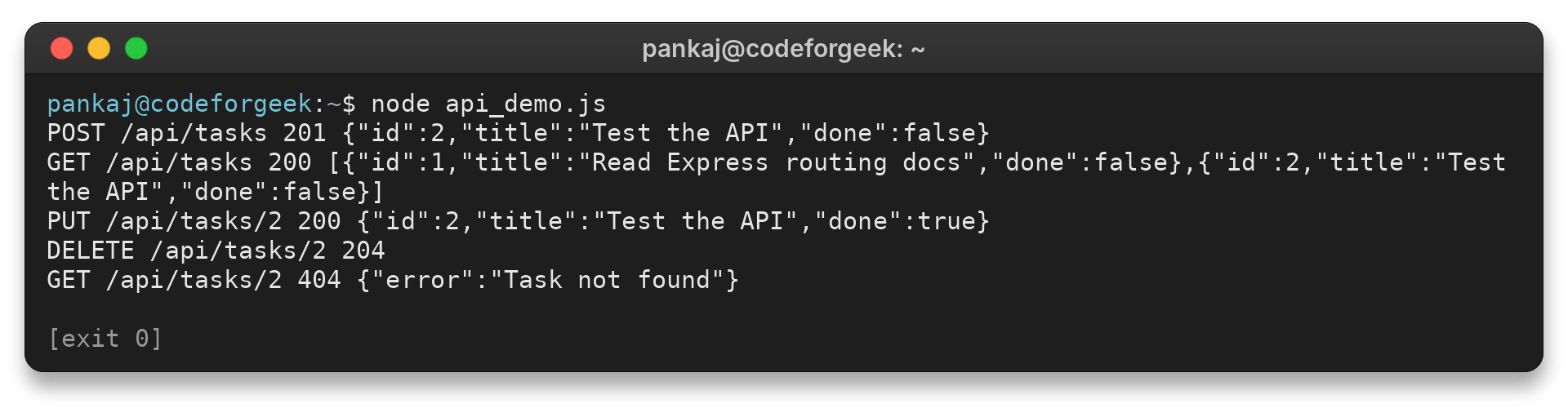
The create call returns 201 and a task with ID 2. The collection then contains both records, and the update call returns 200 with done set to true.
Deletion returns 204 without a body, and a later lookup returns 404. The demo starts on an available ephemeral local port, exercises the handlers, and closes the server when the requests finish.
To test the persistent server yourself, run it in one terminal and send a POST request from another client with a JSON body containing a title. Then call GET on the collection and on the new item’s ID. Update the record before deleting it.
A final GET for that ID should return a 404 response after deletion. This sequence checks both successful changes and the API’s response when the requested resource is gone.
Check the request method and mounted path when a route returns 404. A router mounted at /api/tasks and a route defined at /:id combine to make /api/tasks/2. A typo in either the mount prefix or route path means the intended handler does not match.
In an API client, choose POST, enter the collection URL, and send a raw JSON object with a title. Set the content type to application/json, then inspect both the status line and returned task. Copy the assigned ID into the item URL for later GET, PUT, and DELETE requests.
If the response is HTML, check whether the request reached the API prefix and whether a route sent its own response. A JSON body with an error status points to the API handler instead. This quick distinction narrows whether to inspect the URL or the request data.
Handle Missing Data and API Errors
Use the status and message to tell a client whether to correct the request or investigate a server failure.
| Case | Response | Check |
|---|---|---|
| Unknown route or method | 404 with “Route not found” | Check the HTTP method and full path |
| Unknown task ID | 404 with “Task not found” | Check that the record exists |
| Missing or empty title | 400 with field guidance | Send a non-empty string title |
| Malformed JSON | 400 with “Invalid JSON” | Send valid JSON and Content-Type application/json |
| Unexpected application error | 500 with a generic message | Inspect server logs, not the public response |
Express treats a 404 as a route outcome, while error middleware receives errors passed with next(err).
An error middleware function has four parameters and should be registered after ordinary middleware and routes. When res.headersSent is already true, pass the error onward rather than sending a second response.
When an API client sends JSON, set the Content-Type header to application/json. The request parser uses that header to identify the body format, and the sample returns its title validation message if the handler receives no usable title.
The original tutorial used Express 4-era packages such as body-parser. This version uses express.json(), which Express provides as built-in middleware, and the example targets Express 5. Check the migration guide before moving an existing Express 4 app because path matching and some request APIs changed.
When upgrading old route code, check these common differences rather than changing the dependency alone:
- Use app.delete() instead of the removed app.del() method.
- Replace the removed req.param() lookup with the specific source: req.params, req.body, or req.query.
- Set a response status before serializing JSON, such as res.status(201).json(task), rather than using the old two-argument res.json() signature.
- Express 5 requires a named wildcard, such as /*splat. Use /{*splat} when the route must also match the root path.
Async database calls also behave differently across these major versions. Express 5 forwards a rejected Promise returned by an async route to error middleware. Express 4 does not do that automatically, so catch the rejection and pass it to next(err), or use a helper whose behavior you have tested.
Callback-based APIs still need to pass their error to Express explicitly. If asynchronous work runs in a timer or another callback, catch the error there and call next(err) so the request reaches the error handler.
Verify a migration by requesting each method, a missing task, an unmatched path, invalid JSON, and rejected asynchronous work. Assert the expected status and body for every case because a successful start alone does not prove the API contract still works.
Express 5 reports a listening error, such as a port already in use, through the callback passed to app.listen(). Check that callback argument to distinguish a startup conflict from a route or request error.
The task array exists only in the running process and resets when it stops. Use a database and model layer when records must persist across restarts or be shared by multiple server processes.
The separate REST API with Node.js and MongoDB tutorial covers that next step.
Conclusion: Keep Routes and Resources Aligned
The route example gives you a local contract to test before choosing a storage layer. Persistence, authentication, and deployment need their own design before the API is used beyond a local exercise.
For database storage, continue with building a RESTful API with Node.js and MongoDB. Express’s routing guide and error-handling guide document the framework behavior used here.
FAQ
These answers cover the API choices that come up while adapting the example.
What does Express do in a REST API?
Express matches HTTP methods and URL paths to handlers, and middleware can parse requests or handle errors around those routes.
Do I need MongoDB to build an Express API?
No. The example uses an in-memory array to demonstrate routes, but its data disappears when the Node.js process stops. Use a database when records must persist.
How do I return JSON from an Express route?
Call res.json(value) in the handler. For a non-default status, set it first, such as res.status(201).json(task).
What does a 404 response mean?
A 404 response means the route or task was not found. Check the HTTP method, full path, and item ID.
Why does Express reject my JSON request?
Check the body syntax and Content-Type header. Invalid JSON is caught by the parser, while an absent title reaches route validation.
Should I move an Express 4 app to Express 5?
This article uses Express 5. Review the migration guide and run route and error tests because some methods and path syntax changed.
Where does Express keep a route parameter?
Express stores named URL segments in req.params. This API reads the :id value there.