New to Rust? Grab our free Rust for Beginners eBook Get it free →
How to Convert NodeList to Array in JavaScript
Discover simple methods to convert NodeList to Array in JavaScript. Explore easy steps and practical tips with us. Find out more in this helpful guide now.


When you have a NodeList of DOM elements and want to use array methods, converting it gives you access to methods such as filter() and map(). A NodeList is an indexed collection of DOM nodes, and Array.from() creates a separate array from it.
This article shows how to convert and filter a NodeList, and when spread or a loop fits.
TL;DR: Convert a NodeList to an Array
Use Array.from(nodeList) to create an array before calling methods such as filter() or map().
- Array.from() accepts iterable and array-like inputs.
- […nodeList] is concise when the NodeList is iterable.
- The resulting array is separate from its source. It does not track later changes to a live source.
What Is a NodeList?
A NodeList is an indexed collection of DOM nodes with a length property. A selector such as document.querySelectorAll() returns a static NodeList, so adding matching elements later does not change that selection.
| Check | NodeList | Array after conversion |
|---|---|---|
| Indexed access | Yes | Yes |
| Array.isArray(value) | false | true |
| Tracks a live source | Some NodeLists do | No |
How to Convert a NodeList to an Array Step by Step
Use the method that matches the input and the work that follows.
Step 1: Select the nodes
Call a DOM selector and keep its result in a variable. This example uses a NodeList-shaped iterable fixture so the conversion logic can run in Node.js without a browser DOM.
const nodeList = {
  0: { textContent: "Ada" },
  1: { textContent: "Grace" },
  length: 2,
  *[Symbol.iterator]() {
    for (let index = 0; index < this.length; index += 1) yield this[index];
  },
};
Step 2: Convert and filter
Pass the collection to Array.from(). The optional callback transforms each node before it enters the result.
const names = Array.from(nodeList, (node) => node.textContent);
const selected = names.filter((name) => name.startsWith("A"));
console.log(`isArray=${Array.isArray(names)}`);
console.log(`names=${names.join(", ")}`);
console.log(`filtered=${selected.join(", ")}`);
console.log(`empty=${Array.from({ length: 0 }).length}`);
Running node nodelist_demo.js prints this output:
isArray=true
names=Ada, Grace
filtered=Ada
empty=0
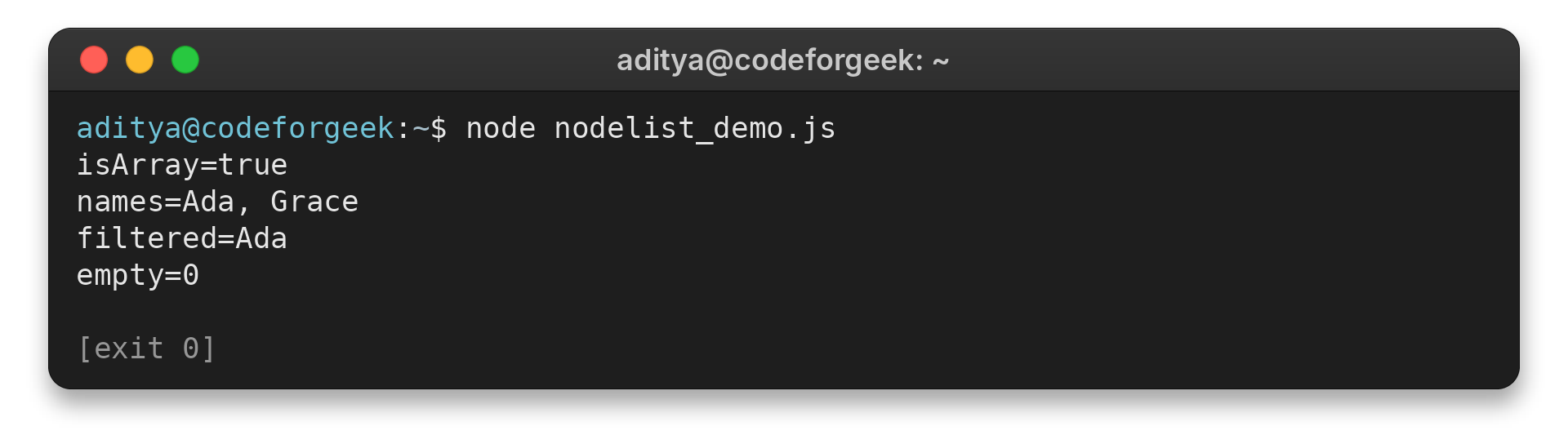
I ran this named-file example and confirmed Array.isArray returns true, the mapping callback reads both names, and the filter keeps Ada. The empty input creates an array with length zero.
Step 3: Choose spread or a loop when it fits
A traditional indexed loop also copies values into a new array. It can handle an array-like object when you read its indexed values.
const nodes = [];
for (let index = 0; index < nodeList.length; index += 1) {
  nodes.push(nodeList[index]);
}
const olderConversion = Array.prototype.slice.call(nodeList);
Array.from() accepts array-like objects with indexed properties and length, while spread requires an iterable. The slice.call form is a legacy alternative. Prefer the clearer modern methods when their input requirements are met.
Try it in a browser
For a page example, put several elements with the same class in the HTML, then run document.querySelectorAll(“.item”). Inspect the selection’s length and an indexed item in the browser console before processing it.
Array.from() and spread work in modern browsers that support their JavaScript features. If you must support older browsers, check the project’s browser targets and compatibility policy before choosing syntax. A transpiler can transform syntax such as spread, but it does not automatically provide missing runtime methods.
NodeList Conversion Edge Cases
Convert before using Array-only methods, and decide whether you need a snapshot or ongoing access to a changing collection.
| Case | Symptom | Fix |
|---|---|---|
| Call filter directly | Direct call raises a TypeError | Use Array.from(collection).filter(…) or […x].filter(…). |
| Spread an array-like value | TypeError occurs when iteration starts | Use Array.from(value) or copy indexed values in a loop. |
| Expect converted items to update with the DOM | The array keeps its original membership | Run the selector again when fresh membership is needed. |
I reproduced the direct-method failure with an array-like fixture: TypeError: collection.filter is not a function. Browser NodeLists may provide methods such as forEach, while Array.prototype methods such as filter are available after conversion. An empty selection is valid and converts to an empty array.
Both collections refer to the same DOM elements. Changing an element remains visible through either reference.
Conclusion
Use Array.from() as a clear default when you want a new array from a NodeList, and use spread when you know the input is iterable. To compare DOM iteration approaches, see CodeForGeek’s jQuery each() method guide and its guide to adding and removing table rows. For NodeList behavior and conversion details, read MDN’s NodeList reference and MDN’s Array.from() reference.
FAQ
These answers cover common questions about converting collections and using the resulting array.
Why convert a NodeList to an array?
An array provides methods such as filter() and map() that are not inherited by a NodeList.
Can I use the spread operator on a NodeList?
Yes, when the NodeList is iterable. Array.from() also supports array-like inputs.
Does the converted array update when the DOM changes?
No. Conversion creates a separate collection of the current node references. Run the selector again to get fresh membership.