New to Rust? Grab our free Rust for Beginners eBook Get it free →
Gemini vs ChatGPT: Free and Paid Plans Compared

Gemini is the better-value paid assistant when your work already lives in Gmail, Docs, Drive, NotebookLM, Android, or Google Search. ChatGPT is the better default when you want a flexible standalone workspace for writing, coding, research, projects, custom assistants, and mixed tool use. Their mainstream individual plans are effectively the same price in the US: Google AI Pro costs $19.99 per month and ChatGPT Plus costs $20 per month.
The free versions are now capable enough for occasional questions, file analysis, web research, images, and voice. Paying makes sense when the free limits interrupt useful work, when you need premium models or agents, or when the subscription replaces another service such as cloud storage or a video-generation tool.
I checked the current US plan pages and help documentation on July 12, 2026. AI plan names, promotional prices, model access, and usage limits change frequently. Confirm the checkout page in your country before paying.
Gemini vs ChatGPT: the buying decision in 30 seconds
| If you need… | Choose | Why |
|---|---|---|
| A capable free chatbot for occasional work | Either | Both include web-connected answers, file and image features, and multimodal tools, but both apply tighter and dynamic free limits. |
| The best $20 plan for Google users | Google AI Pro | It combines higher Gemini limits with 5 TB of storage, Gemini inside Google apps, NotebookLM upgrades, and creative credits. |
| A general-purpose $20 AI workspace | ChatGPT Plus | It is the cleaner choice for projects, custom GPTs, advanced reasoning, research, image generation, and work that is not centered on Google apps. |
| Long documents and Google Drive material | Gemini | Google positions paid Gemini for very large file uploads and direct use across Drive, Docs, Gmail, and NotebookLM. |
| Heavy coding and agent work | ChatGPT Pro or Google AI Pro | Choose ChatGPT for Codex-centered work. Choose Gemini when Jules, Antigravity, Android, or Google Cloud is the natural environment. |
| AI video creation bundled with the subscription | Gemini paid plans | Google includes Flow credits and video-generation access across its paid consumer plans. |
| A governed team workspace | ChatGPT Business or Google Workspace | Do not use a personal subscription as a substitute for admin controls, contractual data protection, and organization-wide policy. |
Current US pricing: free and paid plans compared
The important change is that neither product has a simple “free or $20” ladder anymore. Google and OpenAI now offer lower-cost entry tiers, mainstream individual plans, high-usage professional tiers, and separate business products.
| Product and plan | US price | What materially changes |
|---|---|---|
| Gemini Free | $0 | Gemini 3.5 Flash, varying access to Gemini 3.1 Pro, image generation and editing, Deep Research, Gemini Live, Canvas, Gems, basic NotebookLM, limited Flow access, and 15 GB of Google storage. |
| Google AI Plus | $4.99/month | About 2× the Free usage level, more Gemini features, video generation and Daily Brief, 200 Flow credits, more NotebookLM capacity, Gemini in selected Google apps and Chrome, and 400 GB of storage. |
| Google AI Pro | $19.99/month | About 4× the Free usage level, 1,000 Flow credits, higher access to Gemini 3 Pro, Deep Search and agent features, higher Jules and Antigravity limits, stronger NotebookLM limits, Gemini across more Google apps, and 5 TB of storage. |
| Google AI Ultra | $99.99 or $199.99/month | The $99.99 level is positioned at 5× AI Pro usage with 20 TB of storage. The $199.99 level is positioned at 20× AI Pro usage with 30 TB. Both add the highest Gemini, Search, NotebookLM, Jules, and Antigravity limits, Deep Think, early features, and 10,000 or 25,000 Flow credits. |
| ChatGPT Free | $0 | Limited access to current ChatGPT models plus search, file and image uploads, data analysis, image creation, voice, and GPTs. Advanced tools use stricter rate limits than paid tiers. |
| ChatGPT Go | $8/month | OpenAI advertises roughly 10× more messages, uploads, and image creation than Free, with longer memory and context. It is the budget upgrade when limits are the only problem. |
| ChatGPT Plus | $20/month | Higher limits and access to more advanced models and tools, including stronger reasoning, Deep Research, agent workflows, Codex access, projects, tasks, and custom GPT creation. |
| ChatGPT Pro | $100 or $200/month | Professional high-usage tiers. OpenAI describes the $100 level as roughly 5× Plus allowance and the $200 level as roughly 20×, with access to its highest-capability model tier and longer intensive sessions. |
| ChatGPT Business | $25/user/month monthly or $20/user/month annually | A secure shared workspace, admin controls, SAML SSO and MFA, business connectors, and no training on business data by default. Standard ChatGPT seats start at two users. |
| ChatGPT Enterprise | Contact sales | Enterprise identity, security, support, controls, and contracting beyond the self-serve Business plan. |
Pricing and limit sources: Google’s AI plan comparison, Google’s Gemini Apps limit documentation, OpenAI’s ChatGPT pricing page, the ChatGPT Go announcement, OpenAI’s file-upload documentation, and its Business billing documentation. Prices shown are current US list prices. Promotions, regional prices, and recent Business-plan transitions can change checkout totals.
Do not compare API prices with these subscriptions. ChatGPT and Gemini subscriptions pay for their consumer apps. OpenAI API and Gemini API usage are metered separately, even when you already pay for Plus, Pro, or Google AI Pro.
What the free versions actually give you
Both free tiers expose advanced features, but the vendors intentionally keep their rate limits tighter and more dynamic than paid access. The difference is less about a missing checkbox and more about how long the workflow can continue before a reset.
Published context, file, and reset limits
| Limit | Gemini | ChatGPT |
|---|---|---|
| Consumer context | 32K tokens without a plan, 128K on AI Plus, and 1 million on AI Pro and Ultra. | Context depends on the selected model and plan. OpenAI publishes model-specific limits rather than one subscription-wide number. |
| Usage reset | Google’s limits page says compute-based capacity refreshes periodically until the weekly limit is reached. Complexity, files, model choice, and demand affect consumption. | Message and tool caps vary by plan and demand. The in-product counter is authoritative. |
| File size | Limits vary by feature and file type. Google advertises paid workflows handling source packs equivalent to as many as 1,500 pages. | Up to 512 MB per file, 2 million tokens per text document, roughly 50 MB per spreadsheet, and 20 MB per image. |
| Upload allowance | Published as relative plan capacity rather than a durable file count for consumer accounts. | Free currently allows 3 uploads per day. Paid users can upload as many as 80 files per 3 hours, subject to peak reductions. |
| Project files | Use Drive, NotebookLM, Gems, and Canvas rather than a directly equivalent ChatGPT project container. | Free supports 5 files per project and Pro supports 40. No more than 10 files can be uploaded at once. |
Gemini Free
Google’s current free plan is more than a basic text bot. It includes Gemini 3.5 Flash, varying access to 3.1 Pro, image generation and editing, Deep Research, Gemini Live, Canvas, Gems, limited Flow access, NotebookLM, and 15 GB shared across Gmail, Drive, and Photos.
“Varying access” is the key phrase. Google can change availability by demand, feature, country, and account. The free plan is excellent for trying the workflow, but it is a weak foundation for a daily process that must finish on time.
ChatGPT Free
OpenAI’s free tier also supports much more than text. Its current documentation lists web search, file and image uploads, data analysis, image creation, and GPT use. Those advanced functions share stricter rate limits, and reaching the text limit can also restrict GPT access until the allowance resets.
ChatGPT Free is the stronger trial if you want to evaluate the ChatGPT workspace itself, including projects, GPT discovery, mixed media, and conversational work. Upgrade because the limit blocks useful work, not because a paid badge sounds more capable.
Paid plan features that change the choice
| Decision area | Gemini | ChatGPT | Practical winner |
|---|---|---|---|
| Google ecosystem | Native value across Gmail, Docs, Drive, Vids, Chrome, Search, Android, and NotebookLM. | Can connect to external apps, but it is not the native assistant inside Google Workspace. | Gemini for Google-first work. |
| Standalone workspaces | Gems, Canvas, and Google-connected experiences. | Projects, custom GPTs, tasks, memory, Canvas, apps, and a broad standalone workspace. | ChatGPT for reusable cross-tool workflows. |
| Long files and source collections | Google advertises uploads equivalent to as many as 1,500 pages on paid plans, plus close NotebookLM and Drive integration. | Strong file analysis, projects, data analysis, and research. Published limits vary by plan and workload. | Gemini when the source corpus already lives in Google. |
| Research and web search | Deep Research and Deep Search are tied closely to Google Search and higher paid limits. | Search, Deep Research, and agent mode can build multi-source reports inside the ChatGPT workspace. | Gemini for Google-connected discovery. ChatGPT for synthesis inside a project. |
| Coding | Jules and Antigravity limits rise with Google AI Pro and Ultra. | Codex and advanced reasoning are central paid-plan benefits, with Pro designed for long, intensive sessions. | Follow your development environment rather than a generic benchmark. |
| Images and video | Image generation and editing plus Flow credits and paid video-generation access. | Image creation and editing are available, with paid tiers receiving more and faster capacity. | Gemini if bundled video matters. |
| Voice and live interaction | Gemini Live is included, with broader access on paid plans. | Voice is available across tiers, with higher paid capacity and advanced features. | Try both on your phone. Latency and interruption handling matter more than a feature checkbox. |
| Storage | 15 GB Free, 400 GB AI Plus, 5 TB AI Pro, and 20 TB or more with Ultra. | ChatGPT plans do not replace a general cloud-storage subscription. | Gemini if bundled storage has measurable value to you. |
| Team privacy | Use an eligible Google Workspace plan for enterprise controls. Google says Workspace customer data is not used to train models without permission or instruction. | Business and Enterprise data is not used for model training by default, with admin and identity controls. | Use the business product that matches your company identity and document stack. |
The interfaces are designed for different habits
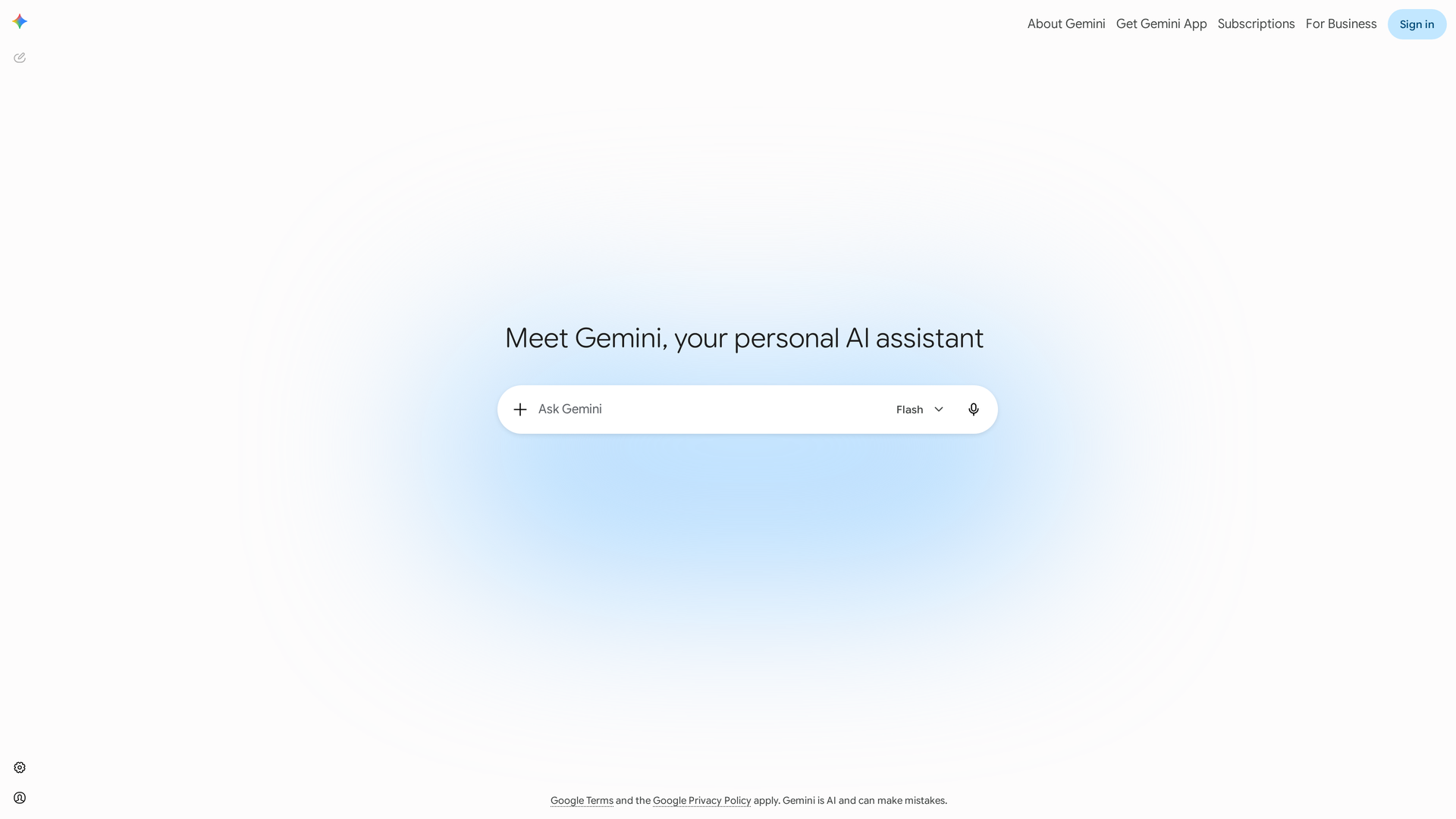
Gemini presents a clean assistant entry point with an attachment control, model selector, voice input, and a single prompt field. The minimal interface hides the wider product bundle behind the conversation and Google ecosystem rather than crowding the start screen with every feature.
ChatGPT feels more like a standalone workbench. Its value compounds when chats live inside projects, reusable assistants carry instructions, files stay with a body of work, and research, coding, images, and scheduled tasks share one interface.
Image note: OpenAI’s public ChatGPT pages returned a Cloudflare human-verification challenge during this refresh. I rejected those captures rather than publishing another challenge screen. The comparison above uses official product documentation for ChatGPT features and only a visually verified Gemini interface image.
Which is better for common workloads?
The plan table explains what you buy. The workload sections below explain when those differences matter during use.
Writing and editing
Choose ChatGPT first when the task is iterative drafting, tone control, rewriting, or maintaining a long-running content project. Projects and custom GPTs make repeatable editorial context easier to organize. Gemini remains useful when the source material and destination are already in Docs, Gmail, or Drive.
Research and long documents
Large source packs in Drive or NotebookLM favor Gemini, especially when the research depends on Google Search integration. ChatGPT becomes more useful when the hard part is turning mixed sources into a decision memo or a reusable project with follow-up work. The source location should decide where you begin.
Coding
Ignore generic “best coder” claims and test the same repository task in both products. Score test passes, invented APIs, review time, and the size of the final diff. ChatGPT’s paid ladder favors Codex and long agent sessions, while Gemini’s paid plans fit workflows built around Jules, Antigravity, Android, or Google Cloud.
Images and video
Gemini has the clearer bundle for video creators. Google exposes monthly Flow credits and video access in the plan ladder. ChatGPT remains a strong image-generation and editing workspace, but its subscription should not be treated as equivalent to a dedicated video plan unless the checkout page explicitly includes the video capacity you need.
Students and casual users
Start free. Both free tiers can explain concepts, analyze files, search the web, and work with images. ChatGPT Go at $8 is the sensible upgrade when you mainly need more messages and uploads. Google AI Plus at $4.99 is unusually aggressive if it is available in your country and the Google integration or 400 GB storage matters.
Teams
Do not buy personal plans for regulated or confidential team workflows. ChatGPT Business and eligible Google Workspace plans add the controls and contractual data treatment that personal subscriptions do not. Evaluate SSO, retention, connectors, audit needs, admin policy, and whether employees can share assistants safely.
When is the $20 upgrade worth it?
Run the free plan long enough to encounter your normal workload and write down every interruption. Upgrade only if one of these conditions appears repeatedly:
- You hit model, message, file, research, or image limits during work that has a deadline.
- You repeatedly move material between the chatbot and the same app ecosystem.
- A premium model or agent completes a task that the free tier cannot finish reliably.
- The bundled storage, NotebookLM capacity, coding agent, or creative credits replace another paid tool.
- You need reusable projects, custom assistants, or longer memory for recurring work.
During the first billing cycle, repeat the same work and record completion time, human corrections, failed citations, and premium-feature use. Keep the subscription when the saved review time exceeds the monthly price. More output alone does not demonstrate value.
Verdict: Gemini or ChatGPT?
Choose Gemini Free if you want a capable multimodal assistant connected to Google and can tolerate changing limits. Choose ChatGPT Free if you want to test the broader ChatGPT workspace and custom-assistant ecosystem.
Choose Google AI Pro at $19.99 if Gmail, Docs, Drive, Search, NotebookLM, storage, and video creation are central to your day. Choose ChatGPT Plus at $20 if you want a flexible standalone assistant for writing, coding, research, projects, and reusable workflows.
Choose a Pro or Ultra tier only after measuring sustained high usage. Their $100 and $200 price points are not “better answer” subscriptions for casual users. They buy higher limits, premium capabilities, and longer intensive sessions.
If you are still deciding, read our complete ChatGPT guide, compare ChatGPT Go, Plus, and Free, or try the Gemini API free tier. API access is separate from the consumer subscriptions compared here.
Frequently asked questions
These answers cover the billing and account details that commonly cause the wrong purchase.
Is Gemini cheaper than ChatGPT?
At the mainstream individual tier, the difference is negligible: Google AI Pro is $19.99 per month and ChatGPT Plus is $20. Google AI Plus at $4.99 is cheaper than ChatGPT Go at $8 in the US, while the highest Gemini and ChatGPT consumer tiers both reach roughly $100 and $200 levels.
Does ChatGPT Plus include API credits?
No. ChatGPT subscriptions and OpenAI API billing are separate. The same separation applies to Gemini consumer plans and Gemini API usage.
Which free plan is better?
Gemini Free is attractive for Google-connected multimodal work, while ChatGPT Free is attractive for projects, GPTs, files, search, and the standalone ChatGPT workflow. Use both with the same three tasks and keep the one that requires fewer corrections.
Which is safer for company data?
Use ChatGPT Business or Enterprise, or an eligible Google Workspace plan, rather than a personal account. OpenAI says Business and Enterprise data is not used for model training by default. Google says Workspace customer data is not used to train generative AI models without permission or instruction.
Are the published usage limits guaranteed?
No. Vendors change rate limits based on plan, model, demand, region, and feature. Treat “2×,” “4×,” or “20×” as the vendor’s current relative plan positioning, not a permanent message guarantee.